
RETROSUN vSeeBox vSee Box V2 Pro
RETROSUN V2 Pro Replacement Voice Remote Control User Manual
Model: vSeeBox vSee Box V2 Pro
Introduction
This manual provides comprehensive instructions for the setup, operation, and maintenance of your RETROSUN V2 Pro Replacement Voice Remote Control. This remote is designed to be compatible with specific vSeeBox models, offering enhanced connectivity and convenient control over your media experience.
Please read this manual thoroughly before using the remote control to ensure proper functionality and to maximize its features.
Package Contents
- 1 x RETROSUN V2 Pro Replacement Voice Remote Control
- (Batteries are not included)
Product Overview

Figure 1: Front and Back View of the Remote Control. The back panel includes a printed guide for the IR learning procedure.

Figure 2: Remote Control Dimensions. The remote measures approximately 6.97 inches in length, 1.73 inches in width, and 0.67 inches in thickness.

Figure 3: Voice and Hotkey Buttons. Features a dedicated voice command button and quick access buttons for popular streaming services.
Compatibility
This replacement voice remote control is compatible with the following vSeeBox models:
- vSeeBox V1 (Note: Voice feature not compatible)
- vSeeBox V2
- vSeeBox Elite
- vSeeBox Max (Note: Voice feature not compatible for V1 Max)
- vSeeBox V2 Pro
Important Note: While this remote can be used with vSeeBox V1/V2 Pro/V1 Max, the voice function may not be compatible due to specific device limitations. This remote is not designed to directly control your TV or other non-vSeeBox devices without IR learning.
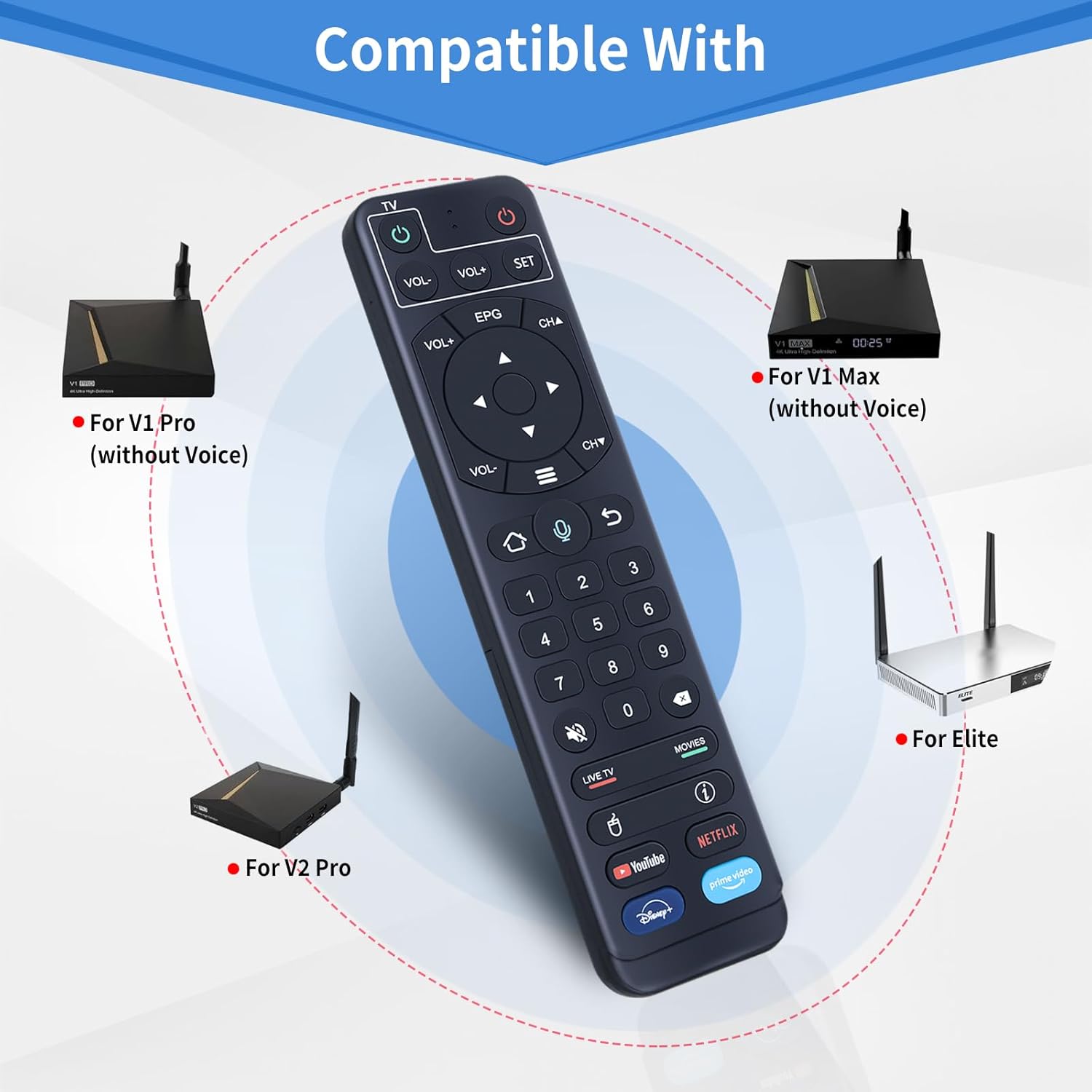
Figure 4: Compatible vSeeBox Devices.
Setup
1. Battery Installation
The remote control requires two 1.5V AAA batteries (not included).
- Open the battery compartment cover on the back of the remote control.
- Insert two AAA batteries, ensuring correct polarity (+ and -).
- Close the battery compartment cover securely.

Figure 5: Battery Installation.
2. Pairing with vSeeBox Device
To pair the remote control with your vSeeBox device, follow these steps:
- Ensure your vSeeBox device is powered on.
- On the RETROSUN remote, press and hold the "OK" button and the "VOL-" button simultaneously for 3-5 seconds.
- The indicator light on the remote control will flash red.
- On your TV screen, a message "Remote control connected successfully" should appear, indicating successful pairing.

Figure 6: Easy Pairing Procedure.
3. IR Learning Procedure (for TV Control)
This remote supports IR learning, allowing it to control basic functions of your TV (e.g., Power, Volume) using your original TV remote. This is useful if your vSeeBox model does not support the voice function or if you prefer direct TV control.
- Press and hold the "SET" key on the RETROSUN remote for 3 seconds. The red indicator light will turn on.
- Within 10 seconds, press the "Power" key in the TV CONTROL area of the RETROSUN remote. The red light will flash.
- Position your original TV remote and the RETROSUN remote face-to-face, approximately 3cm (1 inch) apart.
- Press the "Power" key on your original TV remote. The red light on the RETROSUN remote will flash 3 times and then remain lit, indicating successful learning.
- Repeat steps 2 and 3 for any other keys you wish to learn (e.g., Volume Up, Volume Down).
- Press the "SET" key again to exit the learning status.

Figure 7: IR Learning Program.
Operating Instructions
Basic Navigation
- Directional Pad (D-Pad): Use the up, down, left, and right arrows to navigate menus and select items.
- OK Button: Confirms selections or plays/pauses media.
- Back Button: Returns to the previous screen or menu.
- Home Button: Returns to the main home screen of your vSeeBox device.
- Volume Buttons (VOL+, VOL-): Adjusts the volume.
- Channel Buttons (CH+, CH-): Changes channels (if applicable to your vSeeBox setup).
Voice Control Function
For compatible vSeeBox models (V2, Elite), the voice control feature allows for hands-free operation.
- Press the Voice Button (microphone icon) on the remote control.
- Speak clearly into the microphone located on the remote.
- Examples of commands include: "Open YouTube," "Search for action movies," "Play music," "What's the weather?"

Figure 8: Using Voice Control.
Dedicated Hotkeys
The remote features dedicated buttons for quick access to popular streaming applications:
- YouTube: Launches the YouTube application.
- Netflix: Launches the Netflix application.
- Disney+: Launches the Disney+ application.
- Prime Video: Launches the Amazon Prime Video application.
Maintenance
- Cleaning: Use a soft, dry cloth to clean the remote control. Do not use liquid cleaners or abrasive materials.
- Battery Replacement: Replace batteries when the remote's response becomes sluggish or the indicator light does not illuminate. Always replace both batteries at the same time with new ones of the same type.
- Storage: Store the remote in a cool, dry place away from direct sunlight and extreme temperatures. If storing for an extended period, remove the batteries to prevent leakage.
Troubleshooting
| Problem | Possible Cause | Solution |
|---|---|---|
| Remote not responding. | Low or dead batteries. Incorrect battery installation. Remote not paired. | Replace batteries. Check battery polarity. Re-pair the remote with your vSeeBox device (see "Pairing with vSeeBox Device" section). |
| Voice control not working. | vSeeBox model not compatible with voice function (e.g., V1, V1 Max). Remote not properly paired for voice. | Verify your vSeeBox model supports voice control. Ensure the remote is correctly paired. Speak clearly and close to the microphone. |
| IR learning failed. | Remotes not aligned correctly. Distance too far. Original remote battery low. | Ensure remotes are face-to-face and within 3cm. Try again, ensuring the original remote has fresh batteries. Follow the IR learning steps precisely. |
| Remote controls vSeeBox but not TV. | TV control functions not learned via IR. | Perform the IR Learning Procedure for your TV's power and volume buttons. |
Specifications
- Model: vSeeBox vSee Box V2 Pro Replacement Voice Remote Control
- Brand: RETROSUN
- Dimensions (L x W x H): Approximately 7.05 x 2.2 x 0.98 inches (17.9 x 5.6 x 2.5 cm)
- Item Weight: Approximately 2.89 ounces (82 grams)
- Power Source: 2 x AAA 1.5V Batteries (not included)
- Connectivity: Wireless (specific protocol not detailed, but implies Bluetooth/RF for vSeeBox and IR for TV learning)
- Compatible Devices: vSeeBox V1, V2, Elite, Max (Voice function compatibility varies by model)
Warranty and Support
RETROSUN is committed to providing high-quality products and excellent customer service. If you encounter any issues with your V2 Pro Replacement Voice Remote Control, or if your device model is not on the compatible list and you need assistance, please contact us directly.
For support, please use the Amazon messaging tool to reach out to us. We will endeavor to respond and assist you within 24 hours.
Please retain your proof of purchase for any warranty claims.
Ask a question about this manual
Ask about setup, troubleshooting, compatibility, parts, safety, or missing instructions. Manuals+ will review the question and use this page’s manual context to help answer it.