
Hodozzy 9 Inch
Hodozzy 4G+64G Double Din Android Car Stereo User Manual
Model: 9 Inch Touchscreen GPS Car Radio
Introduction
This manual provides comprehensive instructions for the installation, operation, and maintenance of your Hodozzy 4G+64G Double Din Android Car Stereo. This advanced car multimedia player features a 9-inch HD touchscreen, Wireless CarPlay, Android Auto, GPS navigation, Bluetooth 5.0, Wi-Fi connectivity, DSP sound processing, and support for a rear view camera and steering wheel controls. Please read this manual thoroughly before use to ensure proper functionality and safety.

Image: The Hodozzy 9-inch Double Din Android Car Stereo unit, showcasing its display and key features, along with a microphone and rear camera.
Product Features
- High Performance System: Equipped with Android 13, 4GB RAM, and 64GB ROM for a smooth user experience. Features a 9-inch 1280x720 HD touchscreen with split-screen support and customizable UI. Dual USB ports are included for file transfer and device charging.
- Wireless CarPlay & Android Auto & Mirrorlink: Supports wireless connection for iOS CarPlay and Android Auto, allowing access to messages, contacts, and third-party applications. Voice control functions are available. Dual system mirror link provides complete synchronization of your phone screen to the radio display.
- GPS Navigation and Wifi: Built-in GPS antenna for real-time online navigation and support for offline maps (requires initial internet connection for download). Integrated Wi-Fi allows connection to hotspots for online browsing and software downloads.
- Bluetooth & FM/RDS Radio & DSP: Bluetooth 5.0 for enhanced data transfer and connection stability, supporting hands-free calling and music playback. FM/RDS radio allows storage of 18 preset channels (FM 87.50-108.00 MHz). A 32-band equalizer enables custom audio effects.
- Steering Wheel Controls & Rear View Camera: Includes an AHD HD camera for automatic display of the reversing image when shifting into reverse gear, with optional auxiliary lines. Steering wheel controls allow convenient operation of the radio and other in-car devices (re-learning of controls may be required).
What's in the Box
Upon opening the package, please verify that all the following components are present:
- Hodozzy 9-inch Android Car Stereo Unit
- Rear View Camera
- Power Cable
- RCA Cable
- GPS Antenna
- Rear Camera Input Cable
- USB Cable (x2)
- Mounting Bracket
- Users Manual (this document)
- Microphone (MIC)

Image: A visual representation of the product dimensions and a detailed list of all included accessories and cables.
Setup and Installation
Installation of the Hodozzy car stereo requires basic automotive electrical knowledge. If you are unsure about any steps, it is highly recommended to seek professional installation to avoid damage to the unit or your vehicle.
General Installation Steps:
- Preparation: Disconnect the vehicle's battery negative terminal before starting any electrical work.
- Remove Old Unit: Carefully remove your existing car stereo unit and its mounting brackets.
- Wiring Connections:
- Connect the main power harness (Power Cable) to your vehicle's wiring harness. Ensure correct connections for constant power (B+), accessory power (ACC), ground (GND), and illumination.
- Connect speaker wires according to their polarity.
- Connect the GPS antenna and position it in a location with a clear view of the sky (e.g., dashboard, A-pillar).
- Connect the RCA cables for audio output (if using external amplifiers) and video input/output.
- Connect the USB cables for external devices.
- Rear View Camera Installation:
- Mount the rear view camera at the back of your vehicle, ensuring a clear view.
- Route the camera's video cable to the stereo unit and connect it to the "Rear Camera Input" port.
- Connect the camera's power wire to your vehicle's reverse light circuit so it powers on when reverse gear is engaged.
- Mounting: Secure the Hodozzy unit using the provided mounting brackets. Ensure it is firmly in place.
- Final Checks: Reconnect the vehicle's battery. Turn on the ignition and test all functions of the stereo.
Operating Instructions
Basic Operation:
- Power On/Off: The unit typically powers on with the vehicle's ignition. Press and hold the power button on the unit or steering wheel control to manually turn it off or on.
- Touchscreen Interface: Navigate through menus and applications by tapping, swiping, and pinching on the 9-inch HD touchscreen.
- Volume Control: Adjust volume using the physical buttons on the unit or steering wheel controls.
- Home Screen: The main screen provides access to frequently used applications and widgets. You can customize the layout and arrangement of apps.
- Split Screen Functionality: The unit supports split-screen mode, allowing you to run two applications simultaneously (e.g., navigation and music player).

Image: Demonstrates the vibrant full-color HD screen, split-screen capability, and diverse UI designs available on the car stereo.
Connectivity Features:
Wireless CarPlay & Android Auto:
Connect your iPhone or Android smartphone wirelessly to access navigation, music, calls, and messages directly on the stereo's display. Ensure Bluetooth and Wi-Fi are enabled on your phone.
- Enable Bluetooth on your phone and the car stereo.
- Pair your phone with the car stereo via Bluetooth.
- Once paired, the system will prompt you to activate CarPlay or Android Auto. Follow the on-screen instructions.
- For Android Auto, ensure the Android Auto app is installed on your phone.

Image: Illustrates the seamless integration of Apple CarPlay, Android Auto, and Mirrorlink with various smartphone devices.
Mirrorlink:
Mirrorlink allows you to completely synchronize your phone's screen to the car stereo display. This function typically uses a Wi-Fi connection.
- Open the Mirrorlink application on the car stereo.
- Follow the instructions on the stereo screen to connect your phone via Wi-Fi.
Bluetooth 5.0:
For hands-free calling and audio streaming.
- Go to the Bluetooth settings on the car stereo.
- Enable Bluetooth on your mobile device and search for available devices.
- Select "Hodozzy" (or similar name) from the list on your phone and pair.
- Once connected, you can make/receive calls and play music through the car speakers.
Wi-Fi Connection:
Connect to a Wi-Fi hotspot (e.g., from your phone) to access online features, download apps, and browse the internet.
- Navigate to Wi-Fi settings on the stereo.
- Turn on Wi-Fi and select your desired network.
- Enter the password if prompted.

Image: Displays the GPS navigation interface with online and offline map options, alongside the Wi-Fi connection screen for internet access.
Navigation (GPS):
The built-in GPS module allows for precise navigation. The unit supports both online and offline maps.
- Online Navigation: Requires an active internet connection (via Wi-Fi or mobile hotspot) to provide real-time traffic updates and the latest map data.
- Offline Maps: For navigation without an internet connection, you must first download map resources. Connect the unit to Wi-Fi and use the pre-installed map application to download the required regions.
Audio Features (DSP & FM/RDS):
- DSP (Digital Sound Processor): Access the 32-band equalizer settings to customize the audio output according to your preferences. Adjust bass, treble, balance, and fader settings for an optimized listening experience.
- FM/RDS Radio:
- Tune into FM radio stations (87.50-108.00 MHz).
- Use the auto-scan function to find and save available stations.
- RDS (Radio Data System) provides additional information like station name, song title, and traffic announcements where available.

Image: Details the Bluetooth hands-free calling interface, the 32-band equalizer for sound customization, and the dual USB ports for connectivity.
Rear View Camera:
The included AHD HD camera provides a clear view of the area behind your vehicle, enhancing safety during reversing maneuvers.
- When the vehicle is shifted into reverse gear, the stereo automatically switches to the camera view.
- You can enable or disable the reversing auxiliary lines (guidelines) through the stereo's settings menu.
Steering Wheel Controls (SWC):
The unit supports connection to your vehicle's existing steering wheel controls, allowing you to operate key functions without taking your hands off the wheel.
- After installation, you may need to perform a "re-learning" or "mapping" process for the steering wheel controls within the stereo's settings menu. Follow the on-screen prompts to assign functions (e.g., volume up/down, track skip, mode, answer/hang up call) to your vehicle's buttons.
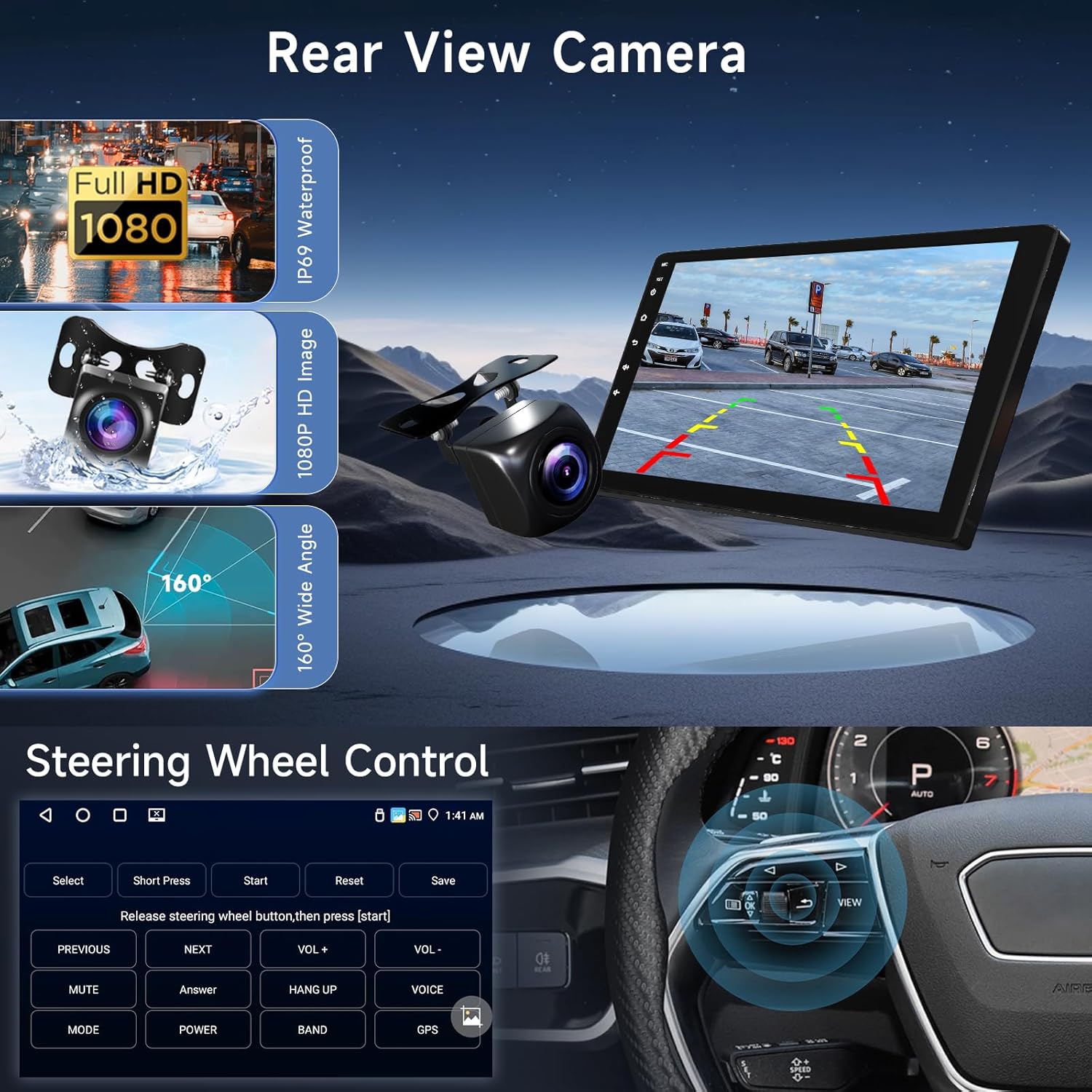
Image: Shows the clear display of the rear view camera with guidelines and the user interface for configuring steering wheel controls.
Maintenance
- Cleaning: Use a soft, dry cloth to clean the touchscreen and unit exterior. For stubborn smudges, dampen the cloth slightly with water or a screen-safe cleaner. Avoid abrasive materials or harsh chemicals.
- Software Updates: Periodically check for software updates through the unit's system settings (requires Wi-Fi connection). Updates can improve performance, add new features, and fix bugs.
- Temperature: Avoid exposing the unit to extreme temperatures for prolonged periods.
Troubleshooting
| Problem | Possible Cause | Solution |
|---|---|---|
| No Power | Incorrect wiring; Blown fuse; Vehicle battery disconnected. | Check power and ground connections. Inspect vehicle's fuse box and the unit's fuse. Ensure battery is connected. |
| No Sound | Speaker wires disconnected; Volume too low; Mute activated; Incorrect audio source. | Check speaker connections. Increase volume. Deactivate mute. Select correct audio source (e.g., FM, Bluetooth, USB). |
| GPS Signal Lost/Inaccurate | GPS antenna obstructed or disconnected; Unit in an area with poor satellite reception. | Ensure GPS antenna is properly connected and has a clear view of the sky. Move vehicle to an open area. |
| Bluetooth/Wi-Fi Connection Issues | Bluetooth/Wi-Fi off on unit or phone; Pairing failed; Interference. | Ensure Bluetooth/Wi-Fi is enabled on both devices. Delete previous pairings and re-pair. Restart both devices. |
| Rear Camera Not Displaying | Camera power/video cable disconnected; Reverse trigger wire not connected. | Check camera power and video connections. Verify the reverse trigger wire is correctly connected to the vehicle's reverse light circuit. |
| Steering Wheel Controls Not Working | Incorrect wiring; Controls not learned/mapped. | Check SWC wiring connections. Perform the steering wheel control learning process in the unit's settings. |
Specifications
| Feature | Detail |
|---|---|
| Brand | Hodozzy |
| Model | 9 Inch Double Din Android Car Stereo |
| Operating System | Android 13 |
| RAM | 4GB |
| ROM (Internal Storage) | 64GB |
| Screen Size | 9 Inch |
| Display Resolution | 1280 x 720 HD |
| Touch Screen Type | Capacitive |
| Connectivity Technology | Bluetooth 5.0, Wi-Fi, USB |
| Special Features | Wireless CarPlay, Android Auto, Mirrorlink, GPS Navigation, DSP (32-band EQ), FM/RDS Radio, Steering Wheel Control (SWC), Rear View Camera Input |
| Included Components | Camera, Cables (Power, RCA, USB, Camera Input), GPS Antenna, Mounting Bracket, Microphone, User Manual |
| Mounting Type | Dashboard Mount |
| Package Dimensions | 31.5 x 19.9 x 8.7 cm |
| Item Weight | 1.24 kg |
| Manufacturer | Hodozzy |
| Date First Available | 26 July 2024 |
Warranty and Support
Hodozzy is committed to providing quality products and excellent customer service.
- Return Policy: This product is eligible for a 30-day return policy from the date of purchase. Please refer to your retailer's specific return terms for details.
- Replacement Policy: Hodozzy offers a 24-month "No Reason For Return or Replacement" policy, indicating strong product support.
- Technical Support: Hodozzy provides lifetime technical support for this product. If you encounter any issues or have questions, please contact Hodozzy customer service. Response is typically within 18 hours.
- Contact Information: For support, please refer to the contact details provided on the Hodozzy official website or through your purchase platform.

Image: Hodozzy's commitment to customer satisfaction, highlighting fast response times, replacement policy, and professional technical support.
Ask a question about this manual
Ask about setup, troubleshooting, compatibility, parts, safety, or missing instructions. Manuals+ will review the question and use this page’s manual context to help answer it.