
PS3000-LCD
Generic Salter Brecknell PS3000-LCD Floor Scale User Manual
Model: PS3000-LCD
1. Product Overview
The Generic Salter Brecknell PS3000-LCD Floor Scale is a robust and accurate weighing instrument designed for demanding applications such as warehouse operations, freight handling, and veterinary use. Its durable construction ensures reliable performance in challenging environments.
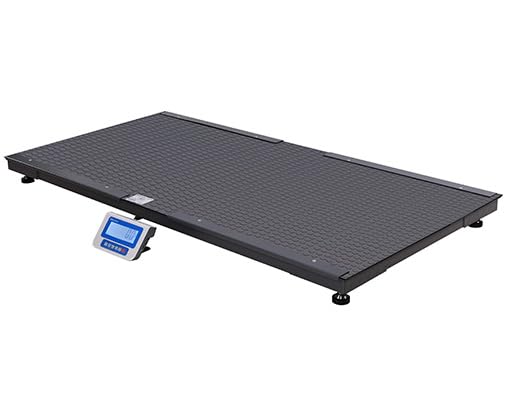
Figure 1: PS3000-LCD Floor Scale with integrated display.
Key features include a substantial capacity of 3000 lb (1500 kg), making it suitable for a wide range of items or animals. The full-size platform is designed for ease of use, minimizing stress for animals during weighing. An anti-slip rubber mat is included to reduce noise and prevent slipping. The scale also features a convenient hold function, allowing a single user to capture and retain the weight reading. It supports both AC and battery power, offering flexibility for installation in various locations, including those without readily available power outlets.
2. Safety Information
- Always place the scale on a firm, level, and stable surface to ensure accurate readings and prevent tipping.
- Do not overload the scale beyond its maximum capacity of 3000 lb (1500 kg).
- Keep the scale clean and free from debris. Avoid using abrasive cleaners or solvents.
- Ensure all cables are properly routed to prevent tripping hazards or damage.
- Do not attempt to disassemble or repair the scale yourself. Refer to qualified service personnel.
- When moving the scale, ensure it is properly secured to prevent damage or injury.
3. Components and What's in the Box
The PS3000-LCD Floor Scale typically includes the following components:
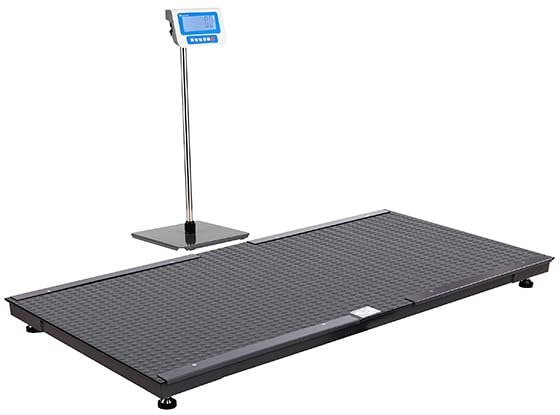
Figure 2: PS3000-LCD Floor Scale with display unit on a stand (stand may be optional or integrated depending on model variant).
- Weighing Platform (Floor Scale)
- LCD Display Unit with six large, easy-to-read digits and white backlight
- Power Adapter (AC)
- Anti-slip Rubber Mat
- User Manual (this document)
- Connecting Cable (between platform and display unit)
4. Setup Instructions
- Unpacking: Carefully remove all components from the packaging. Inspect for any signs of damage during transit. Retain packaging for future transport or storage.
- Placement: Choose a flat, stable, and level surface for the scale. Uneven surfaces can affect accuracy. Ensure adequate space around the scale for safe operation.
- Leveling: The scale typically has adjustable feet. Use a spirit level to ensure the platform is perfectly level. Adjust the feet as necessary.
- Connect Display Unit: Connect the cable from the weighing platform to the designated port on the LCD display unit. Ensure the connection is secure.
- Power Connection:
- AC Power: Plug the power adapter into the display unit and then into a suitable electrical outlet.
- Battery Power: If using battery power, ensure batteries are correctly installed in the display unit's battery compartment. The scale is designed for use in remote locations without AC power.
- Initial Power On: Press the ON/OFF button on the display unit. The display should light up and perform a self-test, then show "0.00" or "0.0" indicating it is ready for use.
- Place Anti-slip Mat: Carefully place the anti-slip rubber mat onto the weighing platform.
5. Operating Instructions
5.1 Basic Weighing
- Ensure the scale is powered on and displays "0.00" or "0.0". If not, press the ZERO or TARE button to zero the scale.
- Carefully place the item or guide the animal onto the center of the weighing platform.
- Wait for the weight reading to stabilize on the LCD display.
- Record the weight as needed.
- Remove the item or animal from the platform. The display should return to "0.00" or "0.0".
5.2 Hold Function
The hold function is particularly useful for weighing live animals or unstable loads, allowing the weight to be captured and displayed even after the load is removed or moves.
- Place the item or animal on the scale.
- Once the weight stabilizes, press the HOLD button (if available on your model). The display will typically show an indicator like "HOLD" and the stabilized weight.
- You can now remove the item or animal. The weight reading will remain on the display.
- To clear the held weight and return to normal weighing mode, press the HOLD button again or the ZERO button.
5.3 Tare Function
The tare function allows you to zero out the weight of a container or an animal's handler, so only the net weight of the desired item or animal is measured.
- Place the empty container or the handler (if weighing an animal with assistance) on the scale.
- Press the TARE button. The display will reset to "0.00" or "0.0", effectively subtracting the weight of the container/handler.
- Now, place the item or animal into/onto the container. The display will show only the net weight.
- To clear the tare and return to normal weighing, remove all items from the scale and press the TARE button again.
6. Maintenance
- Cleaning: Wipe the scale platform and display unit with a damp cloth and mild detergent. Do not use harsh chemicals, abrasive cleaners, or excessive water, as this can damage the electronics. Ensure the scale is dry before use.
- Storage: When not in use for extended periods, store the scale in a dry, clean environment, away from extreme temperatures and direct sunlight. If using battery power, remove batteries to prevent leakage.
- Calibration: While the scale is factory calibrated, professional recalibration may be required periodically, especially after significant impacts or prolonged heavy use, to maintain accuracy. Refer to a qualified service technician for calibration services.
- Inspection: Regularly inspect the platform, cables, and display unit for any signs of wear, damage, or loose connections. Address any issues promptly.
7. Troubleshooting
| Problem | Possible Cause | Solution |
|---|---|---|
| Scale does not power on. | No power from AC adapter; Dead batteries; Loose power connection. | Check AC adapter connection and outlet; Replace batteries; Ensure all cables are securely connected. |
| Inaccurate readings. | Scale not level; Overload; Debris under platform; Environmental factors (vibration, drafts); Needs calibration. | Level the scale using adjustable feet; Do not exceed capacity; Clean under platform; Ensure stable environment; Contact service for calibration. |
| Display shows "Err" or error code. | Overload; Internal fault; Sensor issue. | Remove load if overloaded; Power cycle the scale; If error persists, contact customer support. |
| Weight fluctuates. | Unstable surface; Air currents; Load not stable; Damaged load cell. | Place scale on a stable surface; Avoid drafts; Ensure load is still; Contact service if suspected damage. |
8. Specifications
| Specification | Value |
|---|---|
| Model Number | PS3000-LCD |
| Capacity | 3000 lb / 1500 kg |
| Display Type | LCD with white backlight |
| Power Source | AC Adapter, Battery Power |
| Material | Alloy Steel |
| Color | Black |
| Typical Applications | Warehouse, Freight Operations, Veterinary |
9. Warranty and Support
This product is covered by a standard manufacturer's warranty against defects in materials and workmanship. Please refer to the warranty card included with your purchase for specific terms and conditions, including the warranty period and coverage details.
For technical support, service, or warranty claims, please contact the retailer or the manufacturer's customer service department. Have your model number (PS3000-LCD) and purchase information ready when contacting support.
For further assistance, you may visit the manufacturer's official website or contact their support line. Contact information is typically provided in the product packaging or on the manufacturer's website.
Ask a question about this manual
Ask about setup, troubleshooting, compatibility, parts, safety, or missing instructions. Manuals+ will review the question and use this page’s manual context to help answer it.