
1. Introduction
Thank you for purchasing the HOMIDEC 140CM L-Shaped Gaming Desk with LED Lights. This manual provides essential information for the safe assembly, operation, and maintenance of your new desk. Please read these instructions carefully before beginning assembly and retain them for future reference.
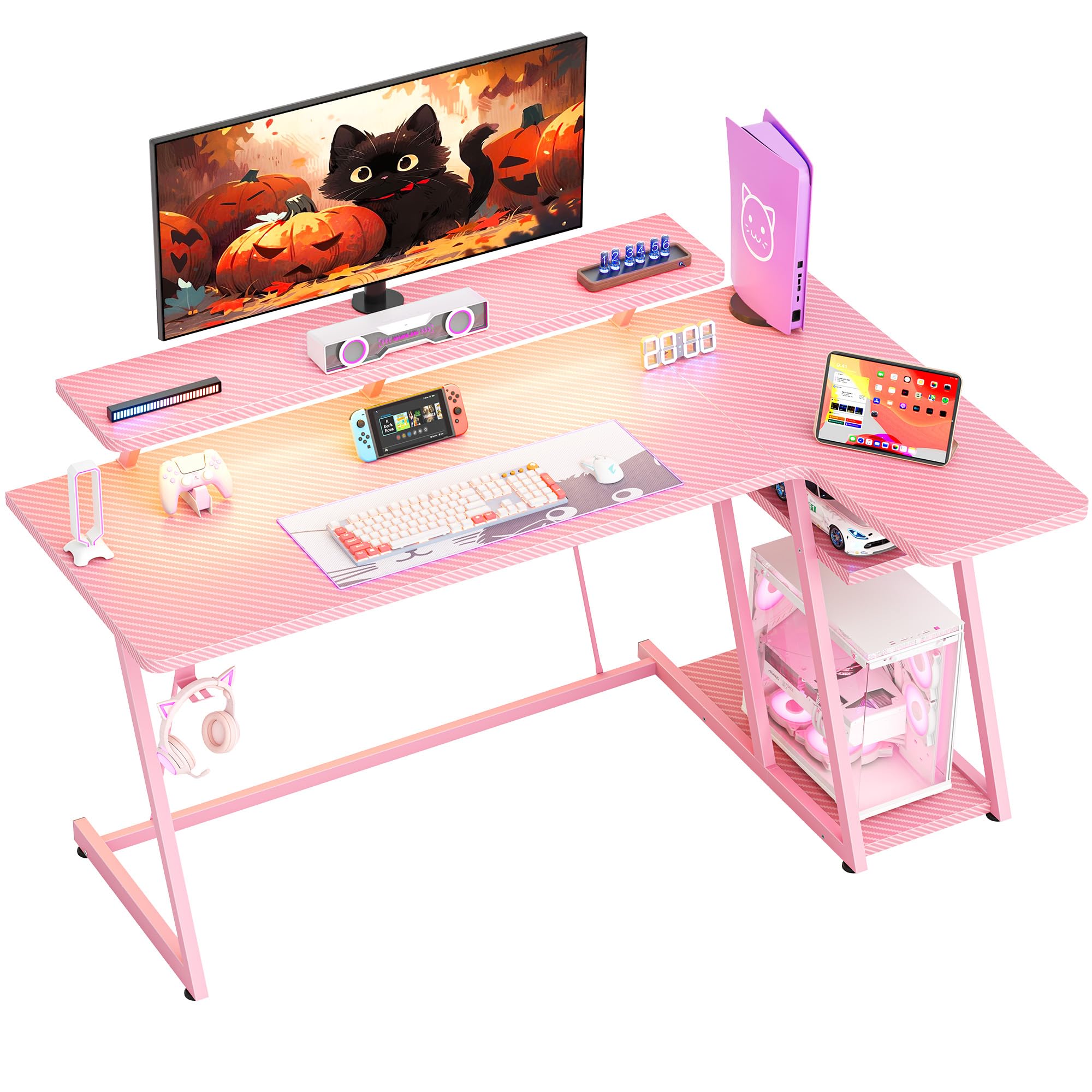
Image: Overall view of the HOMIDEC 140CM L-Shaped Gaming Desk with LED Lights, showcasing its design and features in a gaming setup.
2. Safety Information
- Always assemble the desk on a soft, clean surface to prevent scratches.
- Ensure all screws and fasteners are securely tightened before use. Periodically check and re-tighten as necessary.
- Do not exceed the maximum weight capacity of 220 pounds (100 kg) for the desktop.
- Keep small parts and packaging materials away from children to prevent choking hazards.
- Avoid placing hot items directly on the desk surface without protection.
- Ensure electrical connections for the LED lights are properly secured and away from liquids.
3. Package Contents
Verify that all components listed below are present before beginning assembly. If any parts are missing or damaged, please contact customer support.
- Gaming Desk Components (MDF board sections, steel frame parts)
- LED Light Strip with Remote Control
- Monitor Stand
- Headphone Hook
- Assembly Hardware (screws, bolts, tools)
- Instruction Manual
4. Setup and Assembly
The HOMIDEC gaming desk is designed for straightforward assembly. A detailed installation manual with step-by-step instructions and necessary tools are included in the package. Please follow the provided manual carefully for proper assembly.
- Unpack all components and verify against the package contents list.
- Identify the main desktop sections, monitor stand, and steel frame parts.
- Assemble the steel frame structure, ensuring all connections are secure. The desk features a double Z-shaped leg design for stability.
- Attach the desktop sections to the assembled frame.
- Install the monitor stand, headphone hook, and any other accessories.
- Connect the LED light strip according to its specific instructions.
- Adjust the footpads to ensure the desk is level and stable on uneven surfaces.

Image: Illustration of the desk's stable Z-shaped leg structure and integrated storage shelves, highlighting its robust design.

Image: Close-up view of the convenient headphone hook and the adjustable footpads designed for stability on various floor types.
5. Operating Instructions
5.1. LED Light System
The integrated LED light strip enhances your gaming or work environment. It offers various customization options:
- Colors: Choose from 20 static colors.
- Dynamic Effects: Select from 22 dynamic effects (e.g., fade, flash, jump).
- Control: Use the included remote control to adjust color, speed, and brightness.
- Memory Function: The light strip retains the last selected color and mode when powered off and on.

Image: The LED light strip under the monitor stand, displaying various color options, along with the remote control for customization.
5.2. Ergonomic Monitor Stand
The elevated monitor stand is designed to position your screen at an optimal viewing height, reducing neck and back strain. The space beneath the stand can be utilized for storing small devices or accessories.

Image: The ergonomic monitor stand elevating a display, illustrating how it helps maintain proper posture and provides additional storage space.
5.3. Headphone Hook
A dedicated hook is provided for convenient storage of your headphones, keeping them within reach and off the desktop surface.
5.4. Storage Shelves
The L-shaped desk includes 2-tier storage shelves, ideal for placing a computer case, books, or other gaming and office essentials, helping to keep your workspace organized.
6. Maintenance
To ensure the longevity and appearance of your HOMIDEC gaming desk, follow these maintenance guidelines:
- Cleaning: The desk surface features a carbon fiber texture, which is scratch-resistant and waterproof. Wipe clean with a damp cloth and mild detergent. Avoid abrasive cleaners.
- Spills: Promptly wipe up any spills to prevent water damage, especially around electrical components.
- Fasteners: Periodically check all screws and bolts to ensure they remain tight. Re-tighten if necessary to maintain stability.
- LED Lights: Ensure the LED light strip and its connections are free from dust and moisture.

Image: Close-up of the desk surface, highlighting its carbon fiber texture which is designed to be scratch-resistant and waterproof for easy maintenance.
7. Troubleshooting
If you encounter any issues with your desk, refer to the following common troubleshooting tips:
- Desk is Wobbly: Ensure all assembly screws are tightened. Adjust the footpads on the bottom of the legs to level the desk on uneven floors.
- LED Lights Not Working: Check if the power adapter is securely plugged into both the light strip and a working power outlet. Ensure the remote control has working batteries and is pointed directly at the receiver.
- Missing Parts: Review the package contents list. If parts are missing, contact HOMIDEC customer support with your purchase details.
8. Specifications
| Feature | Specification |
|---|---|
| Brand | HOMIDEC |
| Model Number | LDJZ-140-PK |
| Overall Dimensions (L x W x H) | 140cm x 80cm x 94cm (55.12"D x 31.5"W x 37.01"H) |
| Material | MDF board, Steel frame |
| Net Weight | 21.8 kg (48 lbs) |
| Weight Capacity | 100 kg (220 lbs) |
| Color | Pink |
| Desk Design | L-Shape Computer Desk |
| Included Components | Desk, Monitor Stand, LED Light Strip, Headphone Hook |
| Assembly Required | Yes |

Image: Detailed diagram illustrating the dimensions of the HOMIDEC Gaming Desk, including the main desktop, monitor stand, and storage shelves.
9. Warranty and Support
For warranty information or technical support, please refer to the specific warranty card included with your product or contact HOMIDEC customer service directly. Ensure you have your purchase receipt and model number (LDJZ-140-PK) available when contacting support.