
1. Important Safety Information
Please read all safety instructions before installing or operating this thermostat. Failure to follow these instructions may result in electric shock, fire, or property damage.
- Electrical Safety: This device operates on 110V-60Hz. Ensure the power outlet is properly grounded and rated for the device's maximum current (16A-1100W Max). Do not overload the circuit.
- Placement: Install the thermostat in a dry indoor location, away from direct sunlight, drafts, or heat sources that could affect temperature readings.
- Children and Pets: Keep the device out of reach of children and pets to prevent accidental tampering or damage.
- Maintenance: Do not attempt to disassemble or repair the thermostat yourself. Refer all servicing to qualified personnel.
- Cleaning: Disconnect from power before cleaning. Use a soft, dry cloth. Do not use liquid cleaners or sprays.
2. Product Overview
The Könighaus US_Thermostat is a programmable 7-day thermostat designed for precise temperature control of your heating devices. It features a digital interface for easy programming and dual functionality as both a thermostat and a programmable timer.
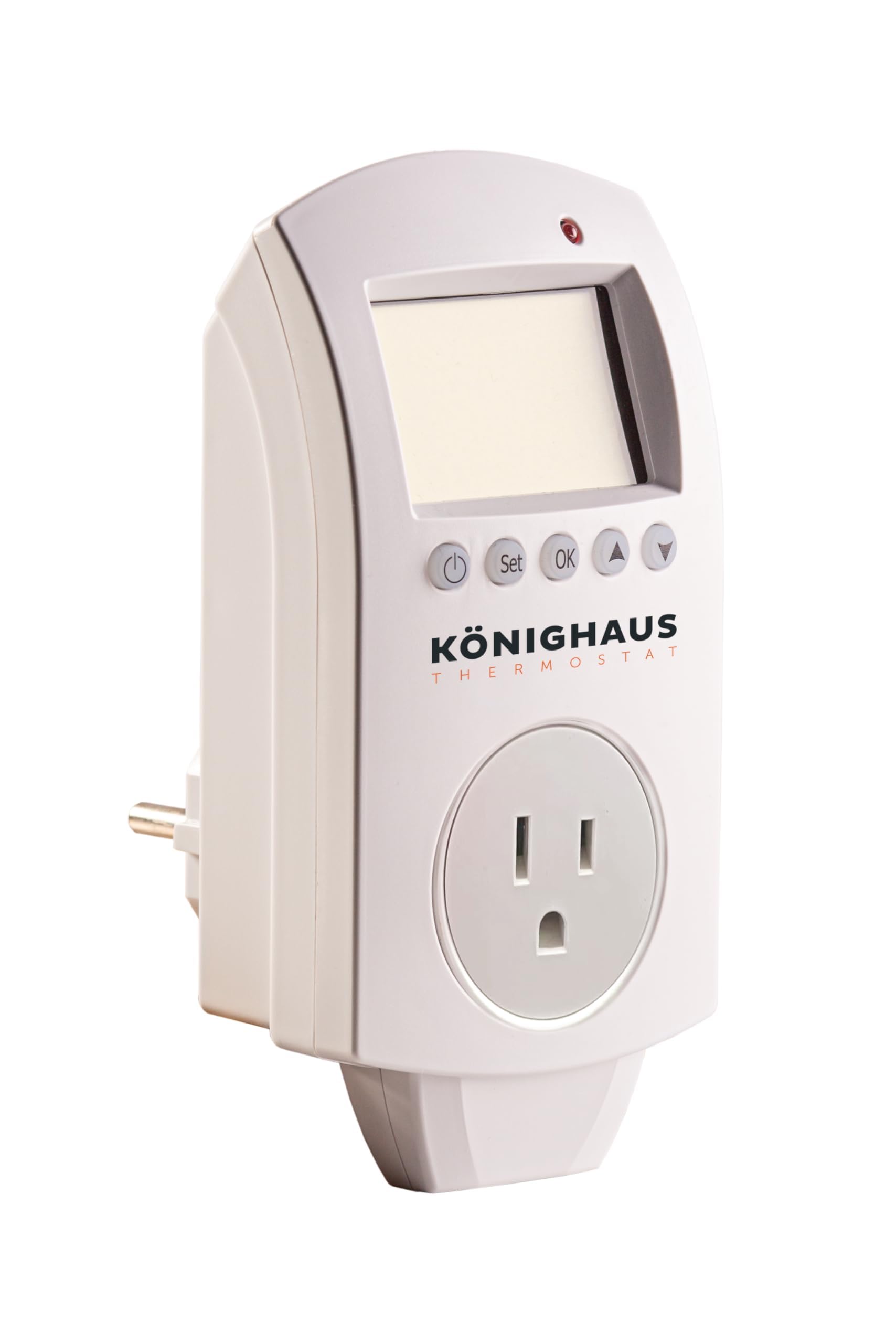
Figure 2.1: Front view of the Könighaus US_Thermostat, showing the digital display and control buttons.
Key Features:
- Programmable 7-Day Thermostat: Set daily heating schedules with ease using the intuitive digital interface.
- Dual Functionality: Works as both a thermostat and a programmable timer.
- Plug & Play Design: Quick to set up and easy to use, no app or WiFi required.
- Custom Heating Control: Optimize energy consumption while maintaining desired room temperature.
- Reliable & Precise: Consistent temperature control for your space.
3. Package Contents
Verify that all items are present in your package:
- Könighaus US_Thermostat Unit
- Instruction Manual (this document)
4. Installation
The Könighaus US_Thermostat features a simple plug-and-play design for quick setup.
- Unpack the Thermostat: Carefully remove the thermostat from its packaging.
- Identify a Suitable Outlet: Choose a standard 110V wall outlet that is easily accessible and not obstructed. Ensure the outlet is not controlled by a switch if you desire continuous power to the thermostat.
- Plug in the Thermostat: Insert the thermostat's plug into the chosen 110V wall outlet. Ensure it is securely seated.
- Connect Heating Device: Plug your heating appliance (e.g., infrared heater) into the receptacle on the front of the thermostat.

Figure 4.1: Back view of the Könighaus US_Thermostat, illustrating the US plug and product information label.
The thermostat is now powered on and ready for initial setup and programming.
5. Operating Instructions
This section guides you through the basic operation and programming of your Könighaus US_Thermostat. The device uses push buttons and a digital display for interaction.
5.1 Initial Setup: Setting Time and Day
- Power On: Ensure the thermostat is plugged into a live outlet. The display should illuminate.
- Enter Time Setting Mode: Press the SET button once. The hour display will flash.
- Adjust Hour: Use the UP or DOWN buttons to set the current hour.
- Adjust Minute: Press SET again. The minute display will flash. Use UP or DOWN to set the current minute.
- Set Day: Press SET a third time. The day of the week will flash (e.g., MO for Monday). Use UP or DOWN to select the current day.
- Exit Setting Mode: Press the OK button or wait a few seconds for the display to return to normal operation.
5.2 Setting Desired Temperature
In normal operating mode, the display shows the current room temperature and the set target temperature.
- Use the UP or DOWN buttons to adjust the target temperature. The new setting will be saved automatically after a few seconds.
- The thermostat will activate the connected heating device when the room temperature falls below the set target temperature and deactivate it when the temperature rises above it.
5.3 Programming a 7-Day Schedule
The thermostat allows you to set different temperature schedules for each day of the week. This is a general guide; specific button labels may vary slightly.
- Enter Program Mode: Press and hold the PROG or MODE button for a few seconds until the display indicates program setting (e.g., 'P1' or a flashing day/time segment).
- Select Day/Period: Use the DAY or NEXT button to cycle through the days (Monday-Sunday) or programming periods (e.g., P1, P2, P3, P4 for morning, day, evening, night).
- Set Time for Period: When the desired day/period is selected, use UP or DOWN to set the start time for that period.
- Set Temperature for Period: Press SET or TEMP. Use UP or DOWN to set the desired temperature for that period.
- Repeat: Continue for all desired periods and days.
- Exit Program Mode: Press the OK or EXIT button, or wait for the display to revert to normal operation.
Note: If you encounter difficulties with programming, refer to the online manual for detailed, model-specific instructions. The programming interface can sometimes be complex, and clear step-by-step guidance is essential.
6. Maintenance
Proper maintenance ensures the longevity and optimal performance of your thermostat.
- Cleaning: Regularly wipe the thermostat's exterior with a soft, dry cloth to remove dust. Do not use abrasive cleaners, solvents, or spray directly onto the unit.
- Avoid Obstructions: Ensure that the thermostat's temperature sensor (usually a small vent or opening) is not blocked by furniture, curtains, or other objects, as this can lead to inaccurate temperature readings.
- Storage: If storing the thermostat for an extended period, unplug it from the wall outlet and store it in a cool, dry place.
7. Troubleshooting
If you experience issues with your Könighaus US_Thermostat, consult the following common problems and solutions:
| Problem | Possible Cause | Solution |
|---|---|---|
| Thermostat display is blank or not turning on. | No power to the outlet. | Check if the outlet is working by plugging in another device. Check your home's circuit breaker. |
| Heating device not turning on/off as expected. | Incorrect temperature setting or programming. | Verify the target temperature is set correctly. Review your programmed schedule. Ensure the heating device is properly plugged into the thermostat. |
| Inaccurate room temperature reading. | Thermostat placed in a location with drafts, direct sunlight, or near a heat source. | Relocate the thermostat to a more stable environment. Ensure no objects are blocking the sensor. |
| Difficulty programming the schedule. | Complex interface or misunderstanding of steps. | Carefully re-read Section 5.3. Refer to the online manual for more detailed, visual instructions if available. Practice the steps without immediate pressure. |
If the problem persists after trying these solutions, please contact Könighaus customer support.
8. Specifications
| Feature | Specification |
|---|---|
| Brand | Könighaus |
| Model Number | US_Thermostat |
| Power Source | Corded Electric |
| Voltage | 110V-60Hz |
| Max Current / Power | 16A-1100W Max |
| Operating Temperature Range | 32-104°F |
| Controller Type | Push Button |
| Control Method | Touch |
| Display Type | LCD |
| Special Feature | Programmable (7-Day) |
| Mounting Type | Wall Mount (Plug-in design) |
| Item Weight | 9.1 ounces |
| Package Dimensions | 5.51 x 3.62 x 3.03 inches |
9. Warranty and Support
For warranty information, technical support, or further assistance, please contact Könighaus directly.
- Manufacturer: Könighaus GmbH
- Address: Albert-Einstein-Straße 1, D-46446 Emmerich am Rhein, Germany
- Phone: +49 2822/5376401
- Email: info@koenighaus-infrarot.de
- Website: www.koenighaus-infrarot.de
- Online Manuals: For the latest and most detailed instructions, including programming guides, please visit https://koenighaus.qr1.at/anleitungen