
Important Safety Information
WARNING: This vanity is heavy and requires two people for assembly. Always unplug the vanity before cleaning or performing any maintenance. Keep electrical cords away from heat sources and liquids to prevent electrical hazards. Do not use the vanity if the electrical components are damaged or malfunctioning. Always follow the instructions provided to ensure safe and proper use.
1. Product Overview
The ALEXNUTRE Makeup Vanity Desk 0009 is designed to provide a functional and organized space for your beauty routine. It features an LED lighted mirror, integrated power outlets, storage drawers, open shelves, and a foldable side panel for adaptable space.

Image 1.1: Overview of the ALEXNUTRE Makeup Vanity Desk 0009, featuring the lighted mirror, storage, and accompanying stool.
2. Setup and Assembly
Please read all instructions carefully before beginning assembly. Ensure all parts are present and undamaged. Assembly requires two people for safety and ease.
2.1 Unpacking and Part Identification
- Carefully remove all components from the packaging.
- Lay out all parts on a clean, soft surface to prevent scratches.
- Refer to the included parts list to identify each component and hardware.
2.2 Assembly Steps (General Guidance)
- Assemble the main metal frame structure. Ensure all connections are secure.
- Attach the desktop surface to the assembled frame.
- Install the storage drawers into their designated compartments. The fabric drawers are designed for easy insertion.
- Mount the mirror unit, including the integrated shelves, onto the desktop. Connect any necessary electrical wiring for the mirror lights and power strip.
- Attach the foldable side panel to either the left or right side of the vanity, as preferred.
- Assemble the accompanying stool.
- Once fully assembled, ensure all screws and fasteners are tightened.

Image 2.1: Components such as open shelves, storage drawers, and the sturdy steel frame, which are part of the assembly process.
3. Operating Instructions
3.1 LED Lighted Mirror
- Power On/Off: Tap the touch sensor button on the mirror to turn the lights on or off.
- Change Light Mode: Briefly tap the touch sensor button to cycle through the three lighting modes: Cool White, Natural White, and Warm White.
- Adjust Brightness: Long-press the touch sensor button to increase or decrease the brightness within the selected mode. Release when the desired brightness is reached.
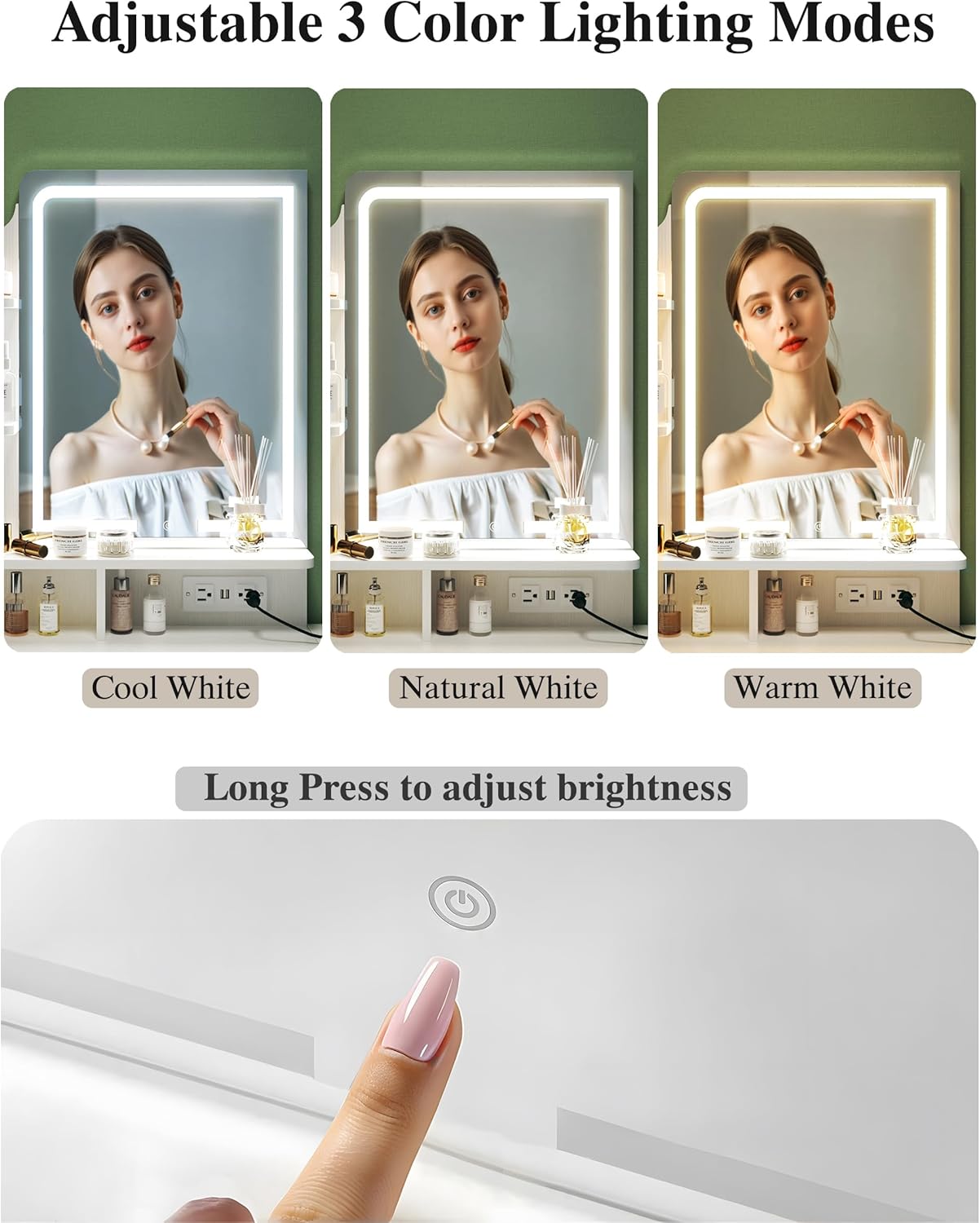
Image 3.1: The LED mirror offers three color lighting modes and adjustable brightness via a touch sensor.
3.2 Built-in Power Strip
- The vanity includes 2 standard AC outlets (125V/12A) and 2 USB ports (5V/2A).
- Plug the vanity's main power cord into a wall outlet.
- Use the integrated outlets and USB ports to power or charge electronic devices such as hair dryers, curling irons, or mobile phones.

Image 3.2: The built-in power strip provides convenient access to AC outlets and USB charging ports.
3.3 Foldable Side Panel
- The side panel can be folded up to expand your workspace or folded down to save space when not in use.
- To expand, gently lift the panel until it locks into its horizontal position.
- To fold down, release the locking mechanism (if applicable) and carefully lower the panel.

Image 3.3: The foldable side panel allows for flexible use of space.
3.4 Storage Drawers and Shelves
- Utilize the two fabric storage drawers for organizing cosmetics, accessories, and other items.
- The open shelves provide easy access storage for frequently used products or decorative items.
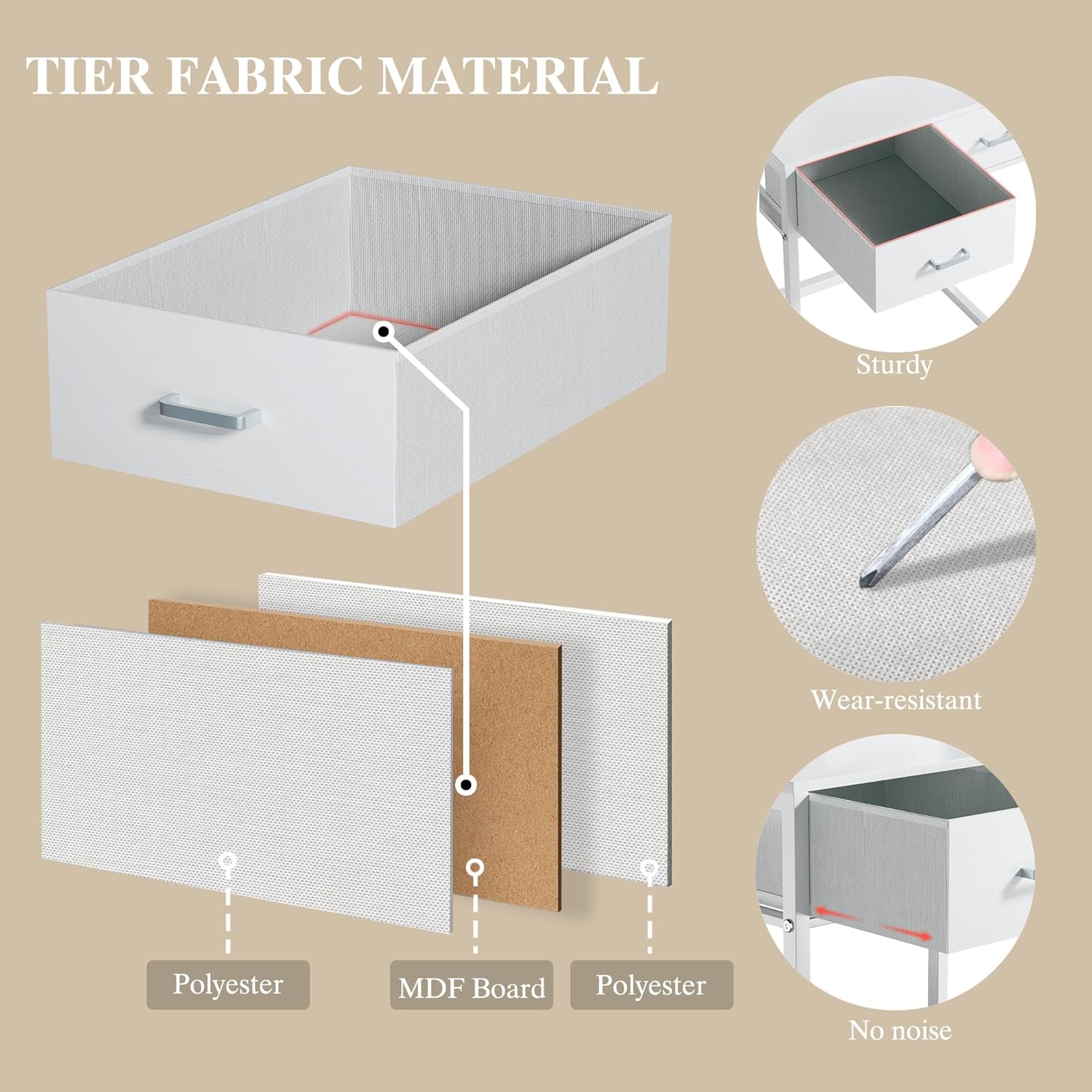
Image 3.4: The fabric storage drawers are constructed from durable polyester and MDF board.
4. Maintenance
- Always unplug the vanity from the power source before cleaning.
- Wipe down surfaces (MDF, metal) with a soft, damp cloth. Avoid abrasive cleaners or harsh chemicals.
- For fabric drawers, spot clean with a mild detergent and allow to air dry completely.
- Regularly check all screws and fasteners to ensure they remain tight. Retighten if necessary.
- Keep the mirror clean with a glass cleaner and a soft, lint-free cloth.
5. Troubleshooting
- Mirror Lights Not Working:
• Ensure the vanity is properly plugged into a functional wall outlet.
• Check if the power cord for the mirror is securely connected.
• Tap the touch sensor button to turn on the lights. - Mirror Lights Too Dim/Bright:
• Long-press the touch sensor button on the mirror to adjust the brightness level. - Power Outlets/USB Ports Not Functioning:
• Verify the main power cord of the vanity is securely plugged into a live wall outlet.
• Ensure the devices you are trying to power are working correctly. - Vanity Feels Unstable:
• Check that all assembly screws and fasteners are fully tightened.
• Ensure the vanity is placed on a flat, level surface. For added stability, consider placing it against a wall. - Drawers Not Sliding Smoothly:
• Check for any obstructions inside the drawer compartments.
• Ensure the fabric drawers are inserted correctly and not overloaded.
6. Specifications

Image 6.1: Detailed dimensions of the vanity desk and stool.
| Feature | Detail |
|---|---|
| Brand | ALEXNUTRE |
| Model Number | Makeup Vanity Desk 0009 |
| Product Dimensions | 15.7"D x 32.7"W x 53.5"H |
| Item Weight | 38.8 pounds |
| Frame Material | MDF, Fabric, Metal |
| Furniture Finish | Fabric, Wood, MDF, Metal |
| Color | Cream White |
| Mirror Type | LED Lighted Mirror with 3 Color Modes |
| Power Outlets | 2 AC Outlets (125V/12A), 2 USB Ports (5V/2A) |
| Storage | 2 Fabric Storage Drawers, 3-tier Side Shelves, 2 Compartments |
| Special Features | Foldable Side Panel |
7. Warranty and Support
This product is backed by the manufacturer's commitment to quality. While specific warranty details are not provided in this manual, for any issues regarding defective products, missing parts, or general support, please contact the seller directly through your purchase platform. The seller is committed to providing a satisfactory solution.
For assistance, please refer to your purchase documentation or the platform where you purchased the product to locate the 'Contact Seller' option.


