
purevox MT4200P
purevox ATV UTV Sound Bar User Manual
Model: MT4200P
1. Introduction
Thank you for purchasing the purevox ATV UTV Sound Bar. This manual provides essential information for the proper installation, operation, and maintenance of your sound bar. Please read this manual thoroughly before use to ensure optimal performance and safety.
This sound bar is designed for use in various outdoor vehicles, including ATVs, UTVs, golf carts, and marine applications, providing high-quality audio with robust weatherproofing and vibrant RGB illumination.

Image: The purevox sound bar is suitable for various vehicles, including ATVs, UTVs, marine vessels, and touring cars/camping setups.
2. Safety Information
- Ensure the sound bar is securely mounted to prevent detachment during vehicle operation.
- Connect the sound bar to a 12V DC power source only. Incorrect voltage can damage the unit.
- Do not disassemble or modify the sound bar. This will void the warranty and may cause damage or injury.
- Keep wiring away from moving parts, sharp edges, and hot surfaces.
- While the unit is weatherproof (IPX5/IP65 rated), avoid submerging it in water.
- Always turn off the vehicle's power before performing any wiring or maintenance.
3. Package Contents
Verify that all items are present in the package:
- purevox UTV Bluetooth Speaker (Sound Bar)
- Mounting Kits (Handlebar Mounts)
- Wireless Remote Control
- User Guide (This Manual)
4. Features
- Bluetooth Connectivity: Built-in Bluetooth for wireless audio streaming, automatically reconnects to the last paired device.
- Weatherproof Design: IPX5/IP65 rated for water and dust resistance, ensuring durability in outdoor environments.

Image: The sound bar is shown mounted on a UTV splashing through water, highlighting its IP65 water and dust resistant rating.
- Powerful Audio Output: Features four 4-inch speakers and two 1-inch soft dome tweeters, powered by a high-performance built-in A/B amplifier, delivering 40 Watts (RMS) with 500W Peak Power.

Image: An internal view of the sound bar showing two 1-inch tweeters, two 4-inch mid-woofers, and two 4-inch full-range speakers, emphasizing its 500W peak power and built-in amplifier.
- RGB Illumination: Multicolor LED lighting with customizable speed, color, mode, and brightness via the included wireless remote control.

Image: The sound bar displaying various RGB colors, illustrating how the lights can sync with music beats for a dynamic visual effect.
- Multiple Inputs: USB and Aux-in ports for wired connection to iPods, iPhones, smartphones, MP3 players, laptops, and tablets.

Image: Close-up of the sound bar's input ports, including 3.5mm Auxiliary, USB Port, and RCA outputs (red and white), demonstrating easy wired connection options.
- Multiple Control Methods: Control via onboard buttons, wireless remote control, or a connected smartphone.

Image: Three icons illustrating the control methods: onboard buttons, the included remote control, and smartphone app control.
5. Installation and Setup
5.1 Mounting the Sound Bar
The sound bar is designed for handlebar mounting and fits roll cages with diameters of 1.75 inches (4.5cm) to 2.25 inches (5.7cm). Ensure the mounting location is secure and does not obstruct your view or vehicle controls.
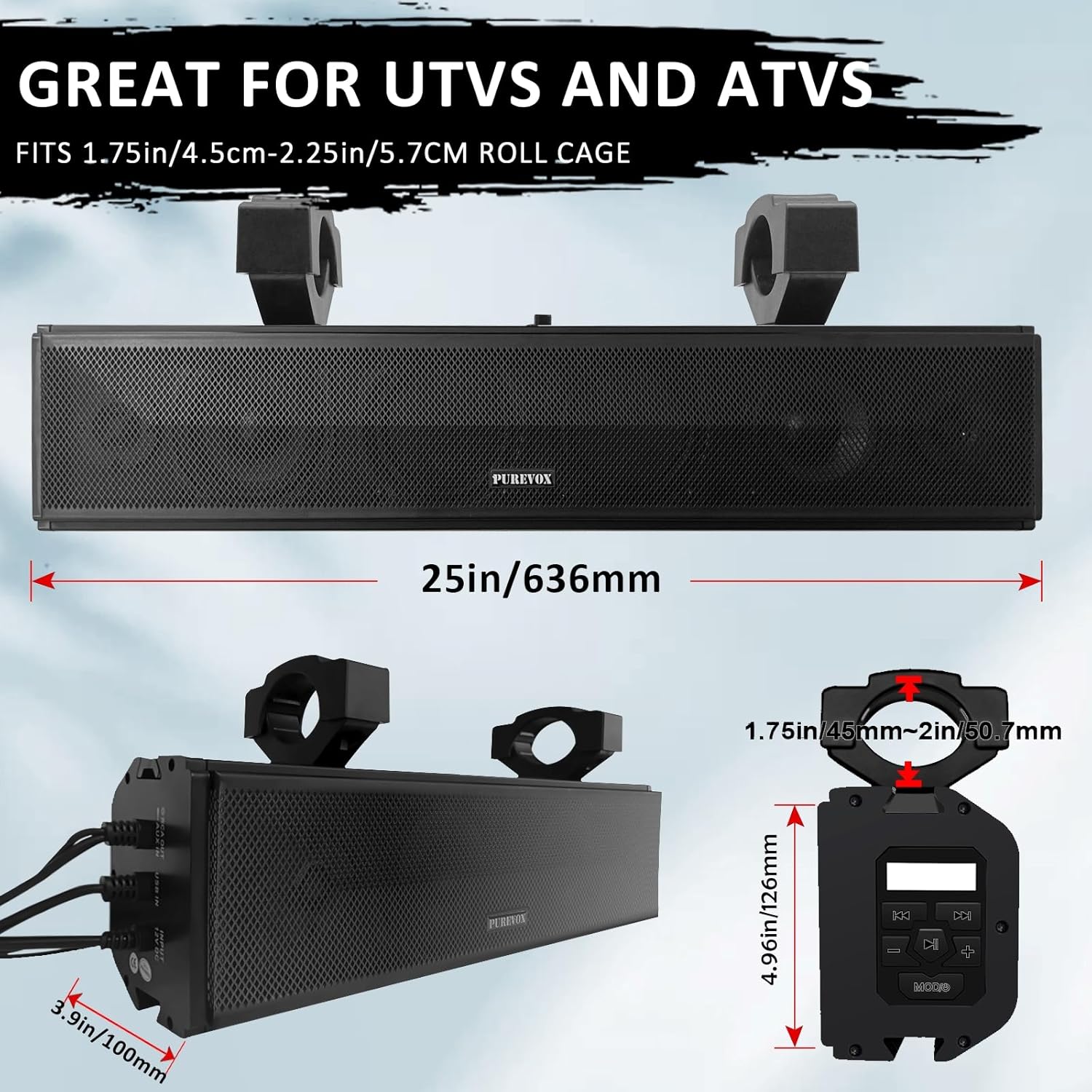
Image: Detailed diagram showing the sound bar's dimensions (25 inches / 636mm length, 4.96 inches / 126mm height, 3.9 inches / 100mm depth) and the adjustable mounting bracket sizes (1.75 inches / 45mm to 2 inches / 50.7mm).
- Select a suitable mounting location on your vehicle's roll cage or handlebar.
- Attach the mounting clamps to the sound bar.
- Securely fasten the sound bar to the chosen location using the provided hardware. Ensure all bolts are tightened to prevent movement during operation.
5.2 Wiring Connections
The sound bar requires a 12V DC power source. It is recommended to connect the power wires directly to your vehicle's battery or a fused accessory circuit.
- Power (Red Wire): Connect to the positive (+) terminal of your 12V DC power source. It is highly recommended to install an inline fuse (not included) close to the power source for protection.
- Ground (Black Wire): Connect to a clean, unpainted metal chassis point on your vehicle or the negative (-) terminal of your 12V DC power source.
- Ensure all connections are secure and insulated to prevent short circuits.
6. Operation
6.1 Power On/Off
Press and hold the power button on the sound bar or remote control to turn the unit on or off.
6.2 Bluetooth Pairing
- Ensure the sound bar is powered on and in Bluetooth mode (indicated by a flashing Bluetooth icon or specific LED pattern).
- On your mobile device, enable Bluetooth and search for available devices.
- Select "purevox Sound Bar" (or similar name) from the list to pair.
- Once paired, the sound bar will confirm the connection, and the Bluetooth indicator will become solid. The sound bar will automatically reconnect to this device when in range and powered on.
6.3 Audio Playback
- Bluetooth: Play audio directly from your paired smartphone or MP3 player. Use the sound bar's controls or your device to adjust volume, skip tracks, and pause/play.
- USB: Insert a USB drive into the USB port. The sound bar will automatically switch to USB mode and begin playing compatible audio files.
- Aux-in: Connect an audio device (e.g., MP3 player, laptop) to the 3.5mm Aux-in port using a standard audio cable. The sound bar will switch to Aux mode.
- RCA: Use the RCA output ports to connect to an external amplifier or subwoofer (if desired).
6.4 RGB Illumination Control
Use the included wireless remote control to manage the RGB lighting:
- Color Selection: Choose from a variety of static colors.
- Mode Selection: Cycle through different lighting effects (e.g., fading, flashing, music sync).
- Brightness Adjustment: Increase or decrease the intensity of the lights.
- Speed Adjustment: Control the speed of dynamic lighting effects.
7. Maintenance
- Cleaning: Use a soft, damp cloth to clean the exterior of the sound bar. Do not use harsh chemicals or abrasive cleaners.
- Connections: Periodically check all wiring connections to ensure they are secure and free from corrosion.
- Mounting: Regularly inspect the mounting hardware for tightness, especially after off-road use.
- Storage: If storing the vehicle for an extended period, consider disconnecting the sound bar from the power source.
8. Troubleshooting
| Problem | Possible Cause | Solution |
|---|---|---|
| No Power | Loose power connection; Blown fuse; Incorrect voltage. | Check power and ground connections. Replace fuse if blown. Ensure 12V DC power. |
| No Audio Output | Volume too low; Incorrect input mode; Device not paired (Bluetooth); Faulty audio cable. | Increase volume. Select correct input mode (Bluetooth, USB, Aux). Re-pair Bluetooth device. Try a different audio cable. |
| Bluetooth Disconnects Frequently | Device too far; Interference; Low battery on source device. | Move device closer to sound bar. Avoid strong electromagnetic interference. Charge source device. |
| RGB Lights Not Working | Remote control battery low; Remote not aimed correctly; Light mode off. | Replace remote battery. Aim remote directly at the sound bar's sensor. Check light mode settings. |
9. Specifications
| Feature | Specification |
|---|---|
| Model Name | MT4200P |
| Brand | purevox |
| Speaker Type | Soundbar |
| Speaker Configuration | Four 4-inch speakers, Two 1-inch tweeters |
| Speaker Size | 26 Inches (overall length) |
| Speaker Maximum Output Power | 40 Watts (RMS) / 500 Watts (Peak) |
| Frequency Response | 100 Hz (minimum specified) |
| Input Voltage | 12 Volts (DC) |
| Connectivity Technology | Bluetooth, Wire (USB, Aux-in, RCA) |
| Wireless Communication Technology | Bluetooth |
| Controller Type | Button, Remote Control |
| Weatherproofing | IP65 Rated (Water and Dust Resistant) |
| Product Dimensions | 4"D x 25"W x 5"H (100mm D x 636mm W x 126mm H) |
| Item Weight | 8.2 Pounds (approx. 3.7 kg) |
| Mounting Type | Handlebar Mount (fits 1.75in/4.5cm - 2.25in/5.7CM roll cage) |
| Included Components | UTV Bluetooth Speaker, Mounting Kits, Remote Control, User Guide |
10. Warranty and Support
10.1 Warranty Information
This purevox product comes with a Limited Warranty. Please refer to the warranty card included in your package or contact purevox customer support for detailed terms and conditions. The warranty covers manufacturing defects under normal use.
Please retain your proof of purchase for warranty claims.
10.2 Customer Support
For technical assistance, troubleshooting, or warranty inquiries, please contact purevox customer support. Visit the official purevox website for the most up-to-date contact information.
Website: purevox Official Store on Amazon
Related documentsMT4200P

Ask a question about this manual
Ask about setup, troubleshooting, compatibility, parts, safety, or missing instructions. Manuals+ will review the question and use this page’s manual context to help answer it.