
1. Introduction
Thank you for choosing the TVG Model 2011 Men's Digital Watch. This timepiece combines robust design with advanced digital functionalities, including a remote control feature. This manual provides detailed instructions to help you utilize all features effectively and ensure proper care.

Image 1.1: The TVG Model 2011 Digital Watch in Gold.
2. Product Overview
The TVG Model 2011 watch is designed for versatility and durability, featuring multiple functions and a clear digital display.
Key Features:
- Multi-functional Intelligent Remote Control: Capable of remotely controlling various devices such as TVs, set-top boxes, projectors, and smart sockets.
- High-Precision Stopwatch: Ideal for timing activities and sports.
- Intelligent Alarm Mode: Set multiple alarms for reminders.
- Durable Electronic Chip: Ensures stable and long-lasting performance.
- Calendar Dual Display: Supports 12/24-hour format and a fully automatic calendar.
- Luminous Display: Features imported LED light-emitting sheets for clear visibility in low-light conditions.
Watch Components and Controls:
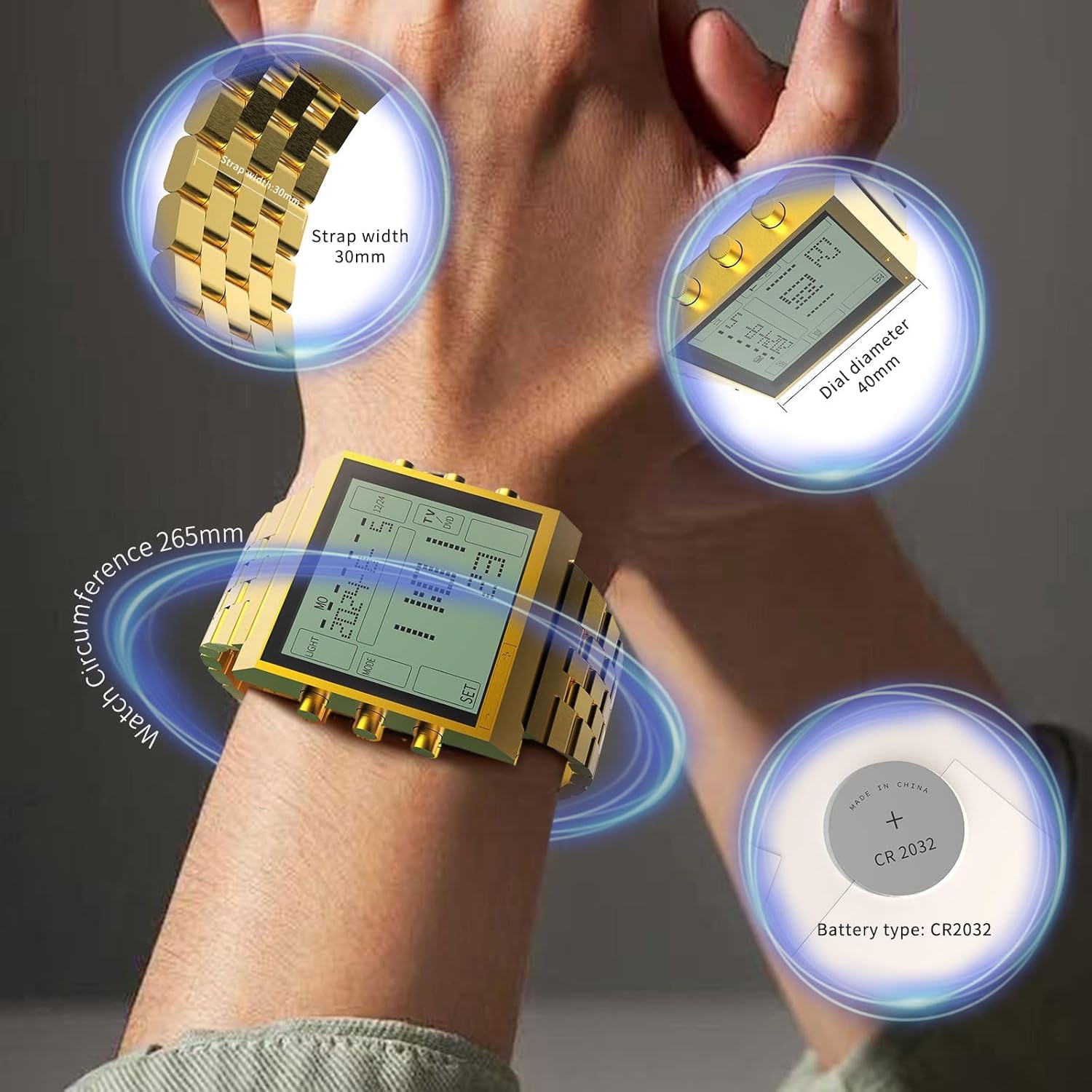
Image 2.1: Overview of watch buttons and display indicators.
- LIGHT Button: Activates the luminous backlight.
- MODE Button: Cycles through different modes (Time, Alarm, Stopwatch, Remote Control).
- SET Button: Used to enter and confirm settings.
- VOL+/CH+ Button: Increases volume/changes channel up in remote mode; adjusts values up in setting mode.
- VOL-/CH- Button: Decreases volume/changes channel down in remote mode; adjusts values down in setting mode.
3. Setup
3.1 Initial Time and Date Setting
- In normal time display mode, press the MODE button until the time digits begin to flash.
- Use the VOL+/CH+ and VOL-/CH- buttons to adjust the hour.
- Press the SET button to move to the next setting (minutes, year, month, day).
- Repeat step 2 to adjust each value.
- After setting all values, press the MODE button to exit setting mode and save changes.
3.2 Strap Adjustment
To ensure a comfortable fit, the watch strap can be adjusted by removing links. This process typically requires a specialized tool.

Image 3.1: Instructions for adjusting the watch strap.
- Identify the strap pins marked with an arrow direction.
- Use the included strap tool to align and push out the pin in the direction of the arrow.
- Remove the desired number of links.
- Reinsert the strap pin in the opposite direction to connect the remaining parts, ensuring it is fully seated.
4. Operating Instructions
4.1 Switching Modes
Press the MODE button repeatedly to cycle through the following functions:
- Normal Time Display
- Alarm Setting
- Stopwatch
- Remote Control
4.2 Alarm Function

Image 4.1: The watch displaying its alarm and stopwatch capabilities.
- From normal time display, press MODE until the alarm icon appears.
- Press SET to activate alarm setting. The hour digits will flash.
- Use VOL+/CH+ and VOL-/CH- to adjust the alarm hour.
- Press SET to move to minutes and adjust.
- Press MODE to exit and save the alarm time.
- To turn the alarm on/off, press SET in alarm display mode without entering setting.
4.3 Stopwatch Function
- From normal time display, press MODE until the stopwatch display appears (usually 00:00:00).
- Press VOL+/CH+ to start the stopwatch.
- Press VOL+/CH+ again to pause.
- Press VOL-/CH- to reset the stopwatch to zero.
4.4 Intelligent Remote Control
The watch can function as a remote control for various electronic devices. It supports basic functions for TVs, DVDs, VCRs, and set-top boxes.
Video 4.1: A short demonstration of the TVG-2011 watch's remote control functionality.
Setup for Remote Control:
- Press MODE until the remote control icon (TV/DVD) appears on the display.
- Point the watch towards the device you wish to control.
- The watch may require a code or an auto-scan function to pair with your device. Refer to the device's manual for compatible remote codes or try the auto-scan feature if available on the watch (often initiated by holding down a button like SET in remote mode).
- Once paired, use the VOL+/CH+ and VOL-/CH- buttons for volume and channel control. Other buttons may correspond to power or input selection.
4.5 Luminous Display
To view the time in dimly lit environments, press the LIGHT button located on the left side of the watch. The imported LED backlight will illuminate the display for a few seconds.

Image 4.2: The watch's luminous display provides clear visibility at night.
5. Maintenance
5.1 Cleaning
Wipe the watch regularly with a soft, dry cloth to remove dust and smudges. For stubborn dirt, a slightly damp cloth can be used, followed by immediate drying.
5.2 Water Resistance
The TVG Model 2011 watch is designed to be water-resistant. However, it is important to avoid prolonged exposure to water, hot water, or steam, which can compromise the seals. Do not press buttons while the watch is wet.

Image 5.1: The watch is designed with water resistance in mind.
5.3 Battery Replacement
The watch uses a CR2032 battery. When the display dims or functions become erratic, it may be time to replace the battery. It is recommended to have battery replacement performed by a qualified technician to ensure water resistance is maintained.

Image 5.2: Watch dimensions and battery type (CR2032).
6. Troubleshooting
| Problem | Possible Cause | Solution |
|---|---|---|
| Display is dim or blank. | Low battery. | Replace the CR2032 battery. |
| Watch not responding to button presses. | Low battery; internal malfunction. | Replace battery. If issue persists, contact support. |
| Remote control not working. | Incorrect pairing; device not supported; watch not pointed correctly. | Ensure watch is in remote mode and pointed directly at the device. Re-attempt pairing or code entry. Verify device compatibility. |
| Water ingress. | Buttons pressed underwater; seals compromised; excessive water pressure. | Immediately dry the watch. Avoid further water exposure. Seek professional inspection if damage is suspected. Note: Water resistance is not absolute waterproofness. |
7. Specifications
- Item Type: Sport Watch
- Clasp Type: Tang Buckle
- Manufacturer: TVG
- Battery: 1 CR2032 battery (included)
- Dial Diameter: 40mm
- Strap Width: 30mm
- Watch Circumference: 265mm
- Product Weight: 113g
- Thickness: 12mm
- Water Resistance: Refer to product packaging for specific depth rating. Avoid pressing buttons underwater.
8. Warranty and Support
For warranty information, product support, or to purchase accessories, please visit the official TVG store or contact your retailer. Keep your purchase receipt as proof of purchase.
Visit the TVG Store on Amazon for more products and information.


