Introduction
This manual provides instructions for the installation, operation, and maintenance of the Maxitrol GV60 G6R-H3TV4-ZV1 Replacement Remote and Holder. This remote control is designed for use with specific fireplace systems.
Important Compatibility Note: This remote must be paired with the G6R-R3AU module (not included). It is not compatible with other Maxitrol control modules.
Safety Information
- CAUTION: FIREPLACE SURFACES ARE VERY HOT! Keep the remote control out of reach of children.
- Always keep children and objects away from the fireplace.
- A barrier designed to reduce the risk of burns from the hot viewing glass is provided with the appliance and must be installed for the protection of children and other at-risk individuals.
Package Contents
- Maxitrol G6R-H3TV4-ZV1 Remote Control
- Remote Holder
- Mounting Hardware (screws, anchors)
Setup
1. Battery Installation
- Locate the battery compartment on the back of the remote control.
- Slide the battery cover open.
- Insert the required batteries (typically AAA) according to the polarity indicators (+/-).
- Close the battery cover securely.
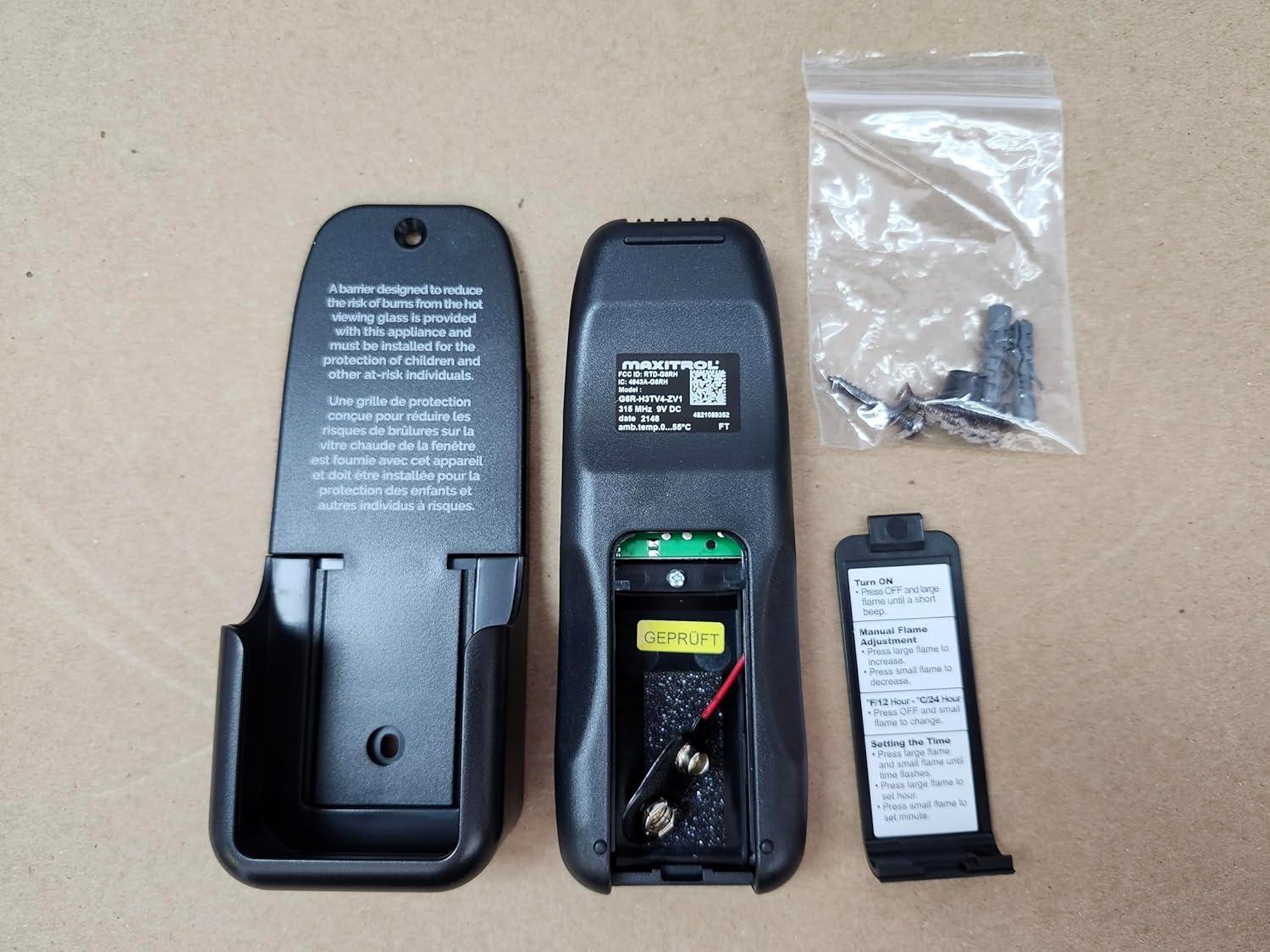
Image: Remote Control Back with Battery Compartment. This image shows the rear view of the Maxitrol G6R-H3TV4-ZV1 remote control. The battery compartment is open, revealing the battery terminals and space for two AAA batteries. The remote's model number and other regulatory information are visible on a sticker. Mounting hardware is also shown next to the remote.
2. Remote Holder Installation
- Choose a suitable location for the remote holder, away from direct heat and moisture.
- Use the provided mounting hardware (screws and anchors) to secure the holder to the wall.
- Ensure the holder is firmly attached before placing the remote control inside.

Image: Remote Control and Holder. This image displays the front of the Maxitrol G6R-H3TV4-ZV1 remote control alongside its wall-mounted holder. The remote features a digital display and buttons for 'SET', 'OFF', and flame/fan/light control. The holder is designed to securely store the remote when not in use. Safety warnings regarding hot fireplace surfaces are visible on the remote.
3. Pairing with G6R-R3AU Module
This remote control requires pairing with a G6R-R3AU module (not included) for proper operation. Refer to the G6R-R3AU module's instruction manual for detailed pairing procedures. The remote will not function with other Maxitrol control modules.
Operating Instructions
Remote Control Buttons
- SET Button: Used to confirm selections or enter programming modes.
- OFF Button: Turns the fireplace off.
- Up/Down Arrows: Adjust flame height, fan speed, or light intensity, and navigate menu options.
- Flame Icon Button: Activates or adjusts the flame.
- Fan Icon Button: Activates or adjusts the fan (if applicable).
- Light Icon Button: Activates or adjusts the light (if applicable).
Manual Flame Adjustment
To manually adjust the flame:
- Press the flame icon button.
- Use the Up arrow to increase flame size.
- Use the Down arrow to decrease flame size.
Setting the Time
To set the time (e.g., for timer functions):
- Press and hold the SET button until the time display flashes.
- Use the Up/Down arrows to adjust the hour. Press SET to confirm.
- Use the Up/Down arrows to adjust the minute. Press SET to confirm.
- The time is now set.
Note: Specific timer functions like "T12 Hour" or "T24 Hour" may be available depending on the paired module. Refer to the G6R-R3AU module manual for details.
Maintenance
Battery Replacement
When the remote control display becomes dim or unresponsive, replace the batteries. Follow the battery installation steps outlined in the Setup section. Always use new batteries of the specified type (e.g., AAA) and dispose of old batteries responsibly.
Cleaning
Wipe the remote control and holder with a soft, dry cloth. Do not use abrasive cleaners or immerse the remote in water.
Troubleshooting
| Problem | Possible Cause | Solution |
|---|---|---|
| Remote not responding. | Dead or low batteries. | Replace batteries. |
| Remote not controlling fireplace. | Not paired with G6R-R3AU module, or module issue. | Ensure remote is correctly paired with the G6R-R3AU module. Verify the module is functioning correctly. This remote is only compatible with the G6R-R3AU module. |
| Intermittent operation. | Weak signal, interference, or low batteries. | Replace batteries. Ensure no obstructions between remote and module. Reduce potential sources of interference. |
Specifications
- Model Number: G6R-H3TV4-ZV1
- Manufacturer: Maxitrol
- Brand: All Pro Fireplace
- Product Dimensions: 4.25 x 3.5 x 1.25 inches
- Item Weight: 4.8 ounces
- Color: Black
- Special Feature: Fireplace Control
- Max Number of Supported Devices: 1
- Compatible Devices: Fireplace (specifically with G6R-R3AU module)
Warranty Information
Specific warranty details for this product are not provided in this manual. Please refer to the original product packaging or contact the manufacturer, Maxitrol, or the retailer, All Pro Fireplace, for comprehensive warranty information.
Support
For technical assistance or further inquiries, please contact the manufacturer, Maxitrol, or your product retailer, All Pro Fireplace. Ensure you have your model number (G6R-H3TV4-ZV1) available when seeking support.