
AGFRC SA19 Winch
AGFRC 19KG Low-Profile Waterproof RC-Winch-Servo User Manual
Model: SA19 Winch | Brand: AGFRC
1. Introduction
The AGFRC SA19 Winch & Servo is a high-performance, low-profile, and waterproof digital brushless servo designed for 1/10 and 1/12 scale RC vehicles. It features a robust full CNC metal gear construction, high-speed operation, and a powerful 19KG torque output. This smart servo is also programmable, allowing users to customize various parameters such as torque, speed, and angle for optimal performance in different applications. Its IP67 waterproof rating ensures reliable operation in challenging environments.

Figure 1: AGFRC SA19 Winch Servo with included winch drum and hook.
2. What's in the Box
- 1 x SA19 Winch Low Profile Smart RC Servo
- 1 x 25T Metal Servo Winch
- 1 x Accessory Kit (includes various plastic servo horns, rubber gaskets, metal gaskets, and mounting screws)

Figure 2: Package contents including the SA19 Winch Servo and accessory kit.
3. Specifications
| Feature | Detail |
|---|---|
| Product Dimensions | 40.8 x 20.2 x 26.5 mm (1.61 x 0.8 x 1.04 inches) |
| Item Weight | 51g (1.80 ounces) |
| Operating Voltage | 4.8V ~ 8.4V |
| Motor Type | Brushless |
| Gear Material | Steel |
| Case Material | Aluminum + Plastic |
| Dead Band | 2 uSec |
| Frequency | 1520us / 333Hz |
| Waterproof Level | IP67 |
| Bearing | Double Ball Bearings (2BB) |
| Wire | JR 180mm / 22AWG |
| Programmable | Yes (via AGF-SPV3 servo programmer, not included) |
| Operating Speed (60°) | 0.110sec @ 4.8V, 0.095sec @ 6.0V, 0.083sec @ 7.4V, 0.073sec @ 8.4V |
| Stall Torque | 13 kg-cm (180 oz-in) @ 4.8V, 16 kg-cm (222 oz-in) @ 6.0V, 18 kg-cm (250 oz-in) @ 7.4V, 19 kg-cm (264 oz-in) @ 8.4V |
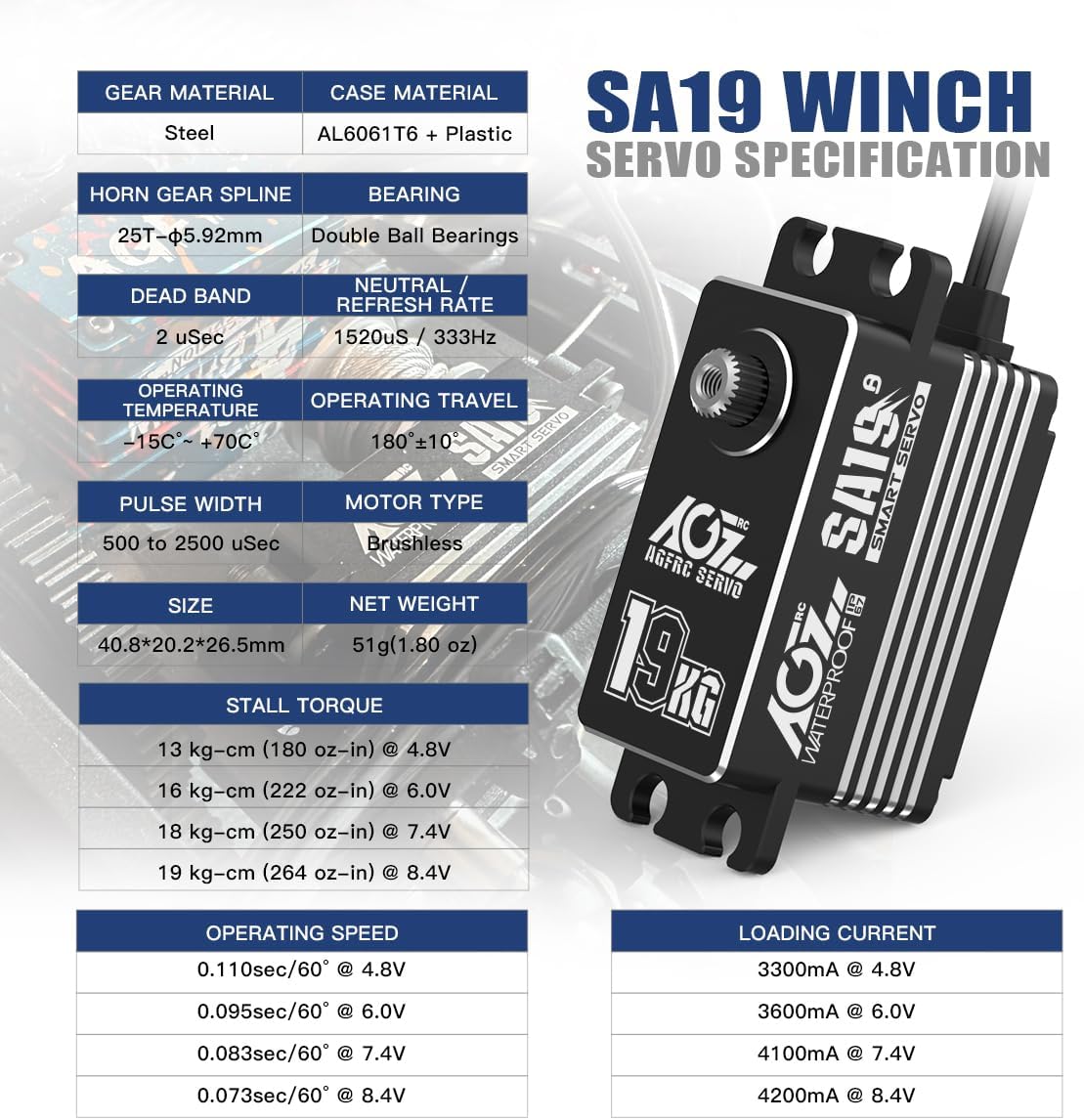
Figure 3: Detailed specifications of the SA19 Winch Servo.
4. Setup and Installation
4.1 Physical Installation
Mount the SA19 Winch Servo securely in your RC vehicle using the provided screws. Ensure that the servo is positioned to allow for full range of motion without obstruction. Attach the appropriate servo horn (25T) from the accessory kit to the servo output shaft. For winch applications, attach the metal winch drum and hook to the servo horn.
4.2 Electrical Connection
Connect the servo's JR wire to the appropriate channel on your RC receiver. Ensure correct polarity (signal, positive, negative). The SA19 Winch Servo supports a wide voltage range from 4.8V to 8.4V. Verify that your power source (e.g., ESC's BEC or external BEC) provides stable voltage within this range to prevent performance issues or damage.
4.3 Programming (Optional)
The SA19 Winch Servo is programmable using the AGF-SPV3 servo programmer (sold separately). This allows for fine-tuning of parameters suchs as:
- Torque and Speed
- Operating Angle and Inversion
- Neutral Position
- Overload Protection
- Soft Start
To program the servo:
- Connect the SA19 Winch Servo to the AGF-SPV3 servo programmer.
- Connect the AGF-SPV3 programmer to a Windows computer via USB.
- Download and install the programming software from the official AGFRC website.
- Follow the on-screen instructions in the software to adjust and save your desired parameters to the servo.
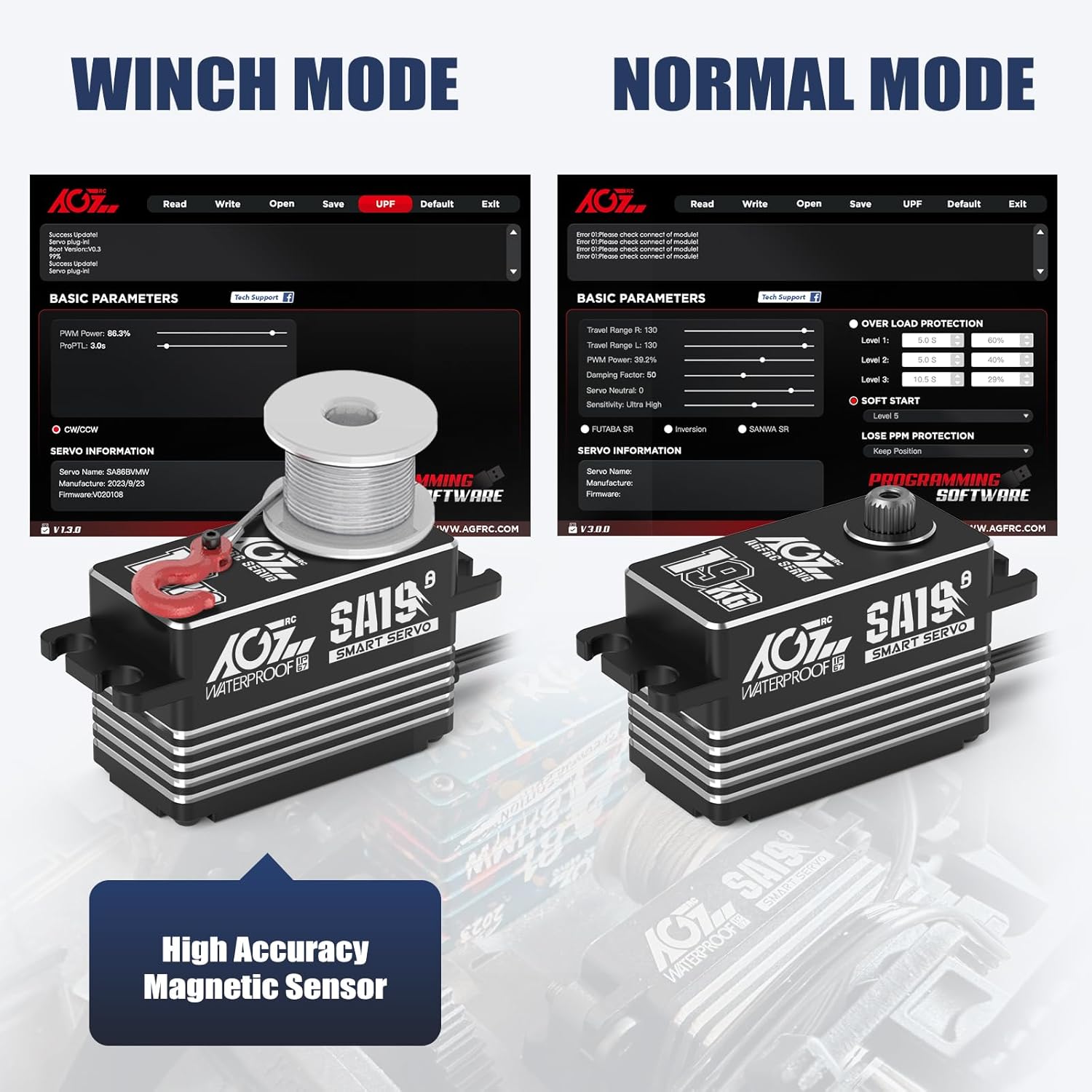
Figure 4: Programming the SA19 Winch Servo via USB programmer.
5. Operating Instructions
5.1 General Operation
Once installed and connected, the SA19 Winch Servo operates like a standard RC servo, responding to commands from your transmitter via the receiver. Ensure your transmitter is properly bound to your receiver and calibrated for the servo channel.
5.2 Winch Mode vs. Normal Mode
The SA19 servo supports both winch mode and normal servo mode. The specific mode and its parameters can be configured using the programming software. In winch mode, the servo is optimized for continuous rotation and precise control of a winch line, while in normal mode, it functions as a standard steering or throttle servo with a defined travel range.

Figure 5: Winch Mode and Normal Mode programming interfaces.
5.3 Applications
This servo is ideal for a variety of RC applications, including:
- 1/10 and 1/12 scale On-Road RC Cars
- RC Drifting Cars
- Racing Cars and Touring Cars
- RC Trucks
- Small Planes and Helicopters
- Other RC models requiring a low-profile, high-performance servo.
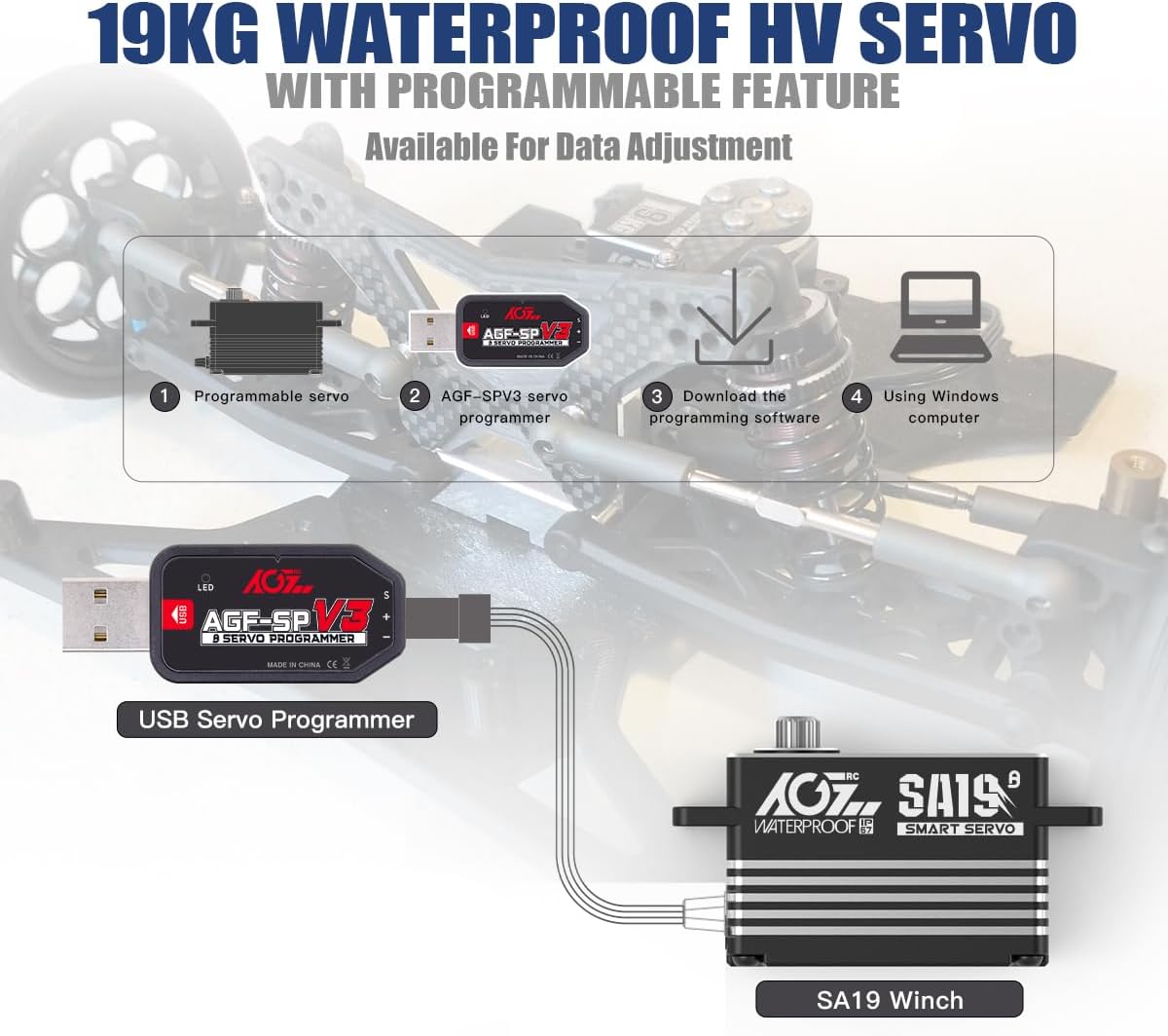
Figure 6: Diverse applications for the SA19 Winch Servo.
6. Maintenance
To ensure the longevity and optimal performance of your AGFRC SA19 Winch Servo, follow these maintenance guidelines:
- Cleaning: Regularly clean the exterior of the servo to remove dirt, dust, and debris. Use a soft, dry cloth. For stubborn dirt, a slightly damp cloth can be used, but ensure no moisture enters the servo case, despite its waterproof rating.
- Waterproof Care: While the servo is IP67 waterproof, it is recommended to dry it thoroughly after exposure to water or humid conditions. Avoid prolonged submersion beyond the specified depth and duration (up to 1 meter for 30 minutes).
- Gear Inspection: Periodically inspect the servo gears for any signs of wear, damage, or foreign objects. Although made of steel, excessive force or impacts can cause damage.
- Connections: Ensure all electrical connections (servo wire to receiver/BEC) are secure and free from corrosion. Loose connections can lead to intermittent operation or power issues.
- Storage: Store the servo in a clean, dry environment away from extreme temperatures and direct sunlight.
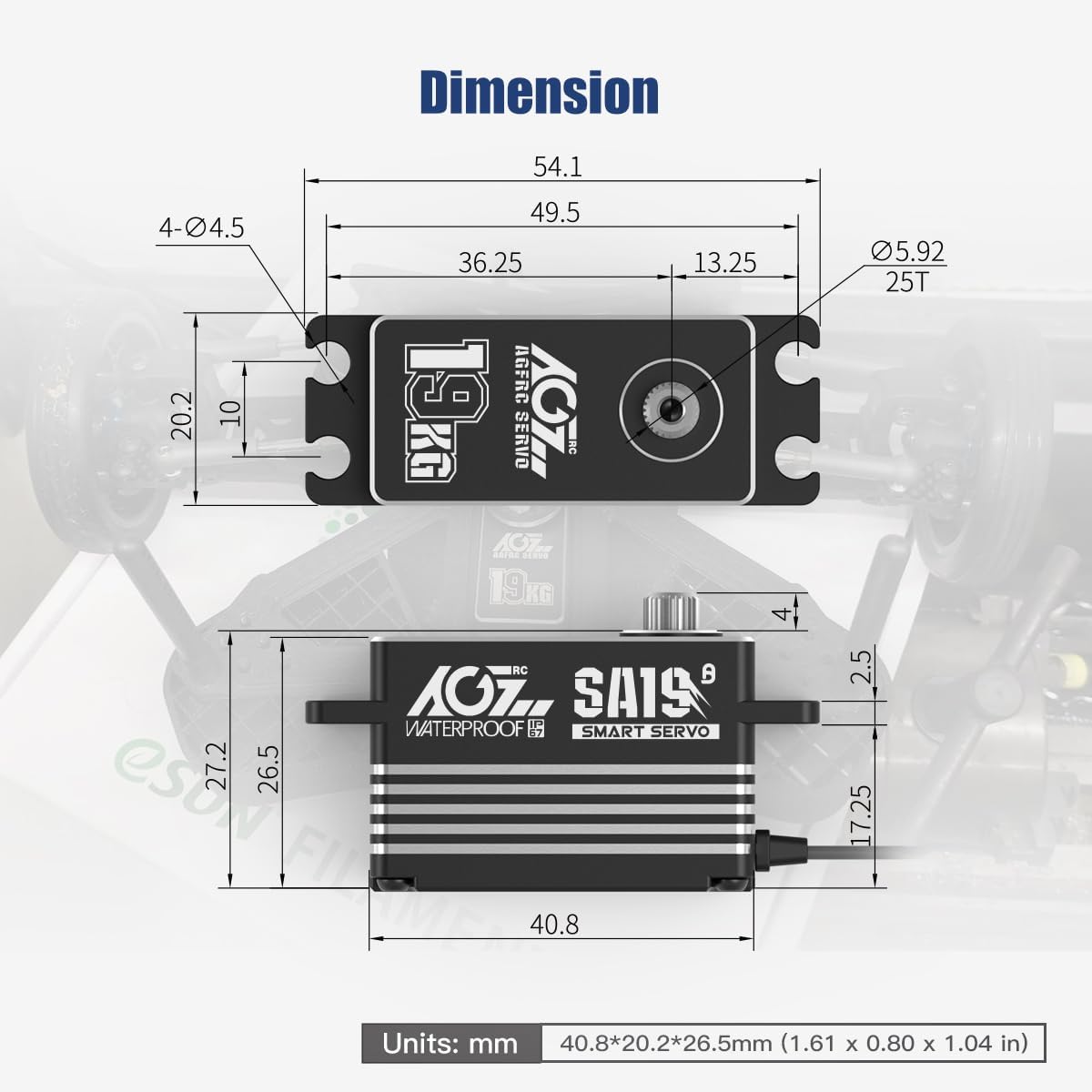
Figure 7: The SA19 Winch Servo's IP67 waterproof design.
7. Troubleshooting
| Problem | Possible Cause | Solution |
|---|---|---|
| Servo not responding or erratic movement |
|
|
| Servo "wobbles" or has excessive play |
|
|
| Servo gets hot during operation |
|
|
8. Warranty and Support
AGFRC products are manufactured to high-quality standards. For warranty information, technical support, or service inquiries, please visit the official AGFRC website or contact their customer service directly. Please have your product model (SA19 Winch) and purchase details ready when contacting support.
Official AGFRC Store: Visit the AGFRC Store on Amazon
Ask a question about this manual
Ask about setup, troubleshooting, compatibility, parts, safety, or missing instructions. Manuals+ will review the question and use this page’s manual context to help answer it.