
1. Product Overview
The Generic A-1 Desktop Sand Blasting Cabinet is designed for efficient surface restoration, including the removal of rust, paint, and oxidation. This versatile unit supports both wet and dry sandblasting operations, making it suitable for a variety of materials and applications. It features a durable metal construction and an integrated lighting system for improved visibility.
Key Components:
- Sandblasting Cabinet: The main enclosure for containing abrasive media and workpieces.
- Glove Holes: Integrated openings with gloves for safe handling of items inside the cabinet.
- Viewing Window: A clear protective cover for observing the sandblasting process.
- Air Pressure Valves: Two gauges for regulating jet air pressure and sandblasting bubble adjustment.
- Lighting Lamp: An 8W fluorescent lamp to illuminate the interior workspace.
- Power Switch: Controls the electrical power to the unit.
- Foot Switch: Provides hands-free control over the sandblasting operation.
- Integrated Exhaust System: Ensures safe and clean abrasive operations, includes a replaceable air filter.
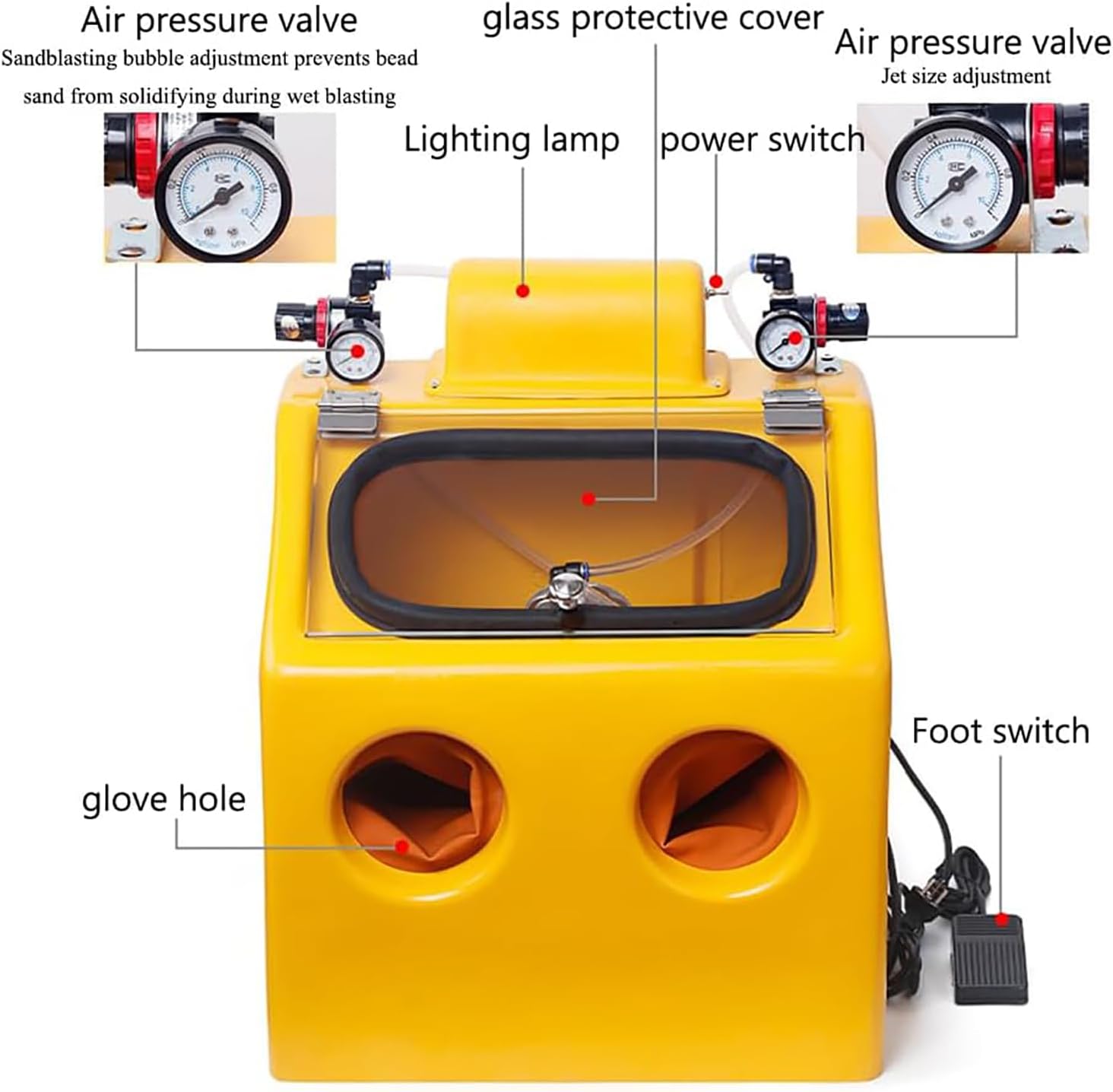
Figure 1: Overview of the Sand Blasting Cabinet components, including air pressure valves, lighting lamp, power switch, foot switch, glove holes, and glass protective cover.
2. Safety Instructions
Read all safety warnings and instructions before operating this sandblasting cabinet. Failure to follow these instructions may result in serious injury or property damage. Keep this manual for future reference.
- Always wear appropriate personal protective equipment (PPE), including eye protection, respiratory protection (dust mask), and hearing protection.
- Ensure the work area is well-ventilated to prevent the accumulation of dust and abrasive particles.
- Connect the unit to a grounded power outlet. Do not modify the plug.
- Do not operate the sandblaster in damp or wet conditions unless specifically designed for wet blasting and all electrical connections are properly sealed.
- Keep children and unauthorized persons away from the operating area.
- Before performing any maintenance or cleaning, disconnect the unit from the power supply and air compressor.
- Use only recommended abrasive media. Incorrect media can damage the equipment or workpiece.
- Regularly inspect the gloves, viewing window, and hoses for wear or damage. Replace worn parts immediately.
- The integrated exhaust system and replaceable air filter are crucial for safe operation. Ensure they are functioning correctly and replace the filter as needed.
3. Setup
Follow these steps to set up your sandblasting cabinet before initial use:
- Unpacking: Carefully remove all components from the packaging. Inspect for any shipping damage.
- Placement: Place the sandblasting cabinet on a stable, level workbench or surface capable of supporting its weight and the weight of the workpiece.
- Air Compressor Connection: Connect your air compressor to the cabinet's air inlet. Ensure all connections are secure and leak-free. The cabinet requires a stable air pressure supply for optimal performance.
- Abrasive Media Loading: Open the cabinet and carefully pour the chosen abrasive media into the designated hopper or collection area at the bottom of the cabinet. Refer to the media manufacturer's instructions for proper loading.
- Electrical Connection: Plug the power cord into a grounded electrical outlet.
- Foot Switch Connection: Connect the foot switch to its designated port on the cabinet.
4. Operating Instructions
The sandblasting cabinet is designed for user-friendly operation with a two-hand system and foot pedal control.

Figure 2: Two-hand operation inside the cabinet, allowing for precise control of the workpiece and nozzle.
- Prepare Workpiece: Place the item to be sandblasted inside the cabinet. Ensure it is positioned securely.
- Power On: Turn on the main power switch. The internal lighting lamp should illuminate, improving visibility.
- Adjust Air Pressure: Use the two air pressure regulating valves located on top of the cabinet to set the desired jet air pressure and sandblasting bubble adjustment.
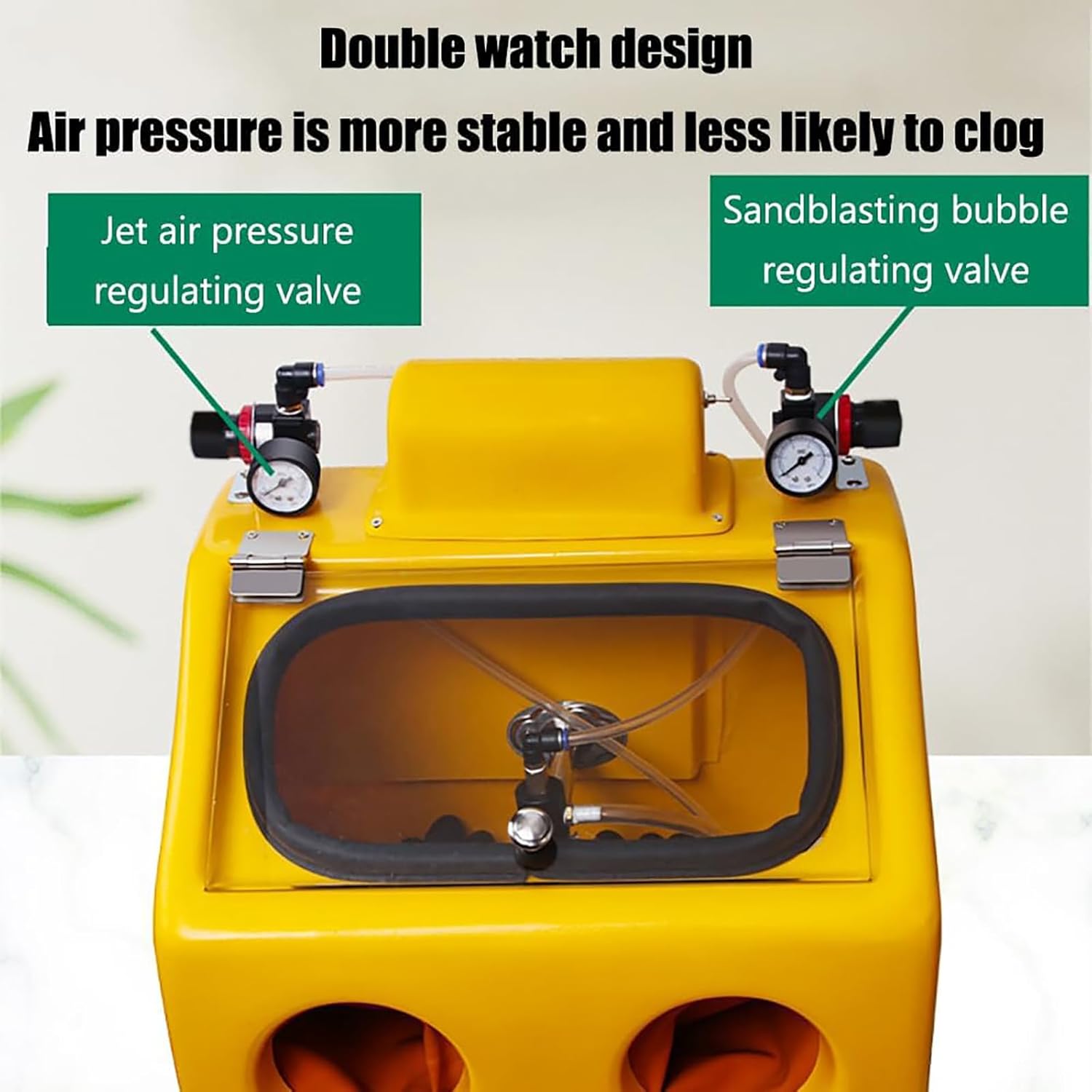
Figure 3: Double gauge design for stable air pressure and reduced clogging.

Figure 4: Detailed view of the two adjustment valves: one for sandblasting bubble adjustment (wet spraying) and one for jet air pressure adjustment.
- Insert Hands: Place your hands into the glove holes.
- Begin Blasting: Press the foot switch to activate the sandblasting nozzle. The foot-controlled operation allows you to manipulate the workpiece with both hands freely.

Figure 5: The foot switch enables hands-free operation, allowing better control of the workpiece.
- Control Nozzle: Direct the nozzle towards the workpiece, moving it steadily to achieve an even finish. The nozzle can be fixed or detached depending on the task.
- Monitor Progress: Observe the blasting process through the viewing window.
- Finish Blasting: Release the foot switch to stop the abrasive flow.
- Power Off: Turn off the main power switch and disconnect the air supply after use.
4.1. Suitable Applications
This sandblasting cabinet is suitable for cleaning, deburring, and surface preparation of various small to medium-sized items, including:
- Jewelry (gold, silver, copper, alloy)
- Small metal parts
- Automotive components
- Restoration projects

Figure 6: Examples of items suitable for sandblasting, such as various types of jewelry.
5. Maintenance
Regular maintenance ensures the longevity and safe operation of your sandblasting cabinet.
- Clean Cabinet: After each use, remove any remaining abrasive media and clean the interior of the cabinet. The dust-proof operating box and dust collector help manage debris.
- Check Air Filter: Regularly inspect the replaceable air filter in the integrated exhaust system. Replace it when it becomes clogged to maintain efficient dust collection and safe operation.
- Inspect Gloves: Check the integrity of the gloves. Replace them if they show signs of wear, tears, or punctures to maintain a sealed environment.
- Clean Viewing Window: Keep the glass protective cover clean for optimal visibility. Use a non-abrasive cleaner to avoid scratching.
- Check Hoses and Connections: Periodically inspect all air hoses and connections for leaks or damage. Tighten or replace as necessary.
- Lubrication: Refer to the manufacturer's recommendations for any lubrication requirements for moving parts, though typically minimal for this type of equipment.
6. Troubleshooting
This section addresses common issues you might encounter with your sandblasting cabinet.
| Problem | Possible Cause | Solution |
|---|---|---|
| No abrasive flow. |
|
|
| Poor visibility inside cabinet. |
|
|
| Air leaks from cabinet. |
|
|
If you encounter problems not listed here or if the suggested solutions do not resolve the issue, contact customer support.
7. Specifications
| Feature | Detail |
|---|---|
| Product Name | Desktop Sandblasting Cabinet |
| Brand | Generic |
| Model | A-1 |
| Material | High-quality steel with powder coating |
| Light Source Equipment | 8W Fluorescent Lamp |
| Sandblasting Type | Manual, Wet and Dry compatible |
| Dimensions (L x W x H) | 42 cm x 38 cm x 53 cm (16.5 x 15 x 20.9 inches) |
| ASIN | B0DB122Z7N |

Figure 7: Dimensional drawing of the sandblasting cabinet.
8. Warranty and Support
For warranty information or technical support, please refer to the documentation provided at the time of purchase or contact your retailer. Keep your purchase receipt as proof of purchase.