
Motorola XT2441-1
Motorola Moto Buds+ User Manual
Model: XT2441-1
Introduction
Thank you for choosing the Motorola Moto Buds+. These earbuds are designed to deliver a premium audio experience with Hi-Res Audio, Dynamic Active Noise Cancellation (ANC), and dual drivers. Featuring Sound by Bose, they offer immersive sound and up to 38 hours of playtime with the charging case. The water-repellent design ensures durability for everyday use. This manual provides essential information for setting up, operating, and maintaining your Moto Buds+.

Image: Motorola Moto Buds+ earbuds in their open charging case, ready for use.
What's in the Box
Your Motorola Moto Buds+ package includes the following items:
- Motorola Moto Buds+ Earbuds
- Wireless Charging Case
- USB Charging Cable
- Multiple Sizes of Ear Cushions (Ear Tips)
- User Manual (this document)
Setup
1. Initial Charging
Before first use, fully charge your Moto Buds+ and their charging case.
- Place both earbuds into the charging case.
- Connect the USB charging cable to the charging port on the case and to a power source (e.g., USB wall adapter, computer USB port).
- The LED indicator on the case will show charging status. A full charge typically takes approximately 2 hours.
- The case also supports wireless charging. Place the case on a compatible wireless charging pad.

Image: The closed charging case of the Moto Buds+, featuring the Motorola and Sound by Bose branding.
2. Bluetooth Pairing
Pair your Moto Buds+ with your smartphone or other Bluetooth-enabled device.
- Ensure the earbuds are in the charging case and the lid is open.
- On your device, go to Bluetooth settings and ensure Bluetooth is enabled.
- The Moto Buds+ should appear in the list of available devices (e.g., "Moto Buds+"). Select it to pair.
- Once paired, the earbuds will automatically connect to your device when taken out of the case and within range.
3. Fitting the Earbuds
For optimal sound quality and comfort, choose the correct size ear cushions.
- Experiment with the different sizes of ear cushions provided to find the best fit for your ears.
- Gently insert each earbud into your ear canal and twist slightly to secure a snug fit.
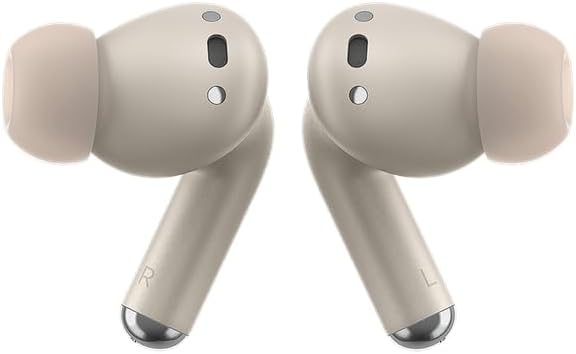
Image: A detailed view of the Moto Buds+ earbuds, highlighting their shape and ear tips for proper fit.
Operating Your Moto Buds+
The Moto Buds+ feature intuitive touch controls for managing audio playback, calls, and noise cancellation modes.
Touch Controls
| Action | Control |
|---|---|
| Play/Pause Audio | Single tap on either earbud |
| Next Track | Double tap on right earbud |
| Previous Track | Double tap on left earbud |
| Answer/End Call | Single tap on either earbud |
| Reject Call | Tap and hold on either earbud |
| Toggle ANC/Transparency Mode | Tap and hold on either earbud (during music playback) |
| Activate Voice Assistant | Triple tap on either earbud |
Moto Buds App Integration
For an enhanced experience, download the official Moto Buds app from your device's app store. The app allows you to:
- Customize touch controls.
- Personalize noise cancellation settings (ANC levels, Transparency mode).
- Check battery status of each earbud and the charging case.
- Update earbud firmware.
- Connect to two different devices simultaneously.
Maintenance
Cleaning Your Earbuds and Case
Regular cleaning helps maintain sound quality and hygiene.
- Use a soft, dry, lint-free cloth to wipe the earbuds and charging case.
- For earwax buildup on the ear tips or speaker mesh, gently use a small, soft brush or cotton swab. Do not use sharp objects.
- Avoid using abrasive materials, alcohol, or chemical cleaners.
Water Resistance
The Moto Buds+ feature a water-repellent design. This means they are protected against splashes and light rain.
- Do not submerge the earbuds or charging case in water.
- Do not expose them to pressurized water or high-velocity water, such as showering or swimming.
- If the earbuds get wet, dry them thoroughly before placing them back in the charging case to prevent damage.
Battery Care
To prolong battery life:
- Avoid exposing the device to extreme temperatures (hot or cold).
- Store the earbuds and case in a cool, dry place when not in use.
- Charge the device regularly, even if not used for extended periods, to prevent deep discharge.
Troubleshooting
If you encounter issues with your Moto Buds+, try the following solutions:
No Sound or Intermittent Connection
- Ensure both earbuds are charged.
- Check that Bluetooth is enabled on your device and the earbuds are paired and connected.
- Move closer to your device to ensure you are within Bluetooth range (typically 10 meters/33 feet).
- Try unpairing and re-pairing the earbuds with your device.
- Restart your audio source device (smartphone, tablet).
Earbuds Not Charging
- Ensure the charging cable is securely connected to both the case and the power source.
- Check the charging port for any debris or obstruction.
- Try a different USB cable or power adapter.
- If using wireless charging, ensure the case is correctly positioned on the charging pad.
Poor Sound Quality
- Ensure the ear tips are clean and free of debris.
- Try different sizes of ear tips to ensure a proper seal in your ear canal.
- Check the audio source for quality issues.
Factory Reset
If issues persist, a factory reset may resolve them. Refer to the Moto Buds app or Motorola support website for specific instructions on performing a factory reset for your model.
Specifications
| Feature | Detail |
|---|---|
| Model Name | Moto Buds+ |
| Model Number | XT2441-1 |
| Noise Control | Active Noise Cancellation |
| Connectivity Technology | Wireless (Bluetooth 5.3) |
| Audio Driver Type | Dynamic Driver |
| Audio Driver Size | 12.4 Millimeters |
| Battery Life (Earbuds) | Up to 8 Hours |
| Total Playtime (with Case) | Up to 38 Hours |
| Water Resistance Level | Water Repellent |
| Control Method | Touch |
| Frequency Range | 20 Hz to 20,000 Hz |
| Impedance | 80 Ohm |
| Color | Gray |
| Item Weight | 8.1 ounces |
Warranty and Support
Motorola products come with a limited warranty. Please refer to the warranty card included in your product packaging or visit the official Motorola support website for detailed warranty terms and conditions specific to your region.
For further assistance, technical support, or to find answers to frequently asked questions, please visit the official Motorola support page or the Motorola Store on Amazon:Motorola Store on Amazon