1. Introduction
Thank you for choosing the Hikity Android 13 Car Stereo. This manual provides detailed instructions for the installation, operation, and maintenance of your new car stereo system, specifically designed for Peugeot 406 models manufactured between 1999 and 2004. Please read this manual thoroughly before use to ensure proper functionality and to maximize your user experience.
2. Safety Information
- Always operate the device responsibly and in accordance with local traffic laws. Distracted driving can lead to accidents.
- Do not attempt to disassemble or modify the unit. This may cause damage, electric shock, or fire, and will void the warranty.
- Ensure all wiring connections are secure and properly insulated to prevent short circuits.
- Consult a professional for installation if you are unsure about any steps.
- Keep the volume at a safe level to remain aware of your surroundings while driving.
3. Package Contents
Please check that all items are present in the package:
- Hikity Android 13 Car Stereo Unit
- Power Harness and Cables
- GPS Antenna
- USB Cables (2)
- External Microphone
- Rear View Camera
- User Manual (this document)
- Mounting Brackets and Screws
- Type-C Cable
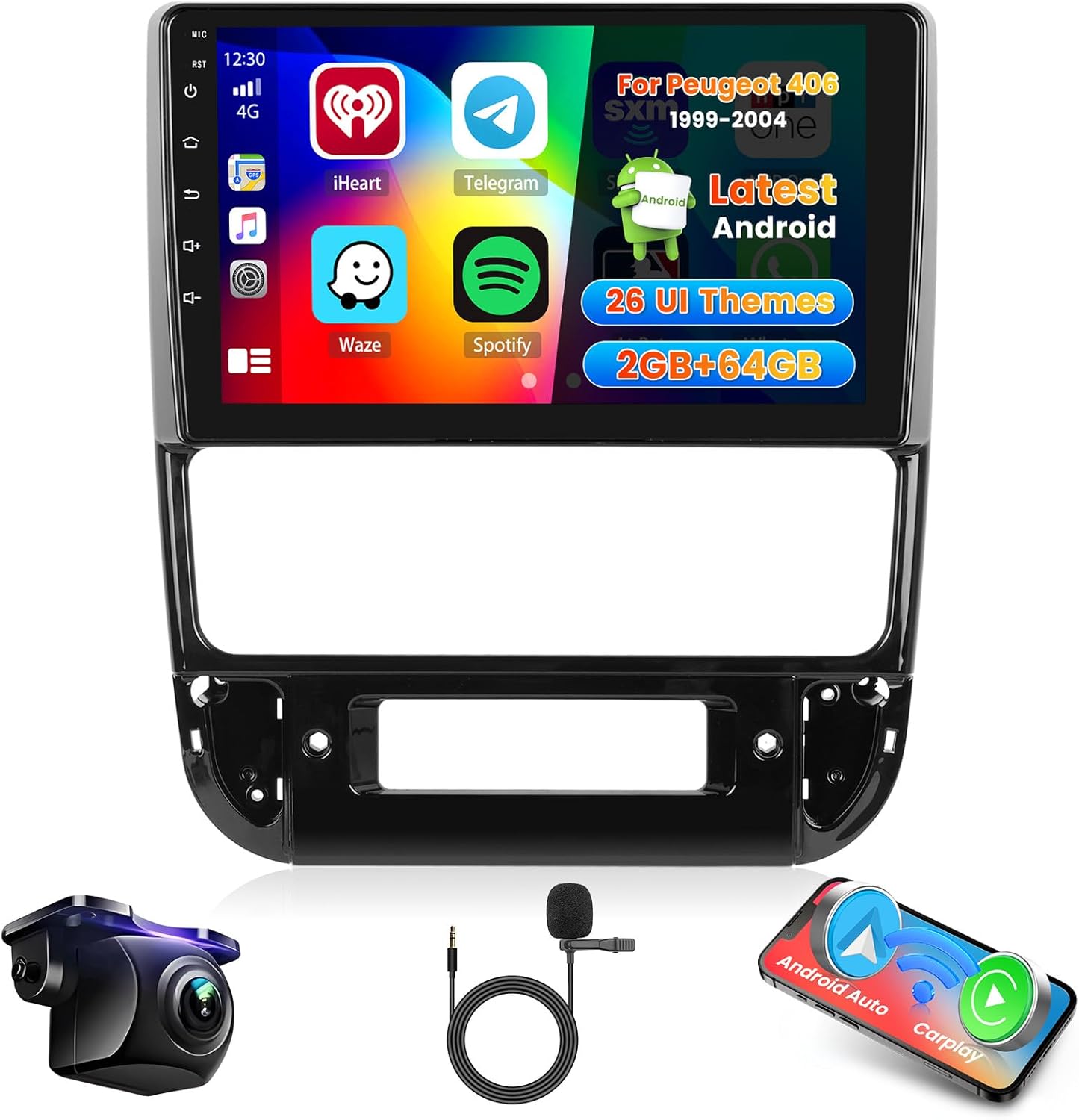
Figure 3.1: Main unit and accessories included in the package.
4. Product Overview
The Hikity Android 13 Car Stereo features a 9-inch capacitive touchscreen display, offering a responsive and intuitive user interface. It runs on Android 13, providing access to a wide range of applications. Key features include wireless Carplay and Android Auto, GPS navigation, Bluetooth connectivity, FM/RDS radio, and support for a rear view camera.
The unit is designed to integrate seamlessly into the dashboard of Peugeot 406 models from 1999 to 2004, replacing the factory radio.
5. Setup and Installation
5.1 Vehicle Compatibility
This car stereo is specifically designed for Peugeot 406 vehicles manufactured between 1999 and 2004. Ensure your vehicle's dashboard matches the compatible configuration shown below.

Figure 5.1: Dashboard compatibility for Peugeot 406 (1999-2004).
5.2 General Installation Steps
- Disconnect Battery: Before starting, disconnect the negative terminal of your vehicle's battery to prevent electrical shorts.
- Remove Old Unit: Carefully remove the existing car stereo and any trim panels as required by your vehicle model.
- Connect Wiring Harness: Connect the provided wiring harness to the car stereo and then to your vehicle's factory wiring. Ensure all connections are secure.
- Connect Peripherals: Connect the GPS antenna, USB cables, external microphone, and rear view camera (if applicable) to the corresponding ports on the car stereo.
- Test Unit: Before fully reassembling the dashboard, reconnect the battery and briefly test the car stereo's basic functions (power on, radio, sound).
- Secure Unit: Mount the car stereo into the dashboard using the provided brackets and screws.
- Reassemble: Reinstall any removed trim panels.
5.3 Steering Wheel Control Connection
The unit supports steering wheel controls for convenience. The connection method depends on whether your vehicle has a CANBUS decoder.

Figure 5.2: Steering Wheel Control wiring and setup.
- Without CANBUS Decoder: Connect the steering wheel control wires (Key1/Key2) in the power cable to the corresponding port or wire of your original car. Then, navigate to "SteeringWheelKey" in the unit's settings for manual matching to activate the button functions.
- With CANBUS Decoder: Connect the CANBUS before powering on the machine. Then, follow this path: Settings -> Factory setup (Password 000000) -> Can Settings to make SWC work properly. First, select the brand of the CANBUS decoder, then the matching model and year according to the actual situation.
6. Operating Instructions
6.1 Wireless Carplay and Android Auto
The car stereo supports both wireless and wired Apple Carplay (for iOS phones) and Android Auto (for Android phones) via USB or WiFi connection. Once connected, you can access navigation, music, calls, and messages directly from the car stereo's interface.

Figure 6.1: Carplay, Android Auto, and Mirror Link functionality.

Figure 6.2: Apple CarPlay and Android Auto interfaces.
6.2 GPS Navigation and WiFi Connection
The unit features built-in GPS/QZSS/SBAS support. It comes with a pre-installed offline navigation program. To use it, connect to WiFi and download the necessary map data from the App Store. With WiFi connected, you can also use online navigation apps like Google Maps and access other online services.

Figure 6.3: GPS Navigation and WiFi features.
6.3 Hands-free Bluetooth and FM/RDS Radio
Connect your smartphone via Bluetooth for hands-free calling and wireless music streaming. The unit also includes an FM/RDS radio tuner, allowing you to listen to your favorite stations and receive real-time traffic and broadcast information.

Figure 6.4: Bluetooth and FM/RDS Radio functions.
6.4 Mirror Link Function
The Mirror Link feature allows you to display your smartphone's screen directly onto the car stereo. It supports one-way connection for both iOS and Android phones, enabling you to view phone content on the larger car stereo display.
6.5 EQ Settings and UI Themes
Customize your audio experience with the built-in equalizer (EQ) settings. You can adjust various sound parameters to match your preferences. The unit also offers 26 different user interface (UI) themes, allowing you to personalize the look of your car stereo's home screen.

Figure 6.5: Customizable UI themes and EQ settings.
6.6 AHD Rear View Camera
The included AHD rear view camera provides a clear display of the area behind your vehicle when reversing, enhancing safety. The car stereo automatically switches to the camera feed when the vehicle is put into reverse gear.

Figure 6.6: Rear view camera display with parking assistance.
7. Troubleshooting
| Problem | Possible Cause | Solution |
|---|---|---|
| Unit does not power on | Incorrect wiring; Blown fuse; Vehicle battery low | Check power connections; Replace fuse; Charge/check vehicle battery |
| No sound | Speaker wires disconnected; Volume too low; Mute function active | Check speaker connections; Increase volume; Deactivate mute |
| Bluetooth not connecting | Bluetooth not enabled on phone/unit; Device not in pairing mode | Ensure Bluetooth is on; Put device in pairing mode; Delete previous pairings and try again |
| GPS signal weak/lost | GPS antenna obstructed or improperly placed; Driving in an area with poor signal | Relocate GPS antenna to a clear view of the sky; Drive to an open area |
| Carplay/Android Auto not working | Incorrect USB cable; Phone not compatible; Software issue | Use original/certified USB cable; Check phone compatibility; Restart phone and unit |
8. Specifications
- Brand: Hikity
- Model Number: d808dbdc-9e35-436e-ad9e-94bacaef21f9
- Screen Size: 9 Inches
- Display Type: Capacitive Touchscreen
- Operating System: Android 13
- Memory Storage Capacity: 64 GB
- Connectivity Technology: Wi-Fi, Bluetooth, USB, FM RDS
- Special Features: Android Auto, Apple CarPlay, RDS, Touchscreen
- Total USB Ports: 2
- Compatible Devices: Smartphone
- Audio Output Mode: APE/FLAC/WAV/MP3/WMA
9. Warranty and Support
This Hikity car stereo comes with a manufacturer's warranty of 33 years. Please retain your proof of purchase for warranty claims. For technical support, troubleshooting assistance, or warranty inquiries, please contact Hikity customer service through the retailer where the product was purchased or visit the official Hikity website.
For further assistance, you may refer to the Hikity brand store: Hikity Store


