
1. Product Overview
The MAHANCRIS Queen Size Headboard and Nightstand set provides a functional and stylish addition to your bedroom. This set includes a headboard with integrated charging capabilities and storage, along with a matching nightstand that also features a charging station and ample storage space. Designed for convenience, the headboard offers an ergonomic backrest and hidden compartments, while the nightstand provides multi-tier shelving.

Image 1.1: Overview of the MAHANCRIS Queen Size Headboard and Nightstand set in a bedroom setting.
Headboard Features:
- Integrated Charging Station: Each side of the headboard is equipped with a power strip featuring 2 AC outlets and 2 USB ports for convenient device charging.
- Hidden Storage with Flip Door: A central cubby with a knob lock and flip-down door provides discreet storage for personal items and can temporarily hold drinks or snacks.
- Ergonomic Backrest: Designed with a 95-degree tilt angle to offer optimal support for the neck, back, lumbar, and hips, enhancing comfort while sitting in bed.
- Polished and Curved Edges: Ensures user safety by minimizing sharp corners.
Nightstand Features:
- Practical Charging Station: Includes 2 AC outlets, 1 USB port, and 1 Type-C port with a 4.9 ft power cord for versatile charging options.
- Ample Storage Space: Multi-tier shelves and a cabinet with a door provide organized storage for books, alarm clocks, and personal items.
- Sturdy Construction: Each shelf can hold up to 44 lbs.
2. Safety Information
Please read and understand all safety instructions before assembly and use. Failure to follow these instructions may result in injury or damage to the product.
- Electrical Safety: Ensure all power cords are properly connected to a grounded outlet. Do not overload the charging ports. Avoid exposing electrical components to water or excessive moisture.
- Assembly Safety: Assemble the product on a soft, clean surface to prevent scratches. Ensure all screws and fasteners are securely tightened before use. Do not overtighten screws.
- Weight Limits: Do not exceed the maximum weight capacity of 44 lbs (20 kg) for any shelf on both the headboard and nightstand. Distribute weight evenly.
- Stability: Do not stand or climb on the headboard or nightstand. Keep children and pets away from the product during assembly.
- Placement: Place the product on a level surface. Avoid placing hot items directly on surfaces without protection.
3. Package Contents
Before beginning assembly, verify that all components are present and undamaged. If any parts are missing or damaged, please contact customer support.
- Headboard Panels and Frame Components
- Nightstand Panels and Frame Components
- Hardware Pack (screws, dowels, cam locks, etc.)
- Headboard Power Cords (x2)
- Nightstand Power Cord (x1)
- Assembly Instructions Manual
4. Setup and Assembly
Assembly typically requires two adults. Tools such as a Phillips head screwdriver and a hammer (not included) may be necessary. Follow the detailed assembly diagrams provided in the separate instruction manual included in your package.
4.1 Headboard Assembly
- Unpack all headboard components and lay them out on a soft, clean surface.
- Attach the side frames to the main headboard panels using the provided hardware.
- Install the top shelf and the flip-door storage compartment according to the diagrams.
- Secure the power strips into their designated slots on each side of the headboard.
- Connect the headboard to your bed frame using appropriate mounting hardware (if applicable and not included with headboard).

Image 4.1: Headboard dimensions (59" W x 40.6" H x 11.8" D) and weight capacity (44 lbs).
4.2 Nightstand Assembly
- Unpack all nightstand components and lay them out.
- Assemble the main frame and shelves of the nightstand.
- Install the cabinet door and its hardware.
- Secure the charging station into its designated slot.
- Attach the legs to the bottom of the nightstand.
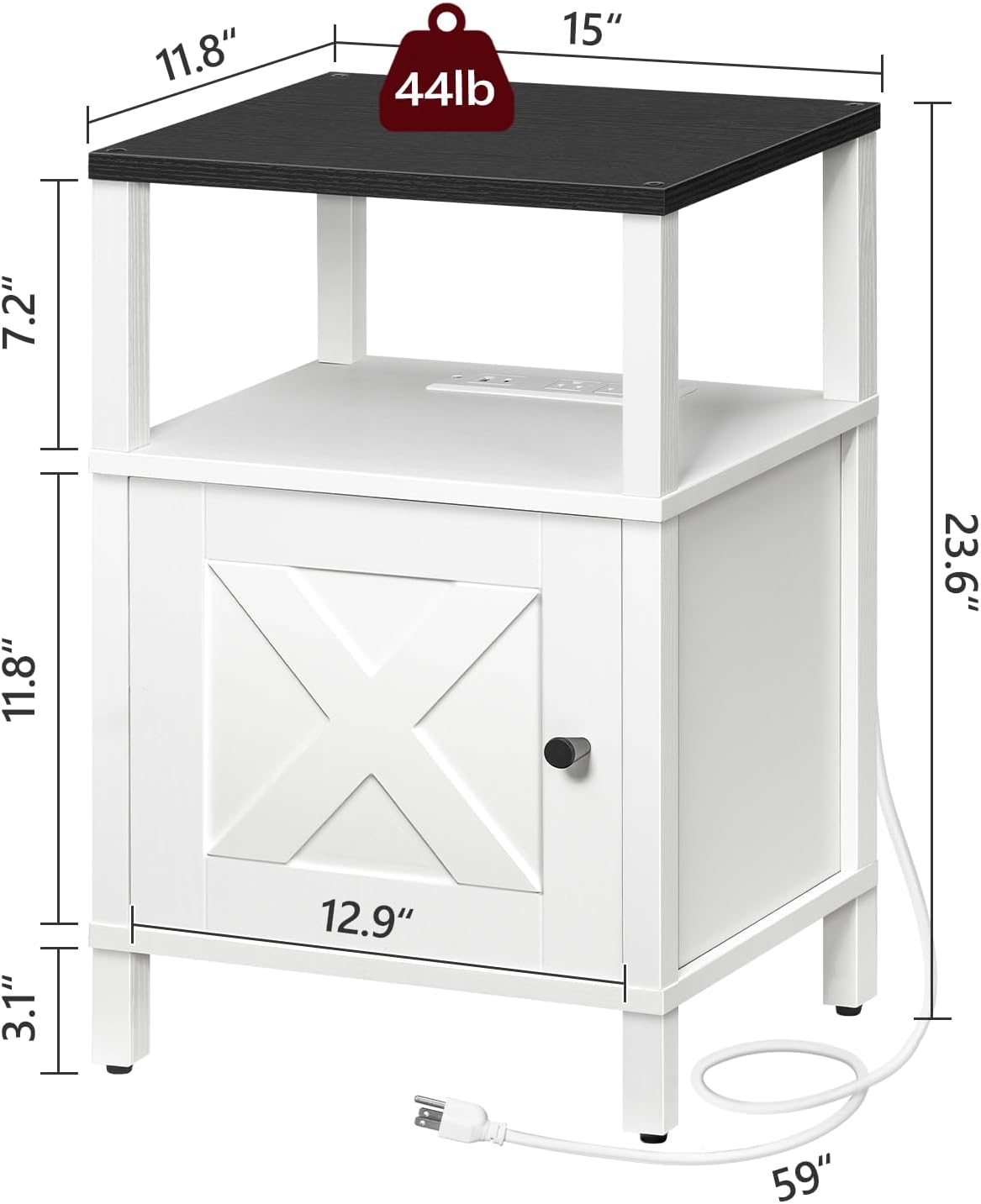
Image 4.2: Nightstand dimensions (15" L x 11.8" W x 23.6" H) and weight capacity (44 lbs).
4.3 Power Connection
- Once assembly is complete, plug the power cords from the headboard and nightstand into separate, easily accessible, grounded wall outlets.
- Ensure cords are not pinched or placed in high-traffic areas where they could be tripped over.
5. Operating Instructions
5.1 Using the Headboard Charging Station
Each side of the headboard features a power strip for convenient charging.
- AC Outlets: Plug in devices requiring standard AC power (e.g., desk lamps, laptops).
- USB Ports: Connect USB cables to charge smartphones, tablets, and other USB-powered devices.

Image 5.1: Detail of the headboard's two multi-port power strips, each with 2 AC outlets and 2 USB ports.
5.2 Using the Headboard Storage Compartment
The central storage compartment offers versatile use.
- Private Storage: Keep the flip door closed to store personal items discreetly.
- Temporary Surface: Open the flip door to create a temporary surface for holding drinks, snacks, or small items.

Image 5.2: The headboard's storage compartment with its flip door, shown both closed for private storage and open to hold items.
5.3 Using the Nightstand Charging Station
The nightstand's charging station provides multiple port types.
- AC Outlets: For standard electrical devices.
- USB Port: For charging USB-compatible devices.
- Type-C Port: For charging modern devices that use USB-C.

Image 5.3: A nightstand with a phone charging on its integrated charging station.
6. Maintenance
Regular maintenance helps prolong the life and appearance of your MAHANCRIS furniture.
- Cleaning: Wipe surfaces with a soft, damp cloth. Avoid harsh chemicals or abrasive cleaners, which can damage the finish.
- Dusting: Regularly dust all surfaces to prevent buildup.
- Hardware Check: Periodically check all screws and fasteners to ensure they remain tight. Retighten as necessary, but do not overtighten.
- Electrical Components: Ensure power cords are not frayed or damaged. If any electrical component appears faulty, discontinue use and contact customer support.
7. Troubleshooting
If you encounter issues with your MAHANCRIS Headboard and Nightstand, refer to the following common problems and solutions.
7.1 Charging Ports Not Working
- Check Power Connection: Ensure the power cord is securely plugged into both the furniture unit and a functional wall outlet.
- Test Outlet: Plug another device into the wall outlet to confirm the outlet is receiving power.
- Overload: Unplug some devices to ensure the charging station is not overloaded.
- Cable Check: Ensure your device's charging cable is not damaged and is properly connected.
7.2 Loose or Wobbly Parts
- Tighten Hardware: Carefully inspect all assembly points and tighten any loose screws or fasteners. Do not overtighten.
- Level Surface: Ensure the furniture is placed on a flat, level surface. Adjust if necessary.
7.3 Difficulty with Flip Door
- Obstruction: Check for any items obstructing the door's movement.
- Hinge Alignment: Ensure hinges are properly aligned and secured.
If problems persist, please contact MAHANCRIS customer support.
8. Specifications
| Brand | MAHANCRIS |
| Model Number | ETBW96E01-HBHB191E01 |
| Headboard Dimensions (L x W x H) | 59" x 11.8" x 40.6" (150 cm x 30 cm x 103 cm) |
| Nightstand Dimensions (L x W x H) | 15" x 11.8" x 23.6" (38 cm x 30 cm x 60 cm) |
| Headboard Charging Ports | 4 AC Outlets, 4 USB Ports (2 AC + 2 USB per side) |
| Nightstand Charging Ports | 2 AC Outlets, 1 USB Port, 1 Type-C Port |
| Power Cord Length | 4.9 ft (59 inches) |
| Weight Capacity (per shelf) | 44 lbs (20 kg) |
9. Warranty and Support
MAHANCRIS products are manufactured with quality and care. For warranty information or technical support, please refer to the warranty card included with your purchase or contact MAHANCRIS customer service directly.
Customer Support: Please visit the official MAHANCRIS website or refer to your purchase documentation for contact details.