
1. Introduction
This manual provides detailed instructions for the installation, operation, and maintenance of your Hikity Android 13 7-inch Carplay Radio. This unit is designed to enhance your driving experience with advanced features such as wireless Carplay, Android Auto, GPS navigation, and multimedia capabilities. Please read this manual thoroughly before use to ensure proper functionality and safety.

Image: Hikity Android Car Radio interface displaying navigation, Bluetooth, and music playback icons.
Key Features:
- Wireless Carplay & Android Auto: Seamless smartphone integration for navigation, music, and calls.
- GPS Navigation & WiFi Hotspot: Online and offline navigation support with internet access via Wi-Fi.
- Bluetooth Connectivity: Hands-free calling, music streaming, and contact synchronization.
- FM/RDS Radio: Access to favorite radio stations with automatic search and storage.
- Mirror Link: Display your smartphone screen directly on the car radio.
- Built-in DSP: Customizable audio effects for an enhanced listening experience.
- Steering Wheel Control (SWC): Compatible with original car steering wheel buttons via Canbus.
- Rear View Camera Support: Provides clear images for safer reversing.
2. Setup and Installation
2.1 Compatibility
This car radio is compatible with various VW, Seat, and Skoda models. Please verify your vehicle's dashboard console against the compatibility chart below before installation.

Image: Compatibility chart for VW, Seat, and Skoda models, illustrating suitable and unsuitable dashboard configurations.
2.2 Wiring Instructions
Correct wiring is crucial for proper operation and to prevent battery drain. The unit comes with a Canbus decoder/power cable (40-pin/36-pin).
- Small Plug Connection: If your car uses a small plug, connect 'A' and 'B' on the power cable. Ensure the Canbus is disconnected.
- Big Plug Connection: If your car uses a big plug, disconnect 'A' and 'B' on the power cable. Ensure the Canbus is connected.

Image: Detailed wiring diagram illustrating connections for small and large power plugs, including Canbus configuration.
2.3 Component Overview
Familiarize yourself with the main unit and included accessories for a smooth installation process.
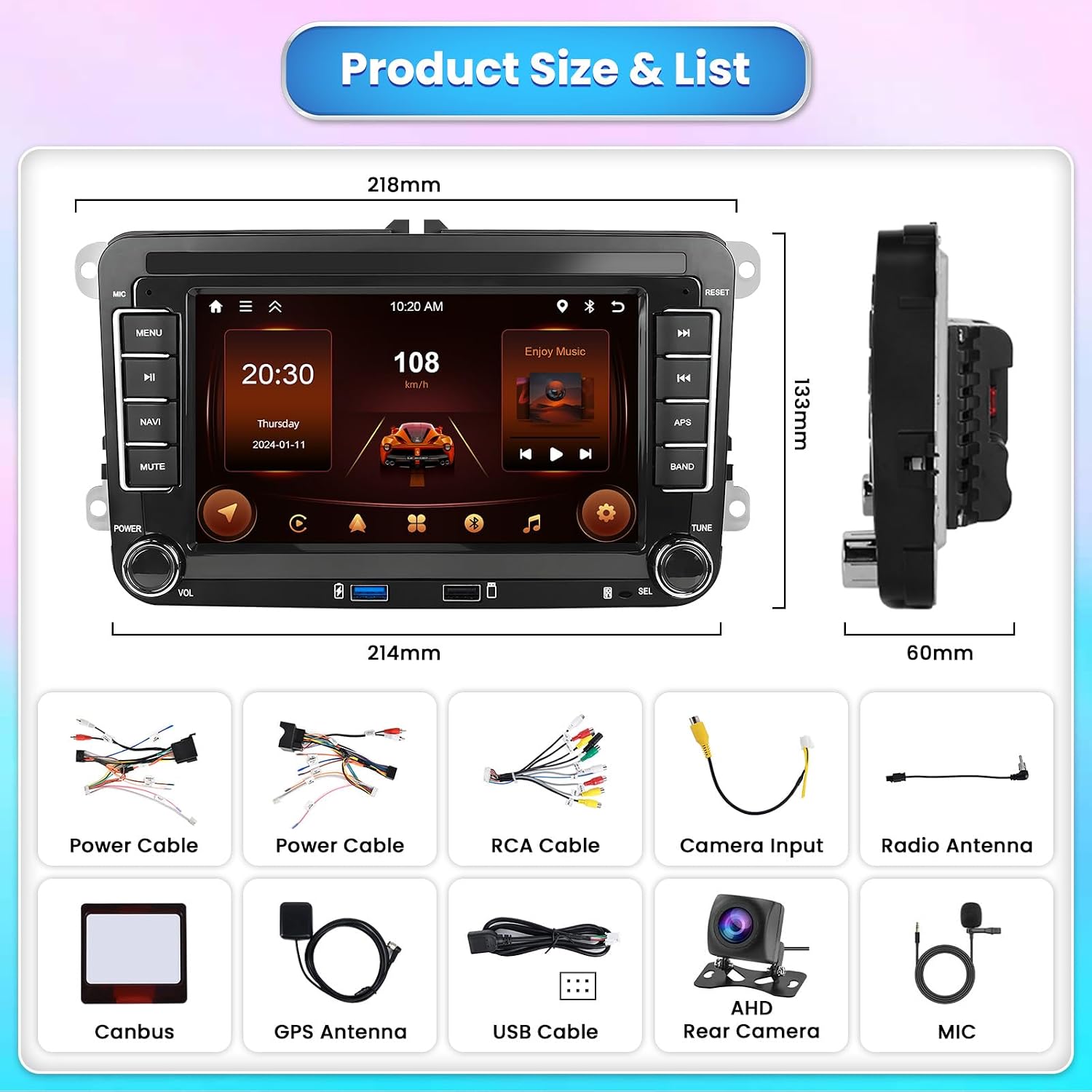
Image: Diagram showing the dimensions of the head unit and a list of included accessories such as power cables, RCA cable, camera input, radio antenna, Canbus, GPS antenna, USB cable, AHD rear camera, and microphone.
3. Operating Instructions
3.1 Wireless Carplay & Android Auto
Connect your smartphone wirelessly or via USB to access Carplay or Android Auto. This allows for integrated navigation, music, messaging, and voice control directly from the unit's display.

Image: Display showing the Wireless Carplay and Wireless Android Auto interfaces with common applications like YouTube, Spotify, and navigation.
3.2 GPS Navigation & WiFi Hotspot
The unit supports both online and offline GPS navigation. Offline maps can be downloaded for use without an internet connection. Connect to a Wi-Fi hotspot to download apps, stream videos, and browse online content.

Image: Quadrant display showing GPS navigation, WiFi hotspot with app icons, Bluetooth hands-free calling, and FM/RDS radio interface.
3.3 Bluetooth Functionality
Pair your mobile phone via Bluetooth for hands-free calls, audio streaming, and contact synchronization. The unit supports Bluetooth 5.0 for stable connections.
3.4 FM/RDS Radio
Utilize the FM/RDS tuner to search for and store your preferred radio stations. The RDS function provides additional information such as station name and song titles where available.
3.5 Mirror Link
Mirror Link allows you to display your smartphone's screen content (video, audio, apps) directly onto the car radio's display, supporting both iOS and Android devices.

Image: Display showing Mirror Link, Built-in DSP audio settings, Split Screen functionality, and examples of 51 UI Themes.
3.6 Built-in DSP (Digital Sound Processor)
Customize your audio experience with the integrated DSP. Adjust sound effects for various music genres like rock, pop, dance, classical, soft, and jazz.
3.7 Split Screen Functionality
Operate two applications simultaneously on the screen, such as navigation and music playback, for enhanced multitasking.
3.8 Steering Wheel Control (SWC)
The unit supports your vehicle's original steering wheel control functions via the included Canbus, allowing you to manage audio and calls without taking your hands off the wheel.

Image: Display illustrating Steering Wheel Control integration and a rear view camera feed with parking assistance lines.
3.9 Rear View Camera
The included high-resolution 170-degree wide-angle rear camera provides clear images, even in adverse weather conditions, to assist with parking and reversing maneuvers.
4. Maintenance
To ensure the longevity and optimal performance of your Hikity Carplay Radio, follow these general maintenance guidelines:
- Cleaning: Use a soft, dry cloth to clean the screen and exterior. Avoid abrasive cleaners or solvents that may damage the surface.
- Temperature: Avoid exposing the unit to extreme temperatures, both hot and cold, for extended periods.
- Software Updates: Periodically check for and install available software updates to ensure the system runs efficiently and securely.
- Cable Connections: Ensure all cables are securely connected. Loose connections can lead to intermittent issues.
5. Troubleshooting
This section addresses common issues you might encounter with your Hikity Carplay Radio.
| Problem | Possible Cause | Solution |
|---|---|---|
| Unit does not turn off or drains battery. | Incorrect A/B power cable connection or Canbus configuration. | Refer to Section 2.2 'Wiring Instructions' and ensure A/B connectors on the power cord are properly connected according to your car's plug type (small or big) and Canbus status. |
| Carplay/Android Auto does not connect automatically. | Intermittent wireless connection, software glitch, or phone settings. | Ensure your phone's Bluetooth and Wi-Fi are enabled. Try forgetting and re-pairing the device. Restart both the car radio and your smartphone. Check for system updates. |
| No parking assistance lines on rear camera display. | Camera model may not support parking lines, or feature needs activation. | Verify if your specific camera model includes parking lines. Check the unit's settings for a parking line activation option. |
| No sound or distorted audio. | Loose speaker connections, incorrect audio settings, or volume too low. | Check all speaker wire connections. Adjust volume levels. Verify DSP settings and equalizer to ensure they are not set to extreme values. |
| GPS signal is weak or inaccurate. | GPS antenna placement, environmental interference, or outdated maps. | Ensure the GPS antenna is mounted in a clear location with an unobstructed view of the sky. Update offline maps if necessary. |
6. Specifications
| Feature | Detail |
|---|---|
| Brand | Hikity |
| Model Name | A3676A4M |
| Model Number | HC-A3676A4MI2CY0022 |
| Operating System | Android 13 |
| Screen Size | 7 inches |
| Screen Type | Capacitive Touchscreen |
| Memory Storage Capacity | 64 GB |
| Connectivity Technology | Bluetooth, USB, Wi-Fi |
| Supported Satellite Navigation Systems | GPS |
| Special Features | FM-tuner, DSP, Steering Wheel Control, Rear Camera Support |
| Audio Output Mode | Stereo |
| Mounting Type | Dashboard Mount |
| Compatible Devices | Smartphone |
| Control Method | Touch |
| Country of Origin | China |
7. Warranty and Support
7.1 Warranty Information
Your Hikity Carplay Radio comes with a 24-month warranty. This warranty covers manufacturing defects and ensures the product meets quality standards.
7.2 Online Support
For any questions or issues regarding your product, Hikity offers lifetime online support. Responses are typically provided within 24 hours. Please refer to the contact information provided with your purchase or visit the official Hikity support website for assistance.