
1. Introduction
The FQBLXY H21 Emergency Weather Radio is a versatile and essential device designed for emergency preparedness and outdoor activities. It integrates multiple functions including AM/FM/NOAA weather alert radio, a powerful 16000mAh power bank, a multi-mode flashlight, a reading lamp, an SOS alarm, and a Bluetooth speaker. With various charging options like hand crank, solar, and Type-C USB, it ensures reliable operation in diverse situations.
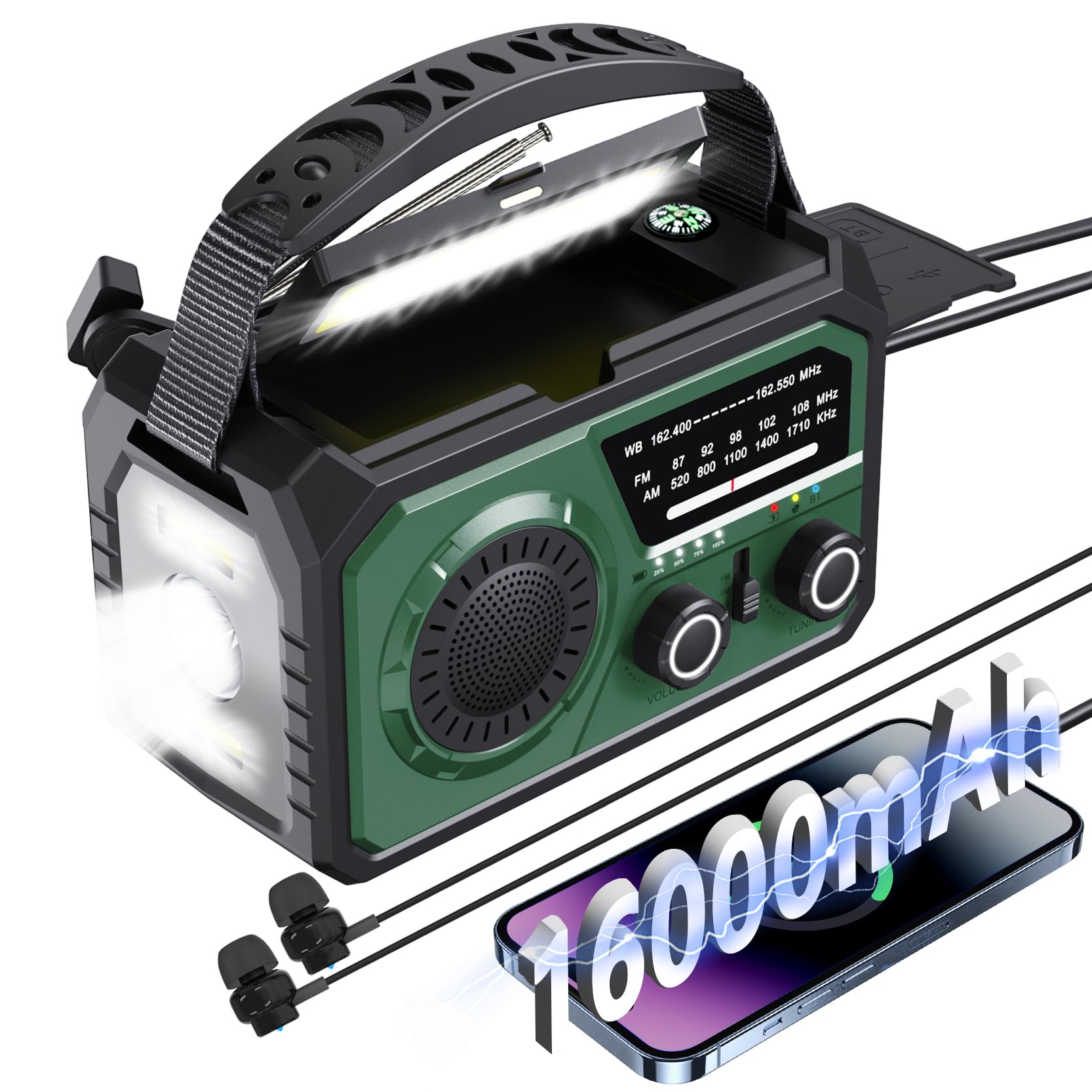
Figure 1.1: FQBLXY H21 Emergency Weather Radio (Green model)
Video 1.1: Overview of the FQBLXY H21 Emergency Weather Radio's features and uses.
2. Package Contents
Please verify that all items are present and in good condition upon opening the package:
- Emergency Hand Crank Radio with LED Flashlight (1 unit)
- Owner's Manual (1 copy)
- Portable Hand Strip (1 unit)
- USB Cable (1 unit)
3. Product Features
- Ultra-High Capacity Power Bank: Integrated 16000mAh battery for charging mobile devices.
- Multi-Band Radio: Receives AM (520-1710 KHz), FM (87-108 MHz), and NOAA Weather Band (162.4-162.55 MHz) signals.
- Multiple Charging Methods: Supports hand crank, solar panel, and Type-C USB fast charging.
- Illumination: Features a 3-mode flashlight (high beam, dipped beam, far & dipped beam) and a dedicated reading LED light.
- Emergency Functions: Includes an SOS alarm for distress signaling and a built-in compass for navigation.
- Audio Connectivity: Built-in Bluetooth 5.3 speaker and a 3.5mm earphone jack for private listening.
- Digital Display: Upgraded LCD screen provides clear channel and battery status information.

Figure 3.1: The 16000mAh battery provides extended usage for various functions.
4. Setup
Before first use, it is recommended to fully charge the radio using the Type-C USB cable. Connect the provided USB cable to the Type-C input port on the radio and a compatible USB power adapter (not included).
Familiarize yourself with the controls and ports. Extend the telescopic antenna for optimal radio reception.

Figure 4.1: Key components and functions of the FQBLXY H21 radio.
5. Operating Instructions
5.1 Radio Operation (AM/FM/NOAA)
- Power On/Off: Rotate the VOLUME knob clockwise to turn on the radio and adjust the volume.
- Select Band: Use the AM/FM/WB (NOAA) Switch to select your desired radio band.
- Tune Station: Rotate the TUNING knob to find a station. The LCD display will show the current frequency.
- Antenna: Extend the retractable antenna for better FM and NOAA reception. For AM, the internal antenna is generally sufficient.

Figure 5.1: The radio supports all 7 NOAA weather channels for critical alerts.
5.2 Flashlight and Reading Lamp
- Flashlight: Press the Flashlight Button (usually on the side) to cycle through the 3 modes: high beam, dipped beam, and combined. Press again to turn off.
- Reading Lamp: Lift the solar panel to reveal the reading lamp. Press the Reading Lamp Button to turn it on/off. Ensure the reading light is switched off when not in use to conserve power.

Figure 5.2: The radio provides versatile lighting options and an SOS alarm.
5.3 Power Bank Function
To charge external devices (e.g., smartphones):
- Open the rubber cover on the side of the radio to access the USB output port.
- Connect your device's charging cable to the USB Output port on the radio.
- The radio will begin charging your device.
5.4 Bluetooth Speaker
To use the radio as a Bluetooth speaker:
- Long press the BT Mode Button (usually labeled 'BT' or with a Bluetooth icon) to switch to Bluetooth mode. The radio will indicate 'Bluetooth Mode' or a similar prompt.
- On your mobile device, enable Bluetooth and search for available devices.
- Select 'H21' (or similar product name) from the list to pair. Once paired, you can play audio through the radio's speaker.

Figure 5.3: Enjoy wireless audio streaming via Bluetooth 5.3.
5.5 SOS Alarm
In an emergency, press the SOS Alarm Button to activate a loud siren and flashing light for signaling distress. Press again to deactivate.
5.6 Charging the Radio
The radio can be recharged using three methods:
- Type-C USB Charging: Connect the provided USB cable to the Type-C input port and a USB power source. This is the fastest charging method.
- Solar Charging: Place the radio in direct sunlight with the solar panel facing upwards. The solar panel will slowly charge the internal battery. This method is ideal for maintaining charge or for emergency top-ups.
- Hand Crank Charging: Rotate the hand crank handle (located on the back/side) clockwise or counter-clockwise at a steady pace. This method provides power for short bursts of use or to initiate charging when other sources are unavailable.

Figure 5.4: Three convenient ways to recharge your emergency radio.
6. Maintenance
- Cleaning: Wipe the radio with a soft, damp cloth. Do not use harsh chemicals or abrasive cleaners.
- Storage: Store the radio in a cool, dry place away from direct sunlight and extreme temperatures.
- Battery Care: For optimal battery life, fully charge the radio at least once every three months, even if not in use. Avoid fully discharging the battery frequently.
- Water Resistance: While designed for outdoor use, avoid submerging the radio in water. Keep ports covered when not in use.
7. Troubleshooting
| Problem | Possible Cause | Solution |
|---|---|---|
| Radio does not turn on. | Battery is depleted. | Charge the radio using Type-C USB, solar, or hand crank. |
| Poor radio reception. | Antenna not extended; weak signal area. | Fully extend the telescopic antenna. Try repositioning the radio. |
| Flashlight/Reading Lamp not working. | Battery is low; light function not activated correctly. | Charge the radio. Ensure the correct button is pressed for the desired light. |
| Cannot charge external devices. | Radio battery is low; incorrect cable/port. | Ensure the radio has sufficient charge. Use the correct USB output port and a functional charging cable. |
| Bluetooth not pairing. | Radio not in Bluetooth mode; device too far. | Long press the BT button to enter Bluetooth mode. Ensure devices are within range (33-49 feet). |
8. Specifications
| Feature | Specification |
|---|---|
| Model Number | H21 |
| Battery Capacity | 16000mAh Lithium Polymer (included) |
| Radio Bands | AM: 520-1710 KHz, FM: 87-108 MHz, WB: 162.4-162.55 MHz |
| Charging Methods | Type-C USB, Solar Panel, Hand Crank |
| Connectivity | USB Output, Bluetooth 5.3, 3.5mm Headphone Jack |
| Product Dimensions | 3"L x 3"W x 5"H (7.62 x 7.62 x 12.7 cm) |
| Item Weight | 1.76 ounces (50 grams) |
| Special Features | Built-In Flashlight (3 modes), Reading Lamp, SOS Alarm, Compass |
9. Warranty and Support
For warranty information or technical support, please refer to the contact details provided on the product packaging or contact the manufacturer directly. Keep your purchase receipt for warranty claims.