
1. Introduction
This manual provides essential information for the safe and effective use of your SAVILER Red Light Therapy Device. This device incorporates both 660nm (red light) and 850nm (near-infrared light) wavelengths, designed for various applications including skin care and muscle relaxation. Please read this manual thoroughly before operating the device.

Figure 1: SAVILER Red Light Therapy Device overview.
2. Safety Information
- Always wear the provided protective eyewear during operation to shield your eyes from direct light exposure.
- Do not use the device in wet environments or with wet hands.
- Keep the device out of reach of children and pets.
- Consult a healthcare professional before use if you have any medical conditions, are pregnant, or are taking photosensitizing medications.
- Discontinue use if you experience any discomfort or adverse reactions.
3. Setup and Assembly
The SAVILER Red Light Therapy Device comes with an adjustable stand for versatile positioning. Follow these steps for assembly:
- Unpack Components: Carefully remove all components from the packaging, including the light panel, stand base, adjustable pole, and power adapter.
- Assemble the Stand: Attach the adjustable pole to the stand base. Ensure the connection is secure. Some models may require unscrewing a gold bar on the pole to lengthen the stand before attaching.
- Attach Light Panel: Securely mount the light panel to the adjustable arm of the stand.
- Positioning for Stability: For optimal stability, position the LED panel on the same side as the stand's base to prevent tipping.
- Adjust Angle and Height: The stand features multiple swivel points (360°, 180°, 90°) and adjustable height (26"-39"). Adjust the panel to your desired position. After adjusting, carefully tighten all screws to prevent thread damage and ensure the panel remains stable.
- Connect Power: Plug the power adapter into the device and then into a suitable electrical outlet.

Figure 2: Adjustable arm and height features.
4. Operating Instructions
The device is controlled via a multi-functional controller. Ensure protective eyewear is worn before starting a session.
- Power On/Off: Press the power button on the controller to turn the device on or off.
- Set Timer: Use the timer options to select a session duration (e.g., 5, 10, 15, 20, 25, 30 minutes). The device will automatically power off after 30 minutes if no timer is set.
- Adjust Brightness: Select from 5 levels of brightness (L0-L4) to suit your preference.
- Pulse Function: Activate the pulse mode if desired.
- Positioning: Position the light panel at a comfortable distance from the area of the body you wish to treat.
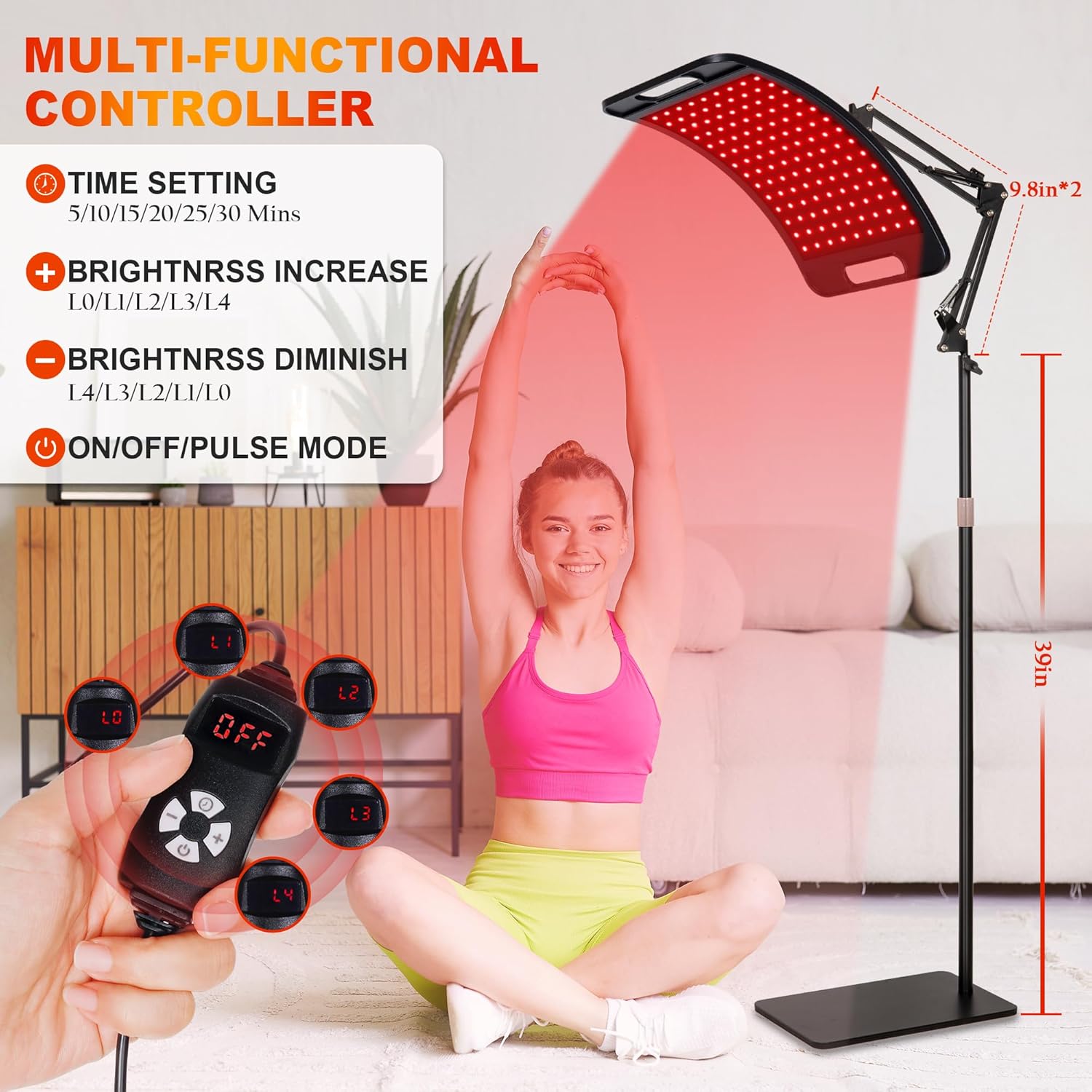
Figure 3: Multi-functional controller.
Recommended Usage
- For Skin Care: The 660nm and 850nm wavelengths are suitable for facial applications.
- For Muscle and Joint Areas: The device can be positioned to target areas such as knees, legs, neck, shoulders, waist, and wrists.

Figure 4: Facial application of red light therapy.

Figure 5: Full body application of red light therapy.
5. Maintenance
- Cleaning: Ensure the device is unplugged before cleaning. Wipe the light panel and stand with a soft, dry cloth. Do not use abrasive cleaners or immerse the device in water.
- Storage: Store the device in a cool, dry place away from direct sunlight and extreme temperatures.
- Cable Care: Avoid bending or twisting the power cable excessively.
6. Troubleshooting
- Device Not Powering On: Ensure the power adapter is securely connected to both the device and a working electrical outlet.
- Stand Instability: If the stand feels wobbly, verify that all assembly screws are tightened. Ensure the light panel is positioned on the same side as the base for better balance. If the pole's connection to the base is loose, check if the embedded nut can be tightened further.
- Light Output Issues: If some LEDs are not illuminating, check for any visible damage. If the issue persists, contact customer support.
7. Specifications
| Brand | SAVILER |
| Model | B0D9W4KBDF |
| Wavelengths | 660nm (Red Light), 850nm (Near-Infrared Light) |
| LED Count | 126 pcs (660nm), 252 pcs (850nm) |
| Panel Dimensions | Approximately 15" x 8.6" |
| Adjustable Stand Height | 26" - 39" |
| Adjustable Stand Angles | Swivel 360°, 180°, 90° |
| Controller Features | 6 Timing Options, 5 Brightness Levels, Pulse Function |
| Package Dimensions | 17.2 x 12.56 x 3.54 inches |
| Weight | 6.66 Pounds |
| Manufacturer | Shenzhen Gangyu Technology Co., Ltd. |

Figure 6: Wavelength penetration depth.
8. Warranty and Support
For warranty information, technical support, or any inquiries regarding your SAVILER Red Light Therapy Device, please refer to the contact information provided with your product packaging or visit the official SAVILER website.