
Gedsffati PT08
Gedsffati [6-in-1] Portable Carbon Monoxide & Oxygen Detector
User Manual
Model: PT08
1. Introduction
The Gedsffati [6-in-1] Portable Carbon Monoxide & Oxygen Detector is a multi-functional device designed for air safety detection in various environments, including outdoor activities like camping, hiking, climbing, and boating, as well as indoor use. It integrates six essential sensors to provide comprehensive environmental data.
This detector features sensors for Carbon Monoxide (CO), Oxygen (O2), Temperature, Humidity, Atmospheric Pressure, and Altitude. All data is displayed clearly on a 2.48-inch HD screen, ensuring easy readability. Its compact and lightweight design, coupled with a long-lasting battery, makes it an ideal companion for ensuring personal safety.
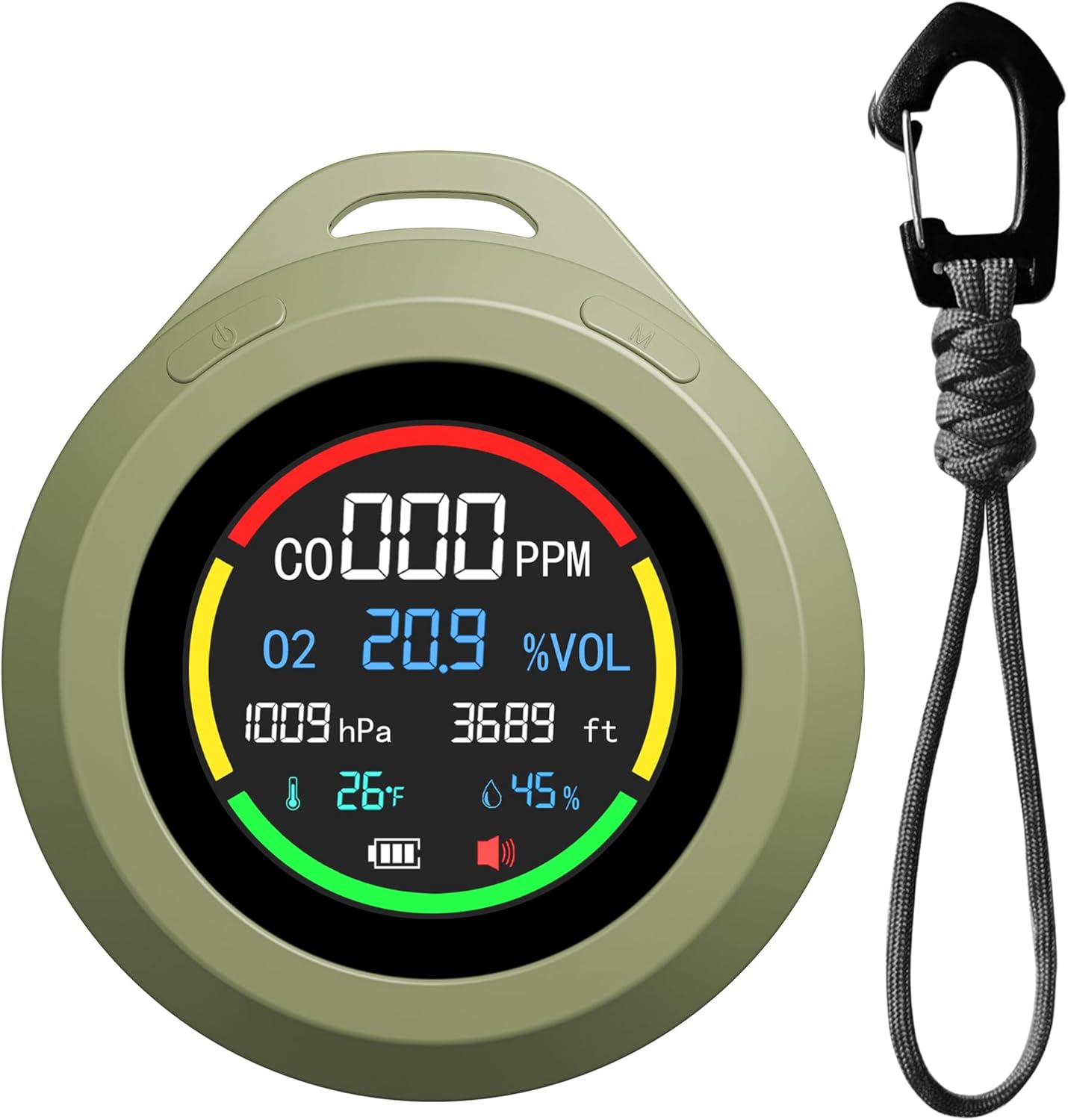
Figure 1: Gedsffati 6-in-1 Portable Carbon Monoxide & Oxygen Detector with included lanyard.
2. Package Contents
- Gedsffati 6-in-1 CO&O2 Detector x1
- Lanyard x1
- User Manual x1
- Type-C Charging Cable (not explicitly listed but implied by Type-C charge support)
3. Setup
3.1 Initial Charging
Before first use, fully charge the detector. The device is equipped with a 1500 mAh efficient lithium battery, providing approximately 72 hours of battery life on a full charge.
- Locate the Type-C charging port on the device.
- Connect the provided Type-C charging cable to the detector and the other end to a compatible USB power adapter (e.g., 5V DC, 10W).
- The battery indicator on the screen will show charging status. Charge until the indicator shows a full battery.
Note: Some users have reported issues with C-to-C USB cables. If charging problems occur, please use a USB-A to USB-C cable.

Figure 2: Battery and charging features of the detector.
3.2 Powering On/Off
- To power on: Press and hold the power button (usually located on the side or top) for a few seconds until the screen illuminates.
- To power off: Press and hold the power button again until the device shuts down.
4. Operating Instructions
4.1 Understanding the Display
The 2.48-inch HD screen provides real-time readings from all integrated sensors. The display typically shows:
- CO (Carbon Monoxide): Measured in PPM (Parts Per Million). Range: 0-500 PPM.
- O2 (Oxygen): Measured in %VOL (Percentage by Volume). Range: 0-30% VOL.
- Temp (Temperature): Measured in °C or °F. Range: 0°C - 50°C (32°F - 122°F).
- Humidity: Measured in % RH (Relative Humidity). Range: 0-95% RH.
- Atmos (Atmospheric Pressure): Measured in hPa (hectopascals). Range: 300-1100 hPa.
- Altitude: Measured in feet (ft).
- Battery Level Indicator.

Figure 3: Detailed view of the detector's display showing various sensor readings.
4.2 Alarm Logic and Safety Guidelines
The detector is designed to provide audible alarms when CO or O2 levels exceed or fall below safe thresholds. Refer to the following general guidelines for alarm triggers:
- Carbon Monoxide (CO) Alarm: An alarm will sound if CO concentration reaches dangerous levels. Evacuate the area immediately and seek fresh air if the CO alarm activates.
- Oxygen (O2) Alarm: Alarms will trigger for both low oxygen (below safe levels) and high oxygen (above safe levels) concentrations. Both conditions can be hazardous.
Always prioritize safety. If an alarm sounds, follow established safety protocols for your environment. Do not ignore alarms.
4.3 Usage Scenarios
The portable design and integrated lanyard make this detector suitable for a variety of applications:
- Outdoor Activities: Ideal for camping, hiking, climbing, and boating to monitor air quality and altitude.
- Travel: Compact size makes it easy to carry for personal safety during travel.
- Indoor Monitoring: Can be used to track CO, O2, temperature, and humidity in enclosed spaces.

Figure 4: Detector in an outdoor hiking environment, demonstrating its portability and utility for outdoor sports.

Figure 5: Detector used for tracking indoor O2 and CO levels, contributing to a safer indoor environment.
5. Maintenance
5.1 Cleaning
To maintain optimal performance, keep the detector clean:
- Wipe the exterior with a soft, dry cloth.
- Do not use abrasive cleaners, solvents, or harsh chemicals.
- Ensure no liquids enter the sensor openings or charging port.
5.2 Battery Care and Storage
- Recharge the battery when the low battery indicator appears to ensure continuous operation.
- For long-term storage, charge the device to approximately 50% and store it in a cool, dry place away from direct sunlight and extreme temperatures.
- Avoid fully discharging the battery for extended periods, as this can reduce its lifespan.
6. Troubleshooting
- Device not powering on: Ensure the battery is charged. Connect to a power source and try again. If still unresponsive, contact support.
- Charging issues (especially with C-to-C cables): If the device does not charge with a USB-C to USB-C cable, try using a USB-A to USB-C cable. This has been identified as a potential compatibility issue.
- Inaccurate readings: Ensure the sensor openings are not obstructed. Avoid exposing the device to extreme dust, humidity, or temperature fluctuations that are outside its operating range. Allow the device to stabilize in a new environment for a few minutes.
- Alarm sounds unexpectedly: Immediately follow safety protocols for CO or O2 alarms. If you suspect a false alarm, move to a well-ventilated area and observe if the readings normalize. If alarms persist without apparent cause, the sensor may require calibration or service.
7. Specifications
| Feature | Specification |
|---|---|
| Model Number | PT08 |
| Dimensions | 2.8 x 2.8 x 1.2 inches |
| Weight | 7.7 ounces (0.48 Pounds) |
| Power Source | Battery Powered (1 Lithium Ion battery, included) |
| Battery Capacity | 1500 mAh |
| Battery Life | Up to 72 hours |
| Charging Port | Type-C |
| Voltage | 5 Volts (DC) |
| Wattage | 10 watts |
| Display | 2.48'' HD screen |
| CO Detecting Range | 0-500 PPM |
| O2 Detecting Range | 0-30% VOL |
| Atmospheric Pressure Range | 300-1100 hPa |
| Temperature Range | 0°C - 50°C (32°F - 122°F) |
| Humidity Range | 0-95% RH |
| Alarm Type | Audible |
| Material | Metal |
| Manufacturer | Shenzhen Prodo Technology Co., Ltd. |
8. Warranty Information
Gedsffati offers a 3-year free exchange for any quality issues encountered with this product. Please retain your proof of purchase for warranty claims.
9. Customer Support
For technical assistance, troubleshooting not covered in this manual, or warranty inquiries, please contact Gedsffati customer support through the retailer's platform or visit the official Gedsffati store page:
Visit the Gedsffati Store on Amazon
Please have your product model number (PT08) and purchase details ready when contacting support.
Ask a question about this manual
Ask about setup, troubleshooting, compatibility, parts, safety, or missing instructions. Manuals+ will review the question and use this page’s manual context to help answer it.