1. Introduction
Thank you for purchasing the BSRCO Handheld Vacuum Cleaner. This compact and powerful cordless vacuum is designed for efficient cleaning of various surfaces, including car interiors, furniture, and small spills. Featuring a built-in LED light for enhanced visibility and convenient USB charging, it offers a versatile and user-friendly cleaning experience. Please read this manual thoroughly before operation to ensure proper use, maintenance, and to maximize the lifespan of your device.

Image: A woman using the BSRCO Handheld Vacuum Cleaner to clean crumbs from a sofa, demonstrating its ease of use for household cleaning.
2. Important Safety Instructions
To reduce the risk of fire, electric shock, or injury, please observe the following safety precautions:
- Read all instructions before using the appliance.
- Do not use outdoors or on wet surfaces.
- Do not allow to be used as a toy. Close attention is necessary when used by or near children.
- Use only as described in this manual. Use only manufacturer's recommended attachments.
- Do not use with damaged cord or plug. If appliance is not working as it should, has been dropped, damaged, left outdoors, or dropped into water, return it to a service center.
- Do not pull or carry by cord, use cord as a handle, close a door on cord, or pull cord around sharp edges or corners. Do not run appliance over cord. Keep cord away from heated surfaces.
- Do not unplug by pulling on cord. To unplug, grasp the plug, not the cord.
- Do not handle plug or appliance with wet hands.
- Do not put any object into openings. Do not use with any opening blocked; keep free of dust, lint, hair, and anything that may reduce air flow.
- Keep hair, loose clothing, fingers, and all parts of body away from openings and moving parts.
- Do not pick up anything that is burning or smoking, such as cigarettes, matches, or hot ashes.
- Do not use to pick up flammable or combustible liquids, such as gasoline, or use in areas where they may be present.
- Do not pick up toxic material, such as chlorine bleach, ammonia, or drain cleaner.
- Do not use without dust cup and/or filters in place.
- Turn off all controls before unplugging.
- Use extra care when cleaning on stairs.
- Do not charge the unit outdoors.
- Use only the charger supplied by the manufacturer to recharge.
- Store the appliance indoors. Put away after use to prevent accidents.
3. Package Contents
Please check the package contents to ensure all items are present and in good condition:
- BSRCO Handheld Vacuum Cleaner Unit
- Crevice Tool
- Brush Nozzle
- Extension Hose (Flexible Tube)
- USB Charging Cable (Type-C)
- User Manual (This document)

Image: The BSRCO Handheld Vacuum Cleaner displayed with its various attachments, including the crevice tool, brush nozzle, and flexible extension hose, highlighting the complete set of accessories.
4. Product Overview
Familiarize yourself with the components of your BSRCO Handheld Vacuum Cleaner:
- 1. Main Unit: Contains the motor, battery, and control buttons.
- 2. Dust Cup: Transparent container for collecting dust and debris.
- 3. HEPA Filter: Located inside the dust cup, filters fine particles.
- 4. Power Button: Turns the vacuum on/off.
- 5. LED Light: Illuminates the cleaning area.
- 6. USB-C Charging Port: For connecting the charging cable.
- 7. Crevice Tool: Ideal for narrow gaps and corners.
- 8. Brush Nozzle: For cleaning delicate surfaces and removing stubborn dirt.
- 9. Extension Hose: Provides flexibility for hard-to-reach areas.
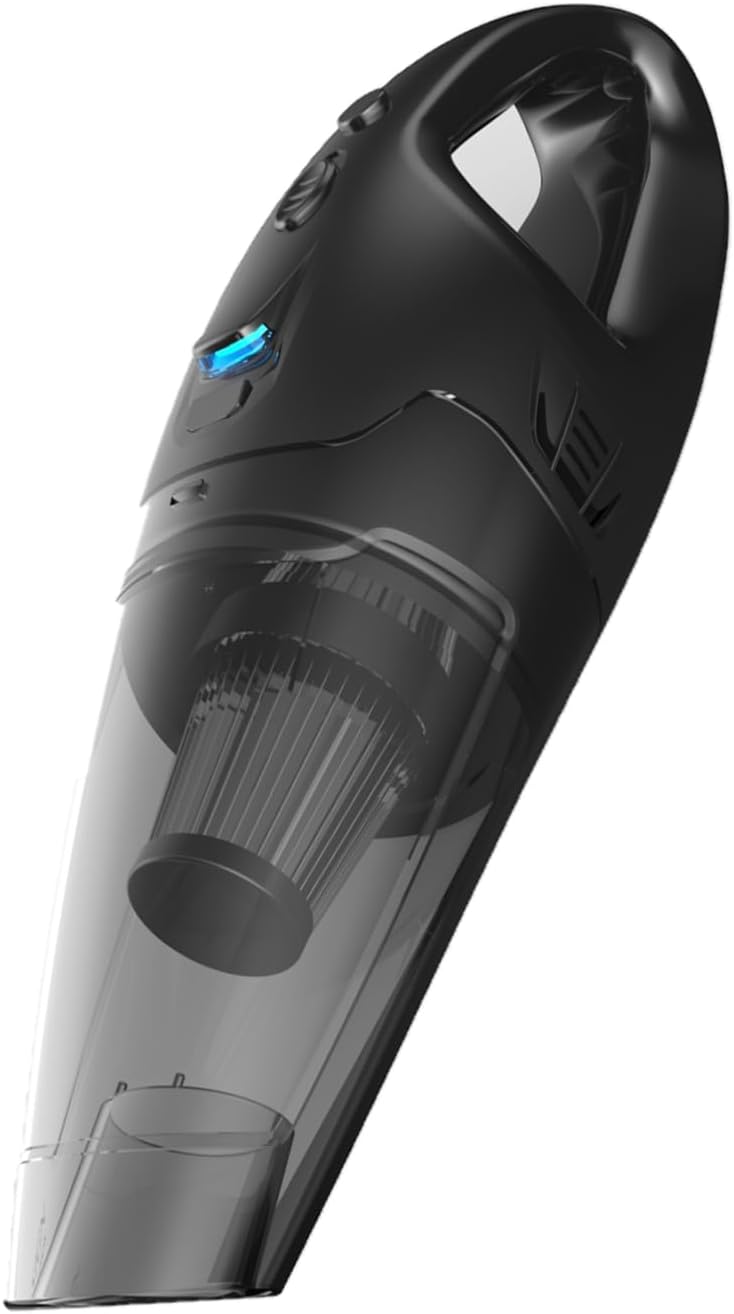
Image: A detailed view of the BSRCO Handheld Vacuum Cleaner, showcasing its sleek design, transparent dust cup, and the integrated LED light.
5. Setup and Charging
5.1 Initial Charge
Before first use, fully charge the vacuum cleaner. The battery life is approximately 30 minutes on a full charge, with a charging time of about 3 hours.
- Locate the USB-C charging port on the vacuum cleaner.
- Connect the provided USB charging cable to the vacuum's charging port.
- Plug the other end of the USB cable into a compatible USB power source (e.g., computer USB port, wall adapter, car charger). Note: Avoid using newer fast chargers as they may not be compatible. Use standard USB charging ports.
- The indicator light will show charging status (refer to LED indicator section for details). Once fully charged, the light will change or turn off.

Image: The BSRCO Handheld Vacuum Cleaner connected to a USB power source for charging, illustrating its versatile Type-C portable charging capability.
5.2 Attaching Accessories
The vacuum comes with various attachments for different cleaning needs:
- Crevice Tool: Push the crevice tool firmly onto the vacuum's suction nozzle until it clicks into place. Use for tight spaces like car seats, corners, and keyboard gaps.
- Brush Nozzle: Attach the brush nozzle over the crevice tool or directly onto the suction nozzle. Ideal for dusting and cleaning upholstery.
- Extension Hose: Connect the extension hose to the vacuum's suction nozzle. Then, attach the crevice tool or brush nozzle to the other end of the hose for extended reach.

Image: The BSRCO Handheld Vacuum Cleaner with a brush attachment being used to clean a computer keyboard, demonstrating its utility for small, intricate cleaning tasks.
6. Operating Instructions
6.1 Powering On/Off
- To turn on the vacuum, press the Power Button located on the top of the unit. The LED light will illuminate, and the vacuum will start.
- To turn off the vacuum, press the Power Button again.
6.2 Using the LED Light
The built-in LED light automatically activates when the vacuum is turned on, providing illumination for dark areas and helping to spot hidden dust and debris.

Image: The BSRCO Handheld Vacuum Cleaner in action, with its built-in LED light brightly illuminating a dusty area on the floor, ensuring no dirt is missed.
6.3 Cleaning Tips
- For general cleaning, use the vacuum without any attachments.
- For tight spaces, car interiors, or between cushions, attach the Crevice Tool.
- For upholstery, pet hair, or delicate surfaces, use the Brush Nozzle.
- For reaching under furniture or high areas, combine the Extension Hose with the desired nozzle.
- Empty the dust cup regularly to maintain optimal suction power.

Image: A hand holding the BSRCO Handheld Vacuum Cleaner with an extension hose and nozzle, cleaning the interior of a car, highlighting its suitability for automotive use.
7. Maintenance
Regular maintenance ensures the longevity and optimal performance of your vacuum cleaner.
7.1 Emptying the Dust Cup
- Ensure the vacuum is turned off.
- Twist or press the release button (if applicable) to detach the dust cup from the main unit.
- Carefully empty the contents of the dust cup into a trash bin.
7.2 Cleaning the HEPA Filter
The HEPA filter is washable and reusable. Clean it regularly to maintain suction power.
- After emptying the dust cup, remove the HEPA filter from inside the dust cup.
- Tap the filter gently over a trash bin to remove loose dust.
- Rinse the filter under cool running water until the water runs clear. Do not use detergent.
- Allow the filter to air dry completely for at least 24 hours before reinserting it into the dust cup. Do not use the vacuum with a wet filter.
- Once dry, place the HEPA filter back into the dust cup and reattach the dust cup to the main unit.

Image: Two HEPA filters, one submerged in water, illustrating the washable and reusable nature of the filter for the BSRCO Handheld Vacuum Cleaner.
7.3 Storage
Store the vacuum cleaner in a cool, dry place away from direct sunlight and extreme temperatures. Ensure it is fully charged before storing for extended periods to preserve battery health.
8. Troubleshooting
If you encounter issues with your BSRCO Handheld Vacuum Cleaner, refer to the following table for common problems and solutions:
| Problem | Possible Cause | Solution |
|---|---|---|
| Vacuum does not turn on. | Battery is depleted. | Charge the vacuum cleaner fully. |
| Charging cable or adapter issue. | Ensure the USB cable is securely connected. Try a different USB port or adapter (avoid fast chargers). | |
| Low suction power. | Dust cup is full. | Empty the dust cup. |
| HEPA filter is clogged. | Clean or replace the HEPA filter. Ensure it is completely dry before reinserting. | |
| Nozzle or hose is blocked. | Check for and remove any obstructions in the nozzle, attachments, or hose. | |
| Vacuum stops unexpectedly. | Battery is low. | Recharge the vacuum. |
| Overheating protection activated. | Turn off the vacuum and let it cool down for at least 30 minutes before resuming use. |
9. Specifications
| Feature | Detail |
|---|---|
| Brand | BSRCO |
| Model Name | Handheld Vacuum |
| Special Feature | Cordless, Built-in LED Light |
| Filter Type | HEPA Filter (Washable & Reusable) |
| Connectivity Technology | USB (Type-C) |
| Capacity | 450 Milliliters |
| Wattage | 24.42 watts |
| Maximum Suction | 6000 Inches |
| Battery Type | Lithium-Ion (3 batteries included) |
| Battery Life | Up to 30 minutes |
| Charging Time | Approx. 3 hours |
| Noise Level | 70 dB |
| Item Weight | 1.65 pounds |
| Product Dimensions (L x W x H) | 14.96" x 4.33" x 4.72" |
| Color | Black |
| Recommended Uses | Car, Home, Office, Pet Hair |
10. Warranty and Customer Support
BSRCO is committed to providing high-quality products. For any questions, concerns, or warranty inquiries regarding your Handheld Vacuum Cleaner, please contact our customer support team through the retailer where you purchased the product or visit the official BSRCO store page on Amazon:
Visit the BSRCO Store on Amazon
Please have your product model number (Handheld Vacuum) and purchase details ready when contacting support.