
XOSS XR01
XOSS XR01 Smart Bike Tail Light User Manual
Model: XR01 | Brand: XOSS
Introduction
The XOSS XR01 Smart Bike Tail Light is designed to enhance cycling safety with its intelligent features and durable construction. This manual provides detailed instructions for the proper use, installation, and maintenance of your XR01 tail light.

Image: The XOSS XR01 Smart Bike Tail Light, a compact black device with a red lens, designed for rear visibility on bicycles.
Product Features
- Automatic Switch & Brake Sensor: The XR01 automatically turns off after 30 seconds of inactivity and turns on when riding vibration is detected. Upon braking, brightness increases for 3 seconds to alert following vehicles, enhancing safety.
- Rechargeable & TYPE-C: Equipped with a 260 mAh TYPE-C rechargeable lithium battery, providing 7 to 16 hours of use (mode dependent) after a 1-hour full charge. Standby time is up to 3 months.
- 4 Modes & Mode Memory: Features four lighting modes: slow flash, breathing flash, fast flash, and steady on. The light remembers the last used mode for convenience.
- Innovative Optical Lenses: Utilizes an innovative optical lens for high visibility and an anti-glare function, ensuring safety without affecting the vision of others.
- IPX6 & Easy to Install: IPX6 waterproof rating allows use in heavy rain. Supports two mounting methods (saddle rail and seat post) and installs in seconds without tools.
Package Contents
Please verify that all items listed below are included in your package:

Image: Contents of the XOSS XR01 package, including the tail light, mounting accessories, and charging cable.
- XOSS XR01 Smart Bike Tail Light
- USB-C Charging Cable
- Saddle Rail Mount
- Seat Post Mount
- Rubber Bands/Zip Ties for mounting
Setup and Installation
Charging the Device
Before first use, fully charge the XR01 tail light. Connect the provided USB-C cable to the charging port on the light and plug the other end into a USB power source (e.g., computer, wall adapter). The indicator light will show charging status.

Image: The XOSS XR01 tail light connected to a laptop via its USB-C charging cable.
Mounting Options
The XR01 offers two primary mounting methods:

Image: Comparison of saddle mounting and seatpost mounting options for the XOSS XR01 tail light.
- Saddle Rail Mounting:
- Attach the saddle rail mount to the rails under your bicycle seat.
- Slide the XR01 tail light onto the mount until it clicks securely into place.
- Seat Post Mounting:
- Secure the seat post mount to your bicycle's seat post using the provided rubber bands or zip ties.
- Slide the XR01 tail light onto the mount until it clicks securely into place.
Ensure the light is firmly attached and facing directly backward for optimal visibility.
Operation
Power On/Off
- Manual On/Off: Press and hold the power button located on the top of the light for approximately 2 seconds to turn the light on or off.
- Automatic On/Off (Vibration Sensing): The XR01 will automatically turn on when it detects riding vibration and turn off after 30 seconds of inactivity.

Image: The XOSS XR01 tail light demonstrating its automatic turn on/off feature based on vibration detection.
Mode Switching and Brightness Control
With the light on, short press the power button to cycle through the four lighting modes:
- Slow Flash
- Breathing Flash
- Fast Flash
- Steady On

Image: Visual representation of the four lighting modes: Normally On, Breathing Flash, Fast Flash, and Slow Flash.
To adjust brightness (when the light is off), long press the button to cycle through Low, Medium, and High brightness settings. The light will remember your last selected mode and brightness.
Brake Sensing
The XR01 features an intelligent brake sensing function. When the light detects a sudden deceleration (braking), its brightness will automatically increase for 3 seconds to provide a clear warning to vehicles behind you, significantly improving safety.
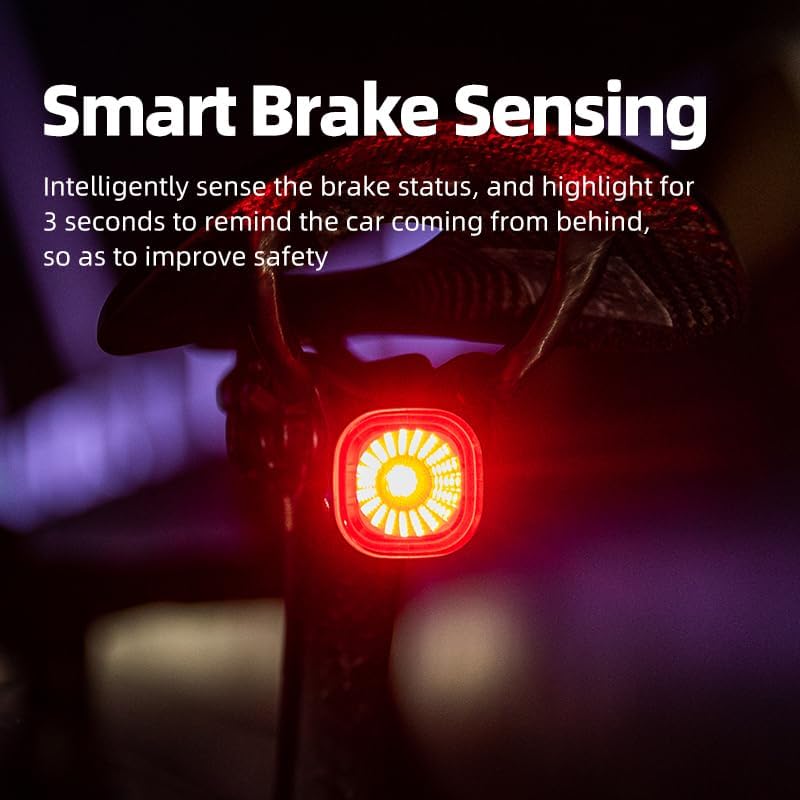
Image: The XOSS XR01 tail light mounted on a bike, illustrating the smart brake sensing feature with increased brightness.
Maintenance
Battery Care
- Recharge the battery regularly, especially if the light has not been used for an extended period.
- Avoid completely draining the battery to prolong its lifespan.
- Use only the provided USB-C cable or a certified equivalent for charging.
Cleaning and Storage
- Wipe the light with a soft, damp cloth to remove dirt and debris. Do not use harsh chemicals or abrasive cleaners.
- Store the light in a cool, dry place when not in use.
Water Resistance (IPX6)
The XR01 is rated IPX6 waterproof, meaning it is protected against high-pressure water jets from any direction. It can withstand heavy rain, but it is not designed for submersion in water.

Image: The XOSS XR01 tail light being sprayed with water, demonstrating its IPX6 waterproof rating.
Troubleshooting
- Light not turning on: Ensure the battery is charged. Press and hold the power button for 2 seconds.
- Light not responding: Try charging the device. If issues persist, contact customer support.
- Brake sensing not working: Ensure the light is mounted securely and is not obstructed. Test in a controlled environment.
- Short battery life: Ensure the light is fully charged. Battery performance can vary with mode usage and temperature.
Specifications
| Feature | Detail |
|---|---|
| Model | XR01 |
| Brand | XOSS |
| Material | Plastic |
| Power Source | Battery Powered (260 mAh Lithium) |
| Water Resistance Level | IPX6 |
| Mounting Type | Seatpost Mount, Saddle Rail Mount |
| Number of Settings | 4 Lighting Modes |
| Item Weight | 3.17 ounces |
| Charging Port | USB-C |
Warranty and Support
For warranty information or technical support, please contact XOSS customer service through the official website or your purchase platform. Keep your proof of purchase for warranty claims.
Related documentsXR01

Ask a question about this manual
Ask about setup, troubleshooting, compatibility, parts, safety, or missing instructions. Manuals+ will review the question and use this page’s manual context to help answer it.