
1. Introduction
This manual provides essential information for the safe and effective use, installation, and maintenance of your ANCBD 6800mAh 14.4V Lithium-Ion Replacement Battery. Please read this manual thoroughly before attempting to install or use the battery. Retain this manual for future reference.
2. Safety Information
Failure to follow these safety instructions may result in fire, electric shock, or other injury or damage.
- Do not completely drain the battery. Discharge the new battery to approximately 5% (not 0%) before recharging.
- Avoid connecting the charging adapter for extended periods after the battery is fully charged, as this may damage the battery.
- Do not subject the battery to human impact, disassembly, squeezing, or piercing.
- Do not expose the battery to fire or water.
- Avoid using or storing the battery in environments with extremely high or low temperatures. Keep away from ignition sources.
- Do not store the battery for prolonged periods without use. If storing, ensure it is partially charged.
- The battery features built-in overcharge, over-discharge, overheating, and short-circuit protection circuits.
3. Product Overview
The ANCBD 6800mAh 14.4V Lithium-Ion Replacement Battery is designed to provide reliable power for compatible robotic vacuum cleaners. It is a high-capacity battery engineered for extended operational time and durability.

Image 3.1: The ANCBD 6800mAh 14.4V Lithium-Ion Replacement Battery, shown with a small cleaning brush and a screwdriver, which may be included for installation.

Image 3.2: Visual representation of the ANCBD 6800mAh Li-ion Battery, emphasizing its security features, long lifespan, high performance, and fast charging capabilities.
4. Specifications
- Model Number: 712110359403
- Battery Type: Lithium Ion
- Voltage: 14.4V
- Capacity: 6800mAh (Nominal), 97.92Wh
- Max Charge Voltage: 16.6V
- Product Dimensions: 2.28 x 2.64 x 6.3 inches
- Item Weight: 13.7 ounces
- Battery Weight: 150 Grams
- Recharge Cycles: Up to 500 times

Image 4.1: Detailed view of the battery parameters, confirming Li-ion chemistry, 14.4V voltage, and 6800mAh capacity.

Image 4.2: Diagram illustrating the physical dimensions of the battery, measuring approximately 1.4 inches by 1.49 inches by 5.15 inches.
5. Compatibility
This replacement battery is compatible with a wide range of robotic vacuum cleaner models. Please verify your vacuum cleaner's model number against the list below to ensure compatibility.
- Proscenic: M7 Pro, M8 Pro, M7 Max, U6
- LDS: M7 Pro, M8 Pro
- Lydsto: R1, R2
- Lenovo: LR1
- Uoni: V980, Max V980 Plus
- Xiaomi Viomi: S9, D800
- Roidmi: Eve Plus
- Kyvol: Cybovac S31
- Coredy: L900, L900W, L900X
- NEABOT: N2
- Onson: J30 Pro
This list is not exhaustive. If your model is not listed, please compare the battery specifications and connector type.

Image 5.1: Examples of compatible robot vacuum cleaner models, including Proscenic M7 Pro, Uoni V980 Max, Lenovo LR1, and Roidmi Eve Plus.

Image 5.2: A visual guide indicating suitability for multiple brands of sweeping robots, advising users to check their specific model.
6. Installation Guide
Battery replacement procedures vary by robot vacuum model. Always refer to your specific vacuum cleaner's instruction manual for detailed steps. The following are general guidelines:
- Power Off: Ensure your robot vacuum cleaner is completely powered off and disconnected from its charging base or power adapter.
- Access Battery Compartment: Typically, the battery compartment is located on the underside of the robot vacuum. You may need a screwdriver (often included with the battery or your vacuum) to remove screws securing the cover.
- Remove Old Battery: Carefully disconnect the old battery's connector from the vacuum's port. Lift out the old battery.
- Inspect Connector: Before installing the new battery, compare its connector shape and the number of cables with the original battery and the vacuum's port to ensure a match.
- Install New Battery: Connect the new ANCBD battery's connector firmly into the vacuum's port. Place the battery into its compartment.
- Secure Cover: Replace the battery compartment cover and secure it with screws.
- Initial Charge: Place the robot vacuum on its charging base or connect the power adapter to begin the initial charging cycle.
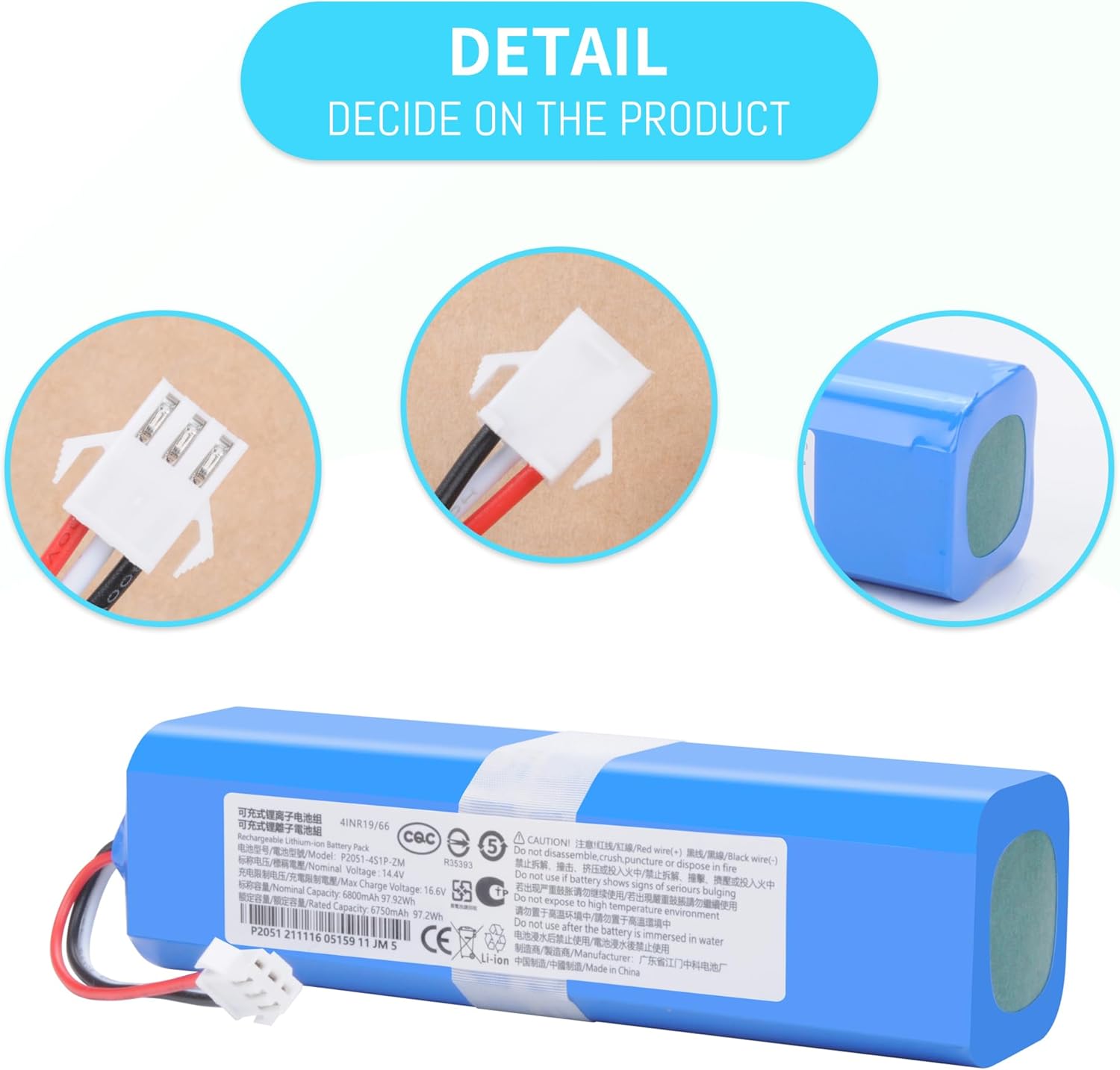
Image 6.1: Detailed view of the battery's white connector, showing the pin configuration and wiring (red, black, white).

Image 6.2: A close-up image of the battery's connector, emphasizing its design for proper fit.
7. Operating Instructions
For optimal performance and battery longevity, follow these recommendations:
- First Use: Upon initial installation, discharge the new battery to approximately 5% (do not fully deplete to 0%). Then, fully charge the battery. Repeat this charge/discharge cycle 3-4 times to condition the new battery.
- Regular Charging: Allow the robot vacuum to charge fully after each cleaning cycle.
- Avoid Overcharging: Do not leave the battery connected to the charger for excessively long periods after it has reached full charge, as this can reduce battery life.
8. Maintenance and Storage
Proper maintenance and storage are crucial for extending the life of your ANCBD battery:
- Regular Discharge/Charge: To maintain battery health, fully discharge and then fully charge the battery every other month, especially if not in frequent use.
- Storage: If the battery will not be used for an extended period, store it in a cool, dry place at approximately 50% charge. Avoid storing it completely empty or fully charged for long durations.
- Environmental Conditions: Do not store or operate the battery in environments with extreme temperatures (very high or very low).
9. Troubleshooting
If you experience issues with your ANCBD replacement battery, consider the following:
- Battery Not Charging: Ensure the battery is correctly installed and its connector is securely seated. Verify that the robot vacuum's charging base or adapter is functioning correctly.
- Reduced Run Time: New batteries may require a few charge/discharge cycles to reach full capacity. Ensure you are following the initial charging recommendations. If the issue persists after several cycles, contact customer support.
- Vacuum Not Powering On: Double-check the battery installation. If the vacuum still does not power on, it may indicate an issue with the vacuum itself or a faulty battery.
For persistent issues, refer to the troubleshooting section of your robot vacuum's original manual or contact ANCBD customer support.
10. Warranty and Customer Support
ANCBD is committed to providing high-quality power products and customer service. This battery is 100% brand new from the manufacturer and is guaranteed against quality problems.
- Quality Assurance: The battery includes protection against overcharge, over-discharge, overheating, and short circuits.
- Customer Service: For any quality issues or inquiries, please feel free to contact ANCBD customer service. We aim to respond within 24 hours and resolve any concerns promptly.