
1. Introduction
This manual provides detailed instructions for the operation and maintenance of your RayHong Digital Magnifier RS350SE. This portable device is designed to assist individuals with visual impairments, low vision, color blindness, and amblyopia by providing adjustable magnification and various display modes for enhanced readability. Please read this manual thoroughly before using the device to ensure proper function and longevity.
2. Product Overview
2.1 Package Contents
- RayHong Digital Magnifier RS350SE
- USB Charging Cable
- AV Cable
- User Manual
- Cleaning Cloth (may vary by package)
2.2 Device Components
Familiarize yourself with the various parts of your digital magnifier:

Figure 1: Labeled diagram of the RayHong Digital Magnifier RS350SE, showing the screen, zoom buttons, mode button, power button, freeze button, lens focus, charging indicator, power indicator, LED light, AV interface, USB interface, wrist strap shaft, speaker, white LED, handwriting bracket, and battery cover.
- LCD Screen: 3.5-inch high-definition display.
- Zoom In/Out Buttons: Adjust magnification levels.
- Mode Button (M): Cycles through various color display modes.
- Power Button: Turns the device on/off.
- Freeze Button: Captures and freezes the current image on the screen. Long press to cycle through reading line options.
- Lens Focus: Automatically adjusts for clear viewing.
- Charging Indicator (Red): Illuminates when charging.
- Power Indicator (Green): Illuminates when the device is on.
- LED Light: Provides illumination for reading.
- AV Interface: Connects to a television for larger display.
- USB Interface: For charging the device.
- Handwriting Bracket: Provides stability for writing under the magnifier.
3. Setup
3.1 Charging the Device
Before first use, fully charge the magnifier. Connect the included USB cable to the device's USB interface and the other end to a compatible USB power adapter (not included) or a computer's USB port. The red charging indicator will illuminate during charging and turn off when fully charged. The device uses a Lithium Polymer battery.
3.2 Powering On/Off
- To Power On: Press and hold the Power button until the screen illuminates and the green power indicator turns on.
- To Power Off: Press and hold the Power button until the screen turns off.
4. Operating Instructions
4.1 Basic Magnification
Place the magnifier directly over the text or object you wish to view. The device will automatically focus. Use the Zoom In (+) and Zoom Out (-) buttons to adjust the magnification level from 2X to 32X.
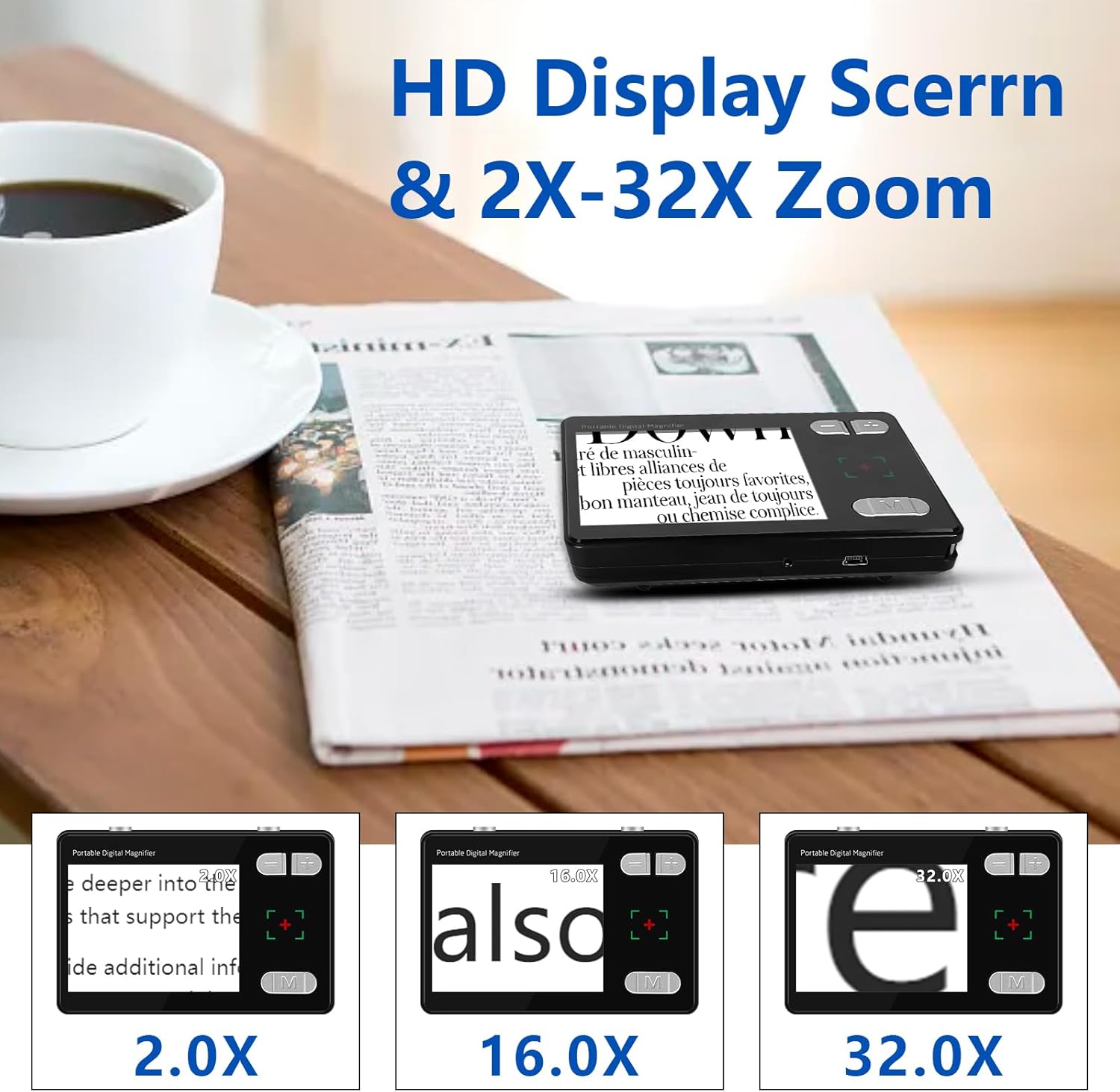
Figure 2: Examples of text magnified at 2.0X, 16.0X, and 32.0X on the device screen.
4.2 Color Modes
The device offers 26 different color modes to enhance readability based on individual preferences and visual conditions. Press the Mode button (M) repeatedly to cycle through the available color combinations, such as black on white, white on black, yellow on blue, and more.
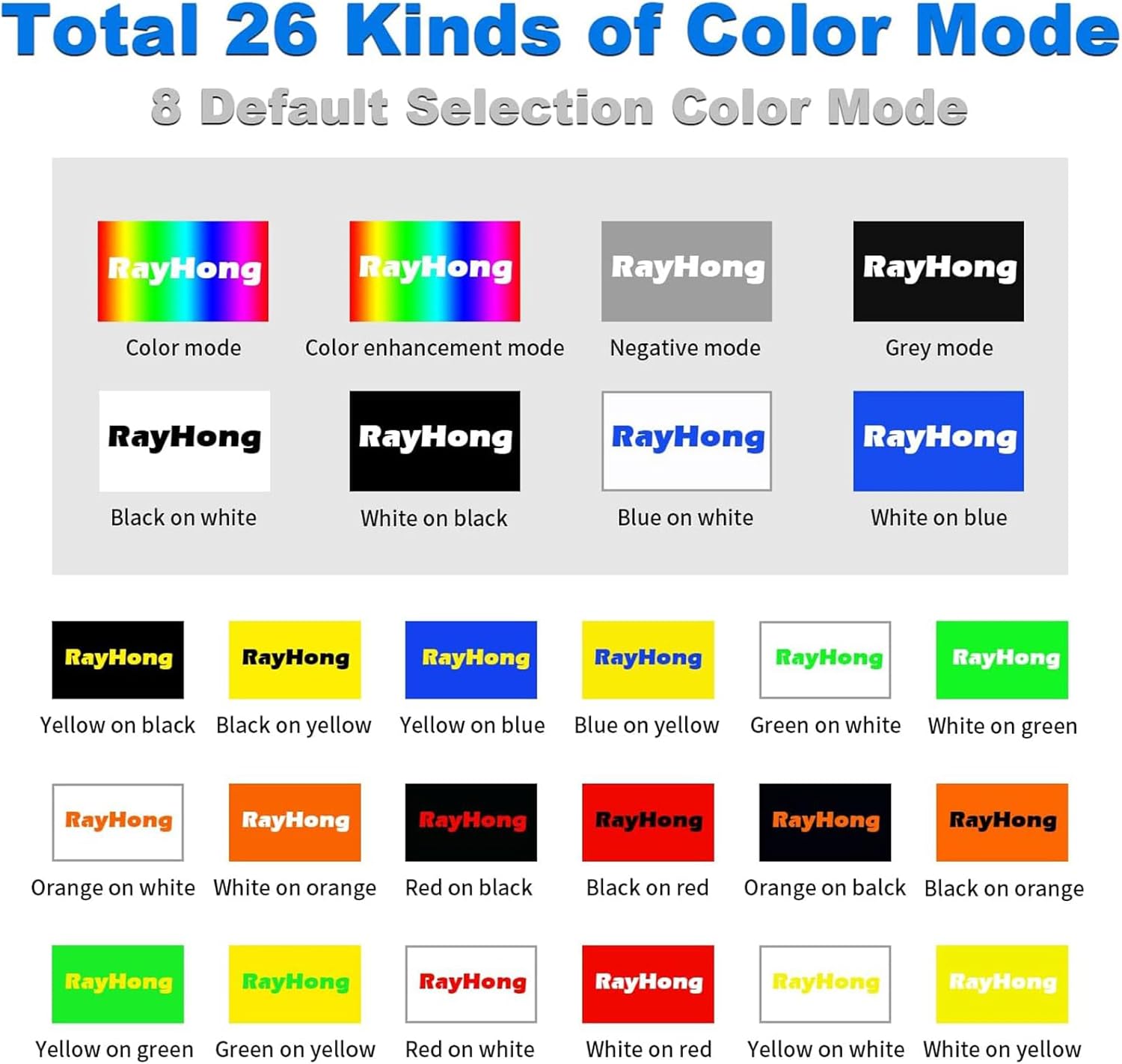
Figure 3: Visual representation of the 26 available color modes, including default and enhanced options.
4.3 Brightness Adjustment
Adjust the screen brightness to suit your environment and comfort. The device features 5 levels of brightness. Use the dedicated brightness adjustment buttons (often integrated with zoom or mode buttons, refer to Figure 1 for exact location) to increase or decrease the screen illumination.

Figure 4: Depiction of the five adjustable brightness levels for optimal viewing in various lighting conditions.
4.4 Reading Line Function
To aid in reading long lines of text, the device offers horizontal and vertical reading lines. Long press the Freeze button to cycle through these options: horizontal reading line, vertical reading line, and turning the reading line off.

Figure 5: The magnifier screen showing text with a horizontal reading line, a vertical reading line, and no reading line.
4.5 Connecting to a TV
For an even larger viewing experience, connect the magnifier to a television using the provided AV cable. Plug one end of the AV cable into the device's AV interface and the other end into the corresponding AV input ports on your television. Select the correct input source on your TV to display the magnifier's output.

Figure 6: The digital magnifier connected to a TV, displaying magnified text on the larger screen.
4.6 Image Freeze Function
Press the Freeze button briefly to capture and freeze the current image on the screen. This allows for closer inspection without needing to hold the device steady over the object. Press the Freeze button again to unfreeze the image and return to live view.
5. Maintenance
- Cleaning: Use a soft, dry, lint-free cloth to clean the screen and body of the device. For stubborn smudges, slightly dampen the cloth with water. Avoid using harsh chemicals or abrasive materials.
- Storage: Store the magnifier in a cool, dry place away from direct sunlight and extreme temperatures.
- Battery Care: To prolong battery life, avoid fully discharging the device frequently. Charge the device regularly, even if not in use for extended periods.
6. Troubleshooting
| Problem | Possible Cause | Solution |
|---|---|---|
| Device does not turn on. | Low battery or device is off. | Charge the device fully. Ensure the Power button is pressed and held correctly. |
| Screen is blurry. | Incorrect distance from object or dirty lens. | Adjust the distance between the magnifier and the object. Clean the lens with a soft cloth. |
| Cannot change magnification. | Buttons not functioning or device frozen. | Ensure you are pressing the correct Zoom In/Out buttons. If frozen, power off and restart the device. |
| No image on TV. | Incorrect cable connection or TV input. | Verify the AV cable is securely connected to both the magnifier and the TV. Ensure the TV is set to the correct AV input source. |
7. Specifications
| Feature | Detail |
|---|---|
| Model Number | RS350SE |
| Brand | RayHong |
| Screen Size | 3.5 inches |
| Magnification Strength | 2X - 32X |
| Color Modes | 26 (including default and enhanced options) |
| Display Resolution | 720P HD |
| Battery Type | 1 Lithium Polymer (included) |
| Item Weight | Approximately 5.3 ounces (0.33 lbs) |
| Product Dimensions | 4"L x 2.5"W |
| Lens Material | Glass |
| Color | Black |
| Output | AV Output for TV connection |
8. Warranty and Support
Specific warranty information for the RayHong Digital Magnifier RS350SE is not provided in this manual. Please refer to the product packaging or contact the retailer where you purchased the device for details regarding warranty coverage and terms.
For technical support or further assistance, please contact RayHong customer service through the contact information provided on the product packaging or the official RayHong website.