
FFQRLP H21
FFQRLP H21 Emergency Radio User Manual
Model: H21 | Brand: FFQRLP
Introduction
The FFQRLP H21 Solar Crank Emergency Radio is a versatile device designed for outdoor activities and emergency preparedness. It integrates multiple functions including AM/FM/NOAA weather radio, a powerful flashlight, a reading lamp, an SOS alarm, a compass, and a power bank. With multiple charging options, it ensures reliable communication and power in various situations.
What's in the Box
- Emergency Weather Radio
- Owner's Manual
- Type C Charging Cable
Key Features
NOAA Weather Alert Radio
Receives weather alerts from 7 NOAA stations (162.400-162.550MHz) for critical emergency information. Also supports AM (520-1710KHz) and FM (87-108MHz) bands.

Image: The radio's display showing reception capabilities for NOAA, AM, and FM bands, set against a stormy sky, indicating its weather alert function.
Multiple Charging Methods
The radio can be charged via Solar Panel, Hand Crank, or USB-C/Type-C cable. This ensures power availability in various scenarios, including power outages or remote locations.
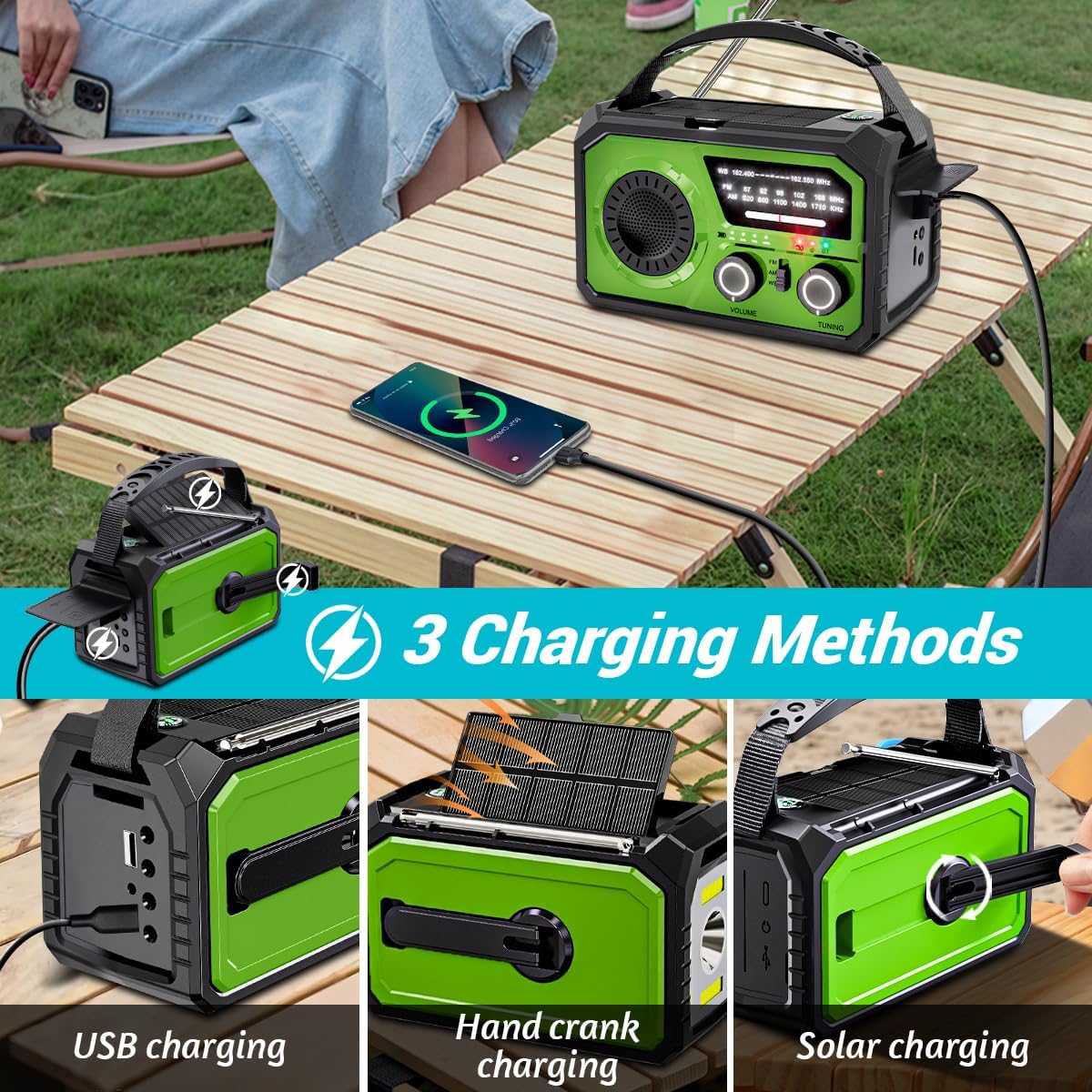
Image: Visual representation of the three charging methods: USB charging, hand crank charging, and solar charging, highlighting the radio's adaptability.
16000mAh Power Bank
Equipped with a 16000mAh/59200mWh built-in battery, it can serve as a power bank to charge external devices like smartphones (5V/3A fast charging).
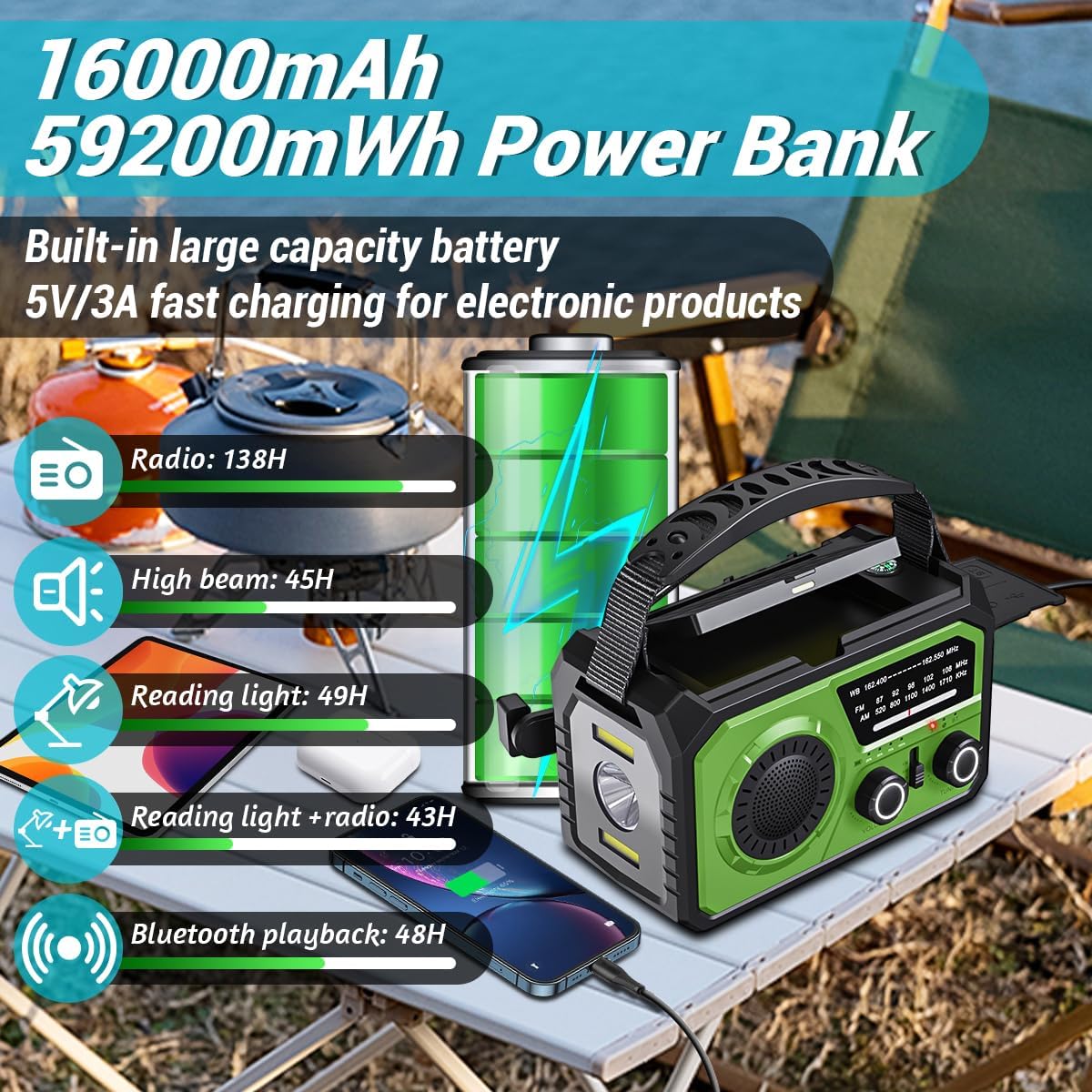
Image: The radio connected to a smartphone via USB, illustrating its power bank capability and showing estimated battery life for different functions like radio, high beam, and reading light.
3-Mode Lighting System
Features a 600LUX spotlight (high beam, dipped beam, far & dipped beam), a reading lamp, and an SOS strobe light for various illumination needs.

Image: Demonstrates the different flashlight modes (Far Beam, Dipped Beam, Far & Dipped Beam) and the reading light, showcasing the radio's versatile illumination features.
SOS Alarm & Compass
Includes an 80dB SOS alarm for emergencies and a 360° compass for navigation.

Image: The radio with an SOS alarm graphic, indicating its emergency signaling capability.

Image: A person holding the radio, highlighting its integrated compass for outdoor navigation.
Wireless Audio Streaming
Supports Bluetooth 5.3 for wireless audio streaming from compatible devices within a 33ft range, and includes a 3.5mm headphone jack for private listening.

Image: Shows individuals enjoying music outdoors, demonstrating the radio's Bluetooth connectivity and headphone jack for entertainment.
Setup
Initial Charging
Before first use, fully charge the radio using the provided Type-C USB cable. Connect the cable to the radio's USB-C port and a compatible USB power adapter (not included). The charging indicator lights will show the charging status.
Antenna Setup
For optimal radio reception, extend the telescopic antenna fully when using AM/FM/NOAA functions.
Operating Instructions
Power On/Off
Rotate the 'Volume' knob clockwise to turn the radio on and adjust the volume. Rotate counter-clockwise until it clicks to turn off.
Radio Tuning (AM/FM/NOAA)
- Select the desired band (AM, FM, or WB for NOAA) using the band switch.
- Rotate the 'Tuning' knob to scan for stations. The frequency display will indicate the current frequency.
- For NOAA weather alerts, ensure the WB band is selected. The radio will automatically alert you to severe weather broadcasts.
Flashlight Operation
Press the dedicated flashlight button to cycle through the different lighting modes: High Beam, Dipped Beam, Far & Dipped Beam, and off.
Reading Lamp Operation
Locate the reading lamp panel and activate it using its dedicated switch or button. This provides diffused light for close-range illumination.
SOS Alarm Activation
Press and hold the SOS button to activate the loud alarm and flashing strobe light. Press again to deactivate.
Power Bank Function
Connect your external device to the radio's USB-A output port using your device's charging cable. The radio will begin charging your device.
Bluetooth Connectivity
Switch the radio to BT mode. The radio will enter pairing mode. On your device, search for "H21" (or similar) in the Bluetooth settings and connect. Once paired, you can stream audio wirelessly.
Maintenance
- Cleaning: Wipe the radio with a soft, dry cloth. Do not use harsh chemicals or abrasive cleaners.
- Storage: Store the radio in a cool, dry place away from direct sunlight and extreme temperatures.
- Battery Care: For optimal battery life, fully charge the radio at least once every three months, even if not in use.
Troubleshooting
| Problem | Possible Cause | Solution |
|---|---|---|
| Radio does not turn on. | Battery is depleted. | Charge the radio using USB, hand crank, or solar panel. |
| Poor radio reception. | Antenna not extended or weak signal. | Fully extend the telescopic antenna. Try repositioning the radio for better signal. |
| External device not charging. | Radio battery low or incorrect cable. | Ensure the radio has sufficient charge. Verify the charging cable is correctly connected and compatible with your device. |
| Bluetooth not connecting. | Radio not in BT mode or device too far. | Switch the radio to BT mode. Ensure your device's Bluetooth is on and within 33ft of the radio. |
Specifications
| Feature | Detail |
|---|---|
| Product Dimensions | 6.14 x 2.99 x 3.93 inches |
| Item Weight | 2.01 pounds |
| Model Number | H21 |
| Battery Capacity | 16000mAh/59200mWh |
| Charging Options | Hand Crank, Solar, USB-C |
| Tuner Technology | AM/FM/NOAA |
| Special Features | Built-In Flashlight, Dust Resistant, Rechargeable, SOS Alarm, Compass, Power Bank |
| Connectivity Technology | Bluetooth 5.3 |
Warranty & Support
The FFQRLP H21 Emergency Radio comes with an 18-month warranty. For any product problems or assistance, please contact our US-based support team, available 24/7 for your convenience.
Ask a question about this manual
Ask about setup, troubleshooting, compatibility, parts, safety, or missing instructions. Manuals+ will review the question and use this page’s manual context to help answer it.