1. Introduction
Thank you for choosing the Fomatrade Digital Stopwatch Model 23. This professional electronic chronograph is designed for precise time measurement in various sports and training activities. It features a large display, multiple functions including time, date, and alarm, and is built with a lightweight, waterproof design. This manual provides detailed instructions to help you set up and operate your stopwatch effectively.
2. Product Overview
Familiarize yourself with the components and controls of your Fomatrade Digital Stopwatch.
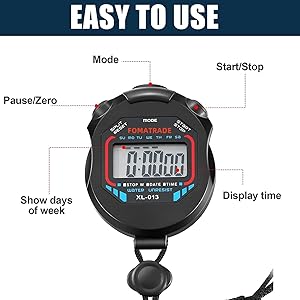
Image 2.1: Stopwatch Controls and Display. This diagram illustrates the main buttons and display areas of the Fomatrade Digital Stopwatch. Key buttons include 'Mode', 'Start/Stop', and 'Split/Reset'. The display shows time, date, and stopwatch readings.
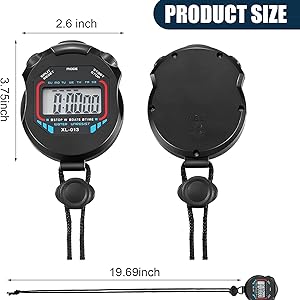
Image 2.2: Stopwatch Dimensions. This image provides the physical dimensions of the stopwatch, including its width (2.6 inches), height (3.75 inches), and lanyard length (19.69 inches).
Key Components:
- Display: Large digital screen for clear visibility of time, date, and stopwatch readings.
- MODE Button: Cycles through different operating modes (Time, Stopwatch, Alarm).
- START/STOP Button: Initiates and pauses the stopwatch, or adjusts settings in setup modes.
- SPLIT/RESET Button: Records split times during stopwatch operation, or resets the stopwatch/adjusts settings.
- Lanyard: For convenient carrying and securing the stopwatch.
3. Setup
Battery Installation:
The stopwatch comes with a CR2032 button battery pre-installed. If the display is dim or unresponsive, the battery may need replacement. Refer to the Maintenance section for battery replacement instructions.
Initial Power On:
The stopwatch should power on automatically once the battery is correctly installed. If the display remains blank, press any button to activate it. The device typically defaults to the Time mode.
4. Operating Instructions
The Fomatrade Digital Stopwatch has three main operating modes: Time Mode, Stopwatch Mode, and Alarm Mode. Use the MODE button to switch between these functions.
4.1. Time Mode (Default Display)
In Time Mode, the display shows the current time (hours, minutes, seconds), day of the week, and date.
Setting Time and Date:
- From Time Mode, press the MODE button three times to enter the Time Setting mode. The seconds will begin to flash.
- Press the SPLIT/RESET button to reset the seconds to zero.
- Press the START/STOP button to advance to the next setting (hours).
- Use the SPLIT/RESET button to adjust the flashing value (hours, then minutes, month, date, day of the week).
- Continue pressing START/STOP to cycle through hours, minutes, month, date, and day of the week. Adjust each flashing value with the SPLIT/RESET button.
- Once all settings are adjusted, press the MODE button to exit Time Setting mode and return to normal Time Mode.
4.2. Stopwatch Mode
This mode is used for timing events. The display will show 0:00:00 when you enter this mode.
Basic Stopwatch Operation:
- From Time Mode, press the MODE button once to enter Stopwatch Mode.
- Press the START/STOP button to begin timing.
- Press the START/STOP button again to pause the timing.
- To resume timing, press START/STOP again.
- To reset the stopwatch to zero, ensure it is paused, then press the SPLIT/RESET button.
Split Time Function:
The split time function allows you to record intermediate times without stopping the main timer.
- From Stopwatch Mode, press the START/STOP button to begin timing.
- While the stopwatch is running, press the SPLIT/RESET button to display the split time. The main timer continues to run in the background.
- Press the SPLIT/RESET button again to return to the running main timer display.
- Repeat step 2 and 3 to record multiple split times.
- To stop the main timer, press the START/STOP button.
- To view the final time and reset, press the SPLIT/RESET button.
4.3. Alarm Mode
This mode allows you to set and activate an alarm.
Setting the Alarm:
- From Time Mode, press the MODE button twice to enter Alarm Mode. The alarm time will be displayed.
- Press the SPLIT/RESET button to toggle the alarm on or off. An alarm icon will appear when activated.
- To set the alarm time, press the START/STOP button. The hour digits will flash.
- Use the SPLIT/RESET button to adjust the hour.
- Press the START/STOP button to move to the minute digits.
- Use the SPLIT/RESET button to adjust the minutes.
- Press the MODE button to confirm the alarm time and exit Alarm Setting mode.
5. Maintenance
Cleaning:
Wipe the stopwatch with a soft, dry cloth. For stubborn dirt, a slightly damp cloth can be used. Avoid harsh chemicals or abrasive cleaners.
Water Resistance:
The Fomatrade Digital Stopwatch is designed to be waterproof, making it suitable for use in various weather conditions. However, it is not recommended for prolonged submersion or use during diving. Avoid pressing buttons underwater to prevent water ingress.
Battery Replacement:
The stopwatch uses one CR2032 button battery. When the display becomes dim or the stopwatch functions erratically, it's time to replace the battery.
- Locate the battery compartment on the back of the stopwatch. It typically has a small screw or a twist-off cover.
- Carefully open the compartment using a small screwdriver or coin, as appropriate.
- Remove the old CR2032 battery. Note its orientation (positive (+) side up).
- Insert a new CR2032 battery with the positive (+) side facing up.
- Securely close the battery compartment.
- Test the stopwatch to ensure it functions correctly. You may need to reset the time and date after battery replacement.
6. Troubleshooting
- Display is blank or dim:
Check the battery. Replace the CR2032 battery if necessary. Ensure the battery is inserted with the correct polarity. - Buttons are unresponsive:
Ensure the stopwatch is not in a locked state (if applicable, though this model does not feature a lock). Try removing and reinserting the battery to perform a hard reset. - Incorrect time or date:
Follow the instructions in section 4.1 to reset the time and date. - Stopwatch not starting/stopping:
Ensure you are in Stopwatch Mode (press MODE button once from Time Mode). Press the START/STOP button firmly.
7. Specifications
- Brand: Fomatrade
- Model Number: 23
- Material: Acrylonitrile Butadiene Styrene (ABS)
- Color: Black
- Product Dimensions: 0.01"D x 0.01"W x 0.01"H (Note: Actual usable dimensions are approximately 2.6" W x 3.75" H, including lanyard attachment point)
- Item Weight: 0.16 ounces
- Battery: 1 x CR2032 (included)
- Functions: Time, Date, Day of Week, Stopwatch, Alarm
8. Warranty and Support
Specific warranty information for the Fomatrade Digital Stopwatch Model 23 is not provided in the product details. For warranty claims, technical support, or further assistance, please contact the seller or manufacturer directly through your purchase platform.