
1. Introduction
Thank you for choosing the CHIFENCHY PulseSound Portable Bluetooth Speaker. This manual provides essential information for setting up, operating, and maintaining your device. Please read it thoroughly before use to ensure optimal performance and longevity.
What's Included:
- CHIFENCHY PulseSound Portable Bluetooth Speaker
- Lanyard
- USB-C Charging Cable
- Quick Start Guide
2. Product Overview & Features
The CHIFENCHY PulseSound speaker is designed for portability and powerful audio performance, featuring a dynamic light show and robust connectivity options.

Image: The CHIFENCHY PulseSound Portable Bluetooth Speaker in Teal, showcasing its compact design and water-resistant exterior.
Key Features:
- Dynamic Audio: Experience 15W continuous (20W peak) sound with zero distortion, delivering crisp highs, rich mid-range, and powerful bass.
- IPX5 Waterproof: Designed to withstand splashes and light rain, making it suitable for outdoor use.
- Extended Playtime: Enjoy up to 15 hours of music playback on a single charge.
- Bluetooth 5.3: Ensures fast, stable, and efficient wireless connection with your devices.
- True Wireless Stereo (TWS) Pairing: Connect two PulseSound speakers for an immersive 360° stereo sound experience with a combined 30W output.
- Dynamic Beat-Synced Light Show: Integrated LED lights pulse and change color with the rhythm of your music, enhancing the listening experience.
- Multiple Connectivity Options: Supports Bluetooth, 3.5mm AUX input, and TF card playback (WAV / FLAC / APE / MP3 formats).
- Portable Design: Compact (2.99"D x 2.99"W x 4.25"H) and lightweight (0.688 lbs / 312g) with an included lanyard for easy carrying.
3. Setup
3.1 Charging the Speaker
- Locate the rubber flap on the side of the speaker.
- Gently open the flap to reveal the USB-C charging port.
- Connect the provided USB-C charging cable to the speaker and a compatible USB power adapter (not included).
- The LED indicator will illuminate to show charging status. It typically takes approximately 2 hours for a full charge.
- Once fully charged, disconnect the cable and securely close the rubber flap to maintain the IPX5 waterproof rating.

Image: The speaker's charging port (USB-C), AUX input, and TF card slot, protected by a rubber flap.
3.2 Powering On/Off
- To Power On: Press and hold the Power button (⏻) located on the side of the speaker for 2-3 seconds. You will hear an audible prompt, and the LED light ring will illuminate.
- To Power Off: Press and hold the Power button (⏻) for 2-3 seconds. You will hear an audible prompt, and the LED light ring will turn off.
3.3 Bluetooth Pairing
- Ensure the speaker is powered on and in Bluetooth pairing mode (the LED light ring will flash).
- On your mobile device, enable Bluetooth and search for available devices.
- Select "PulseSound" from the list of devices.
- Once connected, you will hear a confirmation tone, and the LED light ring will stop flashing and display a steady color.
3.4 True Wireless Stereo (TWS) Pairing
For an enhanced stereo experience, you can pair two CHIFENCHY PulseSound speakers together.
- Ensure both PulseSound speakers are powered on and not connected to any other Bluetooth devices.
- On one of the speakers (this will be your primary speaker), double-press the Play/Pause button (▶▶). The speakers will search for each other.
- Once successfully paired, you will hear a confirmation tone. The LED light rings on both speakers will synchronize.
- Now, connect your mobile device to the primary speaker via Bluetooth as described in section 3.3.

Image: Two PulseSound speakers demonstrating TWS pairing for a wider soundstage.
3.5 Using AUX Input / TF Card
- AUX Input: Open the rubber flap and connect a 3.5mm audio cable (not included) from your audio source to the AUX port on the speaker. The speaker will automatically switch to AUX mode.
- TF Card: Insert a TF card (MicroSD card, not included) with WAV, FLAC, APE, or MP3 audio files into the TF card slot under the rubber flap. The speaker will automatically detect the card and begin playback.
4. Operating Instructions
4.1 Button Functions
The speaker features intuitive touch controls on its side panel:
- Power Button (⏻):
- Short Press: Change lighting modes.
- Press and Hold (2-3s): Power On/Off.
- Double-Press: Change audio inputs (Bluetooth, USB, or AUX).
- Volume Up Button (+):
- Short Press: Increase volume.
- Press and Hold: Skip forward to the next track.
- Play/Pause Button (▶▶):
- Short Press: Play/Pause music.
- Press and Hold: Disconnect/Reconnect Bluetooth.
- Double-Press: Access TWS pairing mode (when two speakers are present).
- Volume Down Button (-):
- Short Press: Decrease volume.
- Press and Hold: Skip back to the previous track.
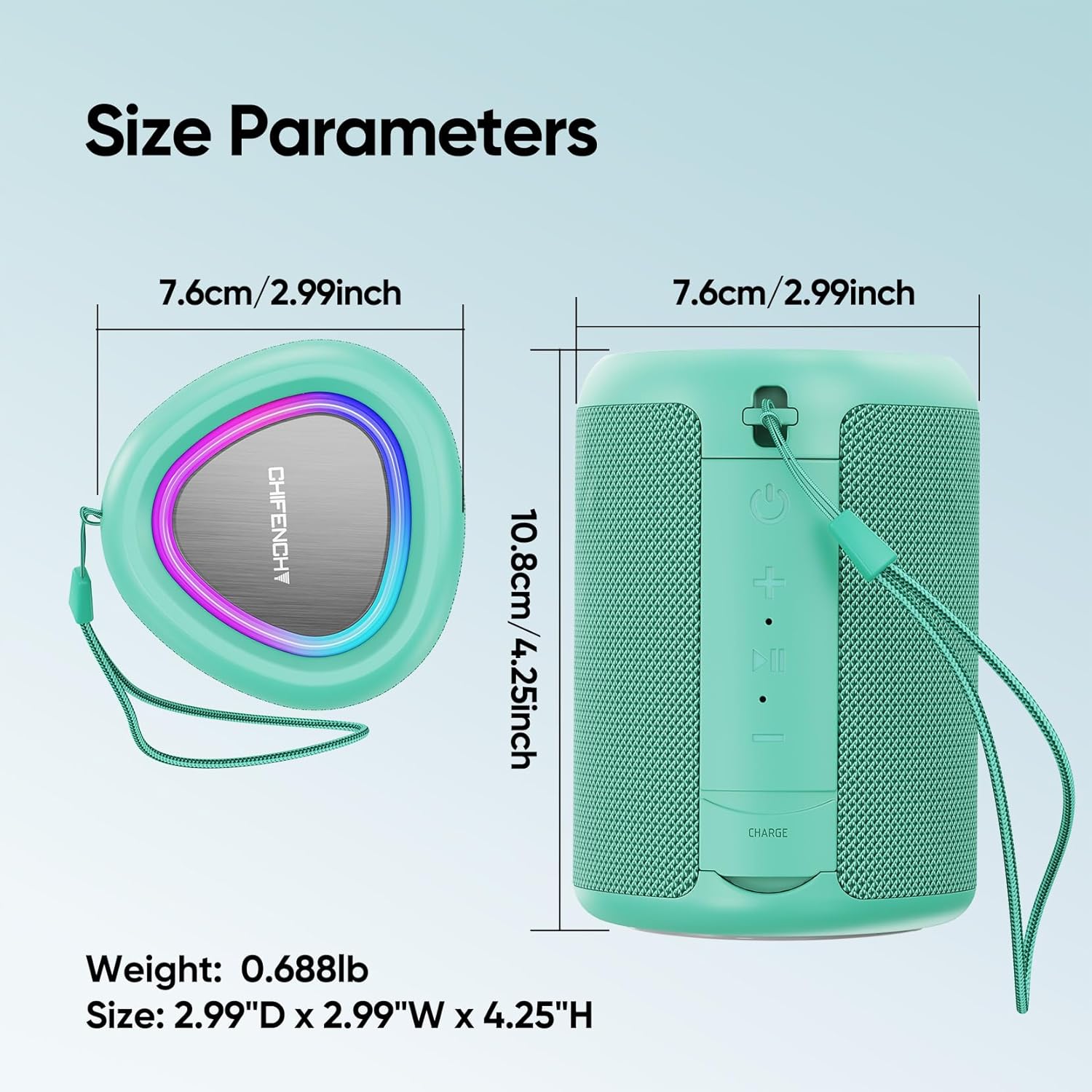
Image: Detailed view of the speaker's control panel with power, volume, and play/pause buttons.
4.2 Dynamic Light Show
The PulseSound speaker features an LED light ring that synchronizes with your music. Short press the Power button (⏻) to cycle through different lighting modes or turn the lights off.

Image: The speaker's top panel with the LED light ring displaying different colors, syncing with music beats.
5. Maintenance
- Cleaning: Use a soft, damp cloth to clean the speaker. Do not use harsh chemicals or abrasive cleaners.
- Waterproof Care: Always ensure the rubber flap covering the charging and input ports is securely closed when using the speaker near water to maintain its IPX5 waterproof rating. Do not submerge the speaker.
- Storage: Store the speaker in a cool, dry place away from direct sunlight and extreme temperatures.
- Battery: To prolong battery life, fully charge the speaker before its first use and recharge it at least once every three months if not used regularly.
6. Troubleshooting
| Problem | Solution |
|---|---|
| Speaker does not power on. | Ensure the battery is charged. Connect the speaker to a power source using the provided USB-C cable. |
| Cannot pair via Bluetooth. |
|
| No sound or low volume. |
|
| TWS pairing failed. |
|
7. Specifications
| Feature | Detail |
|---|---|
| Brand | CHIFENCHY |
| Model Name | PulseSound (A46) |
| Dimensions | 2.99"D x 2.99"W x 4.25"H (7.6cm x 7.6cm x 10.8cm) |
| Weight | 0.688 lbs (312g) |
| Speaker Output Power | 15W (Continuous), 20W (Peak) |
| Bluetooth Version | 5.3 |
| Bluetooth Range | Up to 100 feet |
| Water Resistance | IPX5 (Waterproof) |
| Battery Life | Up to 15 hours |
| Charging Port | USB-C |
| Other Inputs | 3.5mm AUX, TF Card Slot (WAV/FLAC/APE/MP3) |
| Special Features | LED Light Show, TWS Pairing, Portable Lanyard |

Image: Visual representation of the speaker's size parameters and weight.
8. Warranty and Support
The CHIFENCHY PulseSound Portable Bluetooth Speaker comes with a limited warranty. Please refer to the included Quick Start Guide for specific warranty terms and conditions.
For technical support, warranty claims, or any inquiries, please contact our customer support team:
- Email: support@chifenchy.net