
1. Introduction
Thank you for purchasing the TONGYOR SMSL C200 DAC+Headphone Amplifier. This device is designed to provide high-fidelity audio conversion and amplification for various audio sources. This manual provides detailed instructions for setup, operation, and maintenance to ensure optimal performance and longevity of your product. Please read this manual thoroughly before use.

Image 1.1: The SMSL C200 DAC+Headphone Amplifier shown with its remote control. The device features a black chassis, a central function knob, and a digital display.
2. Package Contents
Please check the package contents upon unboxing to ensure all items are present:
- 1 x Remote Control
- 1 x Bluetooth Antenna
- 1 x USB Cable
- 1 x AC Power Cable
- 1 x User Manual (this document)
3. Product Overview
The SMSL C200 integrates a Digital-to-Analog Converter (DAC) and a headphone amplifier, utilizing an ESS ES9038Q2M chip for high-quality audio processing. It supports various input and output options for versatile connectivity.

Image 3.1: A graphic highlighting the key features of the SMSL C200, including the ESS ES9038Q2M chip, 4x OPA1612A op-amps, TRS balanced output, 4.4mm/6.35mm headphone outputs, Bluetooth 5.0, full-function remote control, and Hi-Res Audio support.
3.1 Front Panel
- 6.35mm Headphone Jack: Standard headphone output.
- 4.4mm Balanced Headphone Jack: Balanced headphone output for enhanced audio quality.
- Function Knob: Multi-functional knob for volume control, input selection, and menu navigation.
- Display Screen: Shows current input, sample rate, and volume level.
- Infrared Receiving Window: For remote control signals.
3.2 Rear Panel

Image 3.2: A detailed diagram of the SMSL C200's rear panel, illustrating all input and output ports. These include AC power input, Bluetooth antenna connector, Optical input, USB input, Coaxial input, RCA output, and TRS balanced output.
- AC Power Input (AC100-240V): Connect the provided AC power cable.
- Bluetooth Antenna: Screw in the included Bluetooth antenna for wireless connectivity.
- Optical Input: For connecting optical audio sources.
- USB Input: For connecting to computers, game consoles, or mobile devices.
- Coaxial Input: For connecting coaxial audio sources.
- RCA Output: Unbalanced analog audio output for connecting to external amplifiers or active speakers.
- TRS Balanced Output: Balanced analog audio output for connecting to professional audio equipment.
4. Setup
4.1 Initial Connection
- Power Connection: Connect the AC power cable to the C200's AC Power Input and then to a wall outlet.
- Bluetooth Antenna: Screw the provided Bluetooth antenna onto the designated connector on the rear panel.
- Audio Source Connection:
- USB: Connect a USB cable from your computer, game console (PS4/PS5/Xbox), or mobile device to the C200's USB Input.
- Optical/Coaxial: Connect an optical or coaxial cable from your audio source (e.g., TV, CD/DVD player) to the corresponding input on the C200.
- Output Connection:
- Headphones: Plug your headphones into either the 6.35mm or 4.4mm balanced headphone jack on the front panel.
- External Amplifier/Speakers: Connect the C200's RCA or TRS balanced outputs to your external amplifier or active speakers.
4.2 Driver Installation (for Windows USB 2.0 Mode)
For Windows operating systems using USB 2.0 mode, a driver installation is required to achieve high-standard sampling rates. For Mac OSX 10.6 or later, Linux, and Android, the device is driverless.
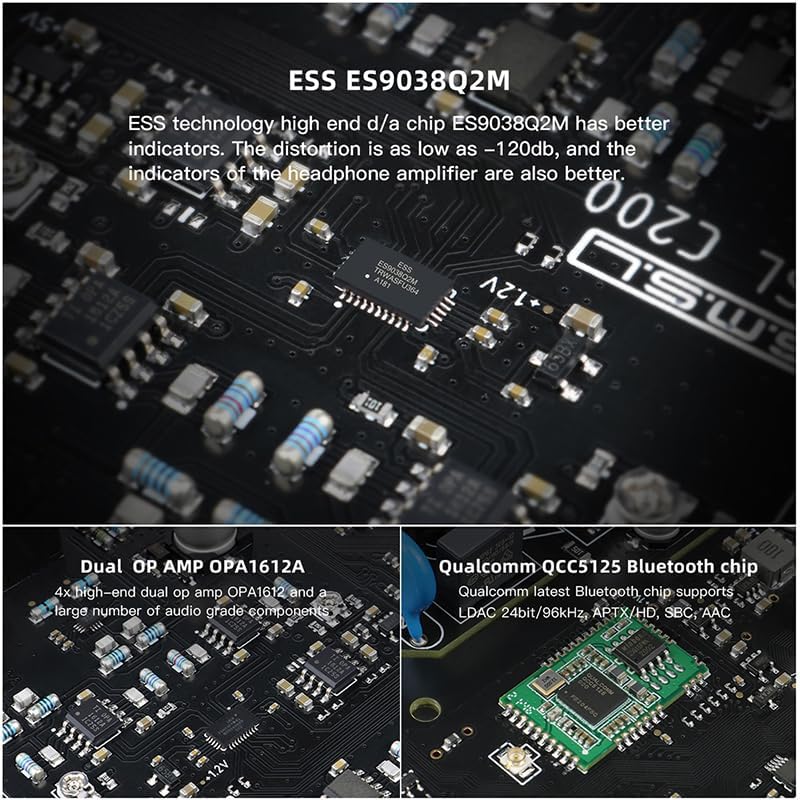
Image 4.1: A visual representation of the USB input modes, U1.1 and U2.0, highlighting compatibility with game consoles like PS4, PS5, and Switch. U1.1 is driverless, while U2.0 requires a driver for Windows systems.
- USB 1.1 Mode: All USB devices can be connected without a driver. This mode supports up to 24bit/96kHz and is compatible with various game consoles (e.g., XBOX, PS4, PS5) and other devices.
- USB 2.0 Mode: For Windows systems, a dedicated driver must be installed to enable higher sampling rates (up to 32bit/768kHz PCM, DSD512). The driver can typically be found on the manufacturer's official website.
5. Operating Instructions
5.1 Power On/Off
- Power On: Press the Function Knob briefly. The display will light up.
- Power Off: Press and hold the Function Knob for approximately 3 seconds. The display will turn off.
5.2 Input Selection
Briefly press the Function Knob to cycle through the available inputs: USB, Optical, Coaxial, Bluetooth. The selected input will be shown on the display.
5.3 Volume Control
Rotate the Function Knob clockwise to increase volume and counter-clockwise to decrease volume. The current volume level will be displayed.
5.4 Gain Setting
The C200 offers high and low gain options for the headphone output. This setting can typically be adjusted via the remote control or by accessing the device's menu (refer to the remote control section for details).
- Low Gain: 0dB (suitable for sensitive headphones)
- High Gain: 11dB (suitable for less sensitive headphones)
5.5 Remote Control
The included remote control provides full functionality for operating the C200 from a distance. Functions include power on/off, input selection, volume adjustment, and menu navigation (e.g., gain settings).

Image 5.1: The SMSL C200 unit positioned next to its black remote control, illustrating the compact design of both components.
6. Bluetooth Pairing
To connect a Bluetooth device to the C200:
- Select 'Bluetooth' as the input source on the C200 using the Function Knob or remote. The display will indicate Bluetooth mode.
- On your mobile device or computer, enable Bluetooth and search for available devices.
- Select 'SMSL C200' from the list of found devices to initiate pairing.
- Once paired, the C200's display will confirm the connection, and audio will be streamed wirelessly.
The C200 supports various Bluetooth codecs:
- LDAC: 24bit/96kHz (up to 990kbps)
- aptX-HD: 24bit/48 kHz (up to 576kbps)
- aptX: 16bit/44.1 kHz (up to 352kbps)
- SBC: 16bit/44.1 kHz (up to 328kbps)
- AAC: 16bit/44.1 kHz (up to 320kbps)
Note: Bluetooth input does not support DSD transmission.
7. Specifications
| Input | USB / Optical / Coaxial / Bluetooth |
| Output | 6.35mm headphone / 4.4mm headphone / TRS / RCA |
| Output Level (TRS) | 4.0Vrms |
| Output Level (RCA) | 2.0Vrms |
| Headphone Output Power (16Ω) | 2.6Wx2 |
| Headphone Output Power (32Ω) | 1.3Wx2 |
| Headphone Gain | Low gain 0dB, High gain 11dB |
| THD+N (Line Out) | 0.0001% (-120dB) |
| THD+N (HP Out) | 0.00013% (-117dB) |
| Dynamic Range (TRS) | 126dB |
| Dynamic Range (RCA) | 125dB |
| Dynamic Range (HP Out) | 123dB |
| SNR (TRS) | 126dB |
| SNR (RCA) | 124dB |
| SNR (HP Out) | 123dB |
| Output Impedance (Line Out) | 100Ω |
| Output Impedance (HP Out) | Near 0Ω |
| USB Transmission | USB1.1, USB2.0 (Asynchronization) |
| USB Compatibility | Windows 7/8/8.1/10/11 (Needs Driver), Android, Mac OSX10.6 or Later, Linux (Driverless) |
| Bit Depth (USB) | 1bit, 16~32bit |
| Bit Depth (Optical/Coaxial) | 1bit, 16~24bit |
| Sampling Rate (USB PCM) | 44.1~768kHz |
| Sampling Rate (USB DSD) | 2.8224~22.5792MHz |
| Sampling Rate (Optical/Coaxial PCM) | 44.1~192kHz |
| Sampling Rate (Optical/Coaxial DSD) | DSD64 (DoP) |
| Bluetooth Specification | 5.0 |
| Power Consumption | 5W |
| Standby Power | <0.5W |
| Dimensions (WxHxD) | 139x32x147.5mm |
| Weight | 510g / 1.12Ibs |
8. Maintenance
- Cleaning: Use a soft, dry cloth to clean the exterior of the device. Avoid using abrasive cleaners or solvents.
- Ventilation: Ensure the device has adequate ventilation. Do not block any ventilation openings.
- Environment: Keep the device away from direct sunlight, heat sources, excessive dust, moisture, and strong electromagnetic fields.
- Power Off: Disconnect the power cable if the device will not be used for an extended period.
9. Troubleshooting
9.1 No Sound Output
- Check if the C200 is powered on.
- Verify that the correct input source is selected on the C200.
- Ensure headphones or external speakers are properly connected and their volume is not muted or set too low.
- Check the volume level on the C200 and the connected audio source.
- If using USB, ensure the correct driver is installed for Windows (USB 2.0 mode).
9.2 Bluetooth Connection Issues
- Ensure the Bluetooth antenna is securely attached.
- Make sure the C200 is in Bluetooth input mode.
- Delete 'SMSL C200' from your device's Bluetooth list and attempt to re-pair.
- Ensure your Bluetooth device is within range of the C200.
9.3 Remote Control Not Responding
- Check if the remote control's batteries need replacement.
- Ensure there are no obstructions between the remote and the C200's infrared receiving window.
- Point the remote directly at the C200's front panel.
10. Warranty and Support
The TONGYOR SMSL C200 DAC+Headphone Amplifier comes with a standard manufacturer's warranty. For specific warranty terms, duration, and support inquiries, please refer to the warranty card included in your package or contact your retailer or the manufacturer directly. Please retain your proof of purchase for warranty claims.


