
S1
User Manual: Open Ear Swimming Headphones (Model S1)
Brand: Generic
1. Introduction
The Generic S1 Open Ear Swimming Headphones are designed for aquatic activities, featuring bone conduction technology and IPX8 waterproofing. This manual provides comprehensive instructions for setup, operation, and maintenance to ensure optimal performance and longevity of your device.

Image: Front and back view of the S1 Open Ear Swimming Headphones, showcasing their compact design and connection cable.
2. What's in the Box
- 1 x S1 Underwater MP3 Player (Headphones)
- 1 x USB Magnetic Dock Charging Cable
- 1 x User's Manual
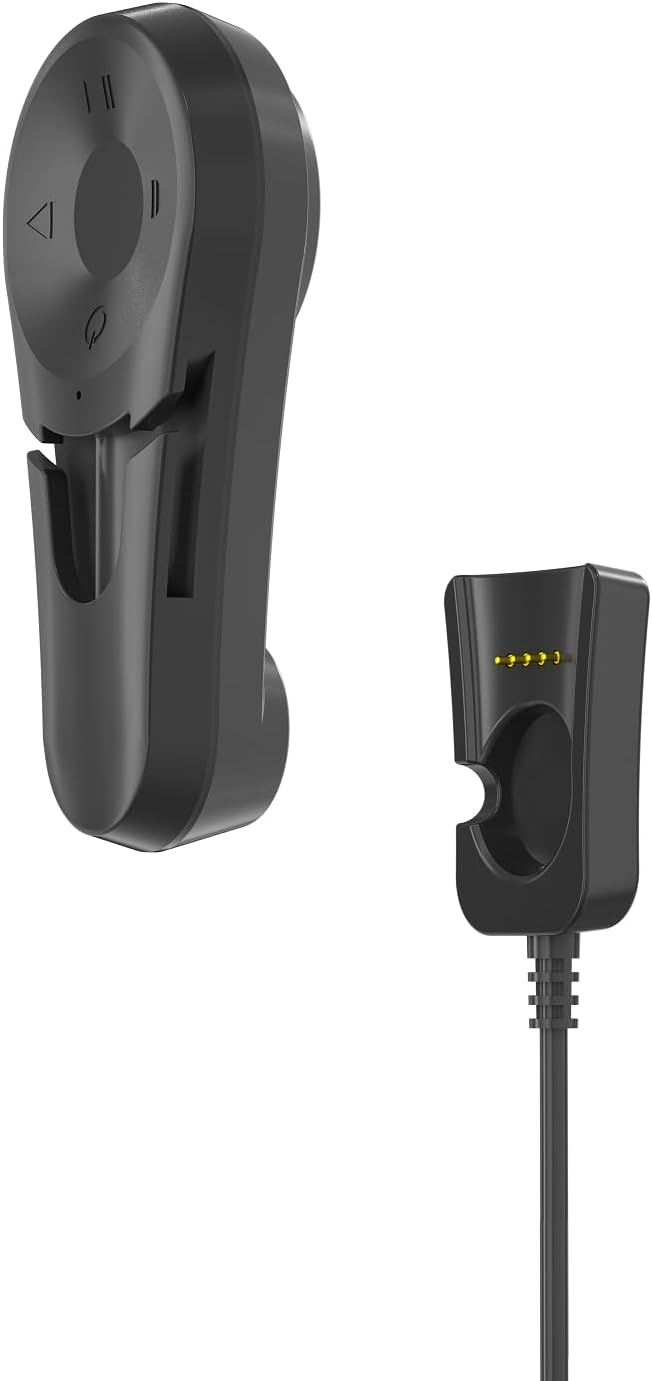
Image: The S1 headphones alongside their magnetic charging dock and cable.
3. Product Features
- Bone Conduction Audio Transmission: Professional 15.8mm bone conduction horn vibrator for clear sound.
- IPX8 Waterproof Rating: Submersible up to 66 feet (20m), ideal for swimming and diving.
- Built-in MP3 Player: 32GB internal storage (stores over 9,000 songs), supports MP3, WMA, FLAC, APE, M4A.
- Bluetooth Connectivity: For wireless audio streaming when out of water. Note: Bluetooth signal is isolated in water, requiring MP3 mode for underwater use.
- Secure Clip Design: Attaches to swimming goggle straps for a stable and comfortable fit on cheekbones.
- Long Battery Life: Up to 16 hours of playtime (depending on settings and volume level).
- One-handed Operation: All buttons are conveniently located on the left side with raised markings for easy use while swimming.

Image: Key features of the S1 headphones, highlighting their waterproof rating, battery life, Bluetooth, and MP3 storage capacity.
4. Setup Guide
4.1 How to Wear
The S1 headphones are designed to clip onto your swimming goggle straps, allowing the bone conduction speakers to rest on your temple bones for optimal sound clarity without covering your ears.
- Identify the left (L) and right (R) sides of the headphones.
- Slide your swimming goggle straps through the brackets on the back of each speaker.
- Adjust the goggles and headphones so the bone conduction speakers rest firmly on your temple bones, not over your ears.

Image: Visual guide demonstrating the three steps for correctly fitting the S1 headphones with swimming goggles.

Image: Close-up of the S1 headphones' integrated clip design, showing them securely attached to swimming goggle straps.
4.2 Charging
Before first use, fully charge your S1 headphones for 24 hours. Subsequent charges take approximately 3 hours from empty to full. Playtime is up to 8 hours, depending on settings and volume level.
- Locate the gold connectors on the back of the headphone unit that has the control buttons.
- Align these connectors with the pins on the USB magnetic dock.
- Connect the USB magnetic dock to a computer's USB port. Your computer should automatically recognize the device.
- The device will automatically turn off if the battery is depleted.

Image: A visual representation of the charging process, music upload, and switching between Bluetooth and MP3 modes.
4.3 Pairing (Bluetooth Mode)
For the first time use, the headphones need to be paired manually with your Bluetooth-enabled device.
- Press and hold the Power button for 3 seconds. A voice prompt will say "Power on".
- Start the Bluetooth function on your phone or device and search for available Bluetooth devices.
- Find "S1" in the device list and click to connect. Once connected, the phone will indicate a successful connection.
4.4 Loading Music (MP3 Mode)
The S1 has a built-in 32GB MP3 player for storing music directly on the device, which is essential for underwater listening as Bluetooth signals do not transmit through water.
- Connect the S1 player to your computer using the USB magnetic dock charging cable.
- Your computer should recognize the device as a removable disk.
- Drag and drop your desired music files (MP3, WMA, FLAC, APE, M4A) into the player's storage folder.
- Safely eject the device from your computer once files are transferred.

Image: A swimmer demonstrating the use of S1 bone conduction headphones in a pool, highlighting their design for underwater use.
5. Operating Instructions
5.1 Controls Overview
All control buttons are located on the left headphone unit for easy access.
| Button/Function | Action |
|---|---|
| Power Button (Center) | Press and hold for 3 seconds to Power ON/OFF. Short press to switch between Bluetooth and MP3 modes. |
| Volume "+" / Next Track | Short press for Volume Up. Long press for Next Track. |
| Volume "-" / Previous Track | Short press for Volume Down. Long press for Previous Track. |
| Play/Pause Button | Press to Play/Pause. Answer/End/Reject calls. |

Image: Detailed view of the control buttons on the S1 headphones, including power, volume, and track navigation.
5.2 Mode Switching
To switch between Bluetooth mode and MP3 player mode, short press the Power button. A voice prompt will indicate the current mode.
5.3 Call Handling
When connected via Bluetooth, you can manage calls using the Play/Pause button:
- Answer/End Call: Short press the Play/Pause button.
- Reject Call: Long press the Play/Pause button.
6. Maintenance and Care Instructions
- After each use, especially in chlorinated or saltwater, rinse the headphones with fresh water.
- Wipe dry with a soft cloth. Do not use abrasive cleaners or materials.
- Store the headphones in a cool, dry place away from direct sunlight and extreme temperatures.
- Avoid pressing the control buttons with excessive force or sharp objects, as this may cause damage.
- Ensure the magnetic charging contacts are clean and dry before charging to prevent corrosion.

Image: The S1 headphones partially submerged in water, illustrating their waterproof capability.
7. Troubleshooting
| Problem | Possible Cause / Solution |
|---|---|
| No power / Device won't turn on. | Battery is depleted. Charge the device fully. Ensure magnetic contacts are clean and properly aligned. |
| Cannot pair via Bluetooth. | Ensure the headphones are in Bluetooth mode. Make sure the device is within range (approx. 10m/33ft). Turn off and on Bluetooth on your phone/device. Forget "S1" from your device's Bluetooth list and try pairing again. |
| No sound or low volume. | Adjust volume on both the headphones and your connected device. Ensure speakers are correctly positioned on temple bones. If underwater, switch to MP3 mode as Bluetooth does not work in water. Check if music files are corrupted if using MP3 mode. |
| Music skipping or not playing correctly (MP3 mode). | Ensure music files are in supported formats (MP3, WMA, FLAC, APE, M4A). Re-upload files to the device. |
| Computer does not recognize the device. | Ensure the USB magnetic dock is securely connected to both the headphones and the computer. Try a different USB port or cable. Restart your computer. |
8. Specifications
| Feature | Detail |
|---|---|
| Model Name | S1 |
| Brand | Generic |
| Connectivity Technology | Wireless (Bluetooth) |
| Audio Driver Type | Bone Conduction Driver (15.8mm) |
| Water Resistance Level | IPX8 (up to 20m/66 feet) |
| Internal Storage | 32GB (approx. 9,000+ songs) |
| Supported Audio Formats | MP3, WMA, FLAC, APE, M4A |
| Battery Life | Up to 16 hours playtime |
| Charging Time | Approx. 3 hours (from empty to full) |
| Item Weight | 4.2 ounces |
| Material | Plastic |
| Color | Black |
9. Official Product Video
Video: An official product video showcasing the S1 Swimming Headphones, their waterproof capabilities, and how they are used for various water activities.
10. Warranty and Support
For warranty information and customer support, please refer to the contact details provided on the product packaging or the official Generic brand website. Keep your purchase receipt for warranty claims.