
1. Introduction and Overview
The Wurkkos DL08 is a high-performance dive light designed for various underwater applications, including recreational diving, underwater photography, and night exploration. It integrates multiple lighting modes and advanced features to provide reliable and versatile illumination in challenging aquatic environments.
Key features include:
- 4-in-1 Lighting: Equipped with 9 LED bulbs offering spotlight (up to 2000 lumens), floodlight (up to 3600 lumens), red light, and UV light modes.
- Ultra-High Brightness: Floodlight mode provides a wide 133-degree beam with a maximum brightness of 3600 lumens and a high Color Rendering Index (90 CRI) for accurate color reproduction.
- Intuitive Controls: Features a rotary switch for mode selection and a middle button for brightness adjustment and power control.
- Dual Brightness Adjustment: Allows switching between four preset brightness levels or continuous stepless adjustment from 10 to 3600 lumens.
- Durable and Waterproof: Constructed from AL6061-T6 aluminum alloy with thickened tempered glass and a double-layer waterproof rubber ring, ensuring IPX8 water resistance up to 100 meters.
- Rechargeable: Integrated Type-C charging port for convenient recharging of the included 5000mAh Lithium-Ion battery.
2. Package Contents
Please verify that all items are present in your package:
- Wurkkos DL08 Dive Light
- USB Type-C Charging Cable
- Lanyard
- Spare O-rings (2)
- User Manual
- 1-inch Camera Ball Mount (pre-installed or included separately)

Image: Contents of the Wurkkos DL08 package.
3. Setup
3.1 Initial Battery Preparation
Before first use, the battery compartment (end cap) must be unscrewed to access the battery. Remove the negative contact insulator disc located between the battery and the contact point. This insulator prevents accidental discharge during shipping. Re-screw the end cap firmly to ensure proper contact and water resistance.

Image: Internal view of the light, highlighting the battery compartment.
3.2 Charging the Battery
The DL08 features a built-in USB Type-C charging port. To charge, unscrew the head of the flashlight to reveal the Type-C port. Connect the provided USB Type-C cable to the light and a compatible USB power source (e.g., wall adapter, power bank, computer USB port). The indicator light on the switch will show charging status.
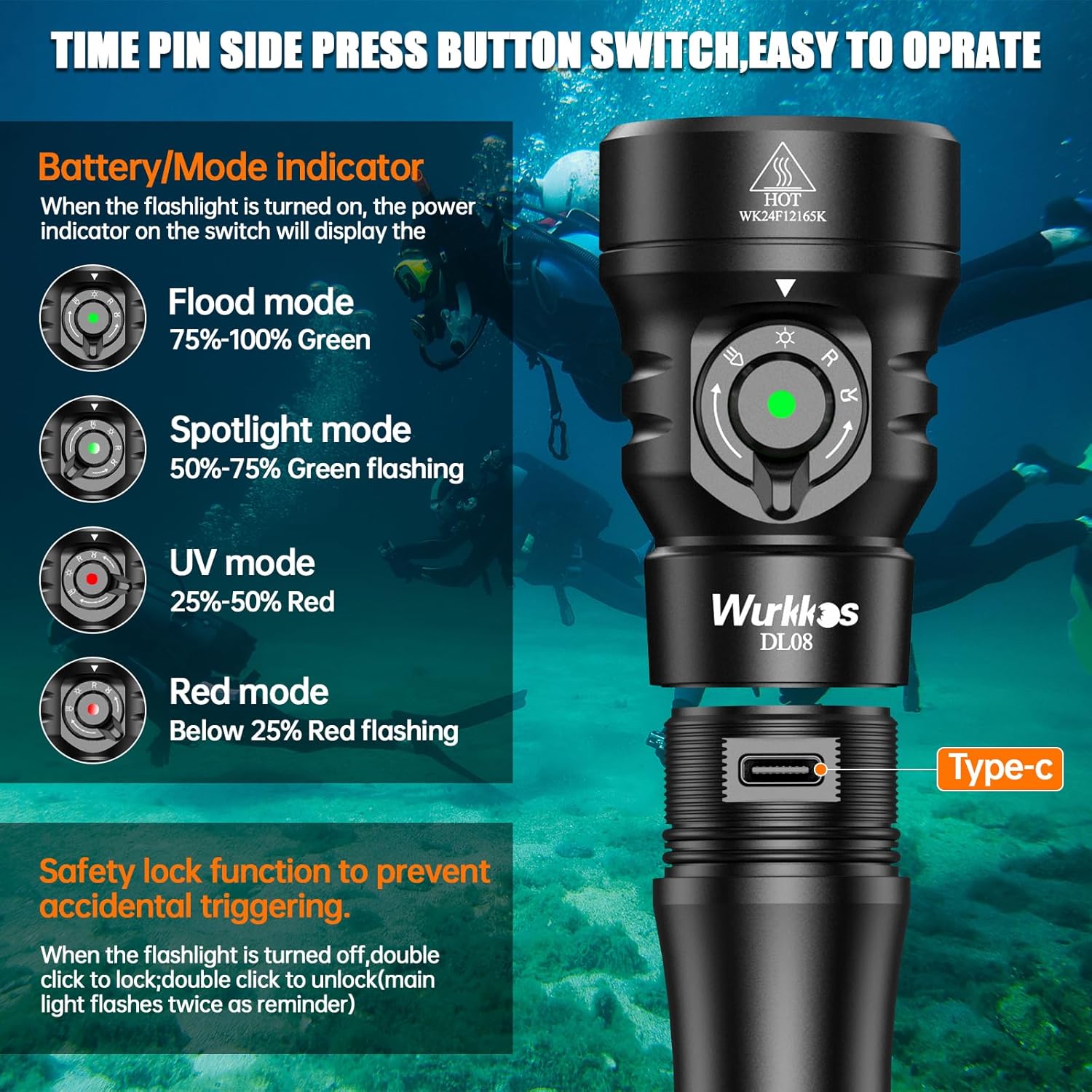
Image: The Type-C charging port is revealed by unscrewing the light head.
4. Operating Instructions
4.1 Power On/Off
To turn the light on or off, press and hold the middle button on the rotary switch for a few seconds.
4.2 Mode Selection
The DL08 offers four distinct lighting modes, controlled by the rotary switch:
- Spotlight Mode: Provides a concentrated beam for long-distance illumination (12° beam angle).
- Floodlight Mode: Offers a wide, even beam for broad area illumination (133° beam angle).
- Red Light Mode: Ideal for preserving night vision and for approaching shy marine life.
- UV Light Mode: Used for observing fluorescent marine organisms.
Rotate the switch to select the desired lighting mode.
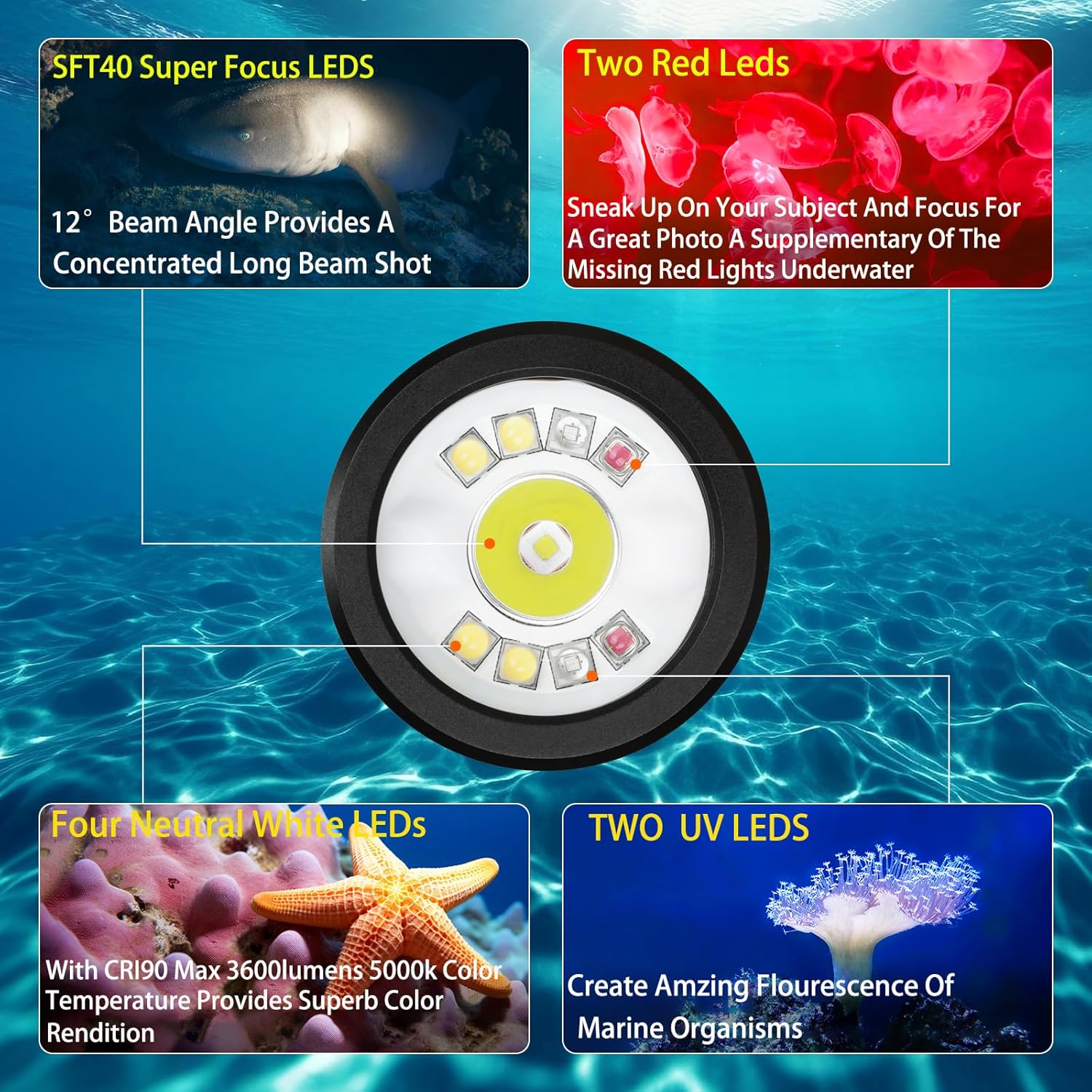
Image: Light head showing different LED types for various modes.

Image: Detail of the rotary mode selection switch.
4.3 Brightness Adjustment (Dual Mode)
The DL08 supports two methods for brightness adjustment:
- Stepped Dimming: Press the middle button repeatedly to cycle through four preset brightness levels (Low, Medium, High, Turbo) within the selected mode.
- Stepless Dimming: Double-click the middle button to switch to stepless dimming. While in stepless mode, press and hold the button to continuously adjust brightness. Release the button at the desired level. Double-click again to return to stepped dimming.
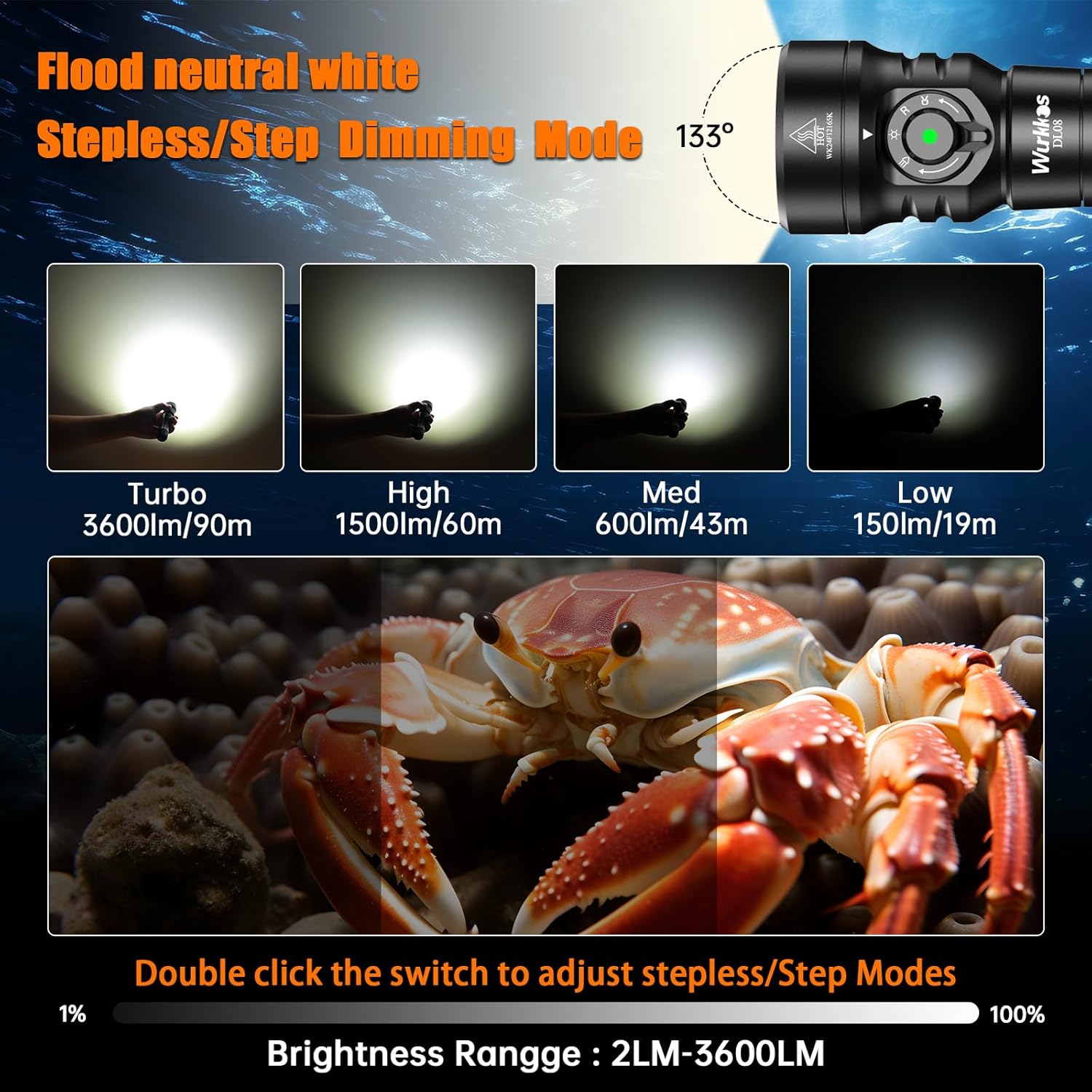
Image: Floodlight mode brightness levels and stepless adjustment.

Image: Spotlight mode brightness levels and stepless adjustment.

Image: Red and UV light mode brightness and runtime details.
4.4 Battery/Mode Indicator
When the flashlight is turned on, the power indicator on the switch displays the remaining battery level and current mode:
- Green: 75%-100% battery (Flood mode)
- Green Flashing: 50%-75% battery (Spotlight mode)
- Red: 25%-50% battery (UV mode)
- Red Flashing: Below 25% battery (Red mode)
4.5 Safety Lock Function
To prevent accidental activation, the DL08 features a safety lock. When the flashlight is off, double-click the middle button to lock it. The main light will flash twice as a reminder. To unlock, double-click the button again.
4.6 Underwater Signal Helper
While the light is on, press the middle button 3 times continuously to activate the red light flashing mode. This can be used as a signal to alert your dive partner to your location.

Image: Wurkkos DL08 in an underwater environment.

Image: Examples of the DL08 being used during dives.
4.7 Product Video
Video: An official product video demonstrating the Wurkkos DL08 dive light's features and performance underwater, including its various light modes and brightness levels.
5. Maintenance
- Rinse After Use: After each dive, thoroughly rinse the dive light with fresh water to remove salt, sand, and other debris.
- Dry Thoroughly: Ensure the light is completely dry before storing or charging.
- Inspect O-rings: Regularly inspect the O-rings for any signs of damage, cracks, or dirt. Clean them gently if necessary.
- Lubricate O-rings: Apply a thin layer of silicone grease to the O-rings periodically to maintain their sealing properties.
- Battery Storage: For very long-term storage (several months or more), it is recommended to remove the battery from the light. Store the battery in a cool, dry place.
- Clean Contacts: Keep the battery contacts and the light's internal contacts clean and free of corrosion.
6. Troubleshooting
- Light Does Not Turn On:
- Ensure the battery is properly inserted and fully charged.
- Verify that the negative contact insulator has been removed from the battery compartment.
- Check if the light is in safety lock mode. Double-click the button to unlock.
- Reduced Brightness or Short Runtime:
- The battery may need recharging.
- Ensure the light is not overheating. The DL08 has thermal regulation that may reduce output to prevent damage.
- Water Leakage:
- Immediately remove the battery and dry the light.
- Inspect O-rings for damage, dirt, or improper seating. Replace if necessary.
- Ensure the end cap is screwed on tightly and correctly aligned.
7. Specifications
| Feature | Specification |
|---|---|
| Model | DL08-Black-01 |
| Color | Black |
| Shape | Cylindrical |
| Material | AL6061-T6 aluminum alloy, Thickened tempered glass, Hard anodized coating |
| Light Source Type | Light Emitting Diode (LED) |
| Power Source | Battery Powered (1 Lithium Ion battery included) |
| Brightness (Floodlight) | Up to 3600 Lumens |
| Brightness (Spotlight) | Up to 2000 Lumens |
| Waterproof Rating | IP68 (Underwater up to 100m) |
| Dimensions (L x W x H) | 5.47" x 1.57" x 1.57" (138.9mm x 40mm x 40mm) |
| Item Weight | 14.1 ounces |
| Beam Angle (Floodlight) | 133 Degrees |
| Beam Angle (Spotlight) | 12 Degrees |
| Color Temperature | 5000 Kelvin (Floodlight), 6500 Kelvin (Spotlight) |
| Color Rendering Index (CRI) | 90 |

Image: Product dimensions.
8. Warranty and Support
Wurkkos products are designed for durability and performance. For specific warranty details and terms, please refer to the warranty information provided with your purchase or visit the official Wurkkos website. If you encounter any issues or require technical assistance, please contact Wurkkos customer support through their official channels. Keep your purchase receipt as proof of purchase for warranty claims.