
1. Introduction
This manual provides detailed instructions for the safe and effective operation of your Jieotwice Bipolar SSTC DIY Musical Tesla Coil. This device is a high-frequency generator designed for educational and experimental purposes, capable of producing impressive electrical arcs and playing music through plasma discharge. Please read this manual thoroughly before assembly and operation to ensure proper usage and safety.
2. Safety Information
WARNING: This product generates high voltage and high-frequency electromagnetic fields. Improper use can result in serious injury or death. Always observe the following safety precautions:
- Do not touch the high-voltage output terminals or arcs during operation. Maintain a safe distance from the device.
- Operate the Tesla Coil in a well-ventilated area, away from flammable materials.
- Keep children and pets away from the operating device.
- Individuals with pacemakers or other medical implants should avoid proximity to the device due to strong electromagnetic fields.
- Ensure the device is properly grounded if applicable (refer to setup instructions).
- Always disconnect power before performing any adjustments or maintenance.
- Do not operate the device near sensitive electronic equipment, as it may cause interference.
3. Package Contents
Verify that all components are present and undamaged upon opening the package:
- 1 x Bipolar SSTC DIY Musical Tesla Coil (Main Unit)
- 1 x Driver Board
- Power Adapter
- Audio Cable (3.5mm)
- Fiber Optic Cable
- Assembly Hardware (screws, nuts, standoffs)

Figure 3.1: Overview of all included components for the Tesla Coil kit, including the main coil, driver board, power supply, and various cables and hardware.
4. Product Features
The Jieotwice Bipolar SSTC DIY Musical Tesla Coil offers advanced features for an enhanced experience:
- Internal integrated fiber optic signal transmission for reliable operation.
- Drive arc extinguishing isolation design for safety and performance.
- Groundless design simplifies setup.
- Supports both 110V and 220V power supply for versatile use.
- Achieves an arc discharge distance of up to 30CM.
- Includes a 3.5MM audio interface for musical operation.
- Seamless switching between Music mode and Normal mode.
5. Setup Instructions
Follow these steps to assemble and prepare your Tesla Coil for operation:
- Unpack Components: Carefully remove all items from the packaging and verify against the package contents list.
- Assemble the Main Coil: Attach the two metal toroids to the ends of the secondary coil. Ensure they are securely fastened.
- Mount the Secondary Coil: Place the assembled secondary coil onto the clear acrylic base, securing it with the provided standoffs and screws.
- Connect the Driver Board: Position the driver board unit beneath the secondary coil assembly. Connect the fiber optic cable from the driver board to the main coil unit.
- Connect Power: Plug the power adapter into the driver board's power input. Do not connect to a wall outlet yet.
- Audio Connection (Optional): If using Music Mode, connect a 3.5mm audio cable from your audio source (e.g., smartphone, computer) to the audio input jack on the driver board.

Figure 5.1: Fully assembled Tesla Coil unit, showing the secondary coil, toroids, driver board, and connected cables.
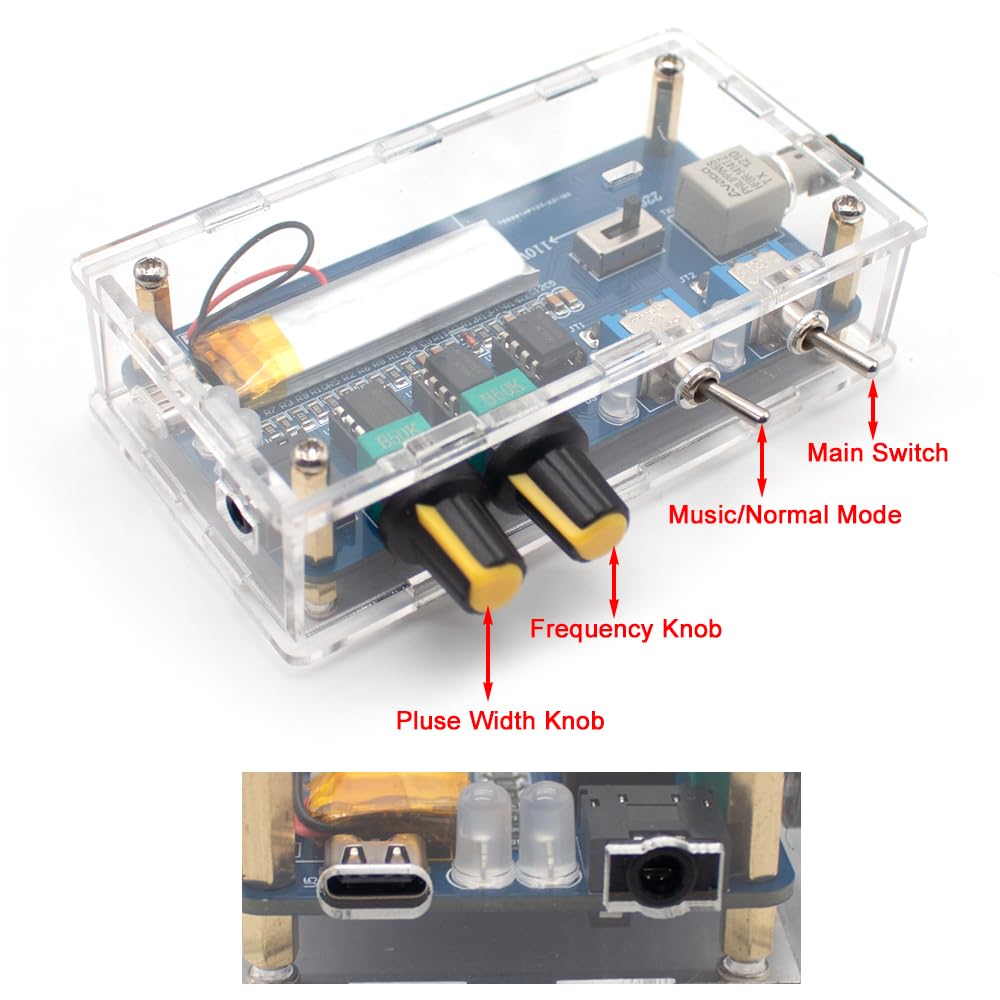
Figure 5.2: Detailed view of the driver board, highlighting the main switch, mode switch, frequency knob, pulse width knob, and input ports.
6. Operating Instructions
Once assembled, follow these steps to operate your Tesla Coil:
- Power On: Connect the power adapter to a suitable wall outlet (110V or 220V).
- Activate Main Switch: Flip the "Main Switch" on the driver board to the ON position. The device will power up.
- Select Mode:
- Normal Mode: Flip the "Music/Normal Mode" switch to "Normal". The Tesla Coil will generate continuous arcs. Adjust the "Frequency Knob" and "Pulse Width Knob" to control the arc characteristics.
- Music Mode: Flip the "Music/Normal Mode" switch to "Music". Ensure an audio source is connected via the 3.5mm jack. Play music from your source; the arcs will modulate with the audio, creating "musical lightning". Adjust the "Frequency Knob" and "Pulse Width Knob" for optimal sound and visual effects.
- Observe Arcs: Maintain a safe distance and observe the electrical arcs. Do not touch them.
- Power Off: When finished, first flip the "Main Switch" to the OFF position, then disconnect the power adapter from the wall outlet.

Figure 6.1: The Tesla Coil in operation, demonstrating the electrical arcs it produces.
7. Maintenance
The Jieotwice Bipolar SSTC DIY Musical Tesla Coil requires minimal maintenance. Follow these guidelines to ensure longevity:
- Cleaning: Ensure the device is powered off and unplugged. Use a soft, dry cloth to gently wipe dust from the surfaces. Do not use liquids or abrasive cleaners.
- Storage: Store the Tesla Coil in a dry, cool environment, away from direct sunlight and excessive humidity. Keep it covered to prevent dust accumulation.
- Inspection: Periodically inspect all connections and components for any signs of wear or damage. If any damage is found, discontinue use and contact support.
8. Troubleshooting
If you encounter issues with your Tesla Coil, refer to the following common problems and solutions:
| Problem | Possible Cause | Solution |
|---|---|---|
| No arcs or weak arcs |
|
|
| No sound in Music Mode |
|
|
| Device not powering on |
|
|
9. Specifications
Detailed technical specifications for the Jieotwice Bipolar SSTC DIY Musical Tesla Coil:
| Parameter | Value |
|---|---|
| Product Name | Bipolar SSTC DIY Musical Tesla Coil |
| Product Voltage | AC 110V / 220V (Universal) |
| Power | 400W |
| Working Current | 0.1A - 2A |
| Product Size (L x W x H) | 300mm x 130mm x 450mm |
| Weight | 2.5 KG |
| Arc Discharge Distance | Up to 30 CM |
| Audio Interface | 3.5mm Jack |

Figure 9.1: Dimensional drawing of the Tesla Coil, indicating its height, length, and width.
10. Warranty and Support
For warranty information and technical support, please contact Jieotwice customer service. Refer to your purchase documentation for specific warranty terms and contact details. Our support team is available to assist with any questions or issues you may encounter.
Manufacturer: Jieotwice
Date First Available: July 19, 2024