
Introduction
This manual provides essential information for the safe and effective operation of the Instek LCR-1010 Handheld LCR Meter. It covers product overview, setup, operating instructions, maintenance, troubleshooting, and technical specifications. Please read this manual thoroughly before using the device to ensure proper functionality and to prevent damage or injury.
Safety Information
Always observe the following safety precautions to prevent electric shock, injury, or damage to the meter or the device under test.
- Do not operate the meter if it appears damaged or if the casing is open.
- Ensure the device under test is de-energized and discharged before connecting the LCR meter, especially for capacitors.
- Use only the specified test leads and accessories.
- Do not exceed the maximum input ratings specified in the technical specifications.
- Keep the meter dry and away from extreme temperatures.
- Refer servicing to qualified personnel only.
Product Overview
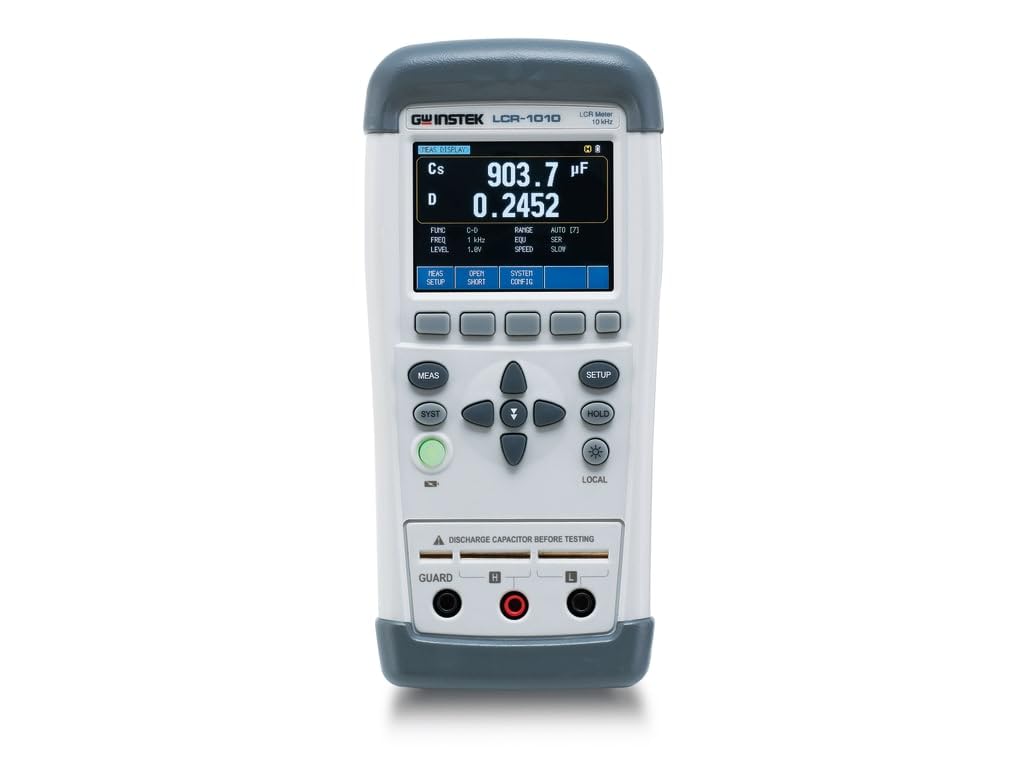
The Instek LCR-1010 is a handheld LCR meter designed for precise measurement of capacitance, inductance, and resistance, along with various related parameters. It features an automatic real-time test function and a high-resolution display.
Setup
- Power On: Press the green power button to turn on the device. Ensure batteries are installed or an AC adapter is connected if applicable.
- Initial Self-Test: The meter will perform a brief self-test upon startup. Wait for the main display to appear.
- Connect Test Leads: Insert the test leads into the 'GUARD', 'H', and 'L' terminals as required for your measurement setup.
- Open/Short Calibration: For accurate measurements, especially at different frequencies, perform an Open/Short calibration. Press the 'OPEN SHORT' button and follow the on-screen prompts.
Operating Instructions
The LCR-1010 offers various measurement modes and settings to suit different component testing needs.
Basic Measurement
- Select Measurement Function: Use the 'FUNC' button (accessed via 'MEAS SETUP') to cycle through primary measurement parameters like C-D, L-Q, R-X, etc.
- Set Test Frequency: Use the 'FREQ' button (accessed via 'MEAS SETUP') to select the desired test frequency (50Hz, 100Hz, 120Hz, 1kHz, 2kHz, 10kHz).
- Set Test Level: Adjust the AC test voltage (0.3V, 0.7V, 1Vrms) or DC test voltage (+/- 1V) using the 'LEVEL' button (accessed via 'MEAS SETUP').
- Connect Component: Carefully connect the component to be measured to the test terminals. Ensure proper polarity if applicable.
- Read Measurement: The primary and secondary measurement results will be displayed on the screen.
Auto LCZ Mode
The Auto LCZ mode automatically identifies the component type (Inductor, Capacitor, or Resistor) and performs the appropriate measurement. This simplifies testing for unknown components.
- To activate, navigate to the 'FUNC' settings and select 'Auto LCZ'.
- Connect the component, and the meter will automatically display the relevant L, C, or R value.
Data Hold Function
Press the 'HOLD' button to freeze the current measurement on the display. Press it again to release the hold and resume real-time measurements.
Display and Controls
The LCR-1010 features a clear display and intuitive button layout:
- Display: Shows primary and secondary measurement parameters (e.g., Cs, D), test frequency, test level, range, equivalent circuit, and speed.
- Soft Keys (below display): 'MEAS SETUP', 'OPEN SHORT', 'SYSTEM CONFIG' for accessing menus and functions.
- Navigation Buttons: Up, Down, Left, Right arrows for menu navigation and value adjustment.
- MEAS Button: Initiates or confirms a measurement.
- SYST Button: Accesses system settings and utilities.
- SETUP Button: Enters setup menus for various parameters.
- HOLD Button: Freezes the current display reading.
- LOCAL Button (with backlight icon): Toggles display backlight and may have other local functions.
- Power Button (Green): Turns the device on and off.
Measurement Parameters
The LCR-1010 can automatically measure a wide range of parameters:
- Capacitance (C): C-D (Dissipation Factor), C-Q (Quality Factor), C-R (Equivalent Series Resistance)
- Inductance (L): L-D (Dissipation Factor), L-Q (Quality Factor), L-R (Equivalent Series Resistance), L-Rdc (DC Resistance)
- Resistance (R): R-Q (Quality Factor), R-X (Reactance), R-Rdc (DC Resistance), Rdc (DC Resistance)
- Impedance (Z): Z-D (Dissipation Factor), Z-Q (Quality Factor), Z-θr (Phase Angle in Radians), Z-θd (Phase Angle in Degrees)
Maintenance
Proper maintenance ensures the longevity and accuracy of your LCR meter.
- Cleaning: Use a soft, dry cloth to clean the exterior of the meter. Do not use abrasive cleaners or solvents.
- Battery Replacement: If the low battery indicator appears, replace the batteries promptly. Refer to the battery compartment for correct battery type and polarity.
- Storage: Store the meter in a cool, dry place away from direct sunlight and extreme temperatures. If storing for extended periods, remove the batteries.
- Calibration: Periodic calibration by a qualified service center is recommended to maintain measurement accuracy.
Troubleshooting
If you encounter issues with your LCR-1010, try the following:
- No Power: Check battery installation or AC adapter connection. Ensure the power button is fully pressed.
- Inaccurate Readings: Perform an Open/Short calibration. Check test lead connections for looseness or damage. Ensure the component is properly connected and discharged. Verify correct test frequency and level settings.
- Display Errors: If the display shows unusual characters or freezes, try restarting the meter. If the problem persists, contact support.
- No Response from Buttons: Ensure the meter is not in a 'Hold' state. Restart the device.
Specifications
| Feature | Specification |
|---|---|
| Model Number | LCR-1010 |
| Basic Accuracy | 0.20% |
| Test Frequencies | 50Hz, 100Hz, 120Hz, 1kHz, 2kHz, 10kHz |
| Test Levels | AC 0.3V/0.7V/1Vrms, DC +/- 1V |
| Display Count | Primary/Secondary 50,000 counts |
| Measurement Parameters | C-D, C-Q, C-R, L-D, L-Q, L-R, L-Rdc, R-Q, R-X, R-Rdc, Rdc, Z-D, Z-Q, Z-θr, Z-θd |
| Measurement Speed | Slow: 2.5 times/s, Fast: 10 times/s |
| Connectivity | USB-HID, USB-VCOM |
| Power Source | AC (adapter) / Battery (not included) |
| Item Weight | 1 pound |
| Product Dimensions | 1 x 1 x 1 inches |
Warranty and Support
Instek products are designed for reliability and performance. For warranty information, technical support, or service inquiries, please refer to the official Instek website or contact your authorized dealer. Keep your purchase receipt as proof of purchase for warranty claims.


