
1. Introduction
Thank you for choosing the H1 PRO Series Boss R800 Foldable Electric Scooter. This manual provides essential information for the safe operation, maintenance, and care of your scooter. Please read it thoroughly before your first ride to ensure optimal performance and safety.
The Boss R800 is designed for efficient urban commuting and recreational use, featuring an 800W motor, a top speed of 24 mph, and a range of up to 28 miles. Its robust construction and advanced features aim to provide a reliable and enjoyable riding experience.
2. Safety Information
Your safety is paramount. Operating an electric scooter carries inherent risks. Always adhere to local laws and regulations regarding electric scooter usage.
General Safety Guidelines:
- Always wear a helmet and appropriate safety gear (knee pads, elbow pads) when riding.
- Ensure all components are securely fastened before each ride.
- Do not ride in adverse weather conditions, such as heavy rain, snow, or ice.
- Avoid riding on uneven surfaces, potholes, or obstacles that could cause loss of control.
- Maintain a safe distance from pedestrians, vehicles, and other obstacles.
- Do not perform stunts or aggressive maneuvers.
- The scooter is designed for a single rider. Do not carry passengers.
- Do not operate the scooter under the influence of alcohol or drugs.
Age and Weight Restrictions:
- This electric scooter is recommended for adults aged 16 and above.
- The maximum weight limit for the rider is 264 pounds (120 kg). Exceeding this limit can affect performance and safety.
Certification:
The Boss R800 has been tested and approved in accordance with UL 2272 standards by SGS, ensuring electrical safety.
3. Package Contents
Please verify that all items are present in the package:
- H-1 Pro Series Boss R800 Electric Scooter
- User Manual (this document)
- Wall Charger
4. Product Overview
Familiarize yourself with the key features and components of your H1 PRO Series Boss R800 Electric Scooter.
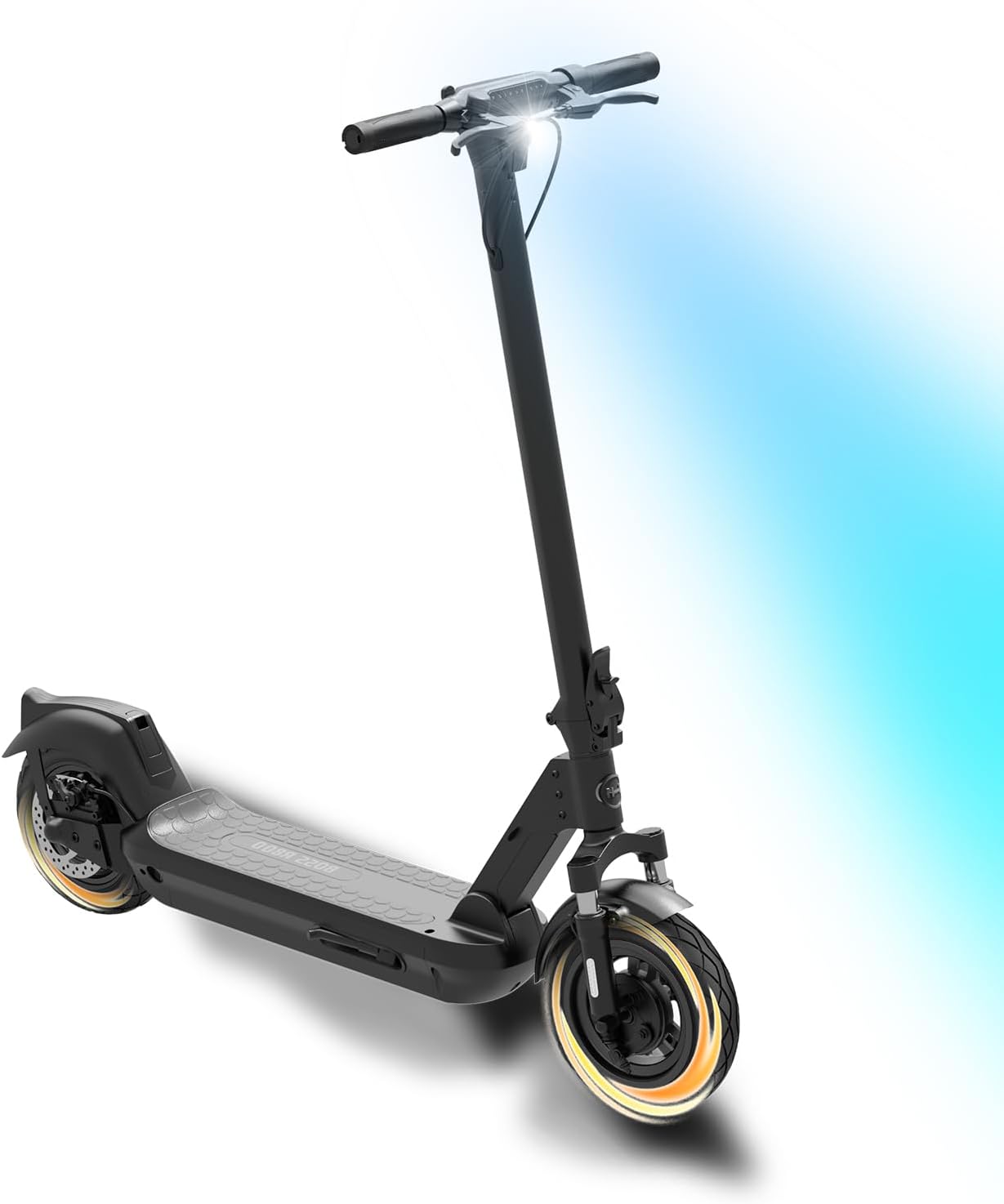
Image 1: The H1 PRO Series Boss R800 Electric Scooter, showcasing its overall design and illuminated headlight.
Key Features:
- Powerful Motor: Equipped with an 800W motor for a maximum speed of 24 mph.
- Extended Range: A 48V/13Ah lithium-ion battery provides up to 28 miles of range.
- Smooth Ride: Features dual front shocks and dual rear spring suspension for enhanced comfort on various terrains.
- Durable Tires: 10-inch self-sealing tubeless tires are designed to automatically plug small punctures and offer increased puncture resistance.
- Advanced Display: A bright, animated LED display shows speed, battery level, mileage, and current speed mode.
- Folding Mechanism: Designed for quick and easy folding, facilitating convenient storage and transport.
- Smart Connectivity: Compatible with the H-1 Pro Series app for remote locking/unlocking, access sharing, location tracking, and settings adjustment.
- Safety Lighting: Adjustable LED headlight for optimal visibility at night and a rear taillight for visibility to traffic.
- Effective Braking: Features front drum and rear disc brakes for reliable stopping power.

Image 2: Visual representation of the scooter's key specifications including 28 mph max speed, 28 miles max distance, 10x2.75 inch self-sealing tubeless tires, 264 lbs max weight, and its folding mechanism.

Image 3: Close-up view illustrating the 48V/13Ah long-range battery, the self-sealing tubeless tires (depicted as 'run flat tires'), and the dual underbody suspension system.

Image 4: Detailed view of the wide, non-slip foot deck, the front drum and rear disc brakes, and the rear taillight for enhanced visibility.

Image 5: Close-up of the handlebar area, highlighting the adjustable LED headlight for night visibility and the bell to alert pedestrians. This scooter is suitable for ages 16+.
5. Setup
Unfolding the Scooter:
- Place the scooter on a flat, stable surface.
- Locate the folding mechanism latch near the base of the handlebar stem.
- Release the latch and carefully lift the handlebar stem until it locks into the upright position. Ensure the locking mechanism is fully engaged.
- Adjust the handlebar height if necessary and secure it.
Initial Charging:
Before your first ride, fully charge the scooter's battery.
- Ensure the scooter is powered off.
- Locate the charging port, typically covered by a rubber flap, on the scooter's frame.
- Connect the wall charger to a power outlet, then connect the charging cable to the scooter's charging port.
- The charging indicator on the charger will typically show red during charging and turn green when fully charged.
- A full charge takes approximately 5.5 hours. Do not overcharge the battery.
- Once charging is complete, disconnect the charger and securely close the charging port cover.
Tire Check:
Before each ride, visually inspect the 10-inch self-sealing tubeless tires for any signs of damage or low pressure. While the tires are designed to be puncture-resistant, maintaining proper inflation is crucial for ride quality and longevity.
6. Operating Instructions
Powering On/Off:
- To power on: Press and hold the power button on the display for a few seconds until the screen illuminates.
- To power off: Press and hold the power button again until the display turns off.
Riding the Scooter:
- Place one foot firmly on the foot deck.
- Use your other foot to push off the ground to gain initial momentum.
- Once moving, gently press the throttle lever to engage the motor.
- Place your second foot on the deck.
- Control your speed using the throttle. The LED display will show your current speed and selected speed mode.
- To brake, gently squeeze the brake levers (front drum and rear disc brakes). Apply both brakes smoothly for controlled stopping.
- Use the adjustable LED headlight for visibility in low-light conditions and the bell to alert pedestrians.
H-1 Pro Series App Functionality:
Enhance your scooter experience by connecting to the H-1 Pro Series app.
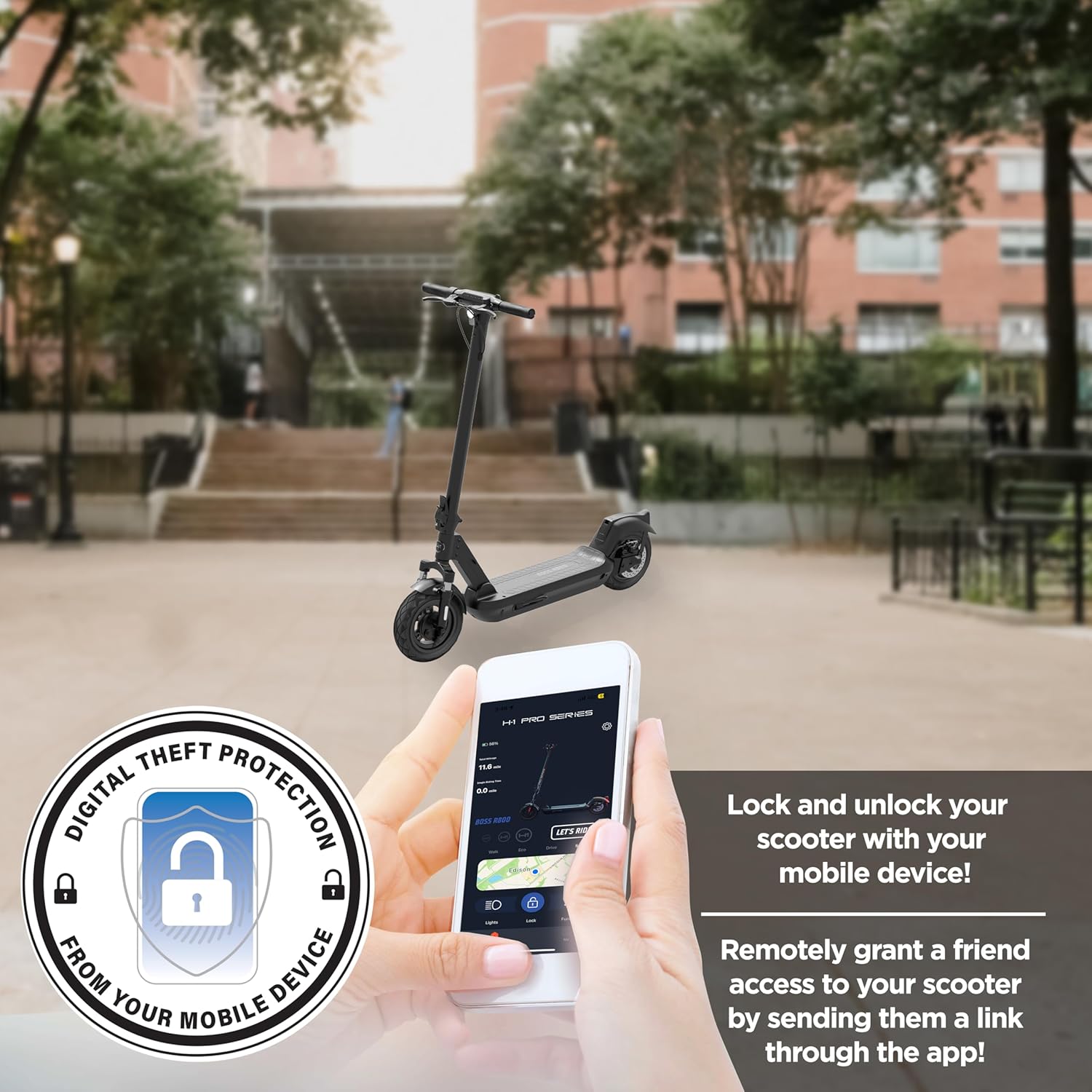
Image 6: Illustration of the H-1 Pro Series app interface on a mobile device, demonstrating features like digital theft protection, remote lock/unlock, and sharing access to the scooter.
- Lock/Unlock: Secure your scooter remotely using your mobile device.
- Remote Access: Grant temporary access to friends or family members by sending them a link through the app.
- Location Tracking: Pinpoint the current location of your scooter.
- Settings Adjustment: Customize various scooter settings directly from the app.
7. Maintenance
Tire Care:
The 10-inch self-sealing tubeless tires are designed for durability and puncture resistance. While they automatically seal small punctures, regular inspection is recommended. Maintain proper tire pressure as specified to ensure optimal ride quality and prevent premature wear.
Cleaning:
Clean your scooter regularly with a damp cloth. Avoid using high-pressure water jets or harsh chemicals, as these can damage electrical components or the finish. Ensure the charging port cover is securely closed during cleaning.
Storage:
When not in use, store the scooter in a cool, dry place, away from direct sunlight and extreme temperatures. If storing for an extended period, ensure the battery is charged to approximately 50-70% and recharge it every 30-60 days to prevent deep discharge.
Battery Care:
To maximize battery life, avoid fully depleting the battery frequently. Always use the original charger provided with the scooter.
8. Troubleshooting
This section addresses common issues you might encounter with your Boss R800 scooter.
- Scooter does not power on: Ensure the battery is sufficiently charged. Check that the power button is pressed and held correctly.
- Reduced range or speed: This can be due to low battery charge, riding uphill frequently, heavy rider weight, or low tire pressure. Ensure tires are properly inflated and the battery is fully charged.
- Brakes feel weak: Inspect brake cables and pads for wear. If issues persist, professional inspection may be required.
- App connectivity issues: Ensure Bluetooth is enabled on your mobile device and the scooter is powered on and within range. Try restarting both the app and the scooter.
For issues not covered here, please refer to the warranty and support section.
9. Specifications
Detailed technical specifications for the H1 PRO Series Boss R800 Electric Scooter.
| Feature | Specification |
|---|---|
| Brand | H1 PRO |
| Model Name | Boss R800 |
| Motor Power | 800W |
| Max Speed | 24 mph |
| Max Distance Range | 28 Miles |
| Battery | 48V/13Ah Lithium-ion |
| Recharge Time | 5.5 hours |
| Wheel Size | 10 Inches |
| Wheel Type | Pneumatic, Self-Sealing Tubeless |
| Suspension Type | Dual Suspension (Front & Rear) |
| Brake Style | Front Drum, Rear Disc Braking |
| Frame Material | Aluminum |
| Weight Limit | 264 Pounds |
| Age Range (Description) | Adult (16+) |
| Special Feature | Anti-Puncture Tire, App Enabled |
| Color | Black |
| UPC | 888255333087 |
| Part Number | H1-BSS-R8-BLK |
10. Warranty and Support
Warranty Information:
The H1 PRO Series Boss R800 Electric Scooter comes with a 1 Year Limited Warranty. This warranty covers manufacturing defects under normal use conditions. Please retain your proof of purchase for warranty claims.
The warranty does not cover damage resulting from misuse, accidents, unauthorized modifications, or failure to follow the instructions in this manual.
Customer Support:
For technical assistance, warranty claims, or any questions regarding your H1 PRO Series Boss R800 Electric Scooter, please contact our customer support team. Refer to the contact information provided on the H1 PRO official website or your purchase documentation.