
Med-Pat TH-1
Med-Pat TH-1 Touchless Digital Thermometer
User Instruction Manual
Model: TH-1 (AOJ-20F)
1. Introduction
This manual provides detailed instructions for the safe and effective use of your Med-Pat TH-1 Touchless Digital Thermometer. This device is designed for accurate and rapid temperature measurement for all ages, including infants, children, and adults, using infrared technology. Please read this manual thoroughly before first use and retain it for future reference.

Image 1.1: The Med-Pat TH-1 Touchless Digital Thermometer and its included storage pouch.
2. Key Features
The Med-Pat TH-1 thermometer offers several features designed for convenience and accuracy:
- Fast & Accurate Readings: Provides precise temperature measurements in approximately 1 second using advanced infrared technology.
- Four Measurement Modes: Supports forehead (temporal), in-ear, and object temperature measurements.
- Instant Fever Detection: Features a 3-color LED backlight system (green, yellow, red) for immediate fever alerts.
- Silent Mode: Allows temperature measurement without audible beeps, ideal for sleeping individuals.
- HD Color Display: Large, easy-to-read display for clear temperature readings.
- Memory Recall: Stores up to 40 previous temperature readings for tracking.
- Ergonomic Design: Comfortable and secure grip for ease of use.
- Magnetic Probe Cover: Facilitates automatic mode switching and battery conservation.

Image 2.1: Visual representation of the Med-Pat TH-1's primary features.
3. What's in the Box
Upon opening the package, verify that all components are present:
- Med-Pat TH-1 Digital Thermometer
- Magnetic Probe Cover
- Storage Pouch
- 2 AAA Batteries
- User Instruction Manual (this document)
- Quick Start Guide

Image 3.1: All items included in the Med-Pat TH-1 product package.
4. Setup
4.1 Battery Installation
- Locate the battery compartment on the back of the thermometer.
- Gently slide open the battery cover.
- Insert the two AAA batteries, ensuring correct polarity (+/-).
- Close the battery cover securely.

Image 4.1: Illustration of the battery compartment and replacement process.
4.2 Initial Power On
After installing batteries, the device will automatically power on. The display will show a brief self-test before entering standby mode, ready for measurement.
5. Operating Instructions
5.1 Measurement Modes
The TH-1 thermometer supports four distinct measurement modes:
- Forehead Mode: For non-contact measurement of body temperature from the forehead. The magnetic probe cover should be attached.
- Ear Mode: For in-ear measurement of body temperature. Remove the magnetic probe cover to activate this mode. An ear-canal light will illuminate.
- Object Mode: For measuring the surface temperature of objects, such as baby bottles or bath water. This mode is typically activated when the magnetic probe cover is removed (AMS technology).

Image 5.1: Demonstrating the use of the thermometer in ear mode for a child.
5.2 Taking a Measurement
- Ensure the correct mode is selected (forehead or ear).
- For forehead mode, hold the thermometer approximately 1-3 cm (0.4-1.2 inches) from the center of the forehead.
- For ear mode, gently insert the probe into the ear canal.
- Press the measurement button (usually indicated by a thermometer icon).
- The reading will appear on the HD color display within 1 second.

Image 5.2: Features enhancing ease of measurement and display clarity.
5.3 Fever Alerts and Color-Coded Display
The thermometer's display backlight changes color to indicate temperature status:
- Green Indicator: Normal temperature (e.g., 95.0°F - 99.5°F). Accompanied by one long beep.
- Yellow Indicator: Mild fever or elevated temperature (e.g., 99.6°F - 100.4°F). Accompanied by short beeps.
- Red Indicator: High fever (e.g., ≥100.5°F). Accompanied by multiple short beeps.
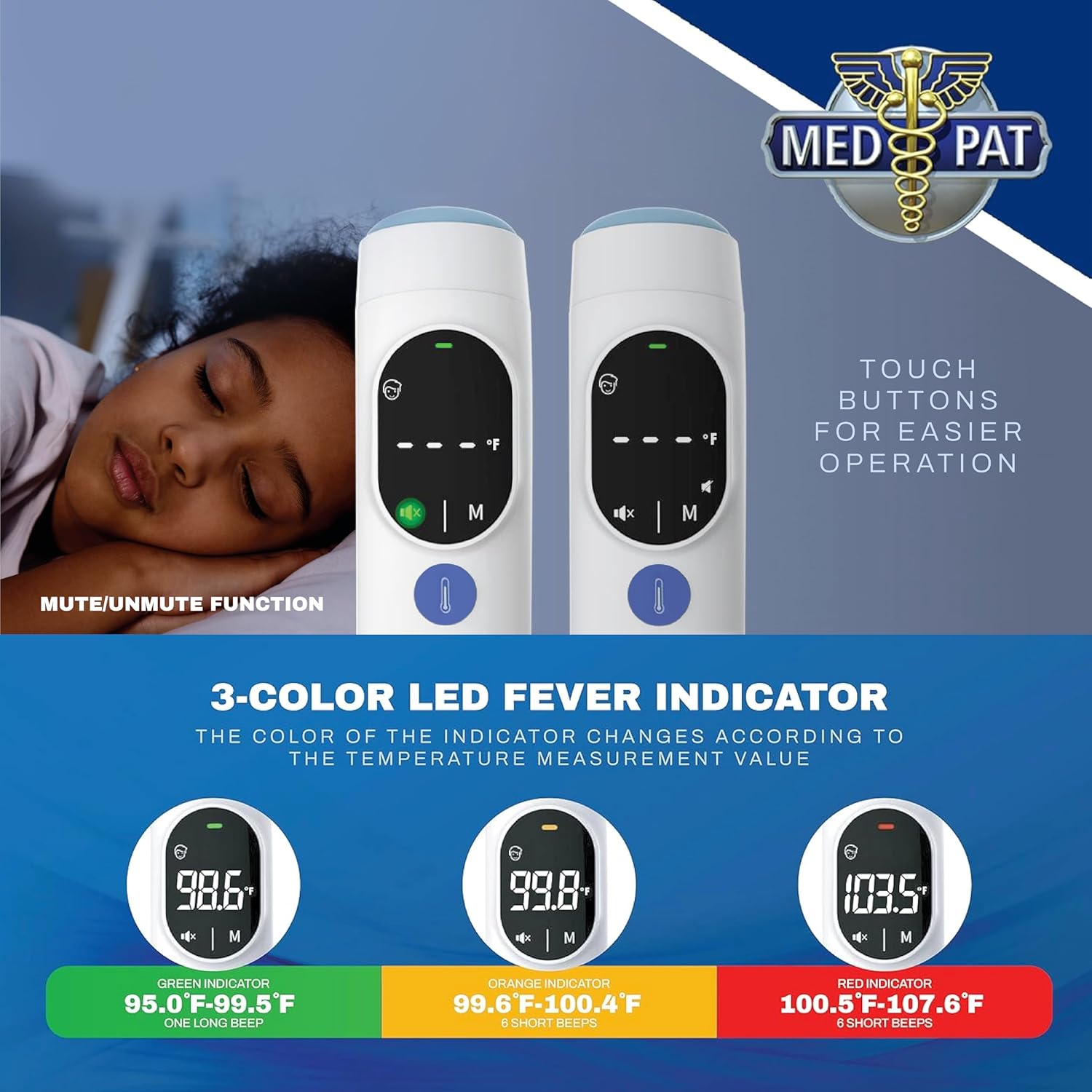
Image 5.3: Explanation of the 3-color LED fever indicator system.
5.4 Silent Mode
To activate or deactivate silent mode, locate the mute/unmute button (often indicated by a speaker icon) and press it. This feature is particularly useful when taking the temperature of a sleeping infant or child to avoid disturbance.

Image 5.4: Visual guide for the mute/unmute function.
5.5 Fahrenheit/Celsius Selection
To switch between Fahrenheit (°F) and Celsius (°C), refer to the quick start guide or the detailed instructions on the device. This setting is typically changed by pressing and holding a specific button (often the measurement button or a dedicated mode button) while the device is off or in standby mode.
5.6 Memory Recall
The TH-1 thermometer can store up to 40 previous temperature readings. To access these readings, press the 'M' (Memory) button. Each press will cycle through the stored measurements, allowing you to track temperature changes over time.
6. Maintenance
6.1 Cleaning
- The thermometer should be cleaned after each use, especially the probe tip.
- Wipe the probe and the body of the thermometer with an alcohol swab or a soft cloth dampened with 70% isopropyl alcohol.
- Do not immerse the thermometer in water or any cleaning solutions.
- Ensure the thermometer is completely dry before storing.
6.2 Storage
- Store the thermometer in its provided storage pouch when not in use.
- Keep the device in a cool, dry place, away from direct sunlight and extreme temperatures.
- Remove batteries if the device will not be used for an extended period to prevent leakage.
7. Troubleshooting
If you encounter issues with your Med-Pat TH-1 thermometer, refer to the following common solutions:
| Problem | Possible Cause | Solution |
|---|---|---|
| Inaccurate or inconsistent readings | Incorrect measurement distance/angle; dirty probe; environmental factors; rapid consecutive measurements. | Ensure proper distance (1-3 cm for forehead); clean probe; allow device to stabilize at room temperature; wait at least 10 seconds between measurements. |
| Display shows 'Lo' or 'Hi' | Temperature is outside the measurable range. | Ensure measurement is within the specified operating range (e.g., body temperature range). |
| No display or device won't turn on | Dead or incorrectly installed batteries. | Replace batteries with new AAA batteries; check battery polarity. |
| Accidental F/C unit change | Inadvertent button press. | Refer to section 5.5 for instructions on how to switch between Fahrenheit and Celsius. |
If the problem persists after attempting these solutions, please contact customer support.
8. Specifications
| Feature | Detail |
|---|---|
| Model Number | AOJ-20F |
| Measurement Method | Infrared (Non-contact forehead, In-ear, Object) |
| Measurement Time | 1 second |
| Temperature Units | Celsius (°C) / Fahrenheit (°F) |
| Memory Storage | Up to 40 readings |
| Display Type | HD Digital Color Display |
| Power Source | 2 x AAA Batteries |
| Automatic Shut-off | Yes (via magnetic probe cover) |
| Product Dimensions | 6.93 x 1.89 x 1.81 inches |
| Product Weight | 4.97 ounces |
| Material | Plastic |
| Age Range | All Ages |
9. Warranty and Support
Med-Pat is committed to providing quality products and customer satisfaction. While specific warranty periods may vary, we stand behind our products with world-class customer care.
If you experience any issues or have questions regarding your Med-Pat TH-1 thermometer, please contact our customer support team for assistance. Contact information can typically be found on the product packaging or on the official Med-Pat website.
For further assistance, please visit the Med-Pat Store on Amazon.
Ask a question about this manual
Ask about setup, troubleshooting, compatibility, parts, safety, or missing instructions. Manuals+ will review the question and use this page’s manual context to help answer it.