
Introduction
This instruction manual provides detailed guidance for the assembly, operation, and maintenance of your FITUEYES Design Storage Shelf, specifically designed for Master V2 FT48/V2 Pro FT48 series floor TV stands. This accessory enhances the functionality and storage capacity of your TV stand.
Safety Information
- Weight Capacity: Do not exceed the maximum load capacity of 22 lbs (10 kg) for the storage shelf. Overloading can cause instability and damage.
- Secure Fastening: Ensure the shelf is securely fastened to the TV stand according to the assembly instructions. Loose connections can lead to accidents.
- Stability: Always place the TV stand and attached shelf on a stable, level surface. Avoid placing it in high-traffic areas where it could be easily bumped.
- Children and Pets: Keep children and pets away from the assembly area. Do not allow them to climb on or play with the TV stand or shelf.
- Cable Management: Utilize the integrated cable management features to prevent tripping hazards and maintain a tidy appearance.
Package Contents
Before beginning assembly, verify that all parts listed below are present and undamaged. If any parts are missing or damaged, contact customer support.
- Storage Shelf (1)
- Mounting Bracket (1)
- Hardware Kit (screws, washers, Allen wrenches, etc.)
- Cable Management Clips (as needed)
- Instruction Manual (this document)

Setup and Assembly
Follow these steps to correctly assemble and attach the storage shelf to your FITUEYES Master V2 FT48/V2 Pro FT48 series TV stand.
Step 1: Prepare the TV Stand
Ensure your FITUEYES Master V2 FT48/V2 Pro FT48 TV stand is already assembled and stable. The storage shelf is designed to integrate with the main pole of these specific models.
Step 2: Attach the Shelf Mounting Bracket
- Locate the designated attachment points on the main pole of your TV stand.
- Align the shelf mounting bracket with these points.
- Secure the bracket using the provided screws and Allen wrench. Ensure it is tightened firmly but do not overtighten.

Step 3: Install the Storage Shelf
- Slide the storage shelf onto the attached mounting bracket.
- Adjust the shelf to your desired height. The shelf allows for height adjustment within a fixed device range, with a maximum difference of 50 to 700 MM from the floor.
- Once the desired height is achieved, secure the shelf in place using the locking mechanism or screws as indicated in the hardware kit.
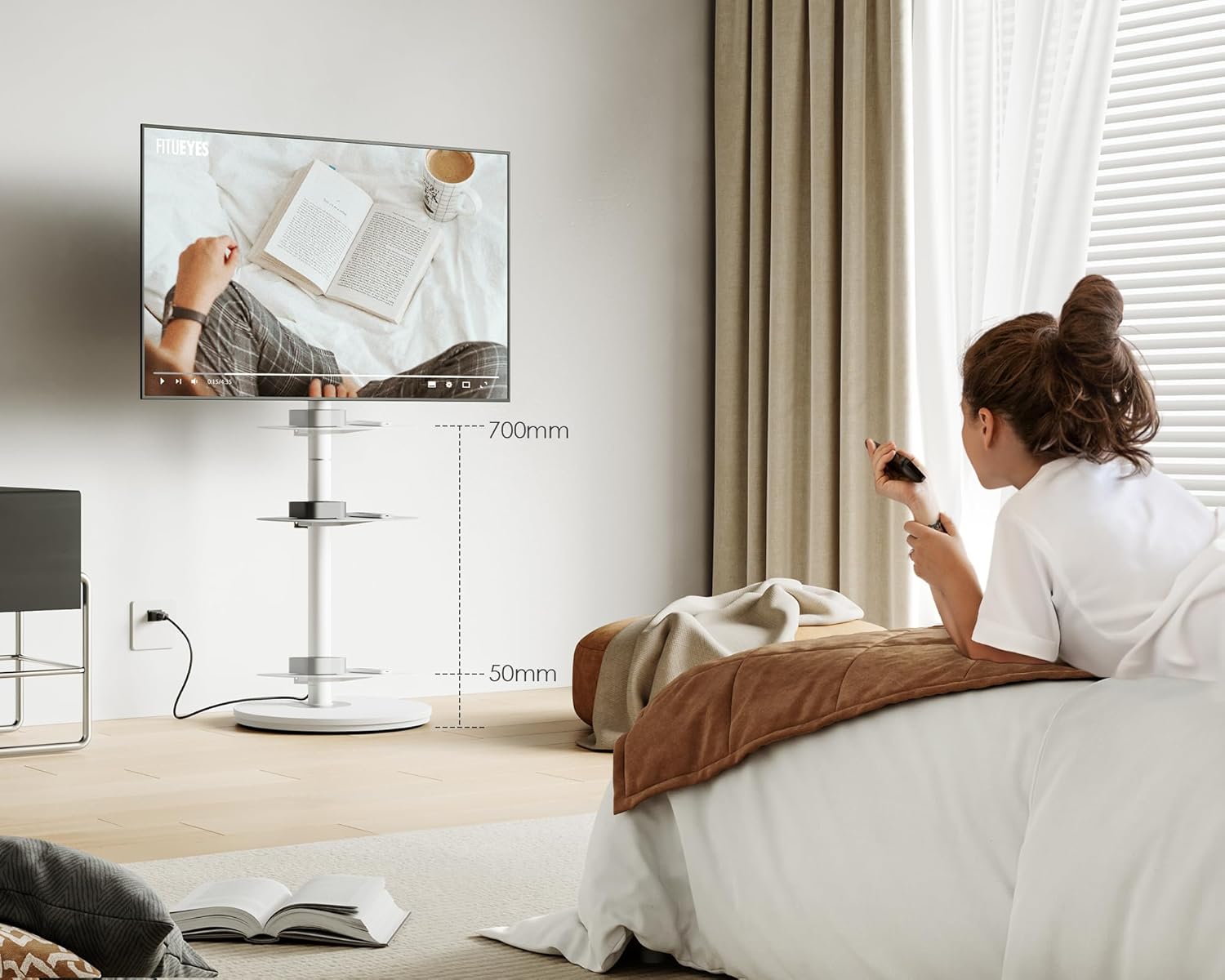
Step 4: Cable Management
- Route any device cables through the integrated cable management system on the TV stand's pole.
- Use the provided cable clips or ties to secure cables neatly along the back of the stand, ensuring a clean and organized appearance.

Assembly Video
For a visual guide on assembly, please refer to the following video:
Video 1: Step-by-step assembly instructions for the WALL A2 model, which shares similar assembly principles for the FITUEYES Master Series TV Stand Storage Shelf.
Operating Instructions
Adjusting Shelf Height
To adjust the height of the storage shelf, loosen the locking mechanism or screws that secure it to the main pole. Carefully slide the shelf up or down to the desired position, then re-tighten the mechanism to ensure stability. Always ensure the shelf is level before placing items on it.
Utilizing Storage Capacity
The shelf provides additional space for media devices, remote controls, or other small items. Distribute weight evenly on the shelf and do not exceed the 22 lbs (10 kg) load capacity.
Maintenance
- Cleaning: Wipe the shelf and stand with a dry, soft cloth. Avoid using abrasive cleaners or harsh chemicals that could damage the finish.
- Regular Checks: Periodically check all screws and connections to ensure they remain tight. Re-tighten if necessary to maintain stability.
- Avoid Moisture: Keep the product away from excessive moisture and direct sunlight to prevent damage and discoloration.
Troubleshooting
- Shelf is Wobbly: Ensure all screws securing the shelf and its bracket to the TV stand are fully tightened. Check that the TV stand itself is on a level surface.
- Difficulty Adjusting Height: Loosen the height adjustment screws sufficiently before attempting to move the shelf. Ensure no cables are obstructing the movement.
- Cables are Messy: Re-route cables through the integrated cable management system and use additional cable ties if needed to secure them.
Specifications
| Feature | Detail |
|---|---|
| Brand | FITUEYES |
| Model Compatibility | Master V2 FT48/V2 Pro FT48 Series TV Stands |
| Product Dimensions | 15"D x 11.6"W x 2.56"H |
| Shelf Size | 12.9 inches x 10.6 inches |
| Number of Shelves | 1 |
| Weight Limit | 22 Pounds (10 kg) |
| Material | Metal |
| Color | White |
| Assembly Required | Yes |
| Installation Type | Cabinet-integrated (for compatible TV stands) |
| Height Adjustment Range | 50mm to 700mm from the floor (relative to TV stand) |
Warranty and Support
For warranty information, product support, or to inquire about replacement parts, please contact FITUEYES customer service. Refer to your purchase documentation or the official FITUEYES website for contact details.
Important Note: Ensure the shelf is not overloaded beyond 22lbs and is securely fastened to the TV stand.