
1. Introduction
This manual provides essential information for the safe and efficient operation of your Cellplay SolarPlay Portable Power Station Q2401. Please read this manual thoroughly before using the product and retain it for future reference.
2. Safety Information
WARNING: Failure to follow these instructions may result in electric shock, fire, or serious injury.
- Do not disassemble, repair, or modify the unit.
- Keep the unit away from fire or direct sunlight.
- Do not use or store the unit in a bathroom or in an area exposed to water or moisture.
- Use only original or certified cables.
- Keep out of reach of children.
- Ensure proper ventilation during use to prevent overheating.
- Do not block the ventilation openings.
- Avoid dropping or subjecting the unit to strong impacts.
- Do not insert foreign objects into the ports.
- Dispose of the product according to local regulations.
3. What's Included
Your package should contain the following items:
- Q2401 Portable Power Station
- AC Charging Cable
- MC4 XT90 Solar Charging Cable
- Instruction Manual
- 400W Solar Panel (if purchased as a bundle)
Note: Due to the heavy weight of the product, the power station and solar panel may be delivered in separate packages.
Video: A quick overview of the SolarPlay 2500W Power Station's features and ports. This video highlights the various input and output options available on the unit.
4. Product Overview
The SolarPlay Portable Power Station Q2401 is a versatile power solution designed for various applications, from home backup to outdoor adventures. It features a large capacity and multiple output ports.
4.1 Key Features
- Large Capacity: 2304Wh battery with 2500W continuous output (4800W peak).
- LiFePO4 Battery: High-quality Lithium Iron Phosphate battery with over 3500 charge/discharge cycles, offering a lifespan of up to 15 years.
- Fast Charging: Fully charged in approximately 1.5 hours with dual charging (AC + Solar).
- Adjustable Input Power: Five levels (300W, 500W, 700W, 900W, 1100W) for flexible charging.
- UPS Function: Uninterruptible Power Supply with a <0.08s switchover time.
- Multiple Output Ports: 14 ports including AC, USB-A (QC3.0), USB-C (PD 20W & 100W), cigarette lighter, and DC5521.
- BMS System: Battery Management System for enhanced safety and protection.
4.2 Front Panel Interface

Image: Front panel of the SolarPlay Portable Power Station, highlighting the display, USB ports, DC ports, and power buttons.
The front panel includes a clear LCD display showing input/output wattage, battery percentage, and remaining runtime. It also features:
- Power Button: To turn the unit on/off.
- Input Adjustment Dial: To select input power (300W, 500W, 700W, 900W, 1100W).
- 12V/10A Cigarette Lighter Port: For automotive accessories.
- 12V/25A XT60 Port: For high-power DC devices.
- 2 x 12V/3A DC5521 Ports: For standard DC devices.
- 2 x USB-A (QC3.0) Ports: For fast charging compatible USB devices.
- 3 x USB-C (PD 20W) Ports: For charging modern devices.
- 1 x USB-C (PD 100W) Port: For high-speed charging of laptops and other power-hungry devices.
- LED Light Bar: Provides illumination with multiple modes (steady, flash, SOS).
4.3 Rear Panel Interface

Image: Rear panel of the SolarPlay Portable Power Station, showing the AC input, four AC output ports, and the XT90 solar input port.
The rear panel features:
- AC Input Port: For charging the power station from a wall outlet.
- 4 x AC Output Ports: Standard 110V AC outlets for household appliances.
- XT90 Input Port: For connecting solar panels (11.5V to 48V, max. 500W) or car charging.
- Overload Protection Button: Resettable circuit breaker.
- AC On/Off Switch: Controls power to the AC outlets.
5. Setup
Before first use, it is recommended to fully charge the power station.
5.1 Initial Charging (AC)
- Connect the AC charging cable to the AC Input port on the rear of the power station.
- Plug the other end of the AC charging cable into a standard wall outlet.
- The LCD display will show the input wattage and charging status.
- The unit will be fully charged in approximately 1.5 hours at 1100W input.

Image: The SolarPlay Power Station being charged simultaneously by an AC wall outlet and a solar panel, illustrating its fast dual charging capability.
5.2 Solar Panel Connection
If you have a SolarPlay 400W solar panel, follow these steps:
- Unfold the solar panel and position it in direct sunlight for maximum efficiency.
- Connect the MC4 XT90 solar charging cable to the XT90 Input port on the rear of the power station.
- Connect the MC4 connectors from the solar panel to the solar charging cable.
- The LCD display will show the input wattage from the solar panel.
Note: Avoid shady areas or reflective surfaces, as these can reduce output power. Do not use the panel when it's wet or raining.
6. Operating Instructions
6.1 Powering On/Off
- To turn on the main unit, press and hold the POWER button on the front panel. The LCD display will illuminate.
- To turn off the main unit, press and hold the POWER button again.
- Individual output sections (USB, DC, AC) have their own ON/OFF buttons. Press these buttons to activate or deactivate the respective outputs.
6.2 Adjusting Input Power
The power station allows you to adjust the AC input power to suit your needs or environment:
- Press the INPUT button repeatedly to cycle through the available input wattage settings: 300W, 500W, 700W, 900W, 1100W.
- Choosing a lower input power can extend the service life of the portable power supply.
6.3 Using Output Ports
Activate the desired output section by pressing its ON/OFF button. Connect your devices to the appropriate ports:
- AC Outlets: For devices requiring 110V AC power. Ensure the AC ON/OFF switch on the rear is engaged.
- USB Ports: For charging smartphones, tablets, laptops, and other USB-powered devices.
- DC Ports (Cigarette Lighter, XT60, DC5521): For 12V DC devices.
6.4 UPS (Uninterruptible Power Supply) Function
The Q2401 features a UPS function. When the power station is connected to a wall outlet and devices are plugged into its AC outputs, it provides power directly from the grid. In the event of a power outage, the unit automatically switches to battery power within 0.08 seconds, ensuring continuous operation for connected devices.

Image: The SolarPlay Power Station acting as an Uninterruptible Power Supply (UPS) for a computer workstation, ensuring continuous power during an outage.
6.5 LED Light Bar
The integrated LED light bar can be activated by pressing its ON/OFF button. It offers multiple modes:
- Steady Light: For general illumination.
- Flash Mode: For signaling or attention.
- SOS Mode: For emergency signaling.
7. Applications
The SolarPlay Portable Power Station is suitable for a wide range of situations:
- Outdoor Camping: Powering lights, portable refrigerators, and charging devices.
- Home Backup: Providing essential power during outages for lights, Wi-Fi routers, and small appliances.
- Power Tools: Operating various power tools for DIY projects or professional use.
- RV Use: Sustainable power for appliances and electronics in recreational vehicles.
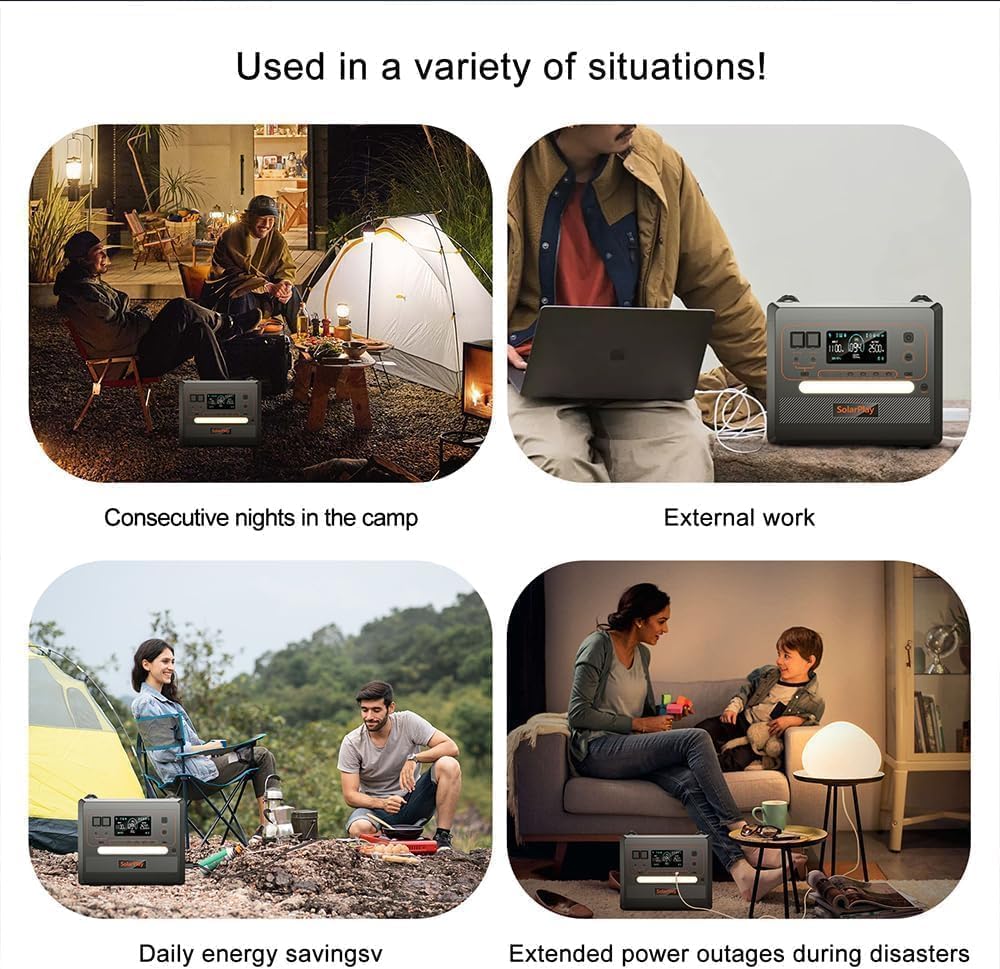
Image: Four different usage scenarios for the SolarPlay Power Station, including camping, external work, daily energy saving, and providing power during extended outages.
8. Maintenance
8.1 Battery Care
- To maximize battery lifespan, avoid fully discharging the unit frequently.
- Store the unit in a cool, dry place away from direct sunlight and extreme temperatures.
- If storing for extended periods, charge the unit to approximately 50-80% every 3-6 months.
8.2 Solar Panel Care
- Keep the solar panel clean from dust, dirt, and debris to maintain optimal charging efficiency. Wipe with a soft, damp cloth.
- Avoid long-term outdoor exposure. This panel is intended for temporary portable use only.
- Fold the panel immediately after each use and store it in a cool, dry place.
9. Troubleshooting
| Problem | Possible Cause | Solution |
|---|---|---|
| Unit does not turn on | Battery is completely discharged. | Connect to AC power for charging. |
| AC output not working | AC output is not enabled or overloaded. | Press the AC ON/OFF switch on the rear. If overloaded, disconnect devices and press the Overload Protection button. |
| Slow charging via solar panel | Insufficient sunlight, panel not optimally angled, or dirty panel. | Reposition panel for direct sunlight, adjust angle, clean panel surface. |
| Unit overheating | Blocked ventilation or excessive load. | Ensure vents are clear. Reduce connected load. Allow unit to cool down. |
10. Specifications
| Feature | Detail |
|---|---|
| Model | Q2401 |
| Brand | Cellplay |
| Battery Type | LiFePO4 (Lithium Iron Phosphate) |
| Capacity | 2304Wh |
| AC Output | 2500W (Rated), 4800W (Peak) |
| AC Input | Max 1100W (Adjustable: 300W, 500W, 700W, 900W, 1100W) |
| Solar Input (DC/MPPT) | 11.5V-48V, Max 500W |
| USB-A Output | 2 x QC3.0 (18W each) |
| USB-C Output | 3 x PD 20W, 1 x PD 100W |
| DC Output | 1 x 12V/10A (Cigarette Lighter), 1 x 12V/25A (XT60), 2 x 12V/3A (DC5521) |
| UPS Function | Yes, <0.08s switchover |
| Dimensions | 15.39"L x 11.22"W x 12.56"H |
| Item Weight | 47.4 Pounds (approx. 21.5 kg) |
11. Warranty & Support
This portable power supply comes with an 18-month warranty. If your product malfunctions within this period, please contact SolarPlay customer support for assistance, return, or refund options.
For further support or inquiries, please refer to the contact information provided in your instruction manual or visit the official Cellplay website.