
JYTIGV RH916
JYTIGV 10000mAh 3-in-1 Magnetic Wireless Portable Charger Instruction Manual
Model: RH916
Introduction
This manual provides detailed instructions for the safe and efficient use of your JYTIGV 10000mAh 3-in-1 Magnetic Wireless Portable Charger. Please read this manual thoroughly before operating the device and retain it for future reference.
Safety Information
- Do not expose the power bank to extreme temperatures, direct sunlight, or fire.
- Avoid dropping, impacting, or disassembling the device.
- Keep away from water and other liquids.
- Do not use if the device is damaged or swollen.
- Keep out of reach of children.
- Use only compatible charging cables and adapters.
- Ensure proper ventilation during charging to prevent overheating. The device features smart heat control to manage temperature during wireless charging.

Image: Smart Heat Control feature, illustrating how the device manages temperature during operation for enhanced safety and battery longevity.
Package Contents
Verify that all items are present in your package:
- 1 x JYTIGV 10000mAh Wireless Power Bank (Model RH916)
- 1 x USB-A to USB-C Charging Cable
- 1 x User Manual (this document)
Product Overview
The JYTIGV 10000mAh power bank is a versatile charging solution featuring multiple output options and an integrated stand. Its compact design makes it suitable for travel.
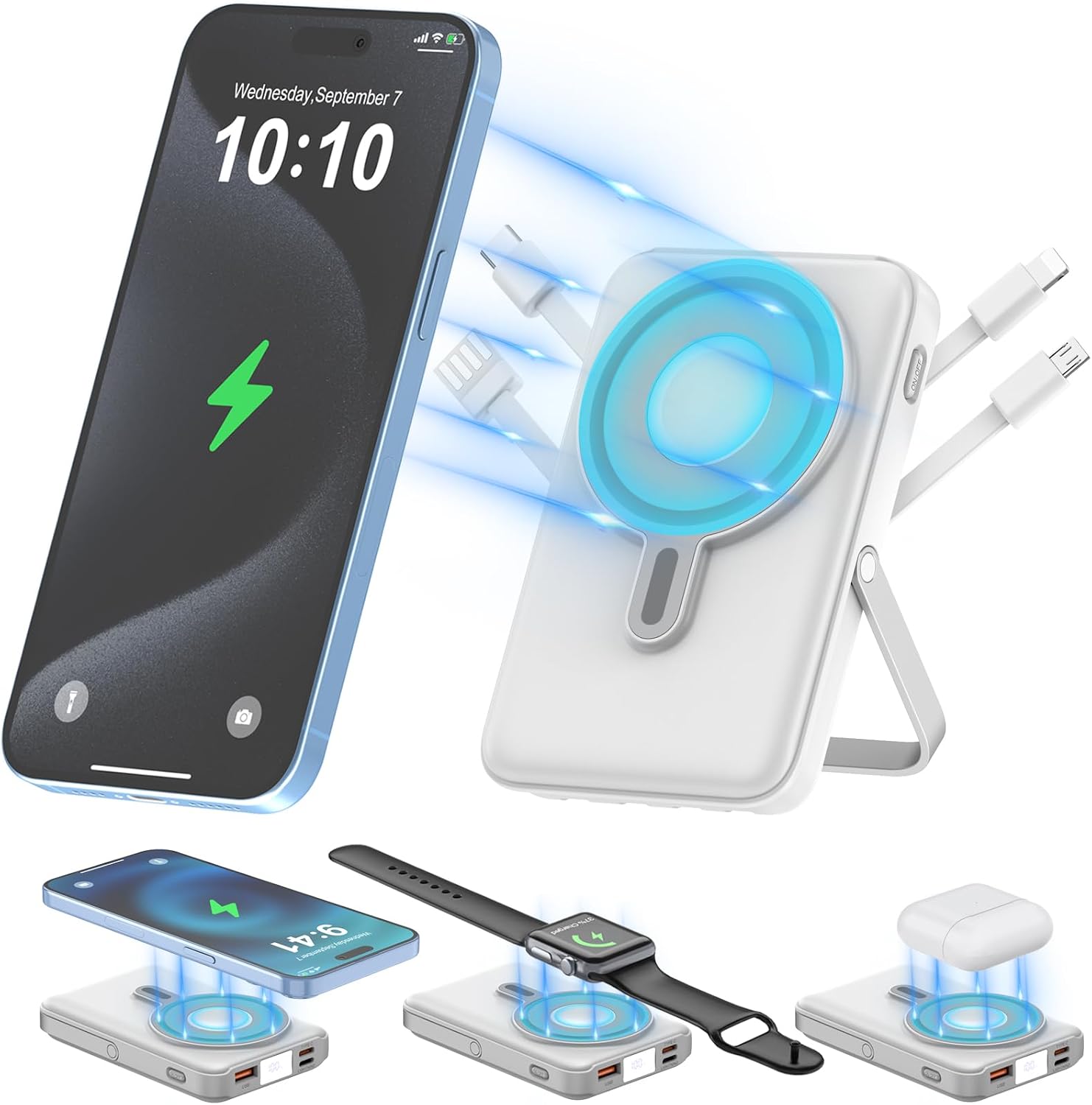
Image: The JYTIGV power bank demonstrating its ability to wirelessly charge an iPhone, Apple Watch, and AirPods simultaneously, alongside its built-in cables.
Components and Ports:

Image: Detailed view of the power bank's ports and built-in cables, highlighting the Type-C output, Type-C input, Lightning input, USB output, LED display, On/Off button, USB-A input, Lightning output, and Micro output.
- Wireless Charging Pad: Magnetic area for compatible devices (15W Max for smartphones, 7.5W Max for iPhone 12-15 series; 5W Max for AirPods; 3W Max for Apple Watch).
- Built-in Cables: Includes USB-C, Lightning, and Micro-USB cables for output.
- USB-A Output Port: 22.5W Max wired fast charging.
- USB-C Input/Output Port: 20W Max for both charging devices and recharging the power bank.
- Lightning Input Port: For recharging the power bank.
- Built-in USB-A Recharging Cable: For recharging the power bank.
- LED Display: Shows remaining battery percentage.
- On/Off Button: Activates/deactivates the power bank and wireless charging function.
- Integrated Stand: Foldable stand for hands-free viewing.

Image: Close-up of the digital LED display, indicating the current battery percentage of the power bank.
Setup
1. Initial Charging of the Power Bank
Before first use, fully charge the power bank. You have three options for recharging:
- Using the Built-in USB-A Cable: Connect the built-in USB-A cable to a USB power adapter (not included) or a computer USB port.
- Using the USB-C Input Port: Connect a USB-C cable (included) to the power bank's USB-C input port and then to a USB-C power adapter or compatible device.
- Using the Lightning Input Port: Connect a Lightning cable (not included) to the power bank's Lightning input port and then to a power adapter.
The LED display will show the charging progress. Once it reaches 100%, the power bank is fully charged.

Image: Illustration of the three methods available to recharge the power bank: using the built-in USB-A cable, a USB-C cable, or a Lightning cable.
2. Activating Wireless Charging
To use the wireless charging function, press the On/Off button located on the side of the power bank once to activate it. The LED display will illuminate.
Operating Instructions
1. Wired Charging
The power bank offers multiple wired charging options:
- Using Built-in Cables: Pull out the appropriate built-in cable (USB-C, Lightning, or Micro-USB) and connect it directly to your device.
- Using USB-A Output Port: Connect your device's USB-A charging cable to the USB-A output port on the power bank.
- Using USB-C Output Port: Connect your device's USB-C charging cable to the USB-C input/output port on the power bank.
The power bank supports 22.5W Max fast charging via the USB-A port and 20W Max via the USB-C port. The LED display will show the charging status.
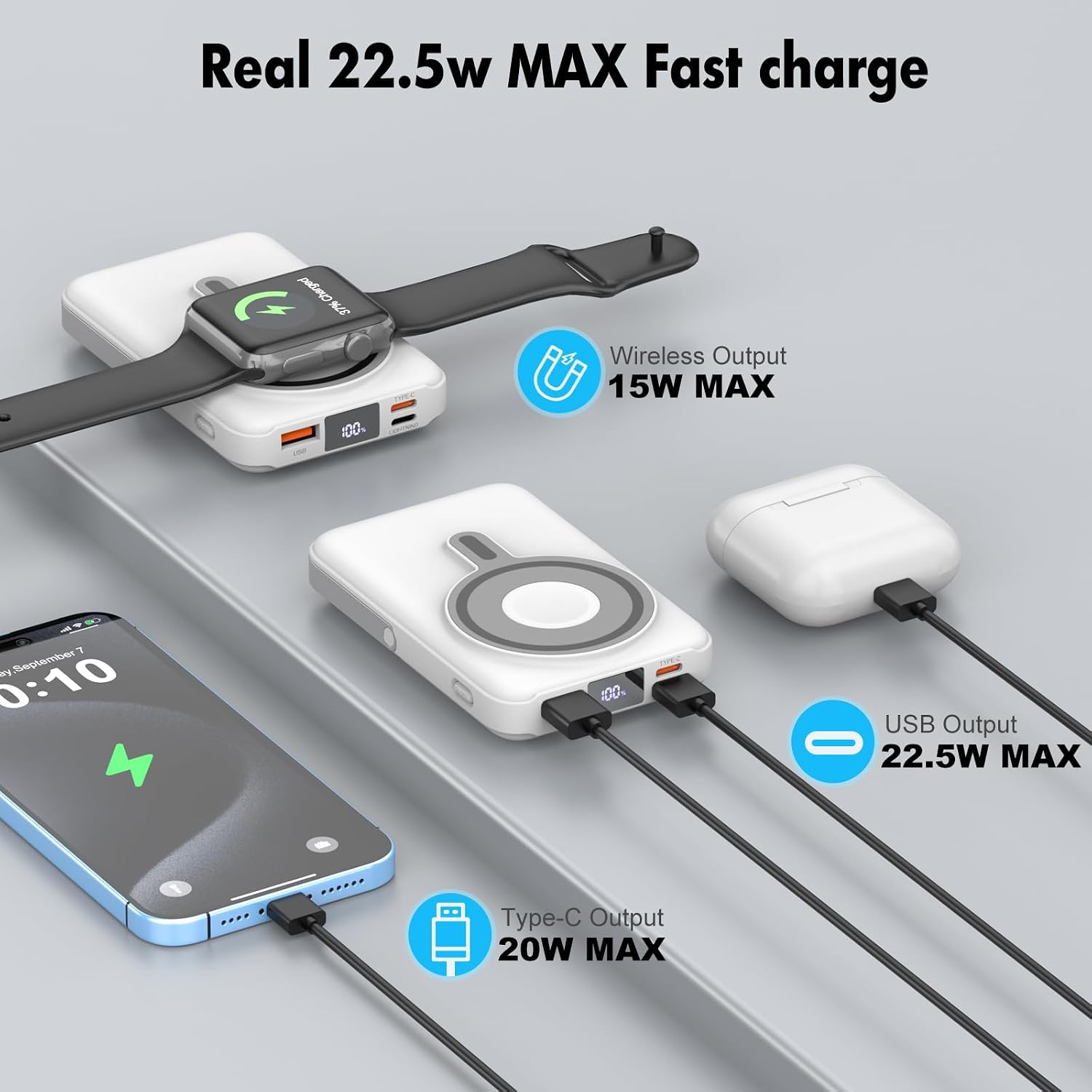
Image: The power bank actively charging multiple devices, including wireless charging for an Apple Watch and wired charging for an iPhone and another smartphone, demonstrating its multi-device capability.
2. Wireless Charging
The power bank supports magnetic wireless charging for compatible devices:
- For iPhone (12/13/14/15 series): Ensure the power bank is turned on. Align your iPhone with the magnetic wireless charging pad on the power bank. The magnetic connection will secure the phone, and charging will begin automatically. For optimal magnetic connection, use a Mag-Safe compatible phone case or no case.
- For Apple Watch (Ultra/8/7/6/SE/5/4/3/2/1): Ensure the power bank is turned on. Place your Apple Watch on the designated wireless charging area. Charging will commence.
- For AirPods (2nd/3rd Gen, Pro/Pro 2nd Gen): Ensure the power bank is turned on. Place your AirPods charging case on the wireless charging area. Charging will commence.
If switching between wireless charging devices (e.g., from phone to watch), double-click the power button to turn off the wireless function first, then click it once to reactivate it before placing the new device.

Image: The power bank securely attached to the back of an iPhone via its magnetic connection, illustrating its portability and convenience for charging while in use.
3. Pass-Through Charging
The power bank supports pass-through charging, allowing you to charge your device while the power bank itself is being recharged. Simply connect the power bank to a power source and then connect your device to the power bank (either wired or wirelessly).

Image: The power bank connected to a wall outlet for recharging, while an iPhone is wirelessly charging on its magnetic pad, demonstrating the pass-through charging feature.
4. Using the Integrated Stand
The power bank features a foldable stand. Extend the stand from the back of the device to prop it up, allowing for hands-free viewing while charging your phone wirelessly.

Image: The power bank utilizing its integrated stand to hold an iPhone upright for convenient viewing while wirelessly charging.
Maintenance
- Cleaning: Wipe the device with a soft, dry cloth. Do not use harsh chemicals or abrasive materials.
- Storage: Store the power bank in a cool, dry place away from direct sunlight and extreme temperatures.
- Battery Care: To prolong battery life, fully charge the power bank at least once every three months if not in regular use.
Troubleshooting
| Problem | Possible Cause | Solution |
|---|---|---|
| Device not charging wirelessly. | Wireless function not activated; device not aligned; incompatible case; device not supported. | Press the On/Off button once to activate wireless charging. Ensure proper alignment on the magnetic pad. Remove thick or non-Mag-Safe cases. Verify device compatibility (iPhone 12-15 series, Apple Watch, AirPods 2/3/Pro/Pro 2). Double-click power button to reset wireless function if switching devices. |
| Power bank not recharging. | Cable or adapter issue; power source issue; power bank battery depleted. | Try a different charging cable or power adapter. Ensure the power source is active. Allow the power bank to charge for a longer period if completely depleted. |
| Slow charging speed. | Using a non-fast charging cable/adapter; multiple devices charging simultaneously; device not supporting fast charging. | Use a fast-charging compatible cable and adapter. Charging multiple devices simultaneously may reduce individual charging speeds. Ensure your device supports the advertised fast charging protocols. |
| LED display not working. | Power bank off; device malfunction. | Press the On/Off button to check if the power bank is active. If the issue persists, contact customer support. |
Specifications
| Feature | Detail |
|---|---|
| Model Number | RH916 |
| Battery Capacity | 10000mAh |
| Wireless Output (Smartphone) | 15W Max (7.5W Max for iPhone 12-15 series) |
| Wireless Output (AirPods) | 5W Max (AirPods 2/3/Pro/Pro 2nd Gen ONLY) |
| Wireless Output (Apple Watch) | 3W Max (Apple Watch Series Ultra/8/7/6/SE/5/4/3/2/1) |
| Wired USB-A Output | 22.5W Max |
| Wired USB-C Input/Output | 20W Max |
| Built-in Cables | USB-C, Lightning, Micro-USB (Output); USB-A (Recharging Input) |
| Dimensions | 4.33 x 2.79 x 0.85 inches |
| Weight | 8.9 ounces |
| Battery Type | Lithium Polymer |
| Color | White with cable |

Image: Visual representation of the power bank's compact dimensions (4.21 x 2.81 x 0.77 inches) and light weight (7.05 oz), emphasizing its portability.
Warranty and Support
This product is covered by a return policy of 2026 days for refund or replacement. For any product inquiries, technical support, or warranty claims, please contact JYTIGV customer service through your purchase platform.
Ask a question about this manual
Ask about setup, troubleshooting, compatibility, parts, safety, or missing instructions. Manuals+ will review the question and use this page’s manual context to help answer it.