
1. Introduction
Thank you for choosing the JYTIGV RH916 Wireless Portable Charger. This 3-in-1 magnetic power bank is designed to provide convenient and versatile charging for your iPhone, Apple Watch, and AirPods, along with other compatible devices. Please read this manual carefully to ensure safe and optimal use of your new device.
What's in the Box:
- 1 x JYTIGV RH916 Wireless Portable Charger (10000mAh)
- 1 x USB-A to USB-C Charging Cable
- 1 x User Manual
2. Product Features
- 3-in-1 Magnetic Charging: Simultaneously charge compatible iPhone 12-15 series, Apple Watch series (Ultra/8/7/6/SE/5/4/3/2/1), and AirPods 2/3/Pro/Pro 2nd Gen.
- Built-in Cables: Features integrated USB-C, Lightning, and Micro-USB output cables for direct charging of various smart devices. Includes a built-in USB-A cable for recharging the power bank.
- Multiple Outputs & Inputs: Offers 6 output options (3 built-in cables, 1 USB-C port, 1 USB-A port, 1 magnetic wireless charging pad) and 3 input options (built-in USB-A recharging cable, USB-C input, iPhone input) for maximum versatility.
- Fast Charging: Supports 15W Max wireless charging for smartphones (7.5W Max for iPhone 12-15 series), 5W Max for AirPods, and 3W Max for Apple Watch. Provides 22.5W Max USB-A wired fast charging and 20W Max USB-C input/output charging.
- Pass-Through Charging: Charge your phone and the power bank simultaneously via the bottom USB-C port.
- Compact & Portable: Measuring 4.33 x 2.79 x 0.85 inches and weighing 7.05 oz, it's designed for easy portability.
- LED Display: Digital display shows the remaining battery percentage.
- Integrated Kickstand: A foldable stand allows for hands-free viewing while charging.
- Superior Safety: Features soft silicone material to protect devices and innovative temperature control technology to prevent overheating during wireless charging.

Figure 2.1: Overview of the JYTIGV RH916 3-in-1 Magnetic Power Bank, showcasing its wireless charging capabilities and built-in cables.
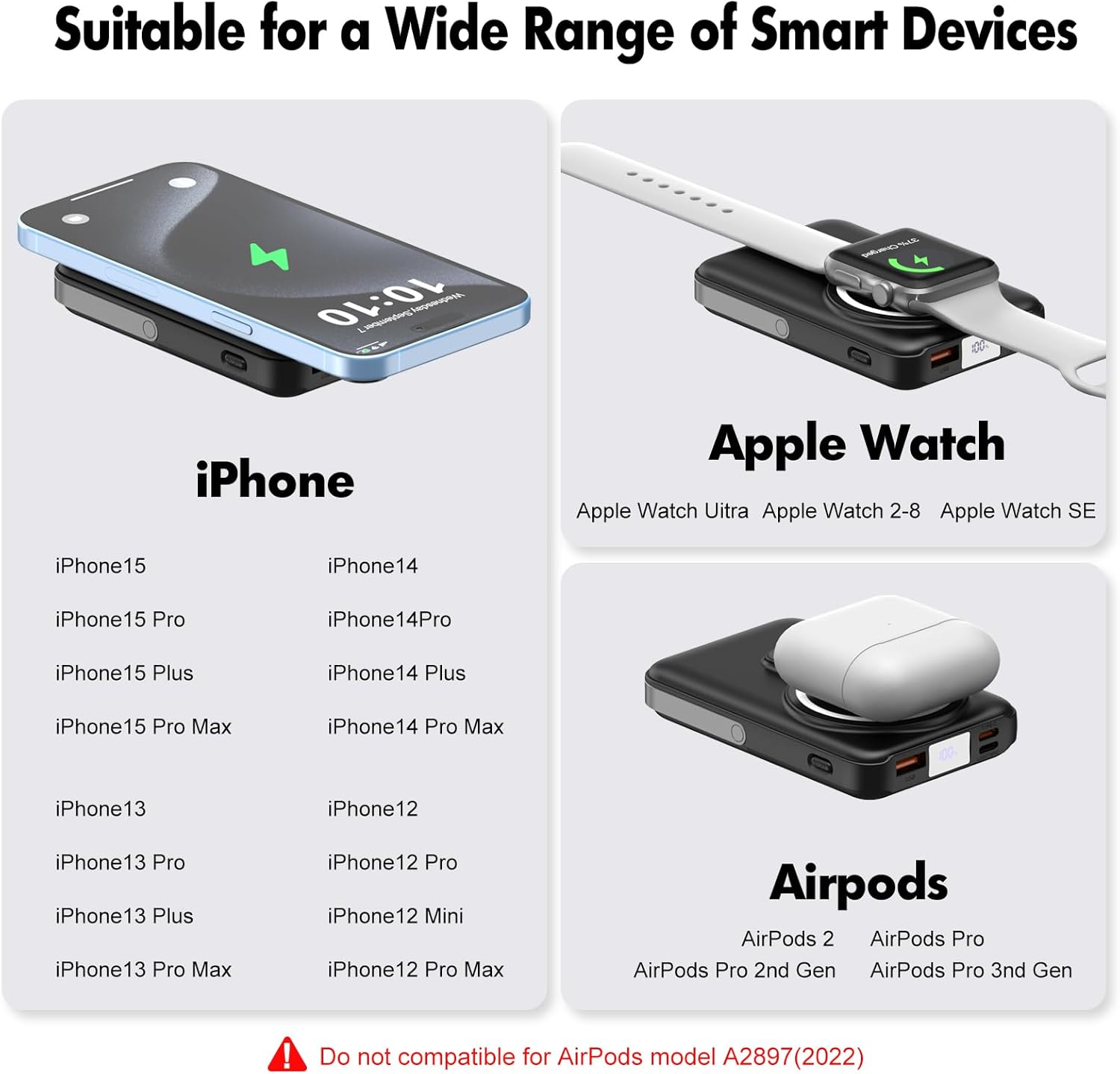
Figure 2.2: Compatibility chart for the power bank, detailing supported iPhone models, Apple Watch series, and AirPods generations.
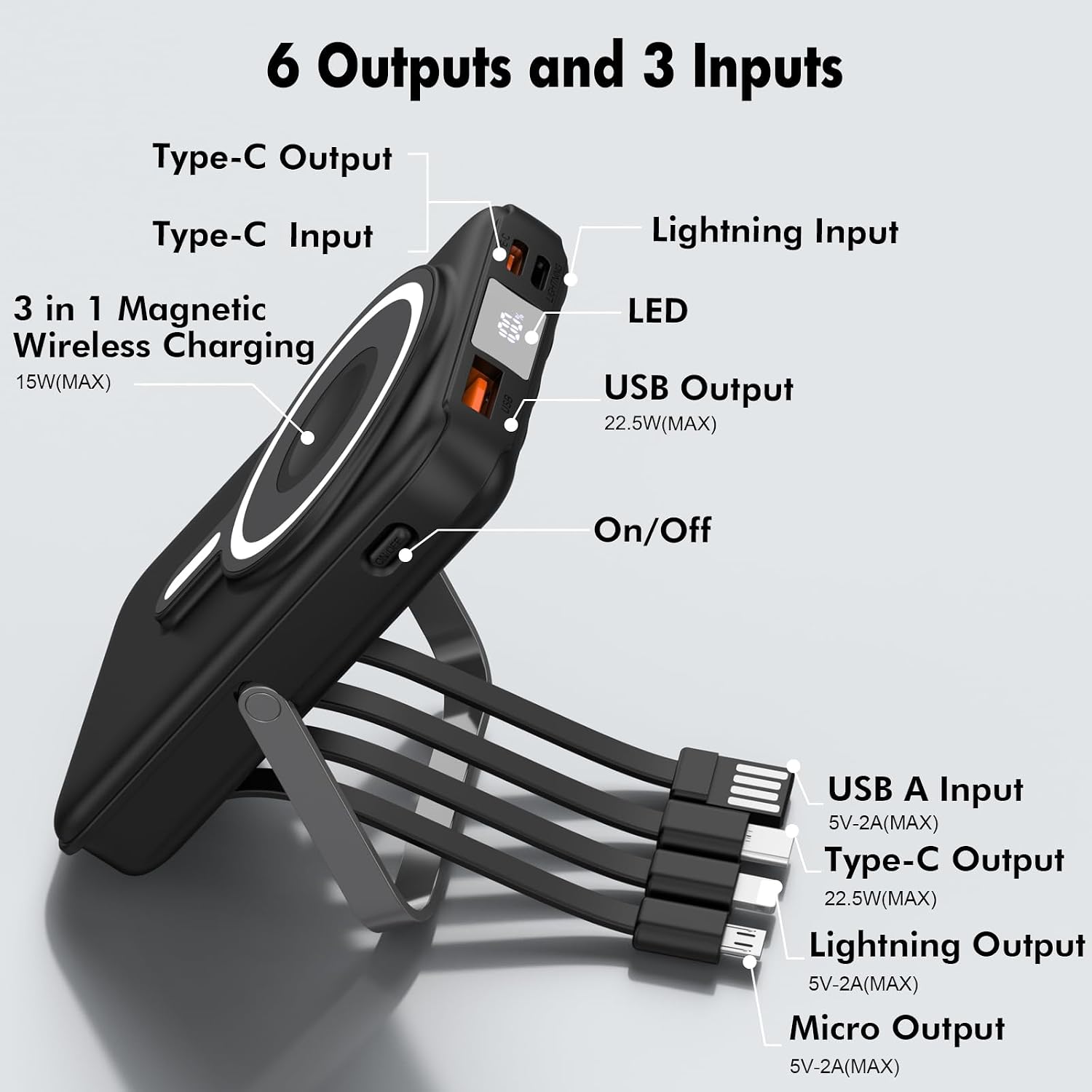
Figure 2.3: Detailed diagram illustrating the various input and output ports and cables available on the power bank.
3. Setup
3.1 Charging the Power Bank
The JYTIGV RH916 power bank can be recharged using three different input options:
- Built-in USB-A Recharging Cable: Connect the integrated USB-A cable to a compatible USB power adapter (not included).
- USB-C Input: Use a USB-C cable (included) to connect the power bank's USB-C input port to a compatible USB-C power adapter.
- iPhone Input: Use a Lightning cable to connect the power bank's iPhone input port to a compatible power adapter.
The LED display will show the charging progress. Ensure the power bank is fully charged before first use for optimal performance.

Figure 3.1: The power bank offers multiple ways to recharge itself, including USB-C, USB-A (built-in), and Lightning inputs.
4. Operating Instructions
4.1 Activating Wireless Charging
To use the wireless charging function, first turn on the power switch located on the side of the power bank. Then, place your mobile phone, Apple Watch, or AirPods on the designated magnetic charging area.
4.2 Charging Devices Wirelessly
- For iPhone (12-15 series): Align your iPhone with the magnetic charging pad on the power bank. For best results, use a Mag-Safe compatible phone case or no case.
- For Apple Watch: Place your Apple Watch on the dedicated wireless charging module. You may need to double-click the power button to activate watch charging.
- For AirPods: Place your AirPods case on the magnetic charging pad.

Figure 4.1: An iPhone charging wirelessly on the magnetic pad of the power bank.

Figure 4.2: An Apple Watch charging on its dedicated wireless module on the power bank.

Figure 4.3: AirPods charging wirelessly on the magnetic pad of the power bank.
4.3 Charging Devices with Built-in Cables and Ports
The power bank features built-in cables and additional ports for wired charging:
- Built-in Cables: Pull out the appropriate built-in USB-C, Lightning, or Micro-USB cable and connect it directly to your device.
- USB-C Output Port: Use your own USB-C to USB-C cable to connect to compatible devices for fast charging.
- USB-A Output Port: Use your own USB-A cable to connect to compatible devices for fast charging.

Figure 4.4: The power bank features convenient built-in charging cables for various devices.

Figure 4.5: The power bank can charge up to 6 devices simultaneously using a combination of wireless and wired connections.
4.4 Using the Integrated Kickstand
The power bank features a foldable kickstand on the back. Extend the kickstand to prop up your phone for hands-free viewing while charging, ideal for watching videos or video calls.

Figure 4.6: The strong magnetic hold ensures your phone stays securely attached to the power bank, even on the go.
5. Safety Information
- Do not expose the power bank to extreme temperatures, direct sunlight, or liquids.
- Avoid dropping or subjecting the device to strong impacts.
- Do not attempt to disassemble or modify the power bank.
- Keep out of reach of children.
- The power bank incorporates innovative temperature control technology to prevent overheating during wireless charging. If the device feels excessively hot, discontinue use and allow it to cool down.
- Use only certified charging cables and adapters.
6. Specifications
| Feature | Specification |
|---|---|
| Model Number | RH916 |
| Battery Capacity | 10000mAh |
| Product Dimensions | 4.33 x 2.79 x 0.85 inches |
| Item Weight | 8.8 ounces |
| Wireless Charging Output (Phone) | 15W Max (7.5W Max for iPhone 12-15 series) |
| Wireless Charging Output (AirPods) | 5W Max |
| Wireless Charging Output (Apple Watch) | 3W Max |
| USB-A Wired Output | 22.5W Max |
| USB-C Input/Output | 20W Max |
| Built-in Cables | USB-C, Lightning, Micro-USB (Output); USB-A (Input) |
| Compatible Devices | iPhone 12-16 series, Apple Watch series, AirPods 2/3/Pro/Pro 2nd Gen, most Android devices |
7. Troubleshooting
- Wireless charging not starting: Ensure the power switch on the side of the power bank is turned ON. For iPhones, use a Mag-Safe compatible case or no case to ensure proper magnetic connection.
- Apple Watch not charging: Double-click the power button on the power bank to activate the Apple Watch charging module.
- Power bank obstructing phone camera: For wide-angle photos (0.5x zoom), rotate the power bank to avoid obstruction.
- Device overheating during wireless charging: The power bank has built-in temperature control. If overheating occurs, temporarily remove the device and allow both to cool down. Consider using wired charging if persistent.
- Slow charging: Ensure you are using compatible fast-charging cables and adapters. Wireless charging is generally slower than wired charging.
8. Official Product Videos
8.1 Quick Review on this Charger! - Must Watch
This video provides a quick and informative review of the JYTIGV RH916 3-in-1 Magnetic Power Bank, highlighting its key features and ease of use.
8.2 Wireless Charger 10000mAh 3-in-1 Magnetic Power Bank
An official video demonstrating the functionality and benefits of the JYTIGV 10000mAh 3-in-1 Magnetic Power Bank, including its wireless charging capabilities for multiple devices.
9. Warranty and Support
For warranty information and customer support, please refer to the contact details provided on the product packaging or visit the official JYTIGV website. Keep your purchase receipt for warranty claims.