
1. Introduction
This manual provides essential information for the safe and effective operation of your Panasonic LUMIX S9 Full Frame Camera. The LUMIX S9 is a compact, full-frame mirrorless camera designed for high-quality image and video capture, featuring advanced autofocus, image stabilization, and seamless smartphone integration via the Lumix Lab app. It is compatible with the L-mount lens system.
2. What's in the Box
Your Panasonic LUMIX S9 camera bundle includes the following items:
- Panasonic LUMIX S9 Full Frame Camera Body with Phase Auto Focus
- Canvas React Plus V60 128GB SD Card (280MBPS Read Speed)
- DMW-BLK22 7.2V 2250mAh Lithium-Ion Battery Pack

Figure 2.1: Included items in the LUMIX S9 camera bundle.
3. Setup
3.1. Battery Installation
Insert the provided DMW-BLK22 Lithium-Ion Battery Pack into the battery compartment located at the bottom of the camera body. Ensure it clicks securely into place. Charge the battery fully before first use using the supplied charger.
3.2. SD Card Installation
Locate the SD card slot on the side of the camera. Insert the 128GB SD card with the label facing the front of the camera until it clicks. To remove, press the card gently until it ejects.
3.3. Lens Attachment
Align the white index mark on the lens with the white index mark on the camera body's lens mount. Rotate the lens clockwise until it clicks into place. To detach, press the lens release button on the camera body and rotate the lens counter-clockwise.

Figure 3.1: LUMIX S9 camera body with L-mount for lens attachment.
4. Operating the Camera
4.1. Power On/Off
To power on the camera, slide the power switch located on the top plate to the "ON" position. To power off, slide it to the "OFF" position.
4.2. Basic Controls
The LUMIX S9 features intuitive controls for quick adjustments:
- Shutter Button: Press halfway to focus, fully to capture an image or start/stop video recording.
- Mode Dial: Select various shooting modes (Automatic, Custom, Movie, etc.).
- Control Dials: Adjust exposure settings like aperture, shutter speed, and ISO.
- AF/MF Switch: Toggle between autofocus and manual focus.
- Display: The fully articulating LCD screen allows for flexible viewing angles, including selfie mode.
4.3. Shooting Modes
The camera supports various shooting modes to suit different scenarios:
- Automatic: Camera automatically selects optimal settings.
- Custom: User-defined settings for specific preferences.
- Landscape: Optimized for wide outdoor scenes.
- Movie: Dedicated mode for video recording.
- Sports: High shutter speeds for capturing fast-moving subjects.
4.4. Autofocus System
The LUMIX S9 utilizes Phase Detection Autofocus (PDAF) with 179 autofocus points, offering fast and accurate focusing for both stills and video. The Hybrid focus features combine different autofocus methods for enhanced performance.
4.5. Image Stabilization
The camera features built-in image stabilization to reduce blur caused by camera shake, ensuring sharper images and smoother video footage, especially in low light or when shooting handheld.
4.6. Video Recording Features
The LUMIX S9 is capable of recording video at 2160p resolution with various frame rates (240, 480, 960). Key video features include:
- Open Gate (Flexible Framing): Capture footage using the full sensor, allowing for flexible cropping to various aspect ratios (e.g., 16:9, 1:1, 9:16) for different social media platforms.
- Real Time LUT: Apply cinematic color grades directly in-camera, allowing for instant preview and application of professional looks without extensive post-production.
- Slow Motion & Time-Lapse: Creative video options for dynamic storytelling.
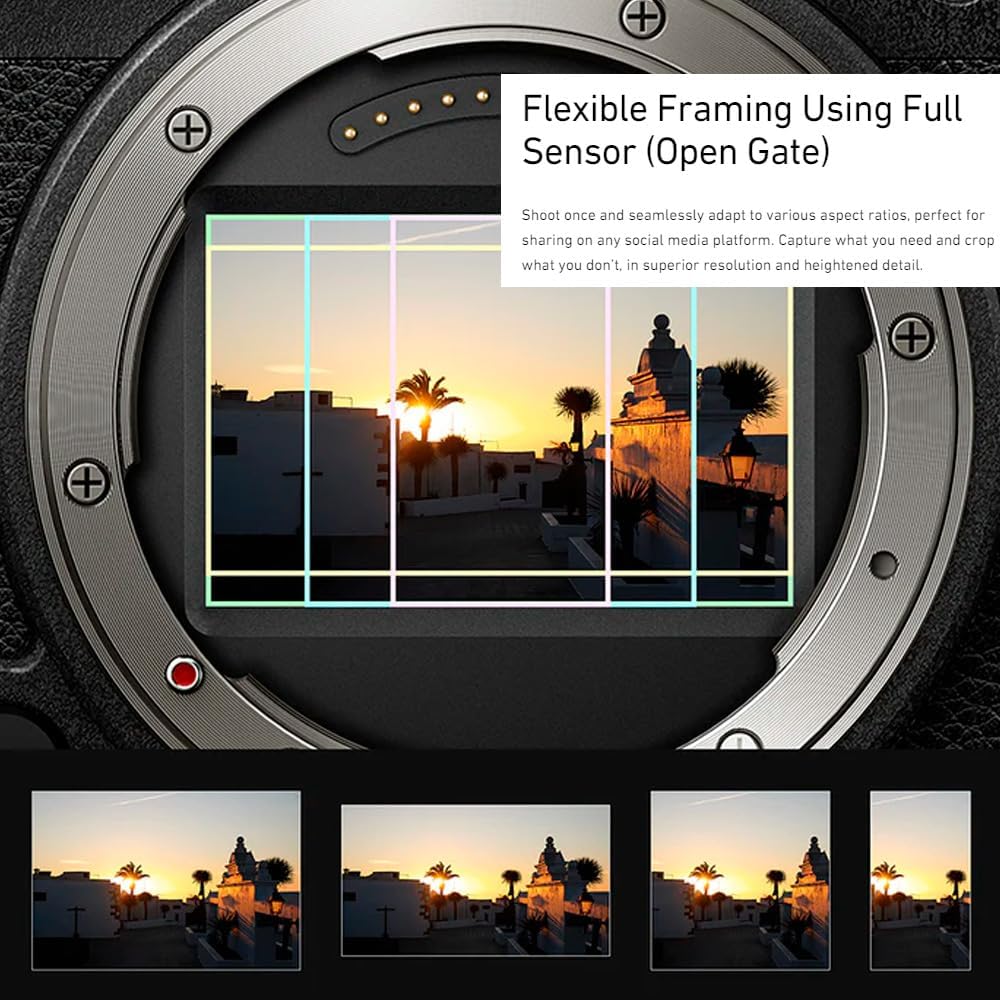
Figure 4.1: Flexible framing capability of the LUMIX S9.

Figure 4.2: Real Time LUT application for instant color grading.
Video 4.1: Product Overview of the Panasonic LUMIX S9, highlighting its compact design and key features.
Video 4.2: Introduction to the LUMIX S9, showcasing its design and creative capabilities.
4.7. Lumix Lab App Integration
The Lumix Lab app allows for ultra-fast Wi-Fi connection to your smartphone, enabling seamless transfer of content. You can preview and apply professional color grades (LUTs) directly in-camera or create your own custom styles within the app for quick and easy sharing to social media.
5. Maintenance
5.1. Cleaning the Camera
- Camera Body: Use a soft, dry cloth to wipe the camera body. For stubborn dirt, slightly dampen the cloth with water.
- Lens: Use a lens blower to remove dust, then gently wipe with a micro-fiber lens cloth. Avoid touching the lens surface with your fingers.
- Sensor: Sensor cleaning should be performed by authorized service personnel to prevent damage.
5.2. Battery Care
- Charge the battery fully before extended storage.
- Store batteries in a cool, dry place.
- Avoid exposing batteries to extreme temperatures.
5.3. Storage
When not in use, store the camera in a dry, dust-free environment, preferably in a camera bag or case. Remove the battery if storing for long periods.
6. Troubleshooting
If you encounter issues with your LUMIX S9 camera, please refer to the following general troubleshooting steps:
- Camera not powering on: Ensure the battery is fully charged and correctly inserted.
- Focus issues: Check that the AF/MF switch is set to the desired mode. Ensure sufficient lighting for autofocus.
- Image quality concerns: Verify shooting mode and settings (ISO, aperture, shutter speed). Ensure the lens is clean.
- Connectivity problems: Restart both the camera and your smartphone. Check Wi-Fi settings on both devices.
For persistent issues, consult the full user manual available on the Panasonic support website or contact customer support.
7. Specifications
| Feature | Detail |
|---|---|
| Brand | Panasonic |
| Model Name | S9 |
| Compatible Mountings | L-mount |
| Photo Sensor Size | Full Frame (35mm) |
| Photo Sensor Technology | BSI CMOS |
| Total Still Resolution | 24 MP |
| Image Stabilization | Yes |
| Auto Focus Technology | Phase Detection Autofocus (PDAF) |
| Video Resolution | 2160p |
| Supported File Format | JPEG, RAW, MP4, MOV |
| Wireless Technology | Wi-Fi |
| Memory Storage Capacity | 128 GB (included SD card) |
| Battery Type | Lithium Ion (DMW-BLK22) |
| Material | Plastic/Composite |
| Item Weight | 2.25 Pounds |
8. Warranty and Support
Your Panasonic LUMIX S9 camera is covered by a manufacturer's warranty. Please refer to the warranty card included in your product packaging for specific terms and conditions. For technical support, service, or additional information, visit the official Panasonic support website or contact their customer service.
Online resources and FAQs are available at www.panasonic.com/support.


