
Introduction
This instruction manual provides detailed information on the operation, maintenance, and troubleshooting of your BAIJIALI Portable AM/FM Radio. Please read this manual thoroughly before using the product to ensure proper function and longevity.
The BAIJIALI Portable AM/FM Radio is designed for ease of use, offering clear and loud sound through its high-performance speaker. It supports versatile power options, including AC adapter for indoor use and a rechargeable lithium battery for portability. Its smooth analog dial ensures effortless tuning across AM, FM, and Shortwave bands.
Product Components
Before you begin, please ensure all components are present in the package:
- BAIJIALI Portable AM/FM Radio Unit
- Rechargeable Lithium Battery
- USB Charging Cable (for DC 5V USB power supply)

Figure 1: Overview of the BAIJIALI Portable AM/FM Radio with key components labeled, including the portable handle, loudspeaker, clear dial, tuning knob, volume adjustment, power on/off switch, DC 5V USB charging port, and AM/FM/SW conversion switch.
Setup
1. Powering the Radio
Your BAIJIALI radio offers two power options:
- AC Power (Indoor Use): Connect the USB charging cable to the DC 5V USB port on the radio and plug the other end into a compatible USB power adapter (not included) connected to a wall outlet.
- Rechargeable Lithium Battery (Portable Use): Insert the included rechargeable lithium battery into the battery compartment located on the back of the radio. Ensure correct polarity. The radio can be charged via the DC 5V USB port when connected to a power source.

Figure 2: Illustration of the two power supply modes: using a DC USB power supply connected to a wall adapter and inserting the DC lithium battery into the battery compartment.
2. Antenna Setup
For optimal reception, extend the telescopic antenna fully. For FM and Shortwave (SW) reception, adjust the antenna's direction for the clearest signal. For AM reception, the radio uses an internal ferrite bar antenna, so antenna extension is not necessary, but rotating the radio itself may improve reception.
Operating Instructions
1. Power On/Off and Volume Adjustment
Locate the Volume knob on the side of the radio. Rotate it clockwise to turn the radio ON and increase the volume. Rotate it counter-clockwise to decrease the volume and turn the radio OFF.
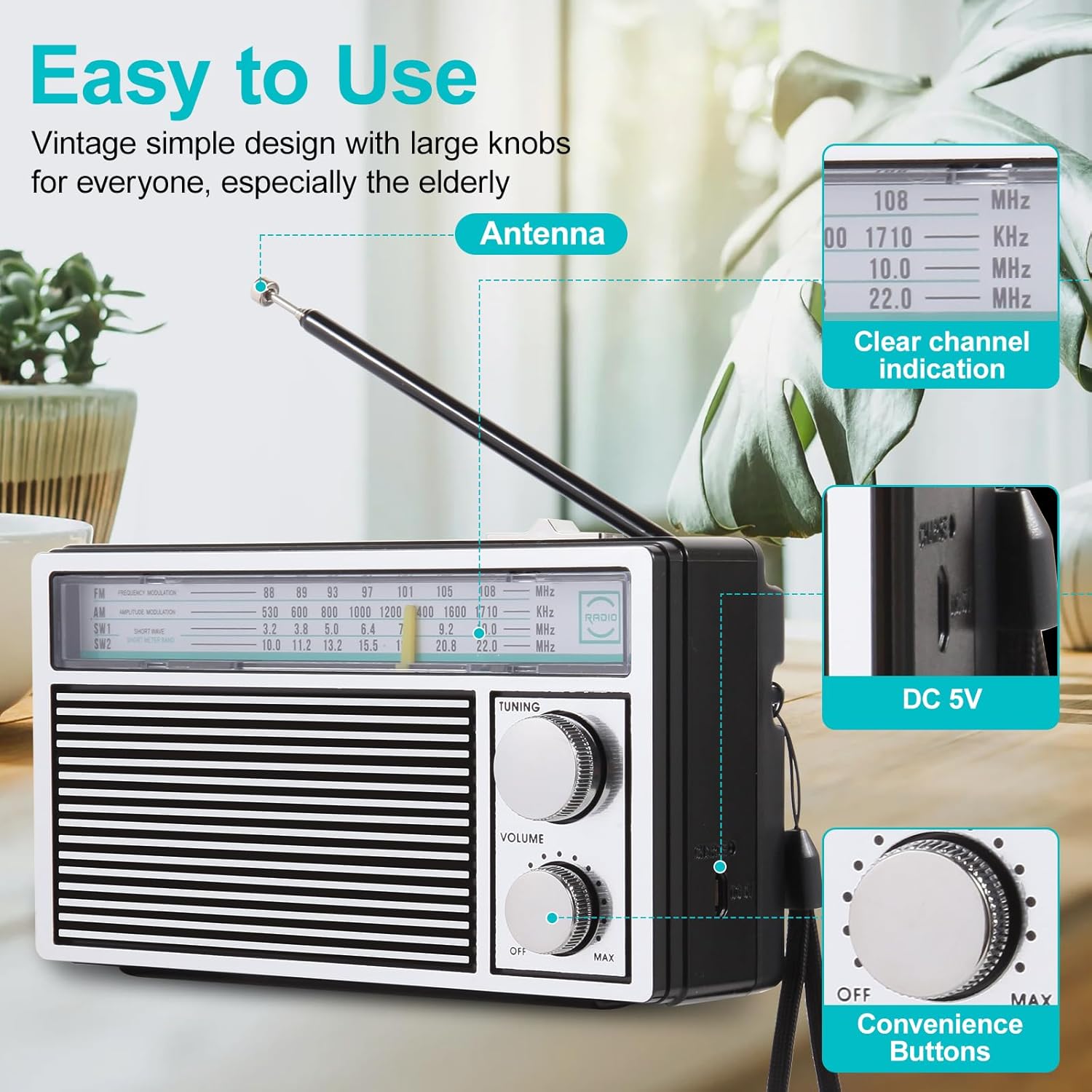
Figure 3: Detailed view of the radio's analog tuning and volume knobs, highlighting their ease of use.
2. Selecting Radio Band (AM/FM/SW)
Use the AM/FM/SW Conversion switch, typically located near the tuning dial, to select your desired radio band:
- FM: Frequency Modulation band (88-108 MHz)
- AM: Amplitude Modulation band (530-1710 KHz)
- SW1/SW2: Shortwave bands (SW1: 3.2-10.0 MHz, SW2: 10.0-22.0 MHz)
3. Tuning to a Station
Once the desired band is selected, slowly rotate the Tuning knob to scan through frequencies. The clear dial indicator will show the current frequency. Stop rotating when you hear your desired station clearly.

Figure 4: The BAIJIALI radio in a home environment, demonstrating its ability to receive AM, FM, and Shortwave signals with its extended antenna.
Maintenance
- Cleaning: Use a soft, dry cloth to clean the exterior of the radio. Do not use abrasive cleaners or solvents, as they may damage the finish.
- Battery Care: If the radio will not be used for an extended period, remove the rechargeable lithium battery to prevent leakage. Store the battery in a cool, dry place.
- Storage: Store the radio in a dry environment, away from direct sunlight, extreme temperatures, and high humidity.
- Antenna Care: Handle the telescopic antenna gently to prevent bending or breaking. Retract it when not in use or when transporting the radio.
Troubleshooting
| Problem | Possible Cause | Solution |
|---|---|---|
| No sound or very low volume. | Volume knob is turned down or radio is off. Battery is low or depleted. | Rotate the Volume knob clockwise to increase volume and turn on. Charge the battery or connect to AC power. |
| Poor reception or static. | Antenna not extended or positioned correctly. Weak signal in the area. Interference from other electronic devices. | Fully extend and adjust the telescopic antenna. For AM, rotate the radio unit. Move the radio to a different location or away from interfering devices. |
| Radio does not turn on. | Battery not inserted correctly or depleted. AC power not connected or faulty. | Ensure battery is inserted with correct polarity and charged. Verify AC adapter and cable connection. |

Figure 5: The radio's loudspeaker, designed to deliver clear and loud audio with minimal noise.
Specifications
| Brand | BAIJIALI |
| Model Number | BAIJIALI Radios Portable Am Fm Radio |
| Supported Radio Bands | AM/FM/SW (Shortwave) |
| Tuner Technology | FM |
| Power Source | Battery Powered (Rechargeable Lithium Battery included), AC Power (via USB) |
| Color | Black |
| Special Feature | Portable |
| Recommended Uses | Music, News |

Figure 6: The compact size and light weight of the BAIJIALI radio, making it highly portable for various activities.
Warranty and Support
For warranty information and customer support, please refer to the documentation provided with your purchase or contact the manufacturer directly. Keep your purchase receipt as proof of purchase for any warranty claims.
For further assistance or inquiries, please visit the official BAIJIALI website or contact their customer service department.