
NINETOM 12.3 inch Touchscreen Car Radio Receiver
NINETOM 12.3 inch Touchscreen Car Radio Receiver User Manual
Model: 12.3 inch Touchscreen Car Radio Receiver for BMW 5 Series F10/F11 (2010-2012) CIC System
Introduction
This manual provides detailed instructions for the installation, operation, and maintenance of your NINETOM 12.3 inch Touchscreen Wireless CarPlay Android Auto Multimedia Car Radio Receiver. Please read this manual thoroughly before installation and use to ensure proper functionality and to prevent damage.
This device is designed for specific BMW 5 Series models. Please verify compatibility before proceeding.
Compatibility Information
This touchscreen unit is compatible with the BMW CIC system. It is not compatible with other BMW systems (e.g., NBT, EVO ID5, EVO ID6).
It is specifically designed for use with:
- BMW 5 Series F10 (2010-2012)
- BMW 5 Series F11 (2010-2012)
Important: This unit is NOT compatible with BMW 5 Series F07 models.
To confirm your vehicle's system, check your original car radio homescreen menu picture. Refer to the image below for visual guidance.

Image Description: A chart illustrating compatibility. It shows examples of BMW CIC, NBT, EVO ID5, and EVO ID6 system menus. The CIC system menu is marked with a green checkmark, indicating compatibility, while the NBT, EVO ID5, and EVO ID6 systems are marked with red crosses, indicating incompatibility. This helps users identify their car's system.
Setup and Installation
The installation process is designed to be plug-and-play, utilizing the original car cables. This ensures a non-destructive installation without the need for cutting or breaking existing wires.
Package Contents
The package includes the 12.3-inch touchscreen unit and all necessary cables for installation.
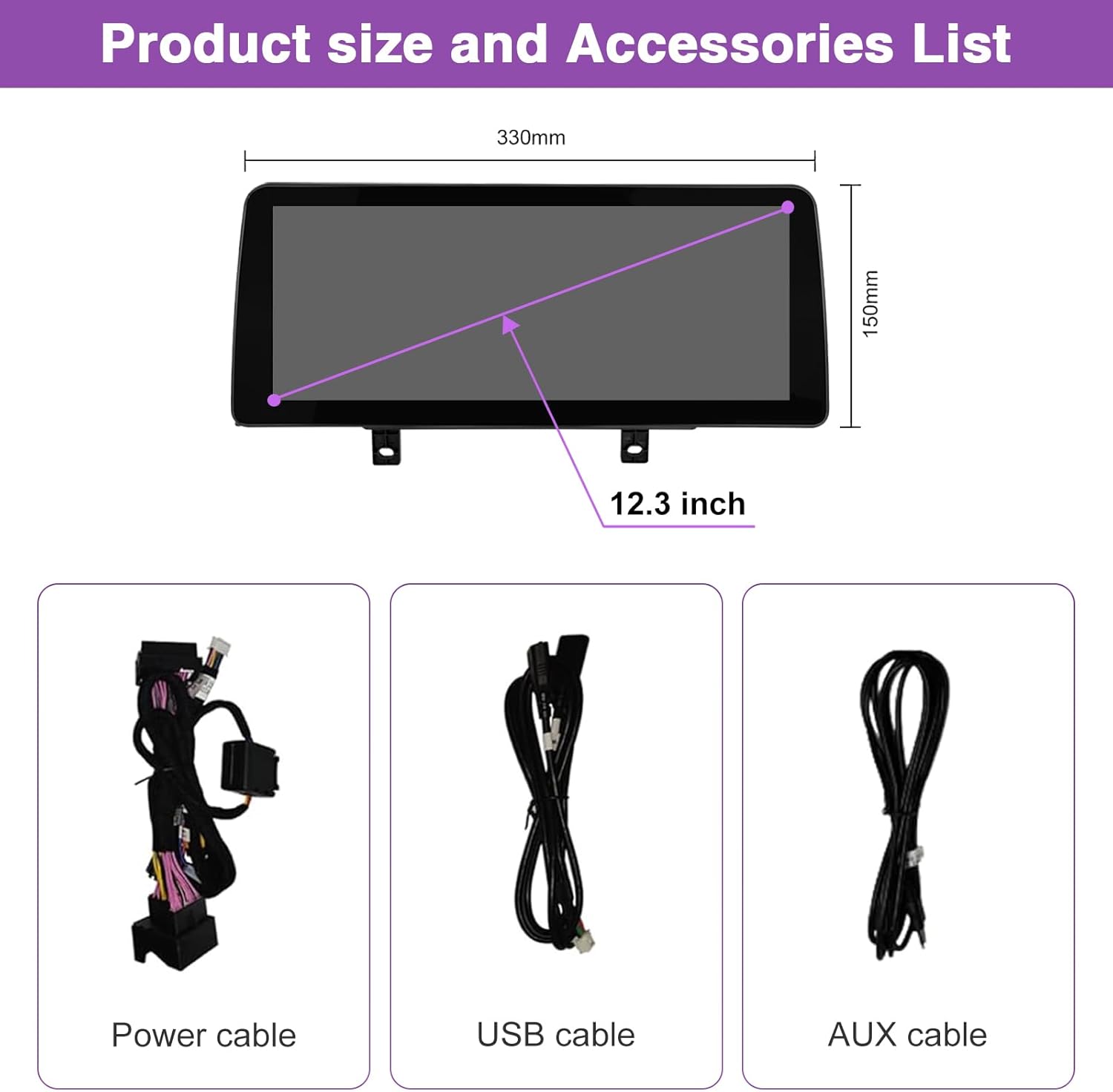
Image Description: An illustration showing the dimensions of the 12.3-inch touchscreen unit (330mm width, 150mm height) and a list of included accessories: a power cable, a USB cable, and an AUX cable.
Installation Steps (General Guidance)
- Ensure the vehicle's ignition is off and the battery is disconnected before starting installation.
- Carefully remove the original car radio unit and display.
- Connect the provided cables to the corresponding ports on the new NINETOM touchscreen unit and the vehicle's wiring harness. The original car cable design facilitates a plug-and-play connection.
- Mount the new 12.3-inch touchscreen unit into the dashboard.
- Reconnect the vehicle's battery.
- Power on the vehicle and test the unit's functionality.
Note: For detailed, model-specific installation instructions, please refer to any supplementary guides provided with your product or contact customer support.
Before and After Installation Comparison

Image Description: A side-by-side comparison showing the car's interior before and after the installation of the NINETOM 12.3-inch touchscreen. The "Before installation" side shows the original smaller screen, while the "After installation" side displays the larger, integrated NINETOM unit with a modern interface.
Operating Instructions
System Overview
The NINETOM touchscreen operates on a Linux system, providing stable performance. It integrates seamlessly with your vehicle's existing systems while offering enhanced multimedia capabilities.
CarPlay and Android Auto
The unit features built-in wired and wireless CarPlay and Android Auto functionality. This allows you to integrate your smartphone for navigation, communication, and entertainment.
- Wireless Connection: Connect your iPhone or Android phone wirelessly via Bluetooth for CarPlay or Android Auto.
- Wired Connection: Use a USB cable to connect your phone for CarPlay or Android Auto.
- Features: Access GPS navigation, make and receive calls, send and receive messages, and stream music directly from your phone's apps. Voice commands via Siri (for CarPlay) or Google Assistant (for Android Auto) are supported.

Image Description: A composite image demonstrating the display of Apple CarPlay and Android Auto interfaces on the NINETOM screen, with corresponding iPhones and Android phones shown. It also illustrates the MirrorLink function for AirPlay (iPhone) and AutoLink (Android), showing a video mirrored from a phone to the car screen.
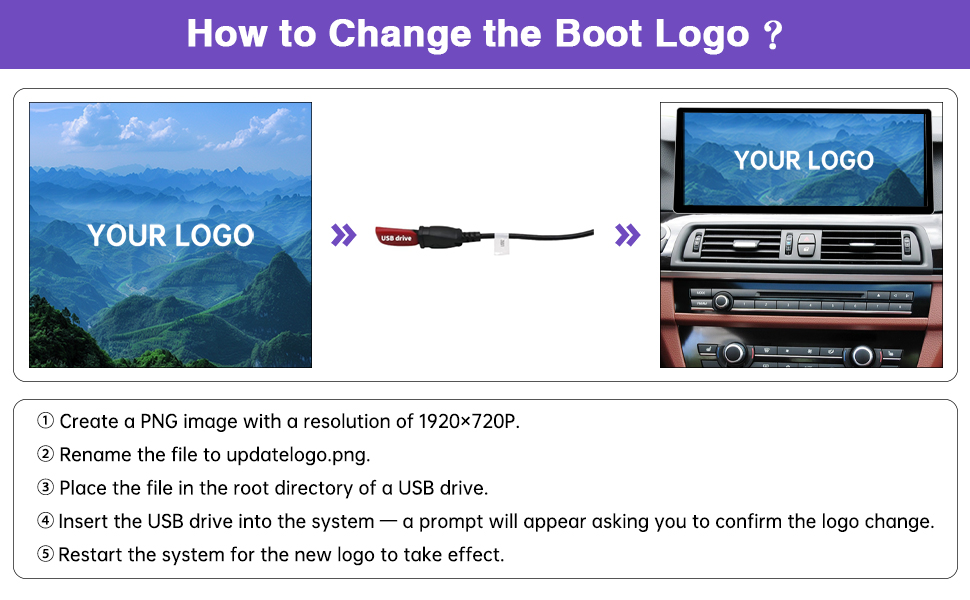
Image Description: This image highlights the support for both wireless and wired CarPlay and Android Auto. It shows various functions like navigation, music playback, and call handling displayed on the car screen, emphasizing seamless smartphone integration.
Retaining Original Vehicle Functions
The NINETOM touchscreen is designed to retain all original vehicle functions. This includes:
- Original car radio and amplifier functions.
- Factory joystick control (iDrive controller).
- Original reversing camera support.
- Compatibility with original or aftermarket rearview cameras.
- Compatibility with DVR systems.
- Original steering wheel controls.
- Original CD player functionality.
No software changes are made to the vehicle's control units, ensuring full compatibility with your BMW's existing systems.

Image Description: A collage of six images demonstrating how the NINETOM unit supports original car settings. These include the original car system display, original stereo sound, original reverse system (with support for aftermarket cameras), keeping the original CD player, original steering wheel control, and original iDrive knob control.
System Switching
You can easily switch between the NINETOM system interface and your original BMW CIC system. To switch, simply long-press the 'MENU' button on your iDrive controller.

Image Description: An animated-style image showing the NINETOM screen interface peeling back to reveal the original BMW system interface underneath, with arrows indicating the ability to switch between the two systems by long-pressing the 'MENU' button.
Display Features
- High Resolution: The 1920 x 720 HD resolution touchscreen provides a clear display for navigation, videos, and other applications.
- Mirror Link: Supports mirror link functionality for displaying content from your smartphone.
- Automatic Light Sensitivity: The display automatically adjusts between day and night modes based on your car's original headlights, enhancing visibility and comfort during driving.

Image Description: A split image showing the NINETOM screen in a car interior, demonstrating the automatic light sensitivity feature. One side shows the screen in "Day Mode" with bright sunlight, and the other side shows it in "Night Mode" with a darker, adjusted display.

Image Description: A visual comparison of screen resolutions. The left side shows a vibrant image with "1920*720" resolution, labeled "Ours - Color Brightness," indicating higher clarity and approximately 1,368,000 pixels. The right side shows the same image with "1280*480" resolution, labeled "Others-Color Brightness," indicating lower clarity and approximately 628,800 pixels.

Image Description: A step-by-step guide on how to customize the boot logo. It shows an image of a custom logo, a USB drive, and the car screen displaying "YOUR LOGO." The steps detail creating a 1920x720 PNG image named "updatelogo.png," placing it on a USB drive, inserting the drive, confirming the change, and restarting the system.
Maintenance
To ensure the longevity and optimal performance of your NINETOM touchscreen unit, follow these general maintenance guidelines:
- Cleaning: Use a soft, lint-free cloth to gently wipe the screen. For stubborn smudges, slightly dampen the cloth with water or a screen-safe cleaner. Avoid harsh chemicals or abrasive materials.
- Software Updates: Periodically check the manufacturer's website or contact customer support for any available software updates. Keeping the software updated can improve performance and add new features.
- Environmental Conditions: Avoid exposing the unit to extreme temperatures, direct sunlight for prolonged periods, or excessive moisture.
Troubleshooting
If you encounter issues with your NINETOM touchscreen, refer to the following common troubleshooting steps:
- No Power/Display:
- Check all cable connections to ensure they are securely seated.
- Verify the vehicle's battery is properly connected and charged.
- If recently installed, double-check the power cable connections.
- Incorrect Display Resolution:
- Ensure the unit's resolution settings match your original car system's resolution. Incorrect resolution settings can lead to display issues.
- After adjusting resolution settings, it may be necessary to disconnect and reconnect the car battery, then restart the system for changes to take effect.
- Issues Switching to Original BMW Interface:
- Ensure you are long-pressing the 'MENU' button on your iDrive controller as instructed.
- If the issue persists, perform a system reset (refer to the support section for guidance).
- Wireless CarPlay/Android Auto Not Connecting:
- Ensure Bluetooth is enabled on both your phone and the NINETOM unit.
- Delete previous pairings on both devices and attempt to pair again.
- Try a wired connection via USB to confirm basic functionality.
- Check for any software updates for the NINETOM unit or your smartphone.
- No Audio Output:
- Verify that the AUX cable is correctly connected between the NINETOM unit and your car's AUX input.
- Ensure your car's audio source is set to AUX.
- Check volume levels on both the NINETOM unit and your car's audio system.
If these steps do not resolve the issue, please contact NINETOM customer support for further assistance.
Specifications
| Feature | Detail |
|---|---|
| Brand | NINETOM |
| Model | 12.3 inch Touchscreen Car Radio Receiver |
| Compatible Vehicles | BMW 5 Series F10/F11 (2010-2012) with CIC System |
| Operating System | Linux |
| Screen Size | 12.3 inches |
| Screen Resolution | 1920 x 720 HD |
| Controller Type | Touch Screen |
| Connectivity Technology | USB, Wireless (Bluetooth for CarPlay/Android Auto) |
| Compatible Devices | Smartphone (for CarPlay/Android Auto) |
| Connector Type | 3.5mm Jack (AUX), USB |
| Audio Output Mode | Stereo, Surround |
| Surround Sound Channel Configuration | 2.1 |
| Video Encoding | H.264, H.265/HEVC |
| Item Weight | 4.72 pounds (2.15 Kilograms) |
| Package Dimensions | 15.35 x 7.2 x 6.77 inches |
Warranty and Support
Customer Support
For any installation issues, operational questions, or troubleshooting assistance not covered in this manual, please contact NINETOM customer support. Provide your product model and purchase details for efficient service.
Contact information for NINETOM support can typically be found on the product packaging, the seller's website, or through your purchase platform.
Warranty Information
Specific warranty details for this product may vary. Please refer to the warranty card included with your purchase or consult the NINETOM official website for the most current warranty policy. Keep your proof of purchase for warranty claims.
Related documents12.3 inch Touchscreen Car Radio Receiver

Ask a question about this manual
Ask about setup, troubleshooting, compatibility, parts, safety, or missing instructions. Manuals+ will review the question and use this page’s manual context to help answer it.