
Important Safety Information
- Read all instructions before use.
- Keep this manual for future reference.
- Use only with compatible Mova L600 (T 300) vacuum cleaners.
- Do not expose the docking station to water or excessive moisture.
- Disconnect from power before cleaning or maintenance.
- Do not operate if damaged. Contact support for assistance.
Product Overview
The IAQIYOPS Mova L600 (T 300) Vacuum Cleaner Charger Docking Station is designed to provide a convenient and reliable charging point for your compatible vacuum cleaner. It features a stable base and charging contacts to ensure efficient power transfer.
Components
- Charging Docking Station
- Power Cable (integrated or separate, implied by product description)

Figure 1: Front view of the IAQIYOPS Mova L600 (T 300) Charging Docking Station. This image shows the main body of the docking station, featuring a dark grey central column and light grey base and top.
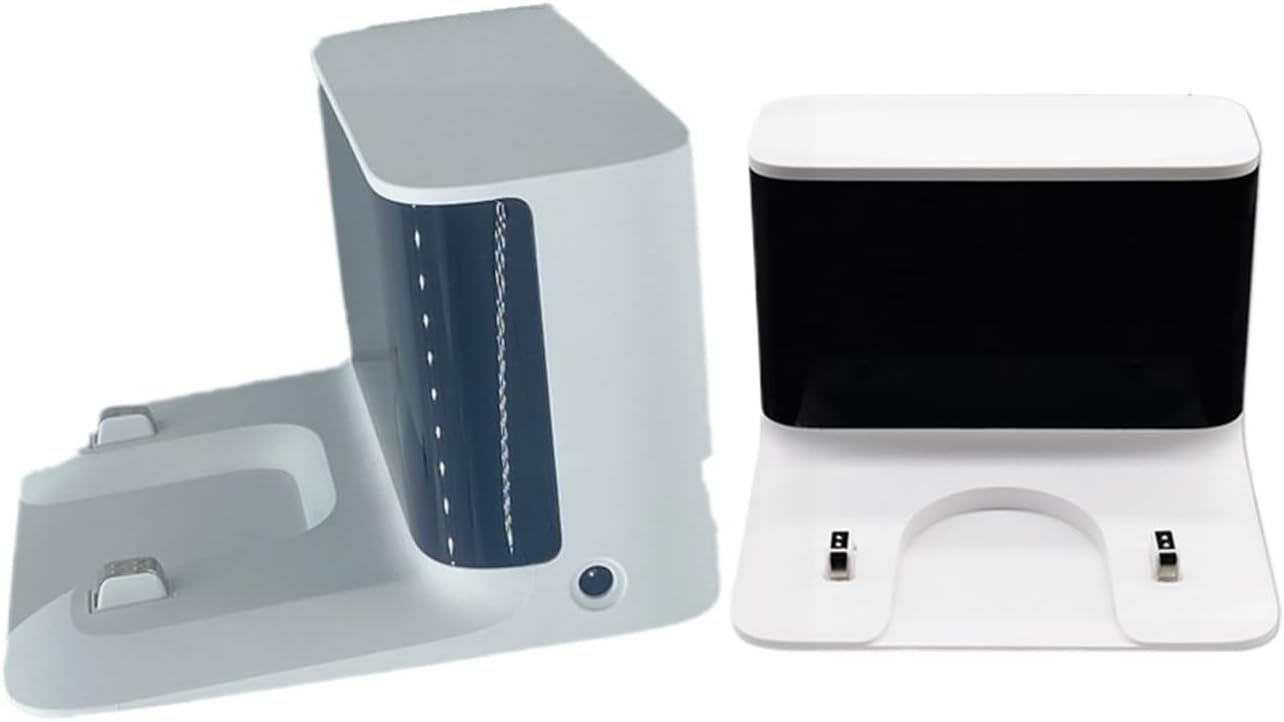
Figure 2: Side view of the IAQIYOPS Mova L600 (T 300) Charging Docking Station, showing its profile and the charging contact area.
Setup
- Choose a Location: Select a dry, stable, and level surface near a power outlet. Ensure there is enough space around the docking station for the vacuum cleaner to be easily docked and removed.

Figure 3: Top-front view of the docking station, highlighting the charging contacts and the area where the vacuum cleaner rests.
- Connect Power: Plug the power cable from the docking station into a suitable power outlet.
Note: Ensure the power outlet matches the voltage requirements specified on the docking station's label.
- Placement: Place the docking station in the chosen location. The non-slip pads on the bottom (see Figure 5) help secure it.

Figure 5: Bottom view of the docking station, showing the non-slip pads for stability.
Operating Instructions
- Docking the Vacuum Cleaner: Carefully align your Mova L600 (T 300) vacuum cleaner with the charging contacts on the docking station. Gently lower the vacuum cleaner onto the base until it clicks into place and the charging indicator (if present on your vacuum cleaner) illuminates.

Figure 4: Angled view of the docking station, illustrating the design for receiving the vacuum cleaner.
- Charging: Once properly docked, the vacuum cleaner will begin charging automatically. The charging time may vary depending on the battery level of your vacuum cleaner.
- Removing the Vacuum Cleaner: To use your vacuum cleaner, simply lift it off the docking station.
Maintenance
Regular maintenance ensures optimal performance and longevity of your docking station.
- Cleaning: Disconnect the docking station from the power outlet. Use a soft, dry cloth to wipe down the exterior. Do not use abrasive cleaners or solvents.
- Charging Contacts: Periodically inspect the charging contacts on both the docking station and your vacuum cleaner for dust or debris. If necessary, gently clean them with a dry cotton swab.
- Storage: If storing the docking station for an extended period, disconnect it from power and store it in a cool, dry place.
Troubleshooting
| Problem | Possible Cause | Solution |
|---|---|---|
| Vacuum cleaner not charging. |
|
|
| Docking station unstable. |
|
|
Specifications
- Model: Mova L600 (T 300)
- Brand: IAQIYOPS
- Compatibility: Mova L600 (rzls4) vacuum cleaners
- Package Dimensions: 1.18 x 0.79 x 0.39 inches
- Item Weight: 1.76 ounces
- Assembly Required: No
- Number of Pieces: 1
Warranty and Support
For warranty information or technical support, please refer to the original product packaging or contact your retailer.
You can also visit the IAQIYOPS brand page on Amazon for potential support resources.