
Introduction
This manual provides comprehensive instructions for the installation, operation, maintenance, and troubleshooting of your Ussuray 53238 Mini Oval 4-Button Topside Control Panel. This control panel is designed for use with Balboa VL200 Heat Jacket Systems and is compatible with Dream Maker X500 Hot Tubs. It includes the 55472 topside panel and 11393 overlay, offering user-friendly control over your hot tub's functions.

Image: The Ussuray 53238 Mini Oval 4-Button Topside Control Panel, featuring an LCD display, four control buttons (Warm, Cool, Jets, Light), and an attached RJ45 8-pin connector cable. The panel is shown with its clear protective casing revealing internal components, and the cable is coiled neatly.
Setup and Installation
The Ussuray 53238 Topside Control Panel is designed for straightforward installation. It connects to your hot tub system using an RJ45 8-pin connector with a 7 ft (84 inch) cord.
Package Contents:
- Topside Panel (Part 55472)
- Overlay (Part 11393)
Installation Steps:
- Ensure the hot tub power is disconnected before beginning installation.
- Carefully remove the existing control panel from its housing.
- Disconnect the old RJ45 connector from the hot tub's control system.
- Connect the new Ussuray 53238 control panel's RJ45 8-pin connector to the corresponding port on your hot tub's control system. The connector is designed for easy, secure attachment.
- Position the new topside panel (55472) into the designated opening on your hot tub. The panel includes an adhesive protective paper for direct installation after removal, ensuring a secure fit and improved sealing performance.
- Apply the 11393 overlay onto the topside panel, aligning it correctly with the buttons and LCD display.
- Verify all connections are secure before restoring power to the hot tub.

Image: A diagram illustrating the Ussuray 53238 control panel, highlighting the 55472 topside component and the 11393 overlay, showing how they fit together.

Image: A close-up view of the RJ45 8-pin connector and the internal circuitry of the control panel, emphasizing the connection point for installation.
Video: An overview of the 53238 4-Button Topside Control Panel, demonstrating its components and the RJ45 connector. This video provides a visual guide to the product's physical characteristics and connection method.
Operating Instructions
The 53238 Mini Oval 4-Button Spa Keypad features an LCD display and four clearly marked buttons for easy control of your hot tub's primary functions.
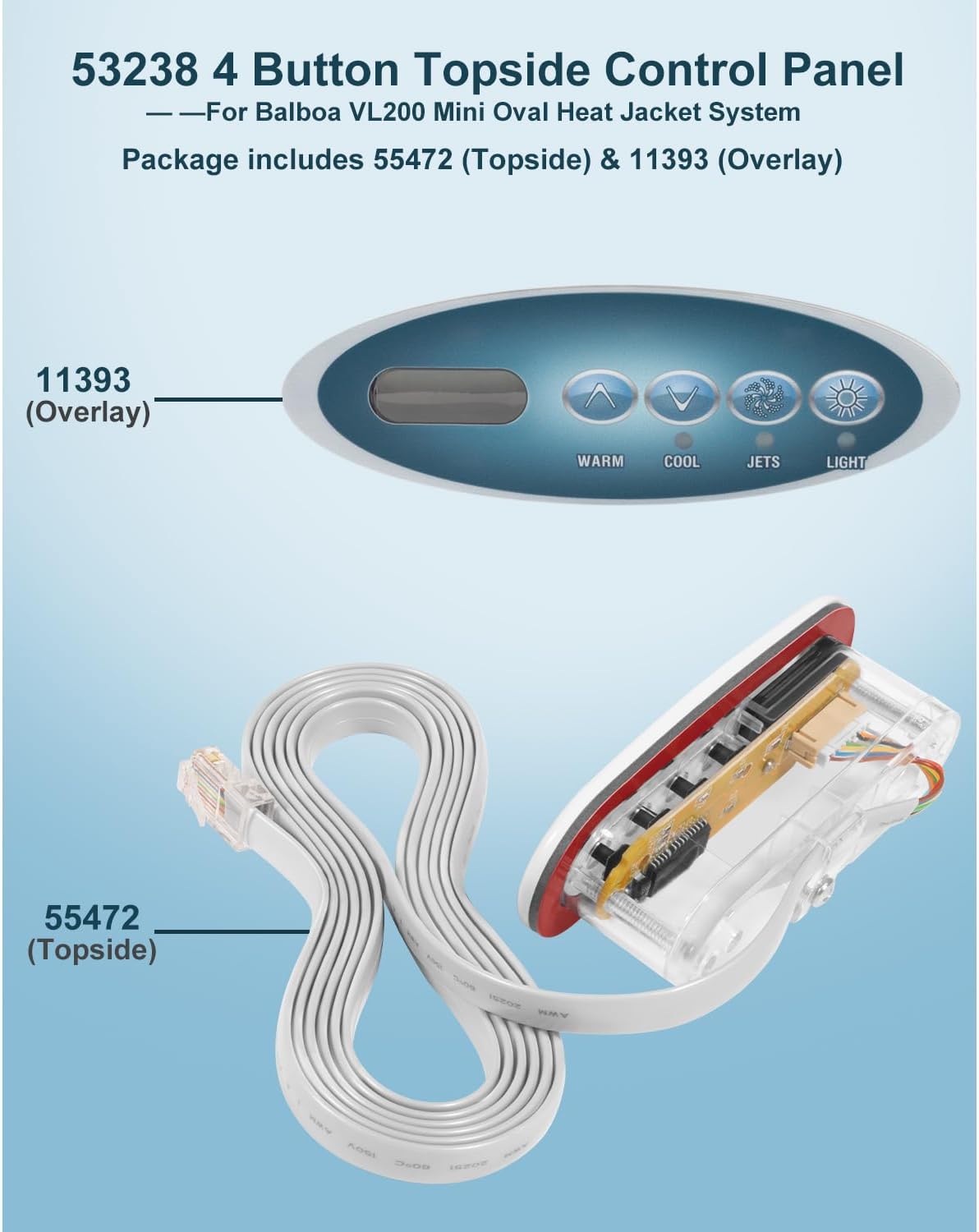
Image: A detailed view of the control panel buttons, illustrating the 'Warm', 'Cool', 'Jets', and 'Light' functions with their corresponding icons and text labels.

Image: A hand demonstrating the pressing of a button on the control panel, highlighting the user-friendly interface and clear button markings.
Button Functions:
- Warm (Up Arrow) & Cool (Down Arrow):
Press the "Warm" or "Cool" button to adjust the set temperature of your hot tub. The temperature range is typically 80°F - 104°F (26.0°C - 40.0°C). Each press will incrementally change the temperature setting. - Jets:
Press the "Jets" button to turn pump 1 on or off. If equipped with multiple speeds, pressing "Jets" again will shift between low and high speeds. Low-speed jet operation will automatically turn off after 4 hours. High-speed jet operation will automatically turn off after 15 minutes. - Light:
Press the "Light" button to operate the spa light. The spa light will automatically turn off after 4 hours.
Maintenance
To ensure the longevity and optimal performance of your Ussuray 53238 Topside Control Panel, follow these general maintenance guidelines:
- Cleaning: Gently wipe the control panel surface with a soft, damp cloth. Avoid abrasive cleaners or solvents that could damage the LCD display or button labels.
- Sealing: The panel is designed with enhanced sealing performance to prevent water vapor intrusion. Avoid tampering with the panel's casing, as this could compromise its water resistance.
- Connections: Periodically inspect the RJ45 connector and cable for any signs of wear or damage. Ensure the connection remains secure.
- Environmental Protection: While designed for hot tub environments, extreme temperatures or direct prolonged sunlight can affect electronic components. Ensure your hot tub cover is used when not in use to protect the panel.
Troubleshooting
The control panel's LCD display may show various diagnostic messages to indicate system status or potential issues. Refer to the table below for common messages and recommended actions.

Image: A table detailing various diagnostic messages that may appear on the control panel's LCD, along with their meanings and required actions for troubleshooting.
Diagnostic Messages and Actions:
| Message | Meaning | Action Required |
|---|---|---|
| -- -- | No message on display. Power has been cut off to the spa. | The control panel will be disabled until power returns. Spa settings will be preserved until next power up. |
| --- | Temperature unknown. | After the pump has been running for 2 minutes, the current water temperature will be displayed. |
| HH | "Overheat" - The spa has shut down. One of the sensors has detected 118°F/47.8°C at the heater. | DO NOT ENTER THE WATER. Remove the spa cover and allow water to cool. Once the heater has cooled, reset by pushing any button. If spa does not reset, shut off the power to the spa and call your dealer or service organization. |
| OH | "Overheat" - The spa has shut down. One of the sensors has detected that the spa water is 110°F/43.5°C. | DO NOT ENTER THE WATER. Remove the spa cover and allow water to cool. At 107°F/41.7°C, the spa should automatically reset. If spa does not reset, shut off the power to the spa and call your dealer or service organization. |
| SA | Spa is shut down. The sensor that is plugged into the Sensor "A" jack is not working. | If the problem persists, contact your dealer or service organization. (May appear temporarily in an overheat condition.) |
| Sb | Spa is shut down. The sensor that is plugged into the Sensor "B" jack is not working. | If the problem persists, contact your dealer or service organization. (May appear temporarily in an overheat condition.) |
| Sn | Sensors are out of balance. If alternating with spa temperature, it may just be a temporary condition. If flashing by itself, spa shut down. | If the problem persists, contact your dealer or service organization. |
| HL | A significant difference between temperature sensors has been detected. This could indicate a flow problem. | If the water level is normal, make sure all pumps have been primed. If problem persists, contact your dealer or service organization. |
| LF | Persistent low flow problems. (Displays on the fifth occurrence of HL message within 24 hours.) Heater is shut down, but other spa functions continue to run normally. | Follow action required for HL message. Heating capability of the spa will not reset automatically; you may press any button to reset. |
| dr | Possible inadequate water, poor flow, or air bubbles in detected in the heater. Spa is shut down for 15 minutes. | If water level is normal, make sure all pumps have been primed. Press any button to reset. This message will reset within 15 minutes. If problem persists, contact your dealer or service organization. |
| dY | Inadequate water detected in heater. (Displays on third occurrence of dr message.) Spa is shut down. | Follow action required for dr message. Spa will not automatically reset. Press any button to reset manually. |
| IC | "Ice" - Potential freeze condition detected. | No action required. All equipment will automatically activate regardless of spa status. The equipment stays on 4 minutes after the sensors detect that the spa temperature has risen to 45°F/7.2°C or higher. An optional freeze sensor may be added to protect against extraordinary freeze conditions. Auxiliary freeze sensor protection is advisable in colder climates. See your dealer for details. |
Note: Even when spa is shut down, some equipment will turn on if freeze protection is needed.
Specifications
Detailed specifications for the Ussuray 53238 Mini Oval 4-Button Topside Control Panel:
- Model Number: 53238
- Compatibility: Balboa VL200 Control Panel, Dream Maker X500 Hot Tub
- Connector Type: RJ45 8-pin
- Cord Length: 7 ft (84 inches)
- Material: Plastic
- Display Type: LCD
- Product Dimensions: 5.31 x 4.33 x 1.97 inches (Panel)
- Item Weight: 1.76 ounces (0.11 Pounds)
- Color: Blue (referring to the button/display area)

Image: A technical drawing showing the precise dimensions of the Ussuray 53238 control panel and its attached cable, including length, width, and height measurements in inches.
Related Replacement Part Numbers:
This control panel replaces or is compatible with the following part numbers: BB53238, MVP240, MAS25, VL200 panel, X310001, 11393, 163742, 305698, 407012, 407014, 407016, 52267, 52267-01, 52144, 52312, 52361, 52365, 52487, 52489, 52564, 52637, 53280, 53636, 53813, 55050, 55080, 55123, 55472, 55563, 55654, 34-52144, 34-52312, 34-52487, 34-55123, 58-138-1185, 9705-50.
Warranty and Support
For any questions regarding your Ussuray 53238 4-Button Topside Control Panel, please contact our service support team. We are committed to assisting you in finding a solution to any issues you may encounter.
While specific warranty details are not provided in this manual, please refer to your purchase documentation or contact the seller, NB Direct LLC, for information on warranty coverage and claims procedures.