
1. Product Overview
This document provides instructions for the ENOIAMYF LDS (Lidar Distance Sensor) replacement part, compatible with Liectroux XR500 robot vacuum cleaners. The LDS sensor is a critical component that enables the robot vacuum to navigate precisely, map its surroundings, and efficiently avoid obstacles during cleaning operations.
The package includes one (1) Distance Sensor. This sensor is designed for durability and long-lasting performance, ensuring reliable operation across various floor types, from hardwood to carpeting.

Image 1: Top view of the ENOIAMYF LDS Sensor, showing its compact design and housing.
2. Installation (Replacement)
This LDS sensor is a replacement part. Installation involves replacing the existing sensor in your Liectroux XR500 robot vacuum cleaner. Please follow these general guidelines carefully:
- Safety First: Before beginning any replacement procedure, ensure the robot vacuum cleaner is powered off and unplugged from its charging base. Remove the battery if accessible and recommended by the vacuum's original manual.
- Access the Sensor: Refer to your Liectroux XR500 robot vacuum cleaner's original service manual or online resources for specific instructions on how to access and remove the existing LDS sensor. This typically involves removing the top cover or specific panels.
- Disconnect Old Sensor: Carefully disconnect any cables or connectors attached to the old LDS sensor. Note their orientation for correct re-connection.
- Remove Old Sensor: Unscrew or unclip the old sensor from its housing.
- Install New Sensor: Place the new ENOIAMYF LDS sensor into the designated slot. Ensure it fits securely.
- Connect New Sensor: Reconnect the cables and connectors to the new sensor. Ensure all connections are firm and correctly oriented.
- Reassemble: Carefully reassemble the robot vacuum cleaner, ensuring all covers and panels are securely fastened.
- Test Functionality: Place the robot vacuum back on its charging base, power it on, and initiate a cleaning cycle to verify proper navigation and obstacle detection.

Image 2: View of the LDS Sensor's internal circuit board and motor assembly.
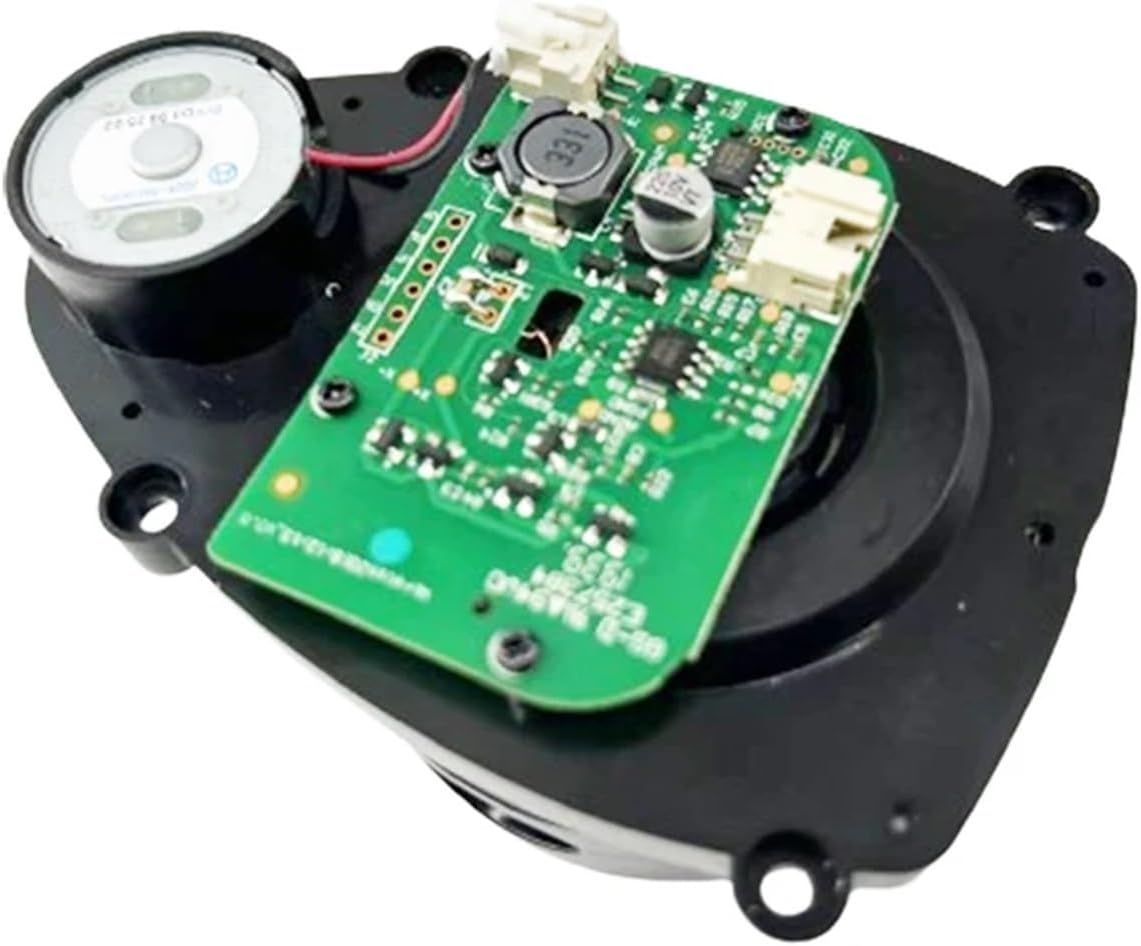
Image 3: Angled view of the LDS Sensor's circuit board, showing connection points.
3. Operation
The ENOIAMYF LDS sensor operates automatically as an integral part of your Liectroux XR500 robot vacuum cleaner's navigation system. Once installed, the sensor continuously scans the environment to perform the following functions:
- Precise Navigation: The sensor emits laser beams and measures the time it takes for them to reflect off objects, creating a real-time map of the room. This allows the robot to navigate efficiently and systematically.
- Obstacle Avoidance: By detecting obstacles in its path, the sensor enables the robot to adjust its route, preventing collisions with furniture, walls, and other objects.
- Room Mapping: The data collected by the LDS sensor is used to build and update internal maps, which the robot utilizes for planning cleaning routes and ensuring comprehensive coverage.
No direct user interaction is required with the sensor itself during operation; its function is fully integrated into the robot vacuum's software.
4. Maintenance
To ensure optimal performance and longevity of your LDS sensor, periodic maintenance is recommended:
- Clean Sensor Surface: Regularly inspect the exterior surface of the LDS sensor for dust, dirt, or debris. Use a soft, dry cloth to gently wipe the sensor lens and housing. Avoid using abrasive materials or harsh cleaning agents.
- Check for Obstructions: Ensure that nothing is obstructing the sensor's rotating mechanism or its line of sight. Hair, tangled threads, or other foreign objects can impair its functionality.
- Avoid Liquids: Do not expose the sensor to water or other liquids, as this can cause damage to the electronic components.
5. Troubleshooting
If your robot vacuum cleaner exhibits navigation issues after sensor replacement, consider the following:
- Navigation Errors / Bumping into Objects:
- Ensure the sensor surface is clean and free from obstructions.
- Verify that the sensor is securely installed and all connections are firm.
- Restart the robot vacuum cleaner.
- Robot Not Mapping Correctly:
- Confirm the sensor is rotating freely.
- Check for any physical damage to the sensor.
- Error Messages Related to LDS:
- Consult your Liectroux XR500 robot vacuum cleaner's original manual for specific error codes and their meanings.
- If the issue persists after checking connections and cleaning, the sensor may require further inspection or replacement.
6. Specifications
| Product Name | LDS Sensor (Distance Sensor) |
| Brand | ENOIAMYF |
| Model Number | fvgefgfer3 |
| Compatibility | Liectroux XR500 Robot Vacuum Cleaner |
| Package Dimensions | 1.18 x 0.79 x 0.39 inches |
| Item Weight | 1.76 ounces |
| Number of Pieces | 1 |
7. Customer Support
For any questions or concerns regarding this product, please contact our customer service. We are committed to providing a response within 24 hours to assist you with your inquiries.
Note: Depending on lighting conditions and monitor settings, the color of the item in images may vary slightly from the actual product. The permissible measurement error is +/- 1-3 cm.