
1. Introduction
This manual provides essential information for the safe and efficient operation of your Eujgoov 1.5KW 380V 3-Phase Variable Frequency Drive (VFD), model JLS B 4T 1.5GB. This VFD is designed to control the speed and torque of 3-phase AC motors, commonly used in applications such as CNC routers, machine tools, and various industrial equipment. Please read this manual thoroughly before installation, operation, or maintenance to ensure proper usage and prevent potential hazards.
2. Safety Instructions
WARNING: Failure to follow these safety instructions may result in serious injury, electric shock, or equipment damage.
- This device operates with high voltage and may cause injury or electric shock.
- Always wait at least 10 minutes after disconnecting power before touching any components, as DC bus capacitors may retain a dangerous charge.
- Ensure proper grounding techniques are used during installation.
- Do not connect power to the output terminals (U, V, W) directly from the main supply. These terminals are for motor connection only.
- All installation and wiring should be performed by qualified personnel in accordance with local electrical codes and regulations.
- Do not operate the VFD in environments with direct sunlight, corrosive gases, flammable gases, oil mist, or excessive dust.
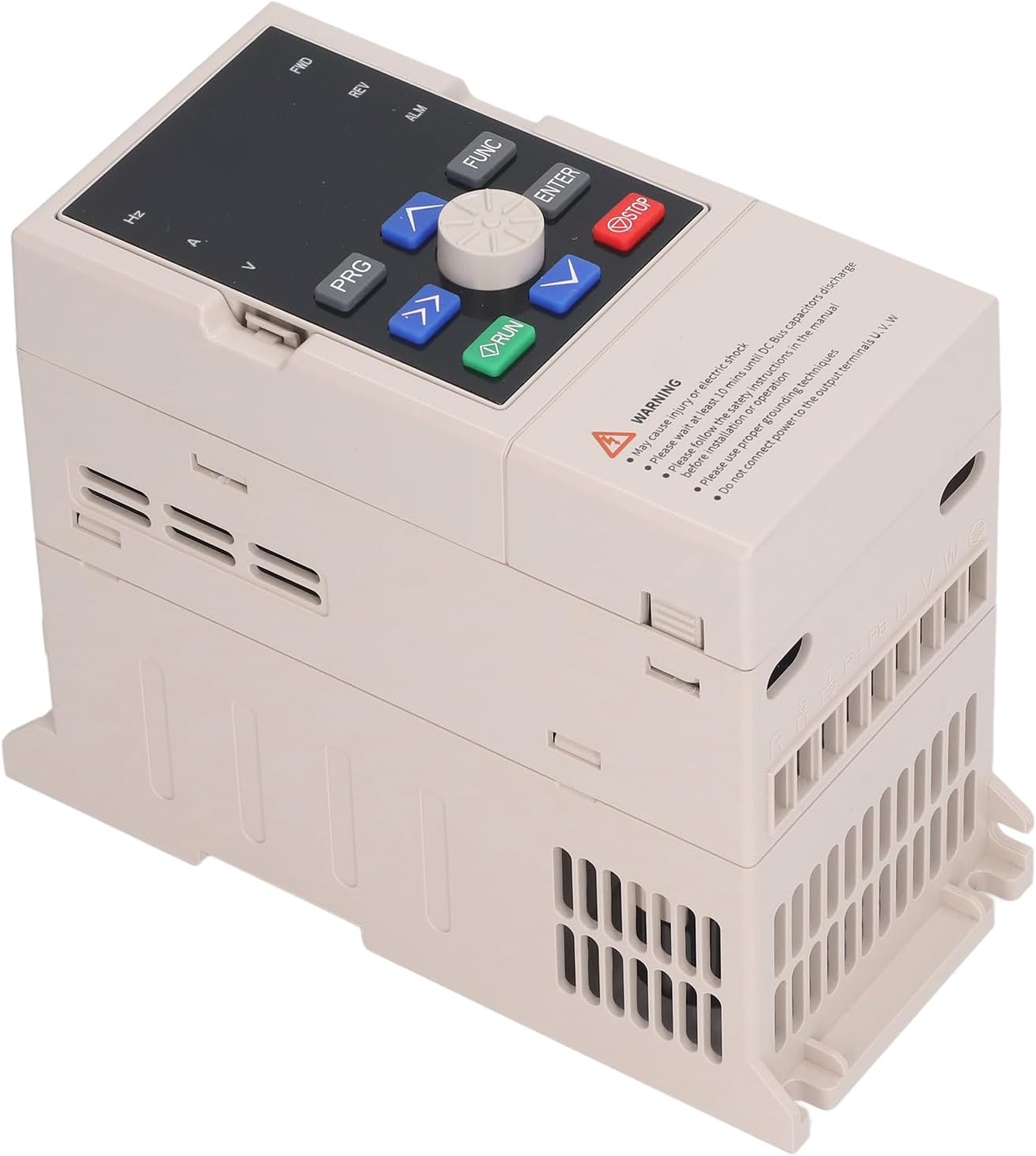
Image: Front panel of the VFD showing the control buttons and a safety warning label. The warning emphasizes risks of electric shock and the need to follow instructions for installation and grounding.
3. Product Features
- High Power Output: Capable of delivering up to 1.5KW, suitable for demanding CNC router applications. Output voltage is finely adjustable.
- Low Noise Operation: Equipped with a large cooling fin and a small fan, designed for efficient heat dissipation and reduced operational noise.
- User-Friendly Interface: Features a well-designed keyboard layout for convenient operation and quick startup.
- Clear Digital Display: An intuitive digital display provides clear operational feedback and is detachable for remote control applications.
- Broad Application Range: Applicable to various speed control equipment including CNC routers, milling machines, drilling machines, mixers, extruders, pumps, ventilators, and conveyors.
- Advanced Control: Supports 16-segment programmable multi-segment speed control, oscillating frequency control with adjustable center frequency, and PID control. Includes RS485 communication.

Image: The VFD unit, illustrating its design features such as the large heat sink for cooling, the low-noise fan, and the ergonomic keyboard layout for ease of use.

Image: The VFD unit displayed alongside various industrial settings, demonstrating its wide range of applications in sectors such as textile, papermaking, chemical, and plastic industries.
4. Specifications
| Parameter | Value |
|---|---|
| Brand | Eujgoov |
| Model | JLS B 4T 1.5GB |
| Material | Aluminium alloy and PC flame retardant |
| Input Current | 5.0A |
| Output Current | 3.7A |
| Applicable Motor Power | 1.5kW |
| Ambient Temperature | -10℃ to +40℃ (reduced rate for 40℃ to 50℃) |
| Ambient Humidity | 5%-95% RH, non-condensing |
| Surrounding Environment | Indoor (no direct sunlight, corrosive gas, flammable gas, oil mist, dust) |
| Altitude | Below 1000m (10% reduction for each 1000m rise above 1000m) |
| Protection Level | IP20 |
| Cooling Method | Air cooled, with fan control |

Image: Side view of the VFD unit, displaying the product label which details the model number (4T-1.5GB), input/output specifications (3PH AC380V 50/60Hz 5.0A, 3PH AC380V 0-320Hz 3.7A), and power (1.5KW).
5. Setup and Installation
Proper installation is critical for the VFD's performance and safety. Ensure all power is disconnected before beginning installation.
5.1 Mounting
- Mount the VFD vertically on a stable, non-flammable surface.
- Ensure adequate clearance around the unit for proper airflow and heat dissipation. Refer to the specifications for ambient temperature requirements.
5.2 Wiring
- Connect the 3-phase AC power supply to the input terminals (R, S, T).
- Connect the 3-phase motor to the output terminals (U, V, W).
- Ensure all connections are secure and properly insulated.
- Connect the ground terminal to a reliable earth ground.
- Do not reverse input and output wiring.

Image: Side view of the VFD, highlighting its ventilation grilles for cooling and the integrated mounting points for secure installation.
6. Operating Instructions
The VFD features a user-friendly control panel for easy operation.
6.1 Control Panel Overview

Image: Close-up of the VFD's control panel, showing the 'PRG' (Program), 'FUNC' (Function), 'RUN', 'STOP' buttons, directional arrow keys, a rotary knob, and 'ENTER' button for navigation and parameter adjustment.
- PRG (Program): Enters/exits parameter setting mode.
- FUNC (Function): Used to navigate through function menus or confirm selections.
- RUN: Starts the motor.
- STOP: Stops the motor.
- Arrow Keys (Up/Down): Adjusts frequency, navigates menus, or changes parameter values.
- Rotary Knob: Provides fine adjustment for frequency or parameter values.
- ENTER: Confirms parameter settings or menu selections.
6.2 Basic Operation
- Power On: Apply 3-phase power to the VFD. The digital display will illuminate.
- Set Frequency: Use the arrow keys or rotary knob to set the desired output frequency.
- Start Motor: Press the RUN button to start the motor.
- Stop Motor: Press the STOP button to stop the motor.
- Parameter Adjustment: Press PRG to enter parameter setting mode. Use arrow keys to navigate and ENTER to select/confirm.
7. Technical Overview
The VFD incorporates advanced control algorithms for precise motor management.
7.1 Speed Torsion Control
This VFD utilizes a sophisticated speed torsion control mechanism to maintain stable motor operation under varying loads. The system continuously monitors actual speed and compares it with the commanded speed, adjusting the torsion current setting to minimize errors.
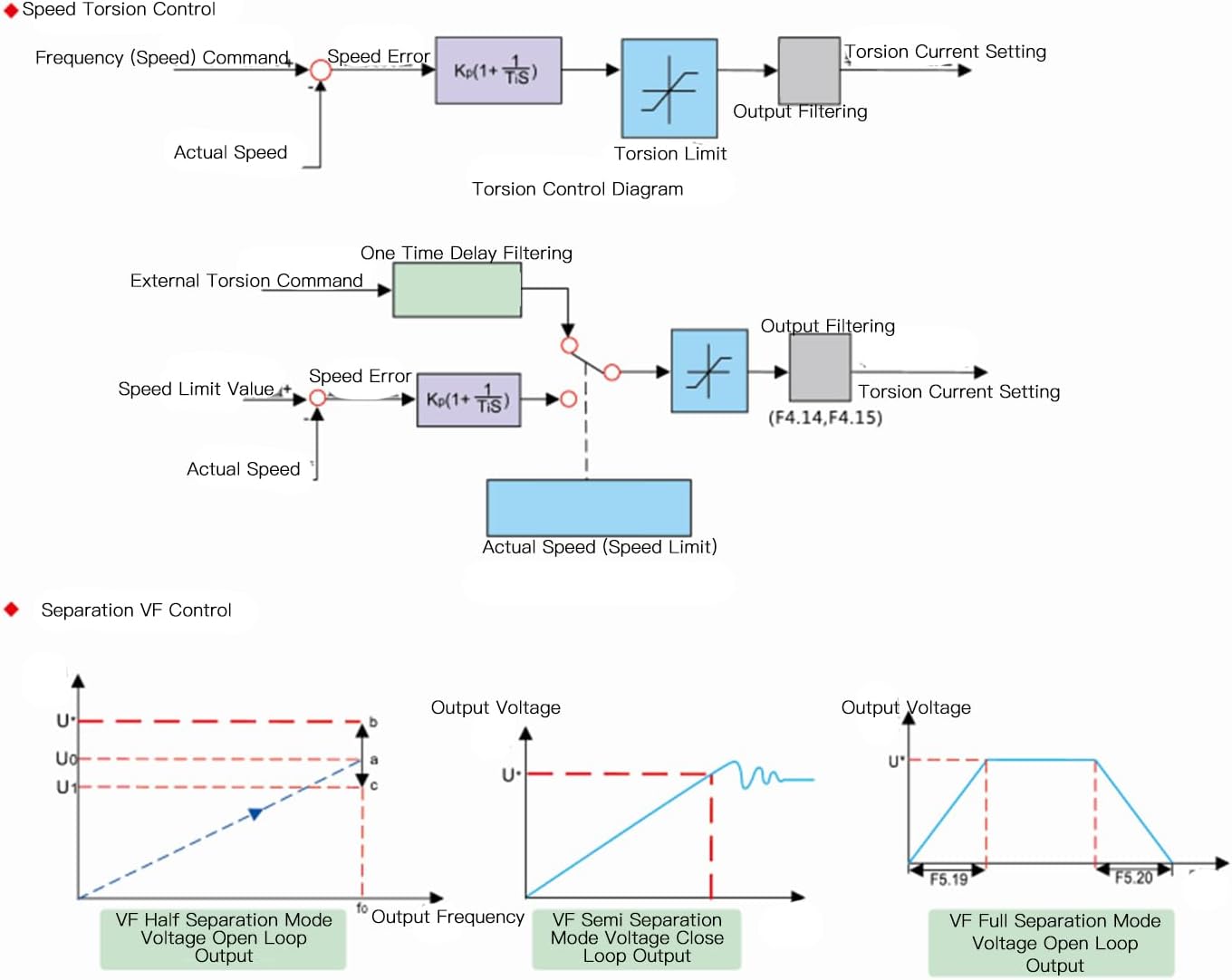
Image: Technical diagrams illustrating the Speed Torsion Control and Separation VF Control methods. The Speed Torsion Control diagram shows feedback loops for frequency/speed command and actual speed, leading to torsion current setting. The Separation VF Control diagram shows different voltage-frequency output characteristics for half separation, semi separation, and full separation modes.
7.2 Separation VF Control
The VFD supports various Voltage-Frequency (VF) control modes, including Half Separation, Semi Separation, and Full Separation. These modes allow for optimized motor performance across different operating conditions and load types, ensuring efficient power delivery and motor protection.
8. Maintenance
Regular maintenance helps ensure the longevity and reliable operation of your VFD.
- Cleaning: Periodically clean the VFD's exterior and ventilation openings to prevent dust accumulation, which can hinder cooling. Use a soft, dry cloth. Do not use liquid cleaners.
- Inspection: Regularly inspect all wiring connections for tightness and signs of wear or damage.
- Environment: Ensure the operating environment remains within specified temperature and humidity ranges.
- Fan Check: Verify that the cooling fan operates freely and without unusual noise.
9. Troubleshooting
This section provides solutions to common issues you might encounter.
9.1 No Power/Display Off
- Check Power Supply: Ensure the main power supply to the VFD is connected and active.
- Check Fuses/Breakers: Inspect any external fuses or circuit breakers for the VFD's input power.
9.2 Motor Not Running
- Check RUN Command: Ensure the RUN button has been pressed or the external run command is active.
- Check Frequency Setting: Verify that the output frequency is set to a non-zero value.
- Check Motor Wiring: Confirm that the motor is correctly wired to the VFD's output terminals (U, V, W).
- Overload/Fault: Check the VFD display for any fault codes (e.g., overcurrent, overload). Refer to the full product manual for specific fault code interpretations.
9.3 Abnormal Noise from Motor/VFD
- Motor Parameters: Ensure motor parameters (e.g., rated current, frequency) are correctly set in the VFD.
- Load Condition: Check if the motor is overloaded.
- VFD Mounting: Ensure the VFD is securely mounted and not vibrating against its mounting surface.
10. Warranty and Support
This Eujgoov VFD comes with a manufacturer warranty of 90 days from the date of purchase.
For technical support, warranty claims, or further assistance, please contact your retailer or the Eujgoov customer service department. Please have your product model (JLS B 4T 1.5GB) and purchase information ready when contacting support.