
Introduction
Thank you for choosing the Antetek Twin Daybed. This versatile daybed is designed to provide comfort and functionality, serving as a bed, sofa, or temporary rest area. It features integrated storage drawers, a wireless charging headboard with USB and Type C ports, and a multi-color LED light strip. This manual provides detailed instructions for assembly, operation, maintenance, and troubleshooting to ensure optimal use and longevity of your product.

Image: The Antetek Twin Daybed in a living room setting, showcasing its design and features.
Setup and Assembly
Your Antetek Twin Daybed is shipped in two separate packages, which may arrive at different times. Please ensure all packages have been received before beginning assembly. Detailed instructions and all necessary tools are included to facilitate a quick and easy setup process.
Package Contents and Preparation
- Verify all components against the included parts list in your assembly guide.
- Ensure you have sufficient space for assembly.
- Keep all small parts out of reach of children during assembly.
Assembly Steps
Follow the step-by-step instructions provided in the separate assembly manual. It is recommended to have two people for certain assembly steps to ensure safety and ease.
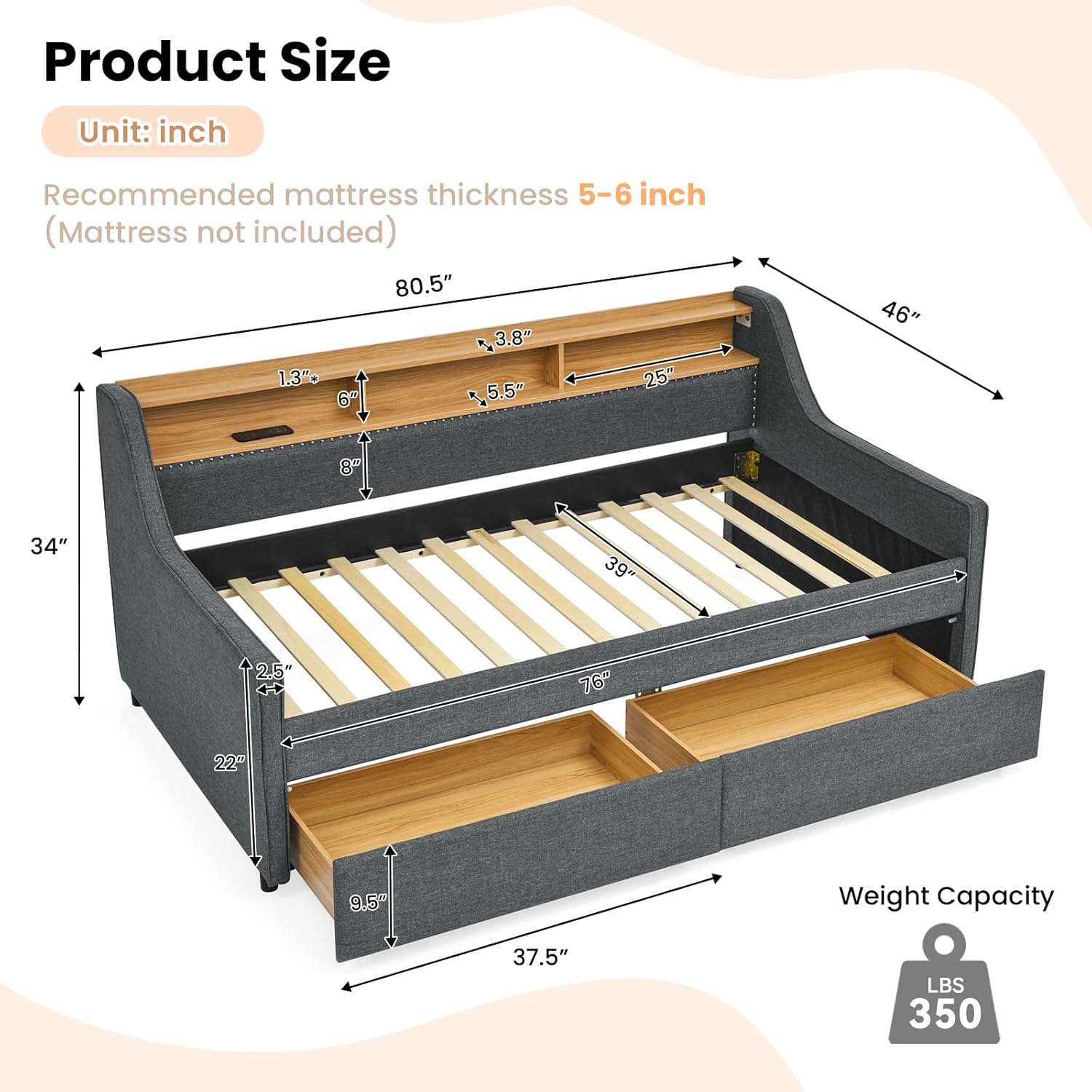
Image: Detailed product dimensions in inches, including overall size, daybed size, and headboard storage dimensions. Recommended mattress thickness is 5-6 inches.
No Box Spring Required
This daybed frame is designed with a sturdy wooden slat support system, eliminating the need for a box spring. The 13 fine wooden slats provide firm support for your mattress, capable of withstanding up to 350 pounds.

Image: Close-up view of the daybed frame's wooden slat support system, highlighting its sturdy construction and the absence of a box spring requirement.
Operating Instructions
Wireless Charging & USB/Type C Ports
The headboard features an integrated wireless charging pad, along with USB and Type C ports, allowing you to conveniently charge compatible electronic devices. Simply place your wireless-charging-enabled device on the designated pad or connect via the appropriate cable.

Image: A person using the wireless charging feature on the headboard, with compatible devices like phones and headsets shown. The USB and Type C charging ports are also visible.
LED Headboard Lighting
The headboard is equipped with a 7-color LED light strip. This feature provides soft ambient lighting, useful as a night light to navigate your room in the dark without disturbing sleep. Use the controls to cycle through the available colors or adjust brightness as desired.

Image: The daybed headboard illuminated by the 7-color LED light strip, demonstrating different color options (orange and purple) for day and night modes.
Storage Drawers
Two spacious storage drawers are integrated beneath the daybed. These drawers are ideal for organizing items such as towels, blankets, socks, and underwear, helping to maintain a tidy living space. The drawers feature smooth-gliding wheels for easy access.

Image: The daybed with its two storage drawers extended, illustrating their capacity for storing various household items. Inset shows a close-up of the smooth wheels.
2-Tier Storage Headboard
The headboard also includes a 2-tier storage shelf, perfect for keeping small personal items organized and within reach. This space can accommodate mobile phones, watches, alarm clocks, small potted plants, and other decorative or functional items.

Image: The daybed with its LED lights on and various items placed on the two-tier headboard storage, demonstrating its practical use for organization.
Maintenance
Cleaning Instructions
- Upholstery: The linen fabric upholstery requires Dry Clean Only. Do not use liquid cleaners or abrasive materials, as this may damage the fabric.
- Wooden Components: Wipe wooden surfaces with a soft, dry cloth. Avoid harsh chemicals.
- Electronic Components: Ensure the wireless charger, USB/Type C ports, and LED lights are clean and free of dust. Use a dry, soft cloth for cleaning. Do not spray liquids directly onto electronic parts.
General Care
- Periodically check all bolts and screws to ensure they are tight. Retighten as necessary.
- Avoid placing the daybed in direct sunlight or near heat sources to prevent fading or material degradation.
- Do not exceed the maximum weight limit of 350 pounds.
Troubleshooting
Common Issues and Solutions
| Problem | Possible Cause | Solution |
|---|---|---|
| Wireless charger not working | Device not compatible; improper placement; power issue. | Ensure device supports wireless charging. Reposition device on the charging pad. Check power connection to the daybed. |
| LED lights not illuminating | Power connection issue; light strip damage. | Verify power connection. Check for any visible damage to the LED strip or wiring. |
| Drawers are difficult to open/close | Obstruction; dirty wheels; misalignment. | Remove any items obstructing the drawers. Clean wheels. Ensure drawers are properly aligned on their tracks. |
| Squeaking noises from frame | Loose bolts or connections. | Inspect all assembly points and tighten any loose bolts or screws. |
If you encounter issues not listed here or require further assistance, please refer to the Support section.
Specifications
| Feature | Detail |
|---|---|
| Overall Size | 46"L x 80.5"W x 34"H |
| Daybed Size | 39"D x 76"W |
| Recommended Mattress Thickness | 5-6 inches (Mattress not included) |
| Weight Limit | 350 Pounds |
| Main Material | MDF, Linen fabric, Plywood, Foam |
| Upholstery Fabric Type | Linen |
| Color | Dark Grey |
| Special Features | Wireless Charger, USB & Type C Ports, 7 Color LED Light, 2-Tier Storage Headboard, 2 Storage Drawers |
| Assembly Required | Yes |
| Box Spring Required | No |
| Product Care Instructions | Dry Clean Only |
| Manufacturer | Antetek |
| Date First Available | July 16, 2024 |
Warranty Information
The Antetek Twin Daybed comes with a Limited Warranty. Please refer to the warranty documentation included with your product packaging for specific terms, conditions, and duration of coverage. This warranty typically covers manufacturing defects under normal use.
For warranty claims or detailed information, please retain your proof of purchase and contact customer support.
Customer Support
Should you have any questions, require assistance with assembly, or need to troubleshoot an issue, please do not hesitate to contact our customer support team. We are committed to providing prompt and helpful service.
For more information about Antetek products or to contact support, please visit the official Antetek Store: