Introduction
Thank you for choosing the MBNGF 35000PA Portable Handheld Car Vacuum Cleaner. This versatile device is designed for efficient cleaning with both vacuum and blower functions, suitable for your car, home, or office. Please read this manual thoroughly before use to ensure proper operation and maintenance.
Product Overview
The MBNGF Portable Handheld Car Vacuum Cleaner is a compact and powerful cleaning tool. It features a high-power suction of 35000PA and a dual suction and blower function for comprehensive cleaning. The cordless design offers maximum portability and ease of use.
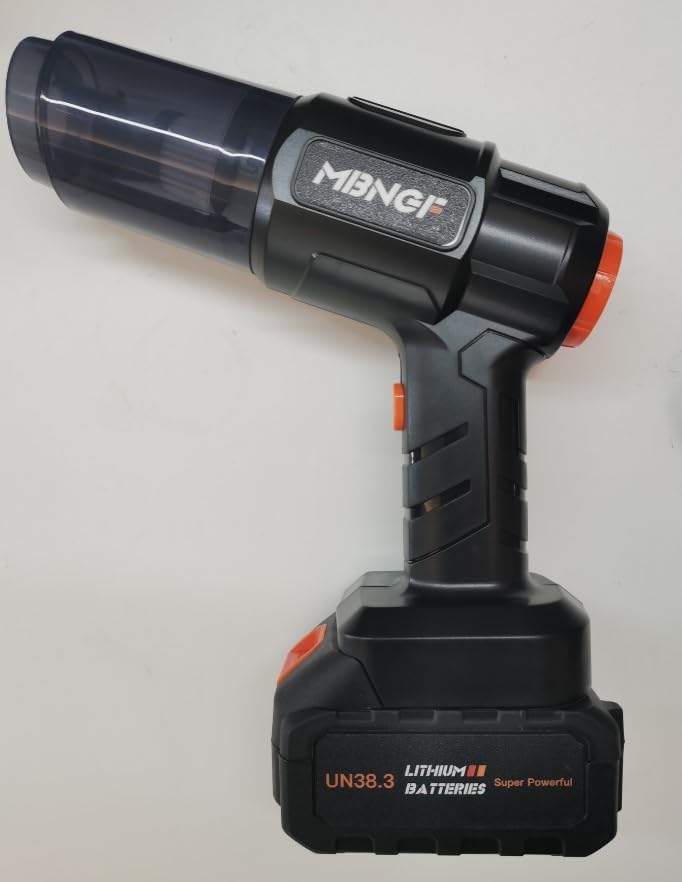
Image showing the MBNGF 35000PA Portable Handheld Car Vacuum Cleaner with its main body, dust cup, and battery attached.
Components:
- Main Vacuum/Blower Unit
- Lithium-Ion Battery (2 included)
- Charging Adapter
- HEPA Filter (2 included, 1 pre-installed)
- Crevice Nozzle
- Brush Nozzle
- Wide Surface Nozzle
- Air Suction Nozzle (for vacuum storage bags)
- User Manual
- Storage Case
Setup
- Charge the Battery: Before first use, fully charge both Lithium-Ion batteries using the provided charging adapter. Connect the adapter to a power outlet and then to the battery. The charging indicator will show when charging is complete.
- Install Battery: Slide a fully charged battery into the base of the main vacuum/blower unit until it clicks securely into place.
- Attach Dust Cup: Ensure the dust cup with the HEPA filter is securely twisted onto the main unit.
- Select Attachment: Choose the appropriate nozzle for your cleaning task and attach it to either the suction port (for vacuuming) or the exhaust port (for blowing).
Operating Instructions
1. Power On/Off:
- To turn on the device, press the power button located on the handle.
- To turn off the device, press the power button again.
2. Using the Vacuum Function:
- Attach the desired vacuum nozzle (e.g., crevice nozzle for tight spaces, brush nozzle for upholstery, wide surface nozzle for larger areas) to the front suction port of the unit.
- Turn on the device and move the nozzle over the area to be cleaned.
- For vacuum storage bags, attach the air suction nozzle to the suction port and follow the bag's instructions.
3. Using the Blower Function:
- Attach the desired blower nozzle to the rear exhaust port of the unit.
- Turn on the device. The blower will expel air, which can be used to clear dust from surfaces, inflate air mattresses, or other inflatable items.
Maintenance
- Emptying the Dust Cup:
- Ensure the device is turned off and the battery is removed.
- Twist the dust cup counter-clockwise to detach it from the main unit.
- Carefully empty the collected debris into a waste bin.
- Cleaning the HEPA Filter:
- Remove the HEPA filter from the dust cup.
- Tap the filter gently to dislodge any loose dust.
- For a more thorough cleaning, rinse the filter under running water. Ensure it is completely dry before reinserting it into the dust cup.
- It is recommended to clean the filter after every few uses to maintain optimal suction power.
- Charging the Battery:
- When the battery indicator shows low power, remove the battery from the unit.
- Connect the charging adapter to the battery and a power outlet.
- Charge until the indicator shows a full charge.
- Storing the Device:
- Store the vacuum cleaner and all accessories in the provided storage case in a cool, dry place.
- Ensure the battery is partially charged (around 50%) if storing for extended periods to prolong battery life.
Troubleshooting
| Problem | Possible Cause | Solution |
|---|---|---|
| Device does not turn on. | Battery is not charged or not properly installed. | Ensure battery is fully charged and securely clicked into place. |
| Low suction power. | Dust cup is full or HEPA filter is clogged. | Empty the dust cup and clean the HEPA filter. |
| Blower function is weak. | Exhaust port is obstructed or battery is low. | Check for obstructions in the exhaust port. Charge the battery. |
| Device overheats. | Prolonged use or clogged filter. | Turn off the device and allow it to cool down. Clean the filter. |
Specifications
| Feature | Detail |
|---|---|
| Brand | MBNGF |
| Model Name | 1 |
| Special Feature | Cordless |
| Filter Type | HEPA Filter |
| Included Components | Accessory Kit |
| Is Cordless? | Yes |
| Capacity | 230 Milliliters |
| Wattage | 120 watts |
| Form Factor | Handheld |
| Color | Black1 |
| Product Dimensions | 1"L x 1"W x 2"H |
| Battery Description | Lithium-Ion |
| Noise Level | 80 Decibels |
| Battery Life | 55 minutes |
| Manufacturer | MBNGF |
| Number of Items | 1 |
| Controller Type | Hand Control |
| Motor Horsepower | 1.6092 horsepower |
| Control Method | Touch |
| Style | Handheld |
| Portable | Yes |
| Number of Power Levels | 1 |
| Indoor/Outdoor Usage | Indoor |
| Maximum Horsepower | 1.61 Horsepower |
| Item Weight | 2.5 pounds |
| ASIN | B0D9HMB5DM |
| Item model number | 1 |
| Batteries | 1 Lithium Ion batteries required. (included) |
| Specific instructions for use | Other |
| Batteries required | Yes |
| Battery type | Lithium-Ion |
| Surface Recommendation | All floors |
| Power Source | Battery Powered |
Safety Information
- Keep the device away from water and moisture.
- Do not use the device to pick up flammable or combustible materials.
- Ensure the filter is clean and properly installed before each use.
- Do not block the suction or exhaust ports during operation.
- Keep out of reach of children.
- Use only the provided charging adapter and batteries.
- Avoid prolonged exposure to direct sunlight or high temperatures.
Warranty and Support
For warranty information or technical support, please refer to the contact details provided on the product packaging or visit the official MBNGF website. Keep your purchase receipt as proof of purchase.