
Introduction
This manual provides comprehensive instructions for the installation, operation, and maintenance of the Xeniol Futaba AT4320 Throttle Spring Kit. This kit is designed to enhance the feel and function of the throttle stick on compatible Futaba remote control transmitters, specifically models FX22, 14SG, 8FG, 10J, 8J, and 6K. Please read this manual thoroughly before attempting any installation or modification to ensure proper function and safety.
Product Overview
The AT4320 Throttle Spring Kit consists of essential components required to modify or replace the throttle spring mechanism in your Futaba remote control. These components are crafted from durable materials to ensure longevity and reliable performance.

Figure 1: The Xeniol Futaba AT4320 Throttle Spring Kit components. This image displays all parts included in the kit: a black plastic lever, a small metal spring, a metal screw, and a small black plastic retainer.
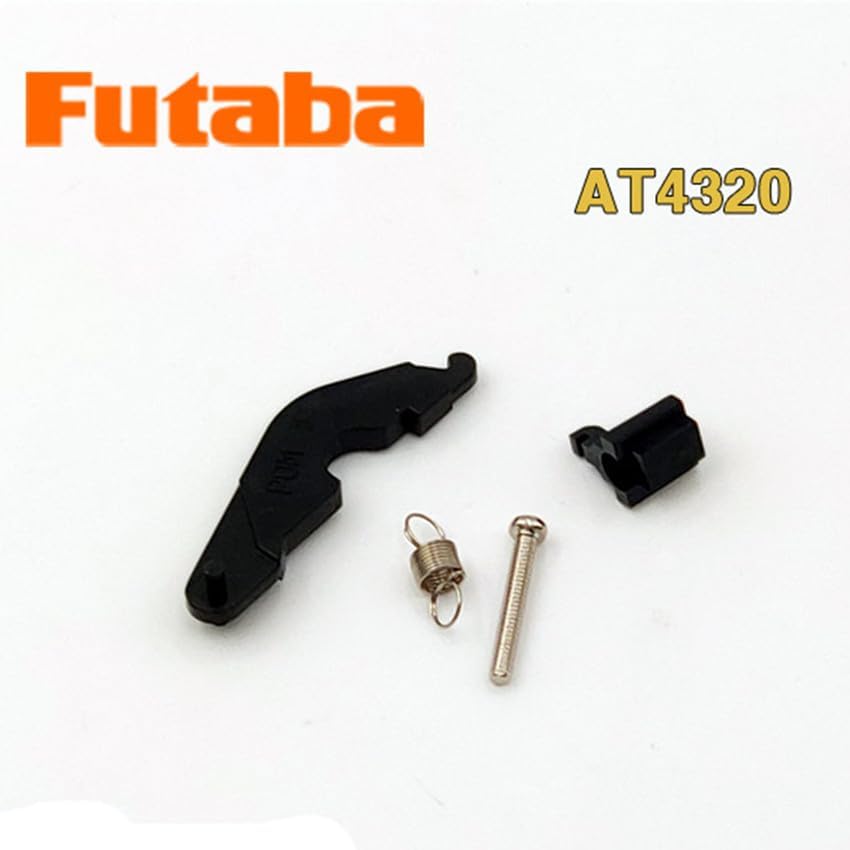
Figure 2: The Xeniol Futaba AT4320 Throttle Spring Kit with "Futaba AT4320" branding. This image shows the kit components arranged on a white background, with the Futaba logo and AT4320 model number clearly visible, indicating compatibility and product identification.
Kit Contents:
- 1x Throttle Lever (Black Plastic)
- 1x Compression Spring (Metal)
- 1x Mounting Screw (Metal)
- 1x Retainer Clip (Black Plastic)
Compatibility
This throttle spring kit is compatible with the following Futaba remote control transmitter models:
- Futaba FX22
- Futaba 14SG
- Futaba 8FG
- Futaba 10J
- Futaba 8J
- Futaba 6K
Ensure your transmitter model is listed above before proceeding with installation.
Setup and Installation
Warning: Modifying your remote control transmitter requires careful handling of internal components. If you are not comfortable with precision work, seek assistance from an experienced technician. Disconnect all power sources and remove batteries from your transmitter before beginning installation.
Required Tools:
- Small Phillips head screwdriver
- Small flathead screwdriver (optional, for prying)
- Tweezers (optional, for spring placement)
Installation Steps:
- Prepare Transmitter: Power off your Futaba remote control and remove all batteries. Place the transmitter on a clean, static-free work surface.
- Open Transmitter Casing: Carefully remove the screws securing the back casing of your transmitter. Note the location of each screw as they may vary in size. Gently separate the two halves of the casing. Be mindful of any wires connecting the halves.
- Locate Throttle Gimbal: Identify the throttle gimbal assembly. The existing throttle spring mechanism will be visible.
- Remove Existing Components: If replacing existing components, carefully remove the old spring, lever, and screw. Pay attention to how they are assembled.
- Install New Lever: Position the new black plastic throttle lever from the AT4320 kit into its designated slot on the gimbal. Ensure it pivots freely.
- Install Spring: Place the metal compression spring onto the designated post or hook on the gimbal and connect it to the new throttle lever. This step may require tweezers for precise placement.
- Secure with Screw: Insert the provided metal mounting screw through the lever and into the gimbal assembly. Tighten gently until snug, but do not overtighten to avoid stripping the plastic.
- Install Retainer Clip: If applicable to your specific gimbal design, secure the retainer clip to hold the spring or lever in place.
- Test Movement: Before closing the casing, gently move the throttle stick to ensure the new spring mechanism operates smoothly and provides the desired tension.
- Reassemble Transmitter: Carefully re-align the transmitter casing halves, ensuring no wires are pinched. Reinsert and tighten all screws.
- Final Check: Reinstall batteries and power on the transmitter. Perform a functional check of the throttle stick movement.
Operating Instructions
Once the AT4320 Throttle Spring Kit is installed, the operation of your throttle stick remains the same, but the tactile feel may be altered. This kit is designed to restore or modify the spring-loaded action of the throttle, which is often preferred for certain flight modes or control preferences.
- The spring provides a centering force to the throttle stick, returning it to a neutral position when released.
- This is particularly useful for modes where throttle control benefits from a defined center point, such as for multi-rotor drones or certain airplane setups.
- Adjustments to throttle tension, if available on your specific transmitter model, should be made via the external adjustment screws on the gimbal, not by modifying the spring kit components.
Maintenance
The Xeniol Futaba AT4320 Throttle Spring Kit is designed for durability and requires minimal maintenance. However, periodic inspection can ensure optimal performance.
- Inspection: Periodically, if you open your transmitter for other maintenance, inspect the spring and lever for any signs of wear, corrosion, or deformation.
- Cleaning: If dust or debris accumulates around the gimbal mechanism, use a soft brush or compressed air to gently clean the area. Avoid using liquid cleaners directly on electronic components.
- Lubrication: The plastic lever and metal screw generally do not require lubrication. If any squeaking or stiffness occurs, a very small amount of dry lubricant (e.g., PTFE-based) can be applied to pivot points, ensuring it does not interfere with electrical contacts.
- Replacement: If the spring loses its tension or any component shows significant wear or damage, replace the entire kit to maintain proper throttle function.
Troubleshooting
| Problem | Possible Cause | Solution |
|---|---|---|
| Throttle stick feels loose or has no spring return. | Spring not installed correctly, spring damaged, or screw loose. | Re-open transmitter and verify spring placement. Ensure screw is snug. Replace spring if damaged. |
| Throttle stick is stiff or binding. | Lever not seated correctly, screw overtightened, or debris. | Check lever alignment. Loosen screw slightly. Clean gimbal area. |
| Kit components do not fit. | Incorrect transmitter model or component orientation. | Verify your transmitter is listed in the compatibility section. Double-check component orientation during installation. |
Specifications
| Feature | Detail |
|---|---|
| Product Name | Xeniol Futaba AT4320 Throttle Spring Kit |
| Model Number | AT4320 |
| Part Number | XNL-99274AA6DA4F85D24EFC383C20D4B738 |
| Material | Metal, Plastic (POM) |
| Compatibility | Futaba FX22, 14SG, 8FG, 10J, 8J, 6K Remote Controls |
| Kit Contents | Throttle Lever, Compression Spring, Mounting Screw, Retainer Clip |
Support and Warranty
For technical support or inquiries regarding the Xeniol Futaba AT4320 Throttle Spring Kit, please contact your retailer or the manufacturer. Specific warranty information may vary by region and retailer. Please retain your proof of purchase for any warranty claims.