
1. Introduction and Overview
Thank you for purchasing the HOENGAGER Artist Gaming PC Desktop. This manual provides essential information for the safe and efficient use of your new computer. Please read this manual thoroughly before operating the device and retain it for future reference.
This powerful gaming PC is equipped with an AMD Ryzen 5 5600G 6-Core 3.9GHz processor, 16GB DDR4 3200MHz RAM, and a 1TB M.2 PCIe SSD for fast performance. It features integrated AMD Radeon Vega Graphics, RGB fans for optimal cooling and aesthetics, and comes pre-installed with Windows 11 Pro 64-bit. It is designed to handle demanding games and multitasking applications.
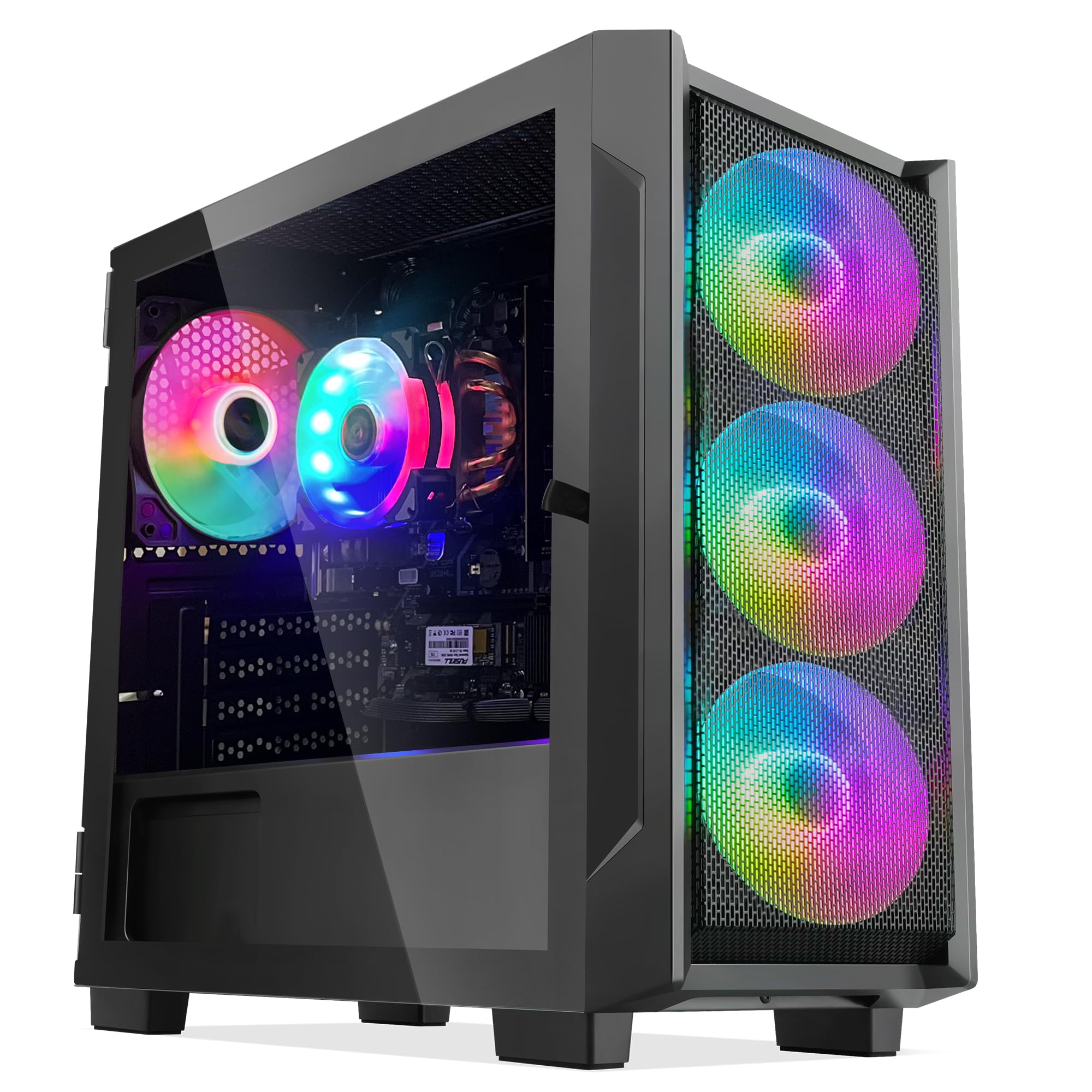
Figure 1: HOENGAGER Artist Gaming PC Desktop
2. Setup Instructions
2.1 Unboxing
- Carefully remove the PC from its packaging.
- Remove any protective films or packaging materials from the exterior and interior of the PC.
- Ensure all accessories (power cable, documentation) are present.
2.2 Connecting Peripherals
Connect your monitor, keyboard, mouse, and other peripherals to the appropriate ports on the rear of the PC. The PC supports HDMI and DisplayPort for graphic output.

Figure 2: Rear I/O Ports
2.3 Power Connection
Connect the power cable to the power supply unit (PSU) at the rear of the PC and then to a wall outlet. Ensure the power switch on the PSU is in the 'ON' position.
2.4 Initial Boot-up
Press the power button located on the top front panel of the PC. Follow the on-screen instructions to complete the Windows 11 Pro setup.

Figure 3: Front Panel and RGB Fans
3. Operating Instructions
3.1 Windows 11 Pro
Your PC comes with Windows 11 Pro pre-installed. Familiarize yourself with the operating system's interface and features. Regular updates are recommended for security and performance.
3.2 RGB Lighting Control
The PC features RGB fans and custom RGB case lighting. Control and customize the lighting effects through the pre-installed software or dedicated buttons on the case, if available. Refer to the software's instructions for detailed customization options.
3.3 Connectivity
- Wi-Fi: The PC supports 802.11AC Wi-Fi for wireless internet connectivity.
- Bluetooth: Integrated Bluetooth allows for wireless connection to compatible devices.
- USB Ports: Utilize the various USB 2.0 and 3.0 ports for connecting external devices.
4. Features
- Processor: AMD Ryzen 5 5600G 3.9GHz (4.4GHz Turbo) 6-Core 12-Thread for robust performance.
- Graphics: Integrated AMD Radeon Vega Graphics, suitable for gaming and multimedia.
- Memory: 16GB DDR4 3200MHz RAM for smooth multitasking.
- Storage: 1TB M.2 PCIe SSD for rapid boot times and application loading.
- Cooling: Efficient air cooling system with RGB fans for maximum airflow.
- Case: Tower gaming case with tempered glass side panel and custom RGB lighting.
- Operating System: Windows 11 Pro 64-bit.
- Connectivity: 802.11AC Wi-Fi and Bluetooth, with multiple USB 2.0 and 3.0 ports, HDMI, and DisplayPort outputs.

Figure 4: Desktop in a Gaming Environment
4.1 Product Videos
Gaming PC Desktop Overview
This video provides a general overview of a gaming PC desktop, highlighting its features and design. (Duration: 0:36)
Aperture Black PC Desktop Features
This video showcases the 'Aperture black' model, demonstrating its internal components, RGB lighting, and overall build quality. (Duration: 0:57)
Light Wave Black PC Desktop
This video highlights the 'Light Wave black' PC desktop, focusing on its aesthetic design and internal lighting. (Duration: 0:42)
5. Maintenance
- Cleaning: Regularly clean the exterior of the PC with a soft, dry cloth. Use compressed air to clear dust from fans and vents to maintain optimal airflow and prevent overheating.
- Software Updates: Keep your Windows operating system and drivers updated to ensure system stability, security, and performance.
- Ventilation: Ensure the PC is placed in a well-ventilated area, away from direct sunlight or heat sources, to prevent overheating.
6. Troubleshooting
- No Power: Check all power connections, including the wall outlet and the PSU switch. Ensure the power cable is securely plugged in.
- No Display: Verify that your monitor is correctly connected to the PC's graphics output (HDMI or DisplayPort) and that the monitor is powered on and set to the correct input source.
- System Slowdown: Check for excessive background applications, malware, or insufficient storage space. Ensure drivers and Windows are up to date.
- Overheating: Ensure proper ventilation around the PC. Clean dust from fans and vents.
7. Specifications
| Component | Specification |
|---|---|
| Processor | AMD Ryzen 5 5600G 3.9GHz (4.4GHz Turbo) 6-Core 12-Thread |
| RAM | 16 GB DDR4 3200MHz |
| Hard Drive | 1 TB M.2 PCIe SSD |
| Graphics Coprocessor | Integrated AMD Radeon Vega Graphics |
| Operating System | Windows 11 Pro |
| Wireless Standard | 802.11ac & Bluetooth |
| CPU Cooler Method | Air cooling |
| Case Fan | RGB Fans |
| PSU | 500W |
| Product Dimensions | 48.26 x 48.26 x 38.1 cm; 11.34 kg |
| Item Model Number | SN-FKW56152556 |
| Color | Black |

Figure 5: Product Dimensions
8. Warranty and Support
For warranty information and technical support, please refer to the documentation included with your product or visit the official HOENGAGER website. Keep your proof of purchase for warranty claims.
If you encounter any issues not covered in the troubleshooting section, please contact HOENGAGER customer support for assistance.