
Introduction
This manual provides detailed instructions for the setup, operation, and maintenance of your JINSHANGZI T800 Ultra 2 Smartwatch. Please read this manual thoroughly before using your device to ensure proper functionality and longevity.
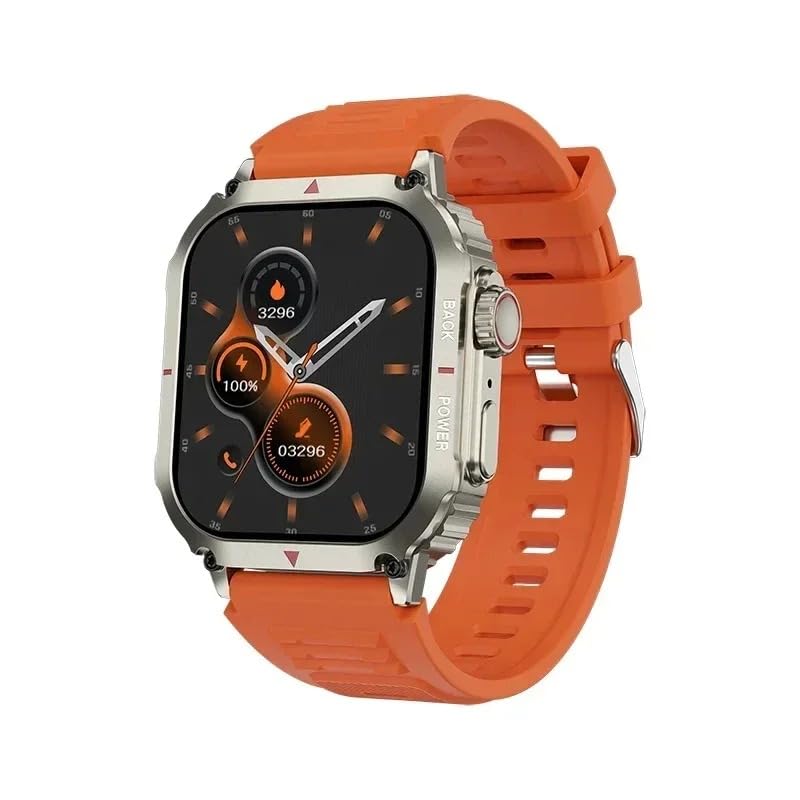
Figure 1: JINSHANGZI T800 Ultra 2 Smartwatch
Setup Guide
1. Package Contents
Ensure all items are present in the package:
- 1 x JINSHANGZI T800 Ultra 2 Smartwatch
- 1 x Charging Cable
- 1 x User Manual
- 1 x Retail Box

Figure 2: Smartwatch and accessories in retail box
2. Charging the Smartwatch
Before first use, fully charge the smartwatch. The device uses wireless charging.
- Connect the charging cable to a USB power adapter (not included).
- Place the smartwatch on the wireless charging pad. Ensure the charging contacts align.
- The watch display will indicate charging status. A full charge typically takes 2-3 hours.
3. Powering On/Off
- Power On: Press and hold the side button until the screen lights up.
- Power Off: Press and hold the side button, then select "Power Off" on the screen.
4. App Installation and Pairing
To unlock the full features of your smartwatch, download and install the Hiwatch Pro application on your iOS or Android smartphone.
- Scan the QR code provided in the manual or on the watch (if available) to download the "Hiwatch Pro" app, or search for "Hiwatch Pro" in your phone's app store.
- Install and open the app. Follow the on-screen instructions to create an account or log in.
- Enable Bluetooth on your smartphone.
- In the "Hiwatch Pro" app, navigate to the device pairing section (usually labeled "Device", "My Device", or "Add Device").
- Select your T800 Ultra 2 Smartwatch from the list of available devices. Confirm the pairing request on both your phone and the smartwatch.
- Once paired, the app will synchronize data with your smartwatch.
Operating Instructions
1. Basic Navigation
- Touch Screen: Swipe left/right, up/down to navigate through menus and features. Tap to select.
- Side Button: Press to return to the home screen or wake the device. Long press for power options.
- Waterfall Flow Menu: The watch features a dynamic waterfall flow menu for smooth navigation.

Figure 3: Dynamic Waterfall Flow Menu
2. Call Functionality
The T800 Ultra 2 supports Bluetooth calls, allowing you to make and receive calls directly from your wrist.
- Making Calls: Access the dial pad or contact list on the watch to initiate a call.
- Receiving Calls: When a call comes in, you can answer or reject it directly from the watch screen.

Figure 4: Using the call function while cycling
3. Health Monitoring
The smartwatch includes various health monitoring features:
- Heart Rate Monitor: Continuously tracks your heart rate.
- Blood Pressure Measurement: Provides blood pressure readings.
- Sleep Monitoring: Tracks your sleep patterns and quality.
- Sedentary Reminder: Alerts you to move after periods of inactivity.
- Drinking Water Reminder: Reminds you to stay hydrated.
- Breathing Exercise: Guides you through relaxation breathing.
4. Activity Tracking
Monitor your daily activities and workouts:
- Pedometer: Records steps, exercise time, mileage, and calories burned.
- Exercise Modes: Supports multiple sports modes including walking, running, climbing, cycling, and indoor running.
- GPS Dynamic Route Tracking: Track your outdoor routes via the connected app.
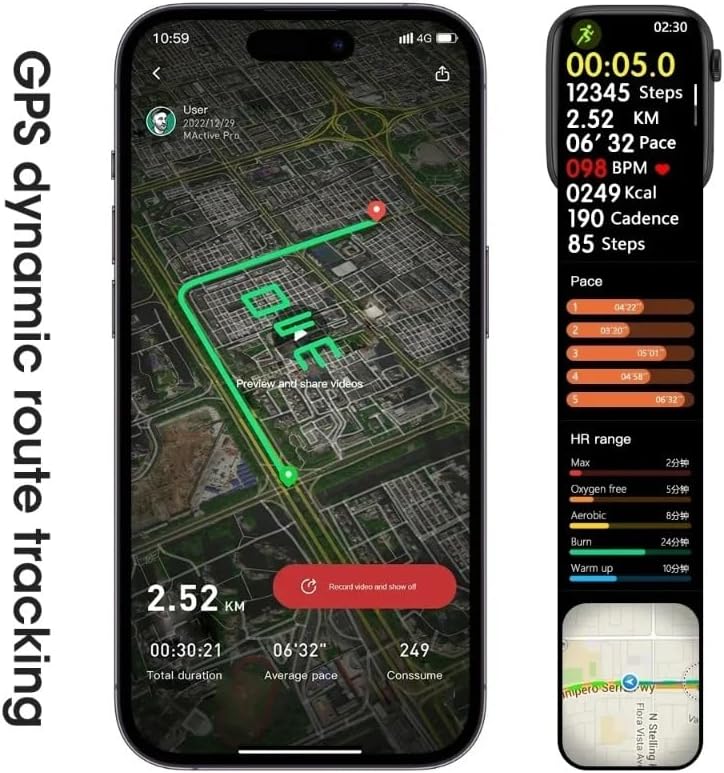
Figure 5: GPS dynamic route tracking via the app
5. Smart Reminders and Notifications
Stay connected with smart notifications:
- Call/Caller ID Reminder: Displays incoming call information.
- Information Push: Receives notifications from SMS, QQ, WeChat, Skype, Facebook, Twitter, Line, WhatsApp, and other apps.

Figure 6: Information reminders displayed on the smartwatch
6. Other Functions
- Raise to Wake: Lift your wrist to illuminate the screen.
- Low Power Mode: Conserves battery life.
- Silent Mode: Disables vibrations and sounds.
- Anti-loss: Helps locate your phone if it's out of range.
- Remote Photo Control: Use your watch as a remote shutter for your phone's camera.
- Music Control: Play, pause, skip tracks on your phone's music player.
- Stopwatch, Alarm Clock, Calendar, Calculator: Standard utility functions.
- Password Lock: Protects your privacy with a password.
- NFC Access Card: For convenient access control (check local compatibility).
- Alipay Payment: For mobile payments (check regional availability and setup).

Figure 7: Examples of additional smartwatch functions
Maintenance and Care
1. Water Resistance
The T800 Ultra 2 Smartwatch is rated IP65 water resistant. This means it is protected against dust ingress and low-pressure water jets from any direction. It is not suitable for swimming, showering, or submersion in water. Avoid exposing the watch to hot water, steam, or high-velocity water.
2. Cleaning
To keep your smartwatch clean and functioning optimally:
- Wipe the screen and strap regularly with a soft, damp, lint-free cloth.
- Do not use harsh chemicals, abrasive cleaners, or solvents.
- Ensure the watch is dry before charging.
3. Battery Care
- Avoid extreme temperatures, which can degrade battery life.
- Charge the battery regularly, even if the watch is not in use for extended periods, to prevent deep discharge.
Troubleshooting
If you encounter issues with your smartwatch, refer to the following common solutions:
- Watch not turning on: Ensure the watch is fully charged. Connect it to the charger for at least 30 minutes.
- Unable to pair with phone:
- Ensure Bluetooth is enabled on your phone and the watch.
- Make sure the "Hiwatch Pro" app is installed and running.
- Restart both your phone and the smartwatch.
- Check if the watch is already paired with another device. Disconnect if necessary.
- Ensure the watch is within Bluetooth range of your phone.
- Notifications not received:
- Verify that notifications are enabled in the "Hiwatch Pro" app settings.
- Check your phone's notification settings to ensure the "Hiwatch Pro" app has permission to send notifications.
- Ensure the watch is connected to your phone via Bluetooth.
- Inaccurate health data: Ensure the watch is worn snugly on your wrist, not too tight or too loose. Clean the sensor on the back of the watch.
- Short battery life: Reduce screen brightness, disable unnecessary notifications, and limit continuous heart rate monitoring if not needed.
If the problem persists, contact customer support for further assistance.
Specifications
| Feature | Detail |
|---|---|
| Brand | JINSHANGZI |
| Model | T800 Ultra 2 (T800) |
| Screen Size | 2.1 Inches |
| Screen Type | LCD |
| Resolution | 320 x 385 |
| Operating System | Android (compatible with iOS and Android) |
| Connectivity | Bluetooth 3.0, 4.0, 5.0 |
| Battery Capacity | 220 mAh Lithium Polymer |
| Charging Method | Wireless Charging |
| Water Resistance | IP65 (Not for swimming or submersion) |
| Material | Zinc Alloy (appearance), Silicone (strap) |
| Health Features | Heart Rate Monitor, Blood Pressure, Sleep Monitor, Sedentary Reminder, Drinking Water Reminder, Breathing Exercise |
| Activity Tracking | Pedometer, Multiple Sports Modes, GPS Dynamic Route Tracking |
| Other Features | Bluetooth Call, Notifications, Remote Camera, Music Control, Stopwatch, Alarm, Calendar, Calculator, Password Lock, NFC Access Card, Alipay Payment |
| Supported Languages | English, Dutch, French, Arabic, German, Indonesian, Italian, Malaysian, Spanish, Russian, Vietnamese, Czech, Turkish, Polish, Portuguese, Thai |
Warranty and Support
For warranty information, please refer to the documentation provided at the time of purchase or contact your retailer. For technical support or further inquiries, please reach out to JINSHANGZI customer service through their official channels.


