
equlup equlupo3dg7e592i
Disc Brake Adjustment Tool User Manual
Brand: equlup | Model: equlupo3dg7e592i
1. Product Overview
The equlup Disc Brake Adjustment Tool is a precision accessory designed for maintaining and adjusting bicycle disc brakes. Crafted from high-quality stainless steel, this tool ensures optimal performance and longevity for your bike's braking system.
Its primary function is to assist in maintaining a consistent and perfectly parallel distance between the brake adjustment plate and the disc rotor. This helps ensure symmetrical movement of the caliper pistons, preventing uneven brake pad wear and improving overall braking efficiency.

Image: The equlup Disc Brake Adjustment Tool, a sleek stainless steel component designed for precise brake adjustments.
Key Features:
- Stainless Steel Construction: Made from durable stainless steel, offering high quality, good wear resistance, and a long service life.
- Precision Adjustment: Designed to maintain a constant and parallel distance between the adjustment plate and the brake rotor for symmetrical piston movement.
- High Efficiency: Provides quick and convenient adjustment, enhancing the overall user experience.
- Wide Application: Suitable for adjusting various types of bicycle disc brakes, ideal for cycling enthusiasts.
- One-piece Stamping: Features right-angle hemming for clear edges and corners, ensuring durability and high fit without deformation.
2. Setup and Installation
Before beginning the adjustment process, ensure your bicycle is stable and the disc brake area is clean and free from any oil or grease contamination. This tool is designed to simplify the alignment of your disc brake calipers.
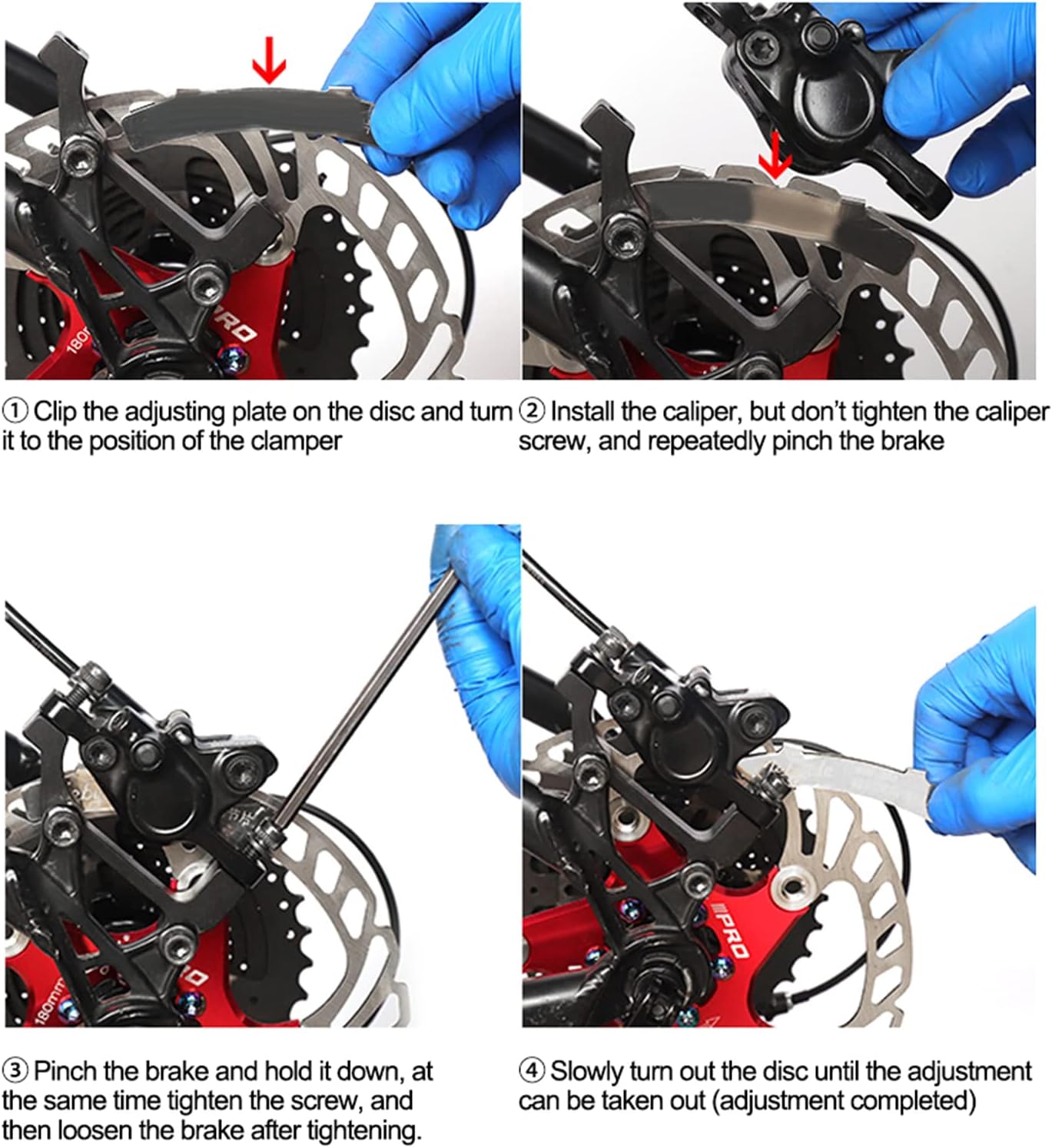
Image: Visual guide demonstrating the four steps for using the disc brake adjustment tool to align the caliper.
- Step 1: Insert the Adjustment Plate
Clip the adjustment plate (the tool) onto the disc rotor. Rotate the disc until the tool is positioned correctly within the brake caliper opening. Ensure the tool sits snugly against the rotor.
- Step 2: Install the Caliper (Initial)
Install the brake caliper back onto its mounting points. Do not tighten the caliper screws fully at this stage. The caliper should be loose enough to allow for slight movement. Repeatedly pinch the brake lever to allow the pads to engage with the adjustment plate and center themselves.
- Step 3: Tighten Caliper Screws
While holding the brake lever firmly to keep the pads engaged and the caliper centered by the tool, carefully tighten the caliper mounting screws. Tighten them evenly to ensure the caliper remains aligned. Once tightened, release the brake lever.
- Step 4: Remove the Tool
Slowly rotate the disc rotor. The adjustment tool should now be able to be easily removed from between the pads and the rotor. If it's difficult to remove, slightly loosen the caliper screws, re-center, and re-tighten. The adjustment is now complete.
3. Operating Instructions
The Disc Brake Adjustment Tool is designed for straightforward operation to achieve precise brake caliper alignment. Follow the steps outlined in the "Setup and Installation" section for optimal results. The tool's design ensures that the brake pads are perfectly parallel to the rotor when the caliper is tightened, leading to even pad wear and improved braking performance.

Image: The adjustment tool shown in context with different disc brake calipers, highlighting its versatility.
Regular use of this tool can help prevent common issues such as brake rub, uneven pad wear, and reduced braking power, ensuring a safer and more enjoyable riding experience.
4. Maintenance
To ensure the longevity and effectiveness of your equlup Disc Brake Adjustment Tool, follow these simple maintenance guidelines:
- Cleaning: After each use, wipe the tool clean with a dry, lint-free cloth. If necessary, use a mild degreaser to remove any brake dust or residue, then dry thoroughly.
- Storage: Store the tool in a dry place, away from direct sunlight and moisture, to prevent any potential corrosion, although its stainless steel construction makes it highly resistant.
- Inspection: Periodically inspect the tool for any signs of damage, bending, or wear. While designed for durability, proper care ensures its precision remains intact.
Important: Always ensure the adjustment plate is clean and not contaminated with oil before use, as oil can transfer to the brake rotor and pads, severely affecting braking performance.
5. Troubleshooting
If you encounter issues during or after using the disc brake adjustment tool, consider the following common problems and solutions:
| Problem | Possible Cause | Solution |
|---|---|---|
| Brake rub persists after adjustment. | Caliper not perfectly centered; screws tightened unevenly; rotor bent. | Repeat the adjustment process carefully, ensuring the brake lever is held firmly while tightening. Check the rotor for trueness; if bent, it may need truing or replacement. |
| Tool is difficult to remove after adjustment. | Caliper tightened too much before releasing brake lever; pads too close. | Slightly loosen caliper screws, gently wiggle the tool, and try to remove. Ensure you release the brake lever before attempting to remove the tool. |
| Braking performance is poor after adjustment. | Oil contamination on rotor/pads; pads worn out. | Clean rotor and pads thoroughly with disc brake cleaner. If pads are contaminated, they may need replacement. Check pad wear indicators. |
6. Specifications
Detailed technical specifications for the equlup Disc Brake Adjustment Tool:
- Model Number: equlupo3dg7e592i
- Material: Stainless Steel
- Color: Silver (#779)
- Product Dimensions (approx.): 84mm (length) x 12mm (width) / 3.3in x 0.5in
- Item Weight: 5 grams
- Package Dimensions: 10 x 4 x 1 cm

Image: The precise dimensions of the adjustment tool, showing its length and width.
7. Warranty and Support
For information regarding warranty, returns, or technical support for your equlup Disc Brake Adjustment Tool, please refer to the purchase documentation or contact the seller directly. Keep your proof of purchase for any warranty claims.
For general inquiries or further assistance, you may also visit the official equlup brand page on Amazon or contact Amazon customer service.
Note: Specific warranty terms may vary based on region and retailer.