
1. Introduction
This user manual provides detailed instructions for the installation, operation, and maintenance of your Hodozzy 6.86-inch 1 Din Car Stereo. Please read this manual thoroughly before using the product to ensure proper function and to prevent damage. Keep this manual for future reference.
2. Safety Information
- Professional Installation Recommended: Due to the complexity of car audio systems, professional installation is highly recommended to avoid damage to the unit or your vehicle.
- Power Supply: This unit operates on a DC12V power supply. Ensure correct voltage to prevent damage.
- Wiring: Connect all wires correctly according to the wiring diagram. Incorrect wiring can cause malfunction or damage.
- Operating Temperature: The optimal operating temperature range is -10°C to 60°C.
- Screen Care: The 6.86-inch touchscreen is a delicate component. Avoid applying excessive force or sharp objects. Clean with a soft, dry cloth.
- Driving Safety: Do not operate the unit in a way that distracts you from driving. Always prioritize road safety.
- Ventilation: Ensure adequate ventilation around the unit to prevent overheating.
3. Package Contents
Please check the package contents upon opening to ensure all items are present:
- 1 x Car MP5 Player (Main Unit)
- 1 x Power Cable
- 1 x Horn Cable
- 1 x Accessories (General term, specific small parts)
- 1 x Microphone
- 1 x Remote Control
- 1 x Steering Wheel Control (Remote)
- 1 x User Manual
- 1 x 12LED Rear Camera

Figure 3.1: Hodozzy 1 Din Car Stereo main unit with included accessories and dimensions. The image shows the 6.86-inch main unit, power cable, horn cable, remote control, microphone, steering wheel control, user manual, 12LED rear camera, and mounting bracket.
4. Product Overview
The Hodozzy 6.86-inch 1 Din Car Stereo features a high-definition touchscreen display and supports various multimedia functions. Below is an overview of the main unit and its components.
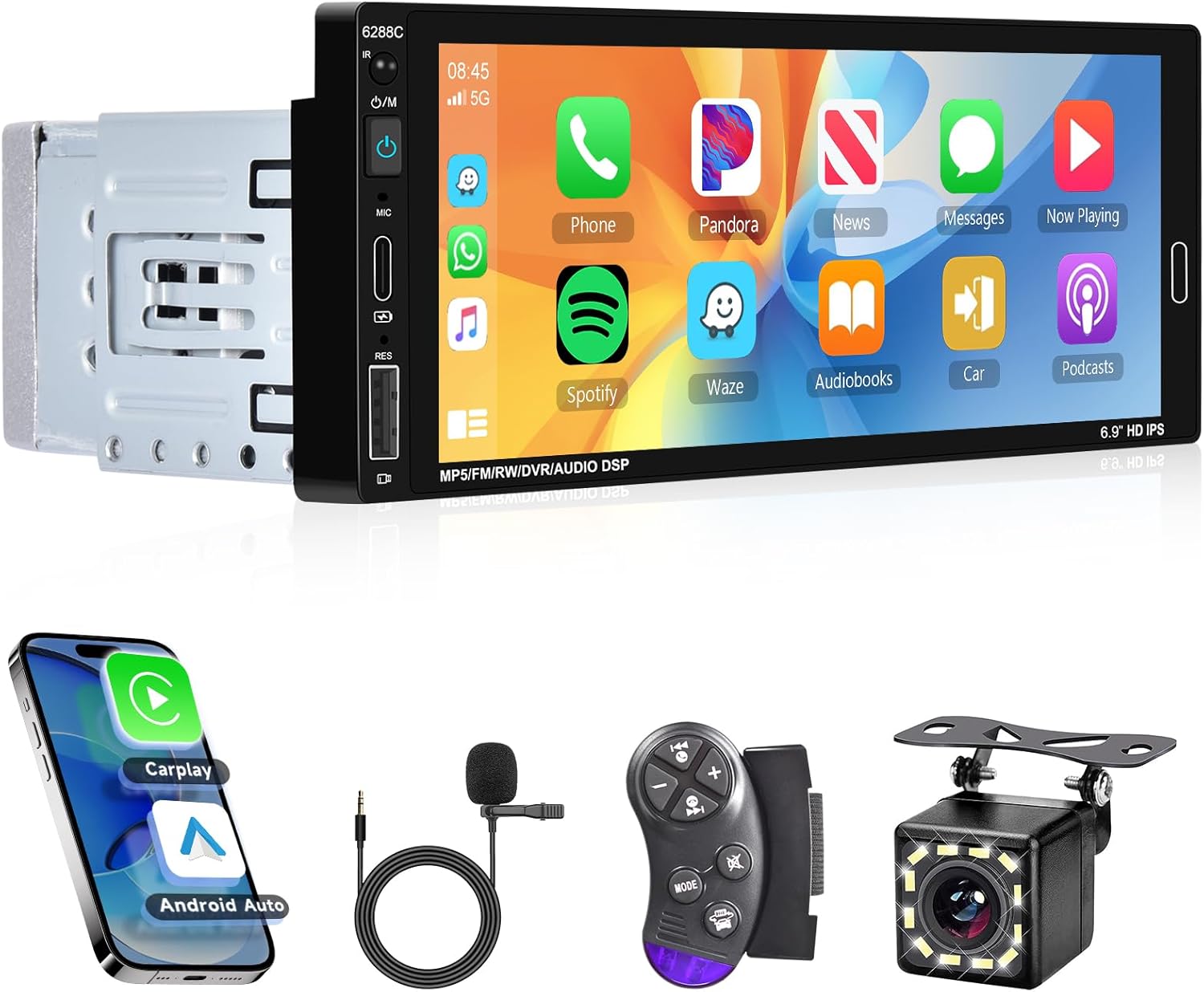
Figure 4.1: Front view of the Hodozzy 1 Din Car Stereo, showing the 6.86-inch HD touchscreen display and physical buttons on the left side for power, microphone, reset, and volume/mode control.
4.1 Main Features
- 6.86-inch HD Touchscreen Display (Resolution: 1280*480)
- Wired CarPlay & Android Auto Connectivity
- Mirror Link Functionality
- Bluetooth 5.0 for Hands-Free Calling and Audio Streaming
- FM Radio Tuner (87.5-108MHz)
- Multiple EQ Modes for Audio Customization
- Support for Steering Wheel Control
- Colorful Backlight Options
- Power-Off Memory Function
- Rear Camera Input (CVBS)
- USB, Type-C, and AUX Input Ports
- Supports TF Card / U Disk for media playback
5. Setup
5.1 Installation
Proper installation is crucial for the performance and safety of your car stereo. It is highly recommended to have the unit installed by a qualified professional. Refer to the wiring diagram provided in the separate installation guide or consult a professional for detailed wiring instructions.
- Ensure the vehicle's battery is disconnected before starting installation.
- Connect the power cable, horn cable, and other necessary wires according to the provided diagram.
- Mount the unit securely in the 1 Din slot of your vehicle's dashboard.
- If installing the rear camera, route the camera cable and connect it to the unit's CVBS input. Ensure the reverse trigger wire is correctly connected.
5.2 Initial Power On
After installation, reconnect the vehicle's battery. Press the power button on the unit to turn it on. The unit will boot up and display the main interface.
6. Operating Instructions
6.1 CarPlay & Android Auto & Mirror Link
This unit supports wired CarPlay and Android Auto, allowing seamless integration with your smartphone for navigation, music, calls, and more. The Mirror Link function allows you to display your phone's screen on the car stereo.
- Connection: Connect your smartphone to the unit using a USB data cable.
- CarPlay/Android Auto: Once connected, the unit will automatically detect and launch CarPlay or Android Auto. You can then use voice commands (Siri or Google Assistant) for hands-free operation.
- Mirror Link: For Mirror Link, ensure your phone's USB debugging mode is enabled (for Android) or trust the device (for iOS) when prompted.

Figure 6.1: Visual representation of CarPlay, Android Auto, and Mirror Link functionalities. Shows the car stereo displaying phone interfaces for navigation, apps, and media, with connection icons.
6.2 Bluetooth and FM Radio
Enjoy hands-free calls and wireless music streaming via Bluetooth, and tune into your favorite FM radio stations.
Bluetooth Operation:
- Go to the Bluetooth menu on the car stereo.
- Enable Bluetooth on your smartphone and search for available devices.
- Select "CAR BT" from the list on your phone to pair.
- Once paired, you can make/receive calls hands-free and play music from your phone through the car speakers.
FM Radio Operation:
- Select the "Radio" icon from the main menu.
- Use the scan function to automatically search and save available stations (up to 18 presets).
- Manually tune to a specific frequency (87.5-108MHz) or use the preset buttons to switch between saved stations.

Figure 6.2: Display showing the FM Radio interface with frequency tuning and preset options.

Figure 6.3: Display showing the Bluetooth interface, including pairing status, call screen, and music playback options.
6.3 EQ Settings
Customize your audio experience with the built-in Equalizer (EQ) settings. Adjust treble, bass, and other frequency bands to match your preferences.
- Access the EQ settings from the main menu.
- Choose from various preset EQ modes (e.g., Jazz, Classic, Rock, Pop, Soft) or create a custom user profile.
- Adjust individual frequency bands and bass amplification for optimal sound quality.

Figure 6.4: Screenshot of the EQ settings interface, showing various frequency sliders and preset options like Jazz, Classic, Rock, Pop, Soft, and User.
6.4 Power Off Memory Function & Seven Color Backlight
The unit features a power-off memory function that remembers the last playback state (music or radio) when the vehicle is turned off and resumes from that point upon restart. The buttons also feature a customizable seven-color backlight.
- Power Off Memory: This function operates automatically.
- Seven Color Backlight: Access the backlight settings in the system menu to choose your preferred color or set it to cycle automatically.

Figure 6.5: Illustration of the power-off memory function and the seven-color backlight feature, as part of the unit's interface, showing different button colors and a visual of the unit resuming playback.
6.5 Steering Wheel Control (SWC)
The unit supports steering wheel control, allowing you to operate key functions without taking your hands off the wheel. This enhances driving safety and convenience.
- Setup: Access the "Steering Wheel" learning function in the system settings.
- Follow the on-screen prompts to map your vehicle's steering wheel buttons to the corresponding functions on the car stereo (e.g., volume up/down, track skip, mode change).
Figure 6.6: A section of the product overview image illustrating the steering wheel control remote and its connection, indicating the unit's compatibility with vehicle steering wheel controls.
6.6 Reverse Image (Rear Camera)
The included 12LED rear camera provides a clear view behind your vehicle, automatically displaying the reverse image on the car stereo screen when you shift into reverse gear. This significantly improves parking safety.
- Ensure the rear camera is properly installed and connected to the unit's CVBS input and the reverse trigger wire.
- When the vehicle is put into reverse, the screen will automatically switch to the camera view.
Figure 6.7: A section of the product overview image showing the included 12LED rear camera and its connection, demonstrating the unit's reverse image display capability.
6.7 Multimedia Input
The unit supports various multimedia inputs for playing audio and video files.
- USB & Type-C Ports: Connect USB drives or Type-C devices to play music (MP3/WMA/WAV/APE/FLAC) and videos (RM/RMVB/AVI/MP4/MKV/3GP).
- TF Card Slot: Insert a TF card (microSD) with your media files.
- AUX Input: Connect external audio devices using a 3.5mm AUX cable.
Figure 6.8: Illustration showing various multimedia input options including USB, Type-C, and AUX ports, along with supported media formats.
7. Troubleshooting
If you encounter issues with your Hodozzy car stereo, please refer to the following common problems and solutions before contacting support.
| Problem | Possible Cause | Solution |
|---|---|---|
| Unit does not power on. | Incorrect wiring; Blown fuse; Insufficient power supply. | Check power connections and fuse. Ensure stable 12V power supply. Consult installation professional. |
| No sound. | Speaker wires disconnected; Volume too low; Mute function active; Incorrect audio source. | Check speaker connections. Increase volume. Deactivate mute. Select correct audio source (FM, Bluetooth, USB, AUX). |
| Bluetooth connection fails. | Bluetooth not enabled on phone/unit; Incorrect pairing process; Interference. | Ensure Bluetooth is on for both devices. Delete previous pairings and re-pair. Move closer to the unit. |
| CarPlay/Android Auto not connecting. | Faulty USB cable; Phone settings (USB debugging); App issues. | Use a high-quality USB data cable. Check phone settings for USB connection mode. Restart phone and unit. |
| Rear camera image not displaying. | Camera not connected; Reverse trigger wire not connected; Camera faulty. | Verify camera and trigger wire connections. Test camera with another display if possible. |
8. Specifications
Detailed technical specifications for the Hodozzy 6.86-inch 1 Din Car Stereo:
| Model: | 6288W |
| Voltage: | DC12V |
| System: | WINCE |
| CPU Chip: | F133 |
| Screen Size: | 6.86 inches Touchscreen |
| Screen Resolution: | 1280*480 |
| CarPlay/Android Auto: | Wired Connection Supported |
| Mirror Link: | Supported |
| Radio Band: | FM (87.5-108MHz) |
| Radio Chip: | QN8035 |
| Output Power: | 45W*4 |
| Operating Temperature: | -10~60°C |
| Bluetooth Version: | 5.0 |
| EQ Modes: | Multiple modes supported |
| Steering Wheel Control: | Supported |
| Backlight: | Seven-color adjustable |
| Power-Off Memory: | Supported |
| Reverse Input: | CVBS |
| Amplifier Chip: | TDA7388 |
| Audio Format: | MP3/WMA/WAV/APE/FLAC |
| Video Format: | RM/RMVB/AVI/MP4/MKV/3GP |
| Image Format: | JPG BMP PNG |
| Memory Support: | TF Card / U Disk |
| Ports: | USB, Type-C, AUX |
9. Maintenance
To ensure the longevity and optimal performance of your Hodozzy car stereo, follow these simple maintenance guidelines:
- Cleaning the Screen: Use a soft, lint-free cloth to gently wipe the touchscreen. For stubborn smudges, slightly dampen the cloth with water or a screen-safe cleaner. Avoid abrasive materials or harsh chemicals.
- General Cleaning: Keep the unit free from dust and debris. Use a soft brush or compressed air to clean around buttons and ports.
- Avoid Liquids: Do not spill liquids on the unit. If liquid enters the unit, immediately power it off and consult a professional.
- Temperature Extremes: Avoid exposing the unit to extreme temperatures (very hot or very cold) for extended periods, as this can affect performance and lifespan.
10. Warranty and Support
Hodozzy is committed to providing quality products and excellent customer service. Your Hodozzy car stereo comes with a manufacturer's warranty and dedicated support.
- Manufacturer's Warranty: This product is covered by a 2-year manufacturer's warranty. Please retain your proof of purchase for warranty claims.
- Customer Support: For any technical assistance, troubleshooting not covered in this manual, or warranty inquiries, please contact Hodozzy customer support.
- Contact Email: hodozzyofficial@163.com

Figure 10.1: Hodozzy customer support information, including contact email and details about warranty and support services.


